
What is Claude Code? What it does, how it works and who it is for
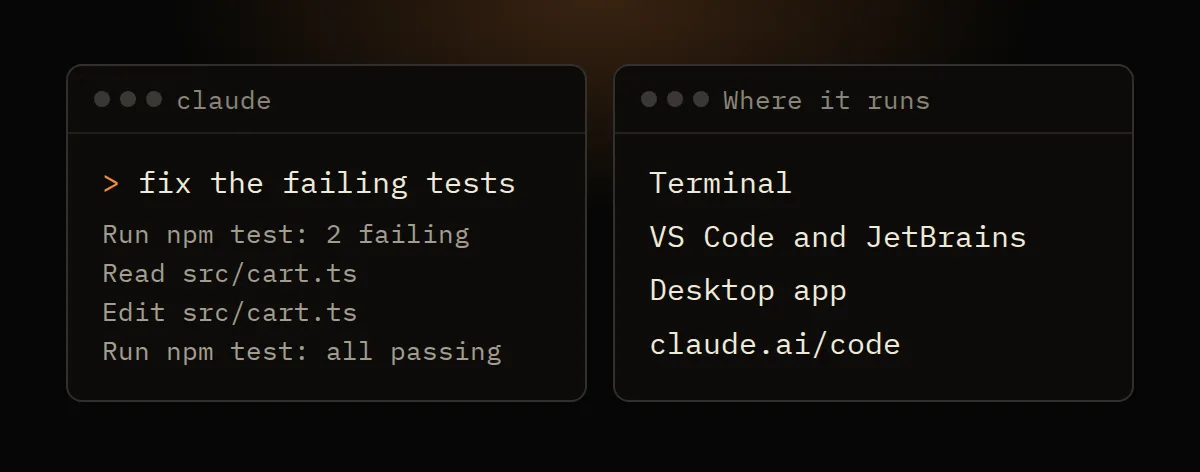
Claude Code is Anthropic's AI coding agent. In Anthropic's words, it "reads your codebase, edits files, runs commands, and integrates with your development tools." You describe what you want in plain English, such as a feature, a bug fix or a pile of tests, and Claude Code works out which files to read, makes the changes across as many files as it needs, runs your tests and commands to check them, and reports back. It runs in your terminal, in VS Code and JetBrains editors, in the Claude desktop app and in your browser, and it needs a paid Claude plan or a Claude Console account.
Source: Claude Code overview, Claude Code docs
Claude Code in one sentence
Claude Code is Claude with hands: the same Claude models you chat with, given tools to work directly in your project instead of answering in a chat window. Where the Claude chat app gives you code to copy and paste, Claude Code opens the files itself, edits them, runs the build, reads the errors and tries again, asking your permission along the way unless you tell it not to.
What does Claude Code do?
| Job | What Claude Code does | Example prompt |
|---|---|---|
| Build features | Plans the approach, writes code across several files and checks it works | add input validation to the user registration form |
| Fix bugs | Traces an error through your code to the cause and fixes it | there's a bug where users can submit empty forms - fix it |
| Clear tedious work | Writes tests, fixes lint errors, resolves merge conflicts, updates dependencies, writes release notes | write tests for the auth module, run them, and fix any failures |
| Explain code | Reads an unfamiliar project and explains it | give me an overview of this codebase |
| Use Git | Stages changes, writes commit messages, creates branches and opens pull requests | commit my changes with a descriptive message |
| Connect your tools | Reads and updates outside systems through MCP, such as Google Drive, Jira or Slack | update the ticket for this bug in Jira |
| Automate | Runs from scripts, CI and schedules with no one at the keyboard | git diff main --name-only | claude -p "review these changed files for security issues" |
Source: Claude Code overview, Claude Code docs
What is Claude Code used for?
Developers use Claude Code for most of the day-to-day work of software: building new features from a description, fixing bugs from an error message, writing the tests nobody got round to, refactoring old code, writing documentation, and reviewing changes before they ship. Teams also run it in GitHub Actions or GitLab CI to review pull requests and sort issues automatically, and on schedules for jobs such as morning pull request reviews, overnight CI failure analysis and weekly dependency audits.
It is not only for code. Claude Code works in any folder, so people run it in a notes folder or a documentation site to search, edit and reorganise Markdown files the same way.
Source: Common workflows, Claude Code docs
How does Claude Code work?
Claude Code works in what Anthropic calls the agentic loop: gather context, take action, check the results, and repeat. A question about your code might only need the first step; a bug fix cycles through all three several times. Two things power it: Claude models that reason, and tools that act. Claude Code is the layer around the model that provides the tools and manages what the model sees.
| Tool category | What Claude can do |
|---|---|
| File operations | Read files, edit code, create files, rename and reorganise |
| Search | Find files by pattern, search content, explore a codebase |
| Execution | Run shell commands, start servers, run tests, use Git |
| Web | Search the web, fetch documentation, look up error messages |
| Code intelligence | See type errors after edits, jump to definitions, find references (with a plugin) |
Anthropic's example: ask it to "fix the failing tests" and Claude might run the test suite, read the error output, search for the relevant files, read them, edit the fix, and run the tests again to confirm. Each tool result tells it what to do next. You can interrupt at any point to steer it.
Source: How Claude Code works, Claude Code docs
What Claude Code can see on your computer
- Your project: the folder you started it in and everything below it, and other files with your permission.
- Your terminal: any command you could run, such as build tools, Git, package managers and scripts.
- Your Git state: the current branch, uncommitted changes and recent commits.
- Your CLAUDE.md: a Markdown file of project instructions it reads at the start of every session.
- Its auto memory: notes it saves for itself about your preferences and corrections.
- Whatever you connect: MCP servers, skills and subagents.
Because it can do what you can do in a terminal, it works in permission modes. In Manual mode it asks before every edit and command that is not read-only. In Auto mode, where terminal and VS Code sessions start, a safety check reviews most actions instead of asking you and blocks risky ones such as production deploys or force pushes. Plan mode only reads and proposes a plan until you approve.
Source: How Claude Code works, Claude Code docs
Is Claude Code safe to use?
Claude Code acts on your computer, so it has several layers of control. Permission modes decide how much it does without asking. Permission rules let you allow, ask about or deny specific commands and files, and a sandbox can limit what its shell commands reach. Checkpoints track the files Claude edits so /rewind can roll them back, though a file changed only by a shell command is not restored, so Git still matters. Auto mode, the default in the terminal and VS Code, blocks actions such as piping a script from the internet into your shell, production deploys and migrations, force pushes over other people's work, sensitive data sent to outside services, and actions that look driven by content Claude read rather than by you.
Instructions in CLAUDE.md are guidance, not enforcement. For a rule that can never be broken, Anthropic recommends a hook, which runs every time whatever Claude decides.
Source: Best practices, Claude Code docs
Which models does Claude Code use?
Claude Code runs on Anthropic's Claude models, and you can switch between them with /model. Anthropic's guide says Sonnet handles most coding tasks well and Opus gives stronger reasoning for complex architectural decisions; the top model, Fable, is paid from usage credits on Pro and can use up to half your weekly limit on Max and Ultra. On models that support it, you also set an effort level that controls how hard Claude thinks.
Source: How Claude Code works, Claude Code docs
Where does Claude Code run?
| Surface | What it is | Good for |
|---|---|---|
| Terminal (the CLI) | The full-featured command-line tool | Every feature, scripting and automation |
| VS Code and Cursor | An extension with inline diffs, @-mentions, plan review and history | Working beside your code in the editor |
| JetBrains | A plugin for IntelliJ IDEA, PyCharm, WebStorm and others | JetBrains users; needs the CLI installed |
| Desktop app | The Claude app's Code tab, for macOS, Windows and Linux (beta) | Visual diffs, several sessions side by side, scheduled tasks |
| Web | claude.ai/code, running on Anthropic's machines | Long tasks, repos you do not have locally, parallel jobs |
| Slack | Mention @Claude with a bug report | Getting a pull request back from team chat |
Every surface connects to the same Claude Code engine, so your CLAUDE.md files, settings and MCP servers work across all of them. Work moves between them too: Remote Control lets you continue a session on your computer from your phone or any browser, claude --teleport pulls a task started on the web into your terminal, and /desktop moves a terminal session into the desktop app to review the diffs visually.
Source: Claude Code overview, Claude Code docs
What is the Claude Code CLI?
The Claude Code CLI is the command-line version: you type claude in a terminal inside your project and talk to it there. It is the most complete version, with every command and skill, and it is what other tools build on. It is also scriptable: claude -p "query" asks one question, prints the answer and exits, so you can pipe logs in, run it in CI, or chain it with other tools.
tail -200 app.log | claude -p "Slack me if you see any anomalies"Install it with one command: curl -fsSL https://claude.ai/install.sh | bash on macOS, Linux and WSL, or irm https://claude.ai/install.ps1 | iex in Windows PowerShell. Native installs update themselves in the background.
Source: Claude Code overview, Claude Code docs
Is Claude Code free? What does it cost?
Claude Code is not on the Free plan. You need a paid Claude plan or a Claude Console account that pays per token:
| Plan | Price | Claude Code usage |
|---|---|---|
| Pro | $20 a month, or $17 a month billed yearly | Usage limits every 5 hours and every week |
| Max | $100 a month | 5x Pro |
| Ultra | $200 a month | 10x Pro each week, no 5-hour limit for verified accounts |
| Team and Enterprise | Per seat | Set by seat type and your admins |
| Claude Console (API key) | Per token used | No plan limits; you pay for what you use |
Prices here are Anthropic's published US prices at the time of writing; check the pricing page for your country. Run /usage inside Claude Code to see how much of your plan you have used.
Source: Claude plans and pricing, Anthropic
How you customise Claude Code
| Feature | What it does |
|---|---|
| CLAUDE.md | Project instructions Claude reads every session: coding standards, commands, decisions |
| Skills | Packaged, repeatable workflows such as /review-pr or /deploy-staging |
| Hooks | Commands that run automatically before or after Claude's actions, such as formatting after every edit |
| MCP servers | Connections to outside services and data |
| Subagents | Helpers that work in their own context and return a summary |
| Plugins | Bundles of skills, hooks, subagents and MCP servers you can share |
Claude Code can also run several agents at once: a lead agent can split a task among subagents and merge the results, and background agents let you run several full sessions and watch them from one screen. For fully custom tools, the Agent SDK lets you build your own agents on the same engine.
Source: Extend Claude Code, Claude Code docs
Claude Code vs Claude, Cursor and Codex
| Tool | How it differs from Claude Code |
|---|---|
| Claude (the chat app) | Answers in a chat window; you copy code in and out. Claude Code works in your files and terminal directly. |
| Cursor | An AI code editor you work inside. Claude Code is an agent that runs in your terminal or alongside your editor, and also installs as an extension in Cursor. |
| OpenAI Codex | OpenAI's coding agent, with its own CLI, app and IDE extension, running on OpenAI's models and ChatGPT plans. The closest like-for-like rival. |
| GitHub Copilot | Started as autocomplete inside your editor and now has agent modes, on GitHub's plans. |
Many developers use more than one. We compare them in detail on our Cursor vs Claude Code, Claude Code vs Codex and Claude vs Claude Code pages.
Who is Claude Code for?
- Professional developers who want an agent doing the legwork of features, fixes and tests while they review.
- Teams automating pull request review, issue triage and recurring maintenance in CI.
- People who are new to coding: Anthropic has a terminal guide and the free Claude Code 101 course on Claude Academy, and the desktop app needs no terminal at all.
- Anyone with a folder of text files to search, edit or reorganise.
Source: Quickstart, Claude Code docs
How to start
- Get a Pro, Max, Ultra, Team or Enterprise plan, or a Claude Console account.
- Install it: curl -fsSL https://claude.ai/install.sh | bash, or the PowerShell command on Windows.
- Open a terminal in your project and type claude, then sign in.
- Ask "what does this project do?", then try a small change.
Our Claude Code tutorial walks through each step with the prompts to type.
Running many Claude Code agents
Once Claude Code is part of your day, it is common to run several sessions at once, each on its own task, often with Codex alongside. Then the question becomes which one needs you now. 10u is an AI coding agent dashboard that shows every Claude Code and Codex session side by side, each in its real terminal, marked Needs you, Working, Waiting or Parked, with the one waiting on you on top. It runs on the subscriptions you already have. They do the building. You decide what gets built.

Questions people ask
- Does Claude Code remember my project between sessions?
- Each session starts with a fresh context, but it reads your CLAUDE.md file every time and keeps its own auto memory of your preferences and corrections, which you can view and edit with /memory.
- Can Claude Code break my project?
- It can make mistakes, which is why it asks permission in Manual mode, blocks risky actions in Auto mode, and keeps checkpoints you can roll back with /rewind. Commit to Git before big changes, because shell command changes are not covered by checkpoints.
- Where can I use Claude Code?
- In your terminal, in VS Code, Cursor and JetBrains editors, in the Claude desktop app, on the web at claude.ai/code, and from Slack by mentioning @Claude.
- What is Claude Code in simple terms?
- An AI coding agent from Anthropic. You describe what you want in plain English and it reads your project, edits the files, runs your tests and commands to check its work, and reports back.
- What does Claude Code do that Claude chat does not?
- It works directly in your files and terminal. Claude chat gives you code to copy; Claude Code opens the files, makes the edits, runs the build and fixes what breaks.
- Is Claude Code free?
- No. It needs a paid Claude plan (Pro, Max, Ultra, Team or Enterprise) or a Claude Console account billed per token. The Free plan does not include it.
- What is the Claude Code CLI?
- The command-line version you run by typing claude in a terminal. It has every feature and can be scripted with claude -p for CI and automation.
- Does Claude Code work in VS Code?
- Yes. Install the Claude Code extension from the VS Code Extensions view. It also installs in Cursor and other VS Code forks, and there is a JetBrains plugin.
- Which programming languages does Claude Code support?
- Anthropic says Claude can read code in any language and understand how components connect, because it works by reading your files and running your own tools.