
Claude Code subagents: how they work and how to build your own
Claude Code subagents are helper agents that take a side task, do it in their own context window, and hand back only a summary. Each has its own system prompt, its own tool access and its own permissions. Claude delegates to them on its own when a task matches a subagent's description, and you can define your own as Markdown files in .claude/agents/ for one project or ~/.claude/agents/ for all of them. They are best for work that would flood your main conversation with search results, logs or file contents you will not look at again.
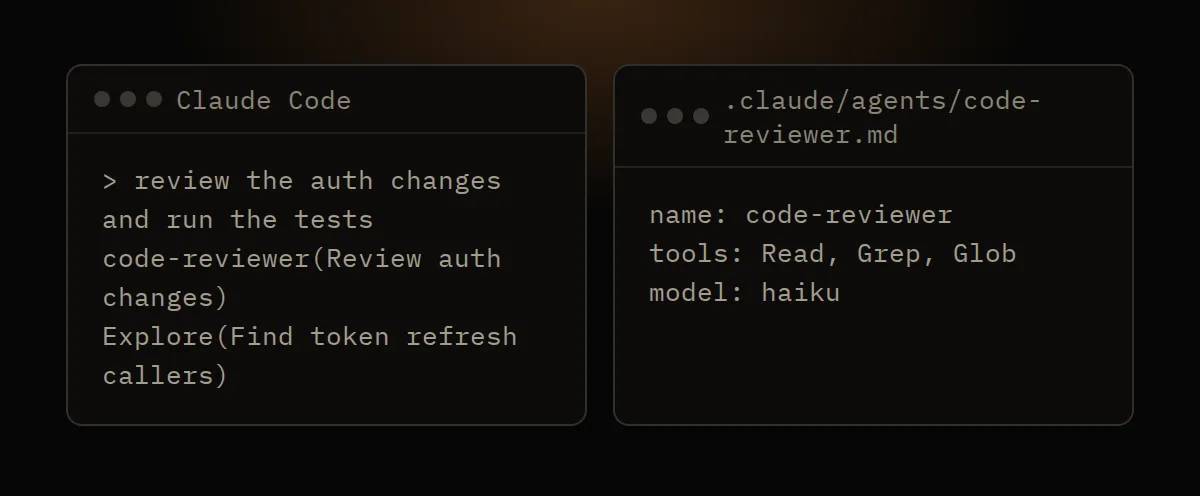
Source: Create custom subagents, Claude Code docs
What Claude Code subagents are good for
- Keeping exploration and noisy output, such as a full test run, out of your main conversation.
- Enforcing limits, such as a reviewer that can read files but not edit them.
- Reusing a set-up across projects with user-level subagents.
- Focused behaviour, with a system prompt written for one job.
- Saving cost by sending simple jobs to a faster, cheaper model such as Haiku.
Subagents send their own requests, which count toward the same usage limits as your main conversation. Anthropic's best-practices guide is blunt about the trade-off: a subagent gives you parallel work or a fresh pair of eyes, not a smarter answer, and because it has to gather context again it can even be slower than doing the task where you are.
Source: Best practices for Claude Code, Anthropic
The built-in Claude Code subagents
| Subagent | Model | Tools | Used for |
|---|---|---|---|
| Explore | The parent conversation's model (Opus when the parent runs Fable on a subscription) | Read-only | Searching and understanding a codebase, at quick, medium or very thorough depth |
| Plan | Inherits from the parent | Read-only | Researching the codebase in plan mode |
| General-purpose | The parent's model by default | Every tool available to subagents | Multi-step tasks that need both exploring and changing code |
| statusline-setup | Sonnet | Limited | Running /statusline |
| claude-code-guide | Haiku | Limited | Questions about Claude Code features |
| web-fetch | Haiku | Web fetching | Reading web pages in sessions that use it |
Explore and Plan start without your CLAUDE.md files or the git status snapshot, to keep research fast and cheap. A subagent of your own named Explore replaces the built-in one, so you can define it with model: haiku to explore on a cheaper model. To remove only Explore and Plan, set CLAUDE_CODE_DISABLE_EXPLORE_PLAN_AGENTS=1; to stop all delegation, deny the Agent tool in permissions.deny.
Source: Create custom subagents, Claude Code docs
Create your first Claude Code subagent
Subagents are Markdown files with YAML frontmatter. The easiest way to make one is to ask Claude:
Create a personal code-improver subagent in ~/.claude/agents/ that scans files and suggests improvements for readability, performance, and best practices. It should explain each issue, show the current code, and provide an improved version. Make it read-only and have it use Sonnet.Claude writes ~/.claude/agents/code-improver.md, which looks like this:
---
name: code-improver
description: Scans files and suggests improvements for readability, performance, and best practices. Use after writing or modifying code.
tools: Read, Grep, Glob
model: sonnet
---

You are a code improvement specialist. For each issue you find, explain
the problem, show the current code, and provide an improved version.
Then try it with Use the code-improver agent to suggest improvements in this project. The delegation shows in the transcript as code-improver(Suggest code improvements). Claude Code watches the agents folders, so a new or edited file is picked up within a few seconds without a restart. On v2.1.198 and later, /agents just reminds you to ask Claude or edit the folders directly; on v2.1.197 and earlier it opened an interactive wizard.
Source: Create custom subagents, Claude Code docs
Where subagent files live
| Location | Who gets it | Priority |
|---|---|---|
| Managed settings | The whole organisation | 1 (highest) |
| --agents flag | This session only | 2 |
| .claude/agents/ | This project; commit it to share with your team | 3 |
| ~/.claude/agents/ | All your projects | 4 |
| A plugin's agents/ folder | Wherever the plugin is enabled | 5 (lowest) |
When two subagents share a name, the higher-priority one wins. Folders are scanned recursively, so you can group files into agents/review/ or agents/research/; identity comes only from the name field. Plugin subagents ignore the hooks, mcpServers and permissionMode fields for security; copy the file into your own agents folder if you need them.
Subagents for one session with --agents
claude --agents '{
  "code-reviewer": {
    "description": "Expert code reviewer. Use proactively after code changes.",
    "prompt": "You are a senior code reviewer. Focus on code quality, security, and best practices.",
    "tools": ["Read", "Grep", "Glob", "Bash"],
    "model": "sonnet"
  }
}'
These exist only for that session and are not saved, which suits testing and scripts. In non-interactive mode, --agents can also take a path to a JSON file.
Source: Create custom subagents, Claude Code docs
Claude Code subagent frontmatter
Only name and description are required. Field names are camelCase and must match exactly, because Claude Code silently ignores a field it does not recognise; claude --debug logs the unknown ones.
| Field | What it does |
|---|---|
| name | Unique identifier, up to 256 characters, no colons |
| description | When Claude should delegate to it |
| tools | Allowlist of tools; inherits all available tools if left out |
| disallowedTools | Tools to remove from the inherited or listed set |
| model | sonnet, opus, haiku, fable, a full model ID, or inherit |
| permissionMode | default, acceptEdits, auto, dontAsk, bypassPermissions or plan |
| maxTurns | Stop after this many turns; the output comes back marked partial |
| skills | Skills loaded in full when the subagent starts |
| mcpServers | MCP servers this subagent can use |
| hooks | Lifecycle hooks scoped to this subagent |
| memory | A persistent memory folder: user, project or local |
| background | Keep it in the background even when Claude asks to wait |
| omitClaudeMd | Start without your CLAUDE.md files |
| effort | low, medium, high, xhigh or max for this subagent |
| isolation | worktree, to work in a temporary git worktree |
| color | Its colour in the task list and transcript |
The Markdown body becomes the subagent's system prompt. Subagents get that prompt plus basic details such as the working directory, not the full Claude Code system prompt. Claude Code skips a file with no name, a name but no description, frontmatter that does not start on the first line, or YAML that does not parse; run claude plugin validate .claude/agents to check a folder.
Source: Create custom subagents, Claude Code docs
Choose a model and effort for each subagent
By default a subagent runs on the same model as the conversation that starts it. When several sources set a model, Claude Code uses the first of these:
- A model Claude passes when it starts the subagent.
- The model field in the subagent's file, including inherit.
- The CLAUDE_CODE_SUBAGENT_MODEL environment variable.
- The main conversation's model, or the parent subagent's model for a nested one.
To force one model onto every subagent, teammate and workflow agent, set both variables in settings, then check the model on each row of /tasks:
{
  "env": {
    "CLAUDE_CODE_SUBAGENT_MODEL": "haiku",
    "CLAUDE_CODE_SUBAGENT_MODEL_FORCE": "1"
  }
}
Subagents inherit your extended thinking setting; there is no per-subagent switch. Set effort in the file for a subagent that needs to think harder or less than the session.
Source: Create custom subagents, Claude Code docs
Control what a subagent can touch
Use tools as an allowlist or disallowedTools as a denylist. If you set both, the denylist is applied first.
---
name: safe-researcher
description: Research agent with restricted capabilities
tools: Read, Grep, Glob, Bash
---
That researcher has no Edit, Write or MCP tools, but it can still change files through Bash. For a reviewer that truly cannot edit, give it tools: Read, Grep, Glob only; Anthropic points out the limit is then enforced by Claude Code rather than requested in a prompt. Every subagent loses a few tools regardless, such as AskUserQuestion and plan mode controls, and background subagents get a smaller built-in set, so do not rely on most built-in tools beyond Read, Grep and Glob in a background run.
Persistent memory
The memory field gives a subagent a folder that survives between conversations, so it can build up your preferences, corrections and project decisions over time.
---
name: code-reviewer
description: Reviews code for quality and best practices
memory: user
---

You are a code reviewer. As you review code, update your agent memory with
the review preferences and corrections you're given.
Source: Create custom subagents, Claude Code docs
What a subagent sees when it starts
A regular subagent does not see your conversation, the skills you have used or the files Claude has read. It starts with its own system prompt plus environment details, the task message Claude writes when handing off the work, your CLAUDE.md files at every level, a git status snapshot, and any skills named in its skills field. Your output style and auto memory do not reach it, and its context window is sized by its own model, so a smaller model means a smaller window. If a rule must reach the subagent, such as ignore the vendor/ directory, say it in the prompt when you delegate; set omitClaudeMd: true for subagents that should start without your CLAUDE.md.
Hooks for subagents
Hooks in your settings files already fire for a subagent's tool calls, the same as in the main conversation. You can also put hooks in a subagent's own frontmatter so they run only while it is active. This one checks Bash commands before they run and lints after every edit:
---
name: code-reviewer
description: Review code changes with automatic linting
hooks:
  PreToolUse:
    - matcher: "Bash"
      hooks:
        - type: command
          command: "./scripts/validate-command.sh"
  PostToolUse:
    - matcher: "Edit|Write"
      hooks:
        - type: command
          command: "./scripts/run-linter.sh"
---
A Stop hook in a subagent becomes SubagentStop when it runs. In settings.json, SubagentStart and SubagentStop events let the main session react when a named subagent begins or ends, for example opening a database connection when db-agent starts. Frontmatter hooks in a project-level subagent only run once you accept the workspace trust dialog for that folder.
Resume a subagent
Each delegation creates a new subagent. To carry on earlier work instead of starting over, ask Claude to resume it: a resumed subagent keeps its full history, including its tool calls and reasoning. Use general-purpose or your own subagent for work you will continue, because Explore and Plan can finish without an ID to resume. A subagent stopped by maxTurns returns partial output and can be resumed to finish.
Source: Create custom subagents, Claude Code docs
How to use Claude Code subagents
Automatic delegation
Claude delegates based on your request, each subagent's description and the current context. Add phrases like use proactively to a description to encourage it. Keep descriptions short: Claude Code warns at start-up when your own subagents' descriptions add up to more than 15,000 tokens, since they take up context in every session.
Ask for a subagent yourself
| How | Example | Effect |
|---|---|---|
| Name it | Use the test-runner subagent to fix failing tests | Claude decides whether to delegate |
| @-mention it | @"code-reviewer (agent)" look at the auth changes | Runs that subagent for this task |
| Run the session as it | claude --agent code-reviewer | The whole session takes its prompt, tools and model |
With --agent, the subagent's system prompt replaces Claude Code's default one, while CLAUDE.md still loads. Set "agent": "code-reviewer" in .claude/settings.json to make it the default for a project.
Foreground and background
A subagent Claude starts from your main conversation runs in the background by default, so you keep working; when it needs permission, the prompt appears in your main session naming the subagent. Its results arrive as a notification in a later turn. To let Claude wait for a subagent instead, set CLAUDE_CODE_FORK_SUBAGENT to 0 and ask it to wait; press Ctrl+B to move a waiting subagent to the background. Run /tasks to see each running subagent and the model it is on.
Source: Create custom subagents, Claude Code docs
Forks: subagents that share your conversation
A fork is a subagent that inherits the whole conversation so far instead of starting fresh. It sees the same system prompt, tools, model and history, and only its final result comes back. Because its prompt and tools match the parent's, its first request reuses the parent's prompt cache, so a fork costs less than a fresh subagent for work that needs the same context. Start one yourself with /subtask:
/subtask draft unit tests for the parser changes so far| Fork | Regular subagent | |
|---|---|---|
| Context | The full conversation | A fresh context with the task Claude writes |
| System prompt and tools | Same as the parent | From the subagent's file |
| Model | Same as the parent | Follows the subagent model order |
| Prompt cache | Shared with the parent | Separate |
Running forks appear in a panel under the prompt: arrow keys move between rows, Enter opens a fork's transcript so you can message it, and x stops it. Fork mode is on by default; add "Agent(fork)" to permissions.deny to stop Claude starting forks.
Source: Create custom subagents, Claude Code docs
Patterns that work
- Isolate noisy work: Use a subagent to run the test suite and report only the failing tests with their error messages.
- Research in parallel: Research the authentication, database, and API modules in parallel using separate subagents.
- Chain them: Use the code-reviewer subagent to find performance issues, then use the optimizer subagent to fix them.
- Review without bias: a subagent that never saw the code being written reviews it against your spec.
Each finished subagent's results come back into your main conversation, so many detailed reports can still fill your context; ask for short summaries. Subagents can start their own subagents up to three layers deep, and by default 20 can run at once in a session before Claude Code refuses more.
Subagent or main conversation?
| Use the main conversation when | Use a subagent when |
|---|---|
| You go back and forth a lot | The task makes lots of output you do not need to keep |
| Planning, building and testing share context | You want to enforce tool limits or permissions |
| It is a quick, targeted change | The work is self-contained and can return a summary |
| Speed matters, since a fresh subagent must gather context | You want an independent reviewer |
For a question about something already in your conversation, /btw is better than a subagent: it has no tools and adds nothing to history.
Source: Create custom subagents, Claude Code docs
Example: a code reviewer subagent
---
name: code-reviewer
description: Expert code review specialist. Proactively reviews code for quality, security, and maintainability. Use immediately after writing or modifying code.
tools: Read, Grep, Glob, Bash
model: inherit
---

You are a senior code reviewer ensuring high standards of code quality and security.

When invoked:
1. Run git diff to see recent changes
2. Focus on modified files
3. Begin review immediately

Review checklist:
- Code is clear and readable
- Functions and variables are well-named
- No duplicated code
- Proper error handling
- No exposed secrets or API keys
- Input validation implemented
- Good test coverage
- Performance considerations addressed

Provide feedback organized by priority:
- Critical issues (must fix)
- Warnings (should fix)
- Suggestions (consider improving)
Example: a debugger subagent
Unlike the reviewer, this one has Edit, because fixing bugs means changing code:
---
name: debugger
description: Debugging specialist for errors, test failures, and unexpected behavior. Use proactively when encountering any issues.
tools: Read, Edit, Bash, Grep, Glob
---

You are an expert debugger specializing in root cause analysis.

When invoked:
1. Capture error message and stack trace
2. Identify reproduction steps
3. Isolate the failure location
4. Implement minimal fix
5. Verify solution works

For each issue, provide:
- Root cause explanation
- Evidence supporting the diagnosis
Anthropic's docs also include debugger, data scientist and database query validator examples. The reviewer above can still change files through Bash; drop Bash from tools for a reviewer that cannot change anything.
Source: Create custom subagents, Claude Code docs
Subagents, background sessions and agent teams
Subagents work inside one session. To run many independent sessions in parallel, Claude Code has background agents and claude agents; for a coordinated group of sessions Claude supervises, it has agent teams. When you have several sessions of Claude Code and Codex going at once, 10u is an AI coding agent dashboard that shows every one side by side, each in its real terminal, marked Needs you, Working, Waiting or Parked. They do the building. You decide what gets built.

Questions people ask
- Can I stop Claude Code using subagents?
- Yes. Deny the Agent tool in permissions.deny to stop all delegation, deny a single type such as Agent(fork), or set CLAUDE_CODE_DISABLE_EXPLORE_PLAN_AGENTS=1 to remove only the built-in Explore and Plan agents.
- How do I create a subagent in Claude Code?
- Ask Claude to create one, or write a Markdown file with name and description frontmatter in .claude/agents/ for a project or ~/.claude/agents/ for all projects.
- Do subagents use more tokens?
- Yes. Each subagent sends its own requests, which count toward the same usage limits as your main conversation. Use Haiku for simple ones and ask for short summaries.
- Can a Claude Code subagent use a different model?
- Yes. Set model: haiku, sonnet, opus, fable or a full model ID in its frontmatter, or inherit to match the main conversation.
- What is the difference between a subagent and a fork?
- A regular subagent starts with fresh context and its own prompt and tools. A fork inherits the whole conversation, tools and model, and shares the prompt cache.
- How many subagents can run at once?
- By default 20 can run at once in a session, and subagents can start their own subagents up to three layers deep.