
Codex models: every model in Codex and how to switch between them
The main Codex models in November 2026 are GPT-6.2 Astra for the hardest work, GPT-6.2 Sol for everyday coding, GPT-6.1 Terra for fast writing and visual tasks, and Luna for focused, repeatable jobs. In the Codex CLI, switch models with /model during a session or start with codex --model gpt-6.2-sol. To make a model your default, set model in ~/.codex/config.toml.
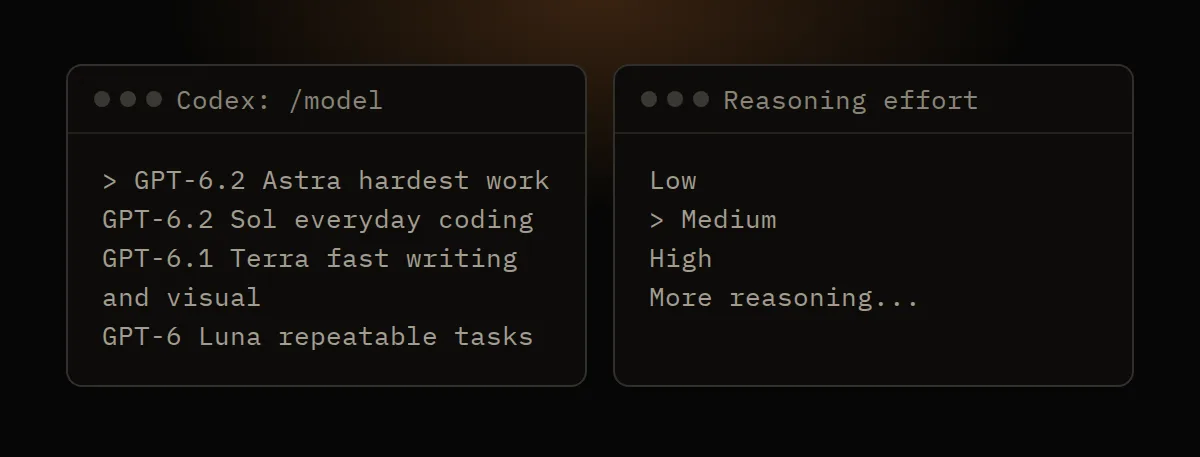
The Codex models list
| Model | Model name to type | Best for | Default context in Codex |
|---|---|---|---|
| GPT-6.2 Astra | gpt-6.2-astra | Demanding work, such as tracing a bug across services, fixing it and testing the change | 272,000 tokens |
| GPT-6.2 Sol | gpt-6.2-sol | Everyday coding, writing and work across several sources | 500,000 tokens |
| GPT-6 Astra | gpt-6-astra | Reasoning and computer use for complex work across code, apps and research | See your client |
| GPT-6.1 Sol | gpt-6.1-sol | Close to GPT-6 Astra at a lower cost, for repeated, long-running work | 500,000 tokens |
| GPT-6.1 Terra | gpt-6.1-terra | Fast, efficient writing, visual understanding and computer use | See your client |
| GPT-6 Luna | gpt-6-luna | High-volume tasks such as summaries, extraction and focused coding | See your client |
GPT-6.2 Astra and GPT-6.2 Sol each support a context window of up to 1 million tokens. Codex starts them at the defaults above, and you can raise the window with model_context_window in config.toml. GPT-6.2 Sol costs fewer credits per token than GPT-6.2 Astra at standard speed, which is why OpenAI suggests it for everyday work.
Which models you see depends on your plan and your client. GPT-6.1 Terra needs Codex CLI 0.159.0 or later, and in Enterprise and Edu workspaces an administrator must turn Luna on first.
Source: Codex models, OpenAI
Which Codex model should you use?
OpenAI's own advice is to start with a task you know well, compare the result with what you need, and change models as your work changes. Think about how long you are willing to wait, how much usage the task needs and how much judgement it involves.
- GPT-6.2 Astra, or GPT-6 Astra, for the hardest end-to-end work. Give it the sources, limits and checks that define a good result.
- GPT-6.2 Sol for everyday work: editing code, drafting documents, or turning several sources into a plan.
- GPT-6.1 Terra for clear writing, reading images and screens, and finishing tasks across supported apps.
- Luna for specific, high-volume tasks where you know what a good result looks like, such as extraction, classification and structured summaries.
| Model | Example task |
|---|---|
| GPT-6.2 Astra or GPT-6 Astra | Compare three vendor proposals against your requirements, explain the trade-offs and recommend one |
| GPT-6.2 Sol | Turn a project brief, meeting notes and a timeline into an implementation plan |
| GPT-6.1 Terra | Summarise the main changes in a set of dashboard screenshots |
| Luna | Turn meeting notes into a table of action items, owners and due dates |
Source: Codex models, OpenAI
How to switch models in Codex
In the Codex CLI
During an interactive session, type /model to switch models or change reasoning effort. To start a session on a particular model, pass --model or its short form -m:
codex --model gpt-6.2-solThe same flag works for non-interactive runs with codex exec, which is how you pick a model in scripts:
codex exec -m gpt-6.2-sol "Review the current changes"Run /status afterwards to confirm the active model.
In the ChatGPT desktop app and IDE extension
Use the model and reasoning control beneath the composer. If you see a Power slider instead of a model list, move it toward Smarter for deeper reasoning or Faster for quicker, cheaper work, and open Advanced to choose a specific model, such as GPT-6.2 Astra.
As your default
The ChatGPT desktop app, the Codex CLI and the IDE extension all read the same ~/.codex/config.toml. Add a model line to set your default, and a reasoning effort if you want one:
model = "gpt-6.2-sol"
model_reasoning_effort = "medium"
If you leave model out, each client uses a recommended model. When you share one config file with the IDE extension, choose a model available in every client you use, such as gpt-6.1-sol. Profiles, selected with --profile, let you keep a second set of defaults, for example a faster model for quick jobs.
Source: Codex models, OpenAI
Source: Codex basic configuration, OpenAI
Reasoning effort in Codex
Reasoning effort sets how much thinking the model does before it answers. Higher effort can improve results on complex tasks, but takes longer and uses more tokens. OpenAI suggests starting with the effort your client picks and adjusting from there.
| Effort | Use it for |
|---|---|
| Light, or low in the CLI and config | Quick, well-scoped tasks |
| Medium | Tasks that need more planning |
| High and Extra High | Difficult work with several steps, sources or trade-offs |
| Max | The hardest single problems, when depth matters more than speed or usage |
| Ultra | Large tasks that split into parts, run in parallel by subagents |
Start Luna on High and GPT-6 Astra on Light. Most tasks need neither Max nor Ultra. In the CLI, choose a model in /model, then More reasoning to see the Max and Ultra options it supports. GPT-6 Luna goes up to Max but not Ultra. If Ultra is missing from the desktop app slider, turn on Ultra in model picker slider under Settings, then Configuration.
Source: Codex models, OpenAI
Source: Model selection guide, OpenAI
Model speed: Standard, Fast and Ultrafast
Speed is a separate choice from the model. On the same model, Fast and Ultrafast generate tokens faster than Standard, and both use more of your plan allowance or credits.
- Fast works with GPT-6.2 Astra and GPT-6.2 Sol, and also with GPT-6.1 Sol, GPT-6.1 Terra, GPT-6 Astra, GPT-6 Sol and GPT-6 Luna. On GPT-6.2 Astra it runs at about 1.5 times Standard speed. With ChatGPT sign-in you can use Fast in the Codex CLI and IDE extension as well as the app.
- Ultrafast runs GPT-6.2 Astra and GPT-6.2 Sol at up to 4.5 times Standard speed, and GPT-6 Astra at up to eight times in Codex. It depends on your plan: on the top Pro plan both GPT-6.2 models are available, and Enterprise and Edu workspaces need it turned on by an owner, because it is off by default.
In the app, open the model or effort picker below the composer and select the lightning bolt to change speed. A faster speed does not change how carefully the model reasons, only how quickly the answer arrives, so pair it with the reasoning effort the task needs.
Source: Fast and Ultrafast modes, OpenAI
Picking models for scripts and CI
In automation, name the model every time rather than relying on the default, because the recommended model changes as OpenAI releases new ones. Pass -m to codex exec, or set model in a profile your pipeline selects with --profile, and print codex --version at the start of each job so the log records which release and model produced a result. When a model retires, search your scripts and config files for its name before the retirement date, not after a job fails.
Source: Codex models, OpenAI
Retired Codex models
Older models keep leaving Codex for people who sign in with ChatGPT. If a script, saved setting or custom agent still names one, Codex will not use it, so update it:
| Model | Status for ChatGPT sign-in | Replace with |
|---|---|---|
| gpt-5.5 | Retired 14 October 2026 at 19:00 UTC | gpt-6.1-sol on Plus, Pro, Business, Enterprise and Edu; gpt-6-luna on Free and Go |
| gpt-5.3-codex-spark | Retired 14 September 2026 | An available model |
| gpt-5.4 | Retired 31 August 2026 | gpt-6-sol |
| gpt-5.4-mini | Retired 31 August 2026 | gpt-6-luna |
| gpt-5.2 and gpt-5.3-codex | Deprecated | An available model |
Check workspace defaults, saved model settings, managed configurations, custom agents, scheduled tasks and any codex exec --model commands in your scripts. These retirements apply to Codex with ChatGPT sign-in only. If you sign in to Codex with an OpenAI API key, model availability follows your API organisation and project, and GPT-5.5 is still available there.
Source: Codex models, OpenAI
Using other models in Codex
Codex can also talk to a custom model provider or a gateway, set with model_provider in config.toml, as long as it offers a compatible Responses API endpoint. Current Codex releases do not support wire_api = "chat" or an endpoint that only speaks Chat Completions, so older proxies built for that format will not work.
model_context_window = 1000000The line above raises the context window to the full 1 million tokens for a model that supports it. A bigger window lets Codex keep more of a large codebase in view, but each turn then costs more tokens.
Source: Codex advanced configuration, OpenAI
Codex models compared with Claude Code models
If you use Claude Code as well, its model picker works the same way: /model in a session, a --model flag at startup, and a model setting in your settings file. Claude Code uses aliases such as opus, sonnet and haiku that point at the recommended version of each family for your provider and update over time, so a script does not need changing every time a new version ships. To pin one exact version, use its full name, such as claude-opus-5-5. Running both agents on the same task is a quick way to see which model family suits your codebase.
Source: Claude Code model configuration, Anthropic
Mixing models across sessions
Many people end up running a stronger model on the hard task and a faster one on the routine work, in separate sessions at the same time. 10u is an AI coding agent dashboard that shows every Codex and Claude Code session side by side, each in its real terminal, marked Needs you, Working, Waiting or Parked. They do the building. You decide what gets built.

Questions people ask
- What models does Codex use?
- In November 2026 the recommended Codex models are GPT-6.2 Astra, GPT-6.2 Sol, GPT-6.1 Terra and Luna, with GPT-6 Astra and GPT-6.1 Sol also available on supported plans.
- What is the best model for Codex?
- GPT-6.2 Astra for the hardest work and GPT-6.2 Sol for everyday coding, which costs fewer credits per token.
- How do I change the model in Codex CLI?
- Type /model in a session, or start Codex with codex --model followed by the model name. Set model in ~/.codex/config.toml to change your default.
- Can I still use GPT-5.5 in Codex?
- Not with ChatGPT sign-in, where it retired on 14 October 2026. It is still available in Codex sessions signed in with an OpenAI API key.
- How big is the Codex context window?
- GPT-6.2 Astra starts at 272,000 tokens and GPT-6.2 Sol at 500,000 in Codex. Both support up to 1 million with model_context_window.