
Claude Code models: which model to use and how to switch
Claude Code runs on Anthropic's Claude models, and on most plans it starts on Opus 5.5. In November 2026 the choices are Opus 5.5 for complex reasoning, Sonnet 5.5 for everyday coding, Haiku 5.5 for fast, simple tasks, and Fable 5.2, the most capable model, for the hardest and longest-running work. Switch any time with /model, start a session on one with claude --model, or save a default in your settings. You can also choose how hard the model thinks with /effort.
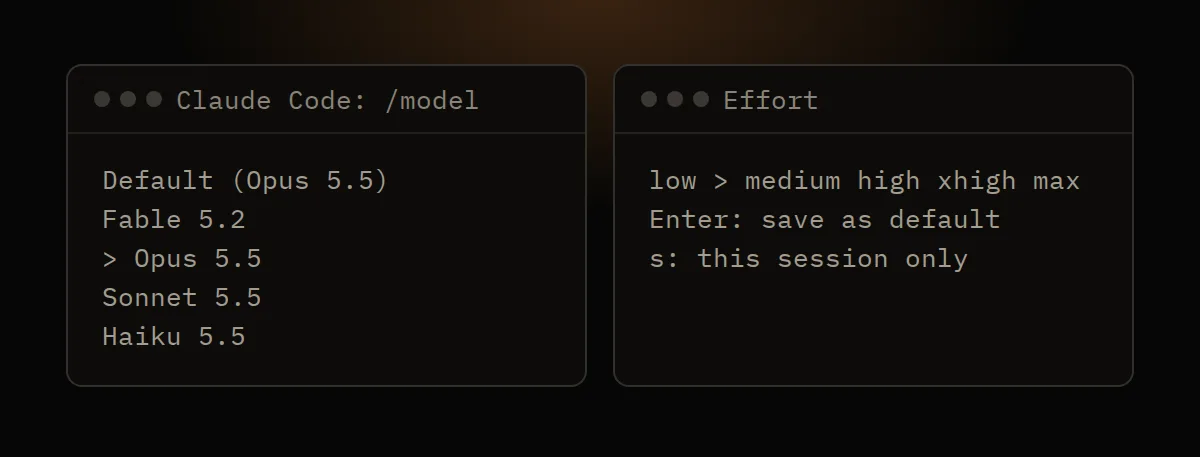
Which models Claude Code uses
| Model | Alias | Model ID | Best for |
|---|---|---|---|
| Fable 5.2 | fable | claude-fable-5-2 | Your hardest, longest-running tasks, larger than a single sitting |
| Opus 5.5 | opus (also best) | claude-opus-5-5 | Complex reasoning, architecture and tricky bugs |
| Sonnet 5.5 | sonnet | claude-sonnet-5-5 | Daily coding tasks |
| Haiku 5.5 | haiku | claude-haiku-5-5 | Fast, simple tasks |
The aliases always point at the recommended version for your provider and move forward when Anthropic releases a new one. On the Anthropic API, opus, sonnet and haiku resolve to Opus 5.5, Sonnet 5.5 and Haiku 5.5. To pin a specific version so it never changes under you, use the full model ID instead, such as claude-opus-5-5.
Each newer model needs a recent Claude Code: Opus 5.5 needs v2.1.280 or later, Sonnet 5.5 needs v2.1.284, Haiku 5.5 needs v2.1.293 and Fable 5.2 needs v2.1.321. If a model fails to load, run claude update first.
Source: Claude Code model configuration, Anthropic
Source: Models overview, Claude API docs
The default model in Claude Code
The default setting is not a model itself: it clears any override and uses the default for your account type. On Pro, Max, Ultra, Team and Enterprise plans and the Anthropic API, that is Opus 5.5. On Claude Platform on AWS, Anthropic-managed Claude models on Google Cloud, Amazon Bedrock and Google Cloud's Agent Platform it is also Opus 5.5, and on Microsoft Foundry it is Sonnet 4.5.
Before v2.1.280, the default was lower on some plans: Sonnet 5 on Pro and Team Standard, and Opus 5 on Max and above. So if your sessions start on an older model, check your Claude Code version before anything else. An organisation admin can also set an organisation default model, which then takes the place of the account-type default.
No Fable model is the default on any plan or provider. You always pick Fable yourself.
Source: Claude Code model configuration, Anthropic
How to change the model in Claude Code
There are five ways to set the model. When more than one applies, the first in this list wins:
- During a session: /model followed by an alias or name switches immediately, or /model on its own opens the picker.
- At startup: claude --model followed by an alias or name.
- Environment variable: ANTHROPIC_MODEL.
- Settings: the model field in your settings file.
- Default for new sessions: ANTHROPIC_DEFAULT_MODEL.
For example, start a session on Opus and switch to Sonnet partway through:
claude --model opus/model sonnetIn the /model picker, Enter switches and saves the model as your default for new sessions, while s switches for this session only and leaves your default alone. Typing /model sonnet directly behaves like Enter. To make a choice permanent by hand, set it in ~/.claude/settings.json:
{
  "model": "opus"
}
The --model flag and ANTHROPIC_MODEL only apply to the session you launch with them. That makes them the way to run different models side by side: start each terminal with its own --model, rather than switching one session back and forth with /model.
To see which model you are on, run /status, or add the model to your status line.
Source: Claude Code model configuration, Anthropic
Set a default model for new sessions
ANTHROPIC_DEFAULT_MODEL chooses the model new sessions start on when nothing else picks one. It needs Claude Code v2.1.236 or later:
export ANTHROPIC_DEFAULT_MODEL=sonnetIt only applies when there is no --model flag, no ANTHROPIC_MODEL, no model value in any settings file (including the one /model saves) and no organisation default. So a choice you save with /model beats it on later launches. ANTHROPIC_MODEL behaves differently: it always returns you to its model on the next launch, whatever you saved with /model. Claude Code ignores ANTHROPIC_DEFAULT_MODEL if you set it to default, inherit, opusplan or haiku, or to a model your account cannot use.
Which model a resumed session uses
A session you resume with claude --resume or --continue keeps the model it was saved on. There are exceptions: if that model has been retired or is blocked by your organisation, if you set an alias variable such as ANTHROPIC_DEFAULT_OPUS_MODEL, or if your provider uses its own deployment IDs, as Bedrock, Agent Platform and Foundry do. A session saved on an older Haiku also resumes on the model haiku now points to. To resume on a model you choose, pass --model when you resume.
Source: Claude Code model configuration, Anthropic
Working with Fable 5.2
Anthropic describes the Fable models as the most capable in Claude Code, suited to tasks larger than a single sitting. They sustain long autonomous sessions, investigate before acting and verify their work more often than smaller models. Select one explicitly:
claude --model fableOr run /model fable inside a session. Fable 5.1 and Fable 5 are still available by model ID, such as /model claude-fable-5-1. Anthropic's advice for getting the most from Fable is to describe the outcome rather than the steps, hand it ambiguous problems such as root-cause investigations, outage debugging and architecture decisions, skip the reminders to test and check because it verifies its own work with less prompting, and give it work you would normally break into pieces.
Depending on your plan and seat tier, Fable usage can bill to usage credits instead of your plan's included limits. When it does, the /model picker shows "Requires usage credits" on the Fable row, and an interactive session asks before continuing on credits. In non-interactive runs with -p, Claude Code does not ask, so check this before scripting Fable.
Source: Claude Code model configuration, Anthropic
Opus vs Sonnet vs Haiku in Claude Code
Anthropic's own one-line descriptions are the clearest guide: opus for complex reasoning tasks, sonnet for daily coding tasks, haiku for simple tasks, and fable for your hardest and longest-running ones. In practice that splits like this:
| If the task is | Start with | Why |
|---|---|---|
| A rename, a small edit, a quick question about the code | Haiku 5.5 | Fast and efficient, and you review each result anyway |
| Implementing a feature with a clear scope | Sonnet 5.5 or Opus 5.5 | Day-to-day engineering work both handle well |
| A bug in a large existing codebase | Opus 5.5 | Deeper reasoning and more checking of edge cases |
| An architecture decision or a migration plan | Opus 5.5, or opusplan | Planning benefits most from the strongest reasoning |
| A long investigation you want to hand off completely | Fable 5.2 | Built for long autonomous sessions and self-verification |
Model and effort work together, so you rarely need the biggest model at the highest setting. Opus 5.5 at its default medium effort matches or beats Opus 5 at high effort on Anthropic's coding and knowledge-work evaluations.
Source: Claude Code model configuration, Anthropic
Claude Code models and your usage limits
The model you pick is the biggest single lever on how far your plan's usage goes. Anthropic's help centre puts it plainly: Opus costs several times more per turn than Sonnet, and Sonnet more than Haiku, so spending Opus on routine work is the fastest way to drain a daily limit. Its suggested defaults are Sonnet for most coding (features, tests, known bugs, refactors), Opus when you are genuinely stuck or the change is wide, and Haiku for quick mechanical work such as renames, log lines and boilerplate.
How usage is counted depends on how you signed in. With a Claude plan, you get a pool of usage that resets on a rolling window, and running out shows a "limit reached, resets at" message; you can switch to a lighter model with /model while you wait. With an API key from the Console, Bedrock, Google Cloud or Foundry, you pay per token with no hard stop, and /cost shows the running spend for the session.
Every turn resends the conversation so far, your CLAUDE.md and any files Claude has read, so the model's per-token cost is multiplied by how long the session has grown. Running /clear between unrelated tasks does as much for your limits as choosing a cheaper model.
Source: Models, usage and limits in Claude Code, Claude Help Center
opusplan: Opus to plan, Sonnet to build
opusplan is a special setting that uses opus in plan mode, for reasoning and architecture decisions, then switches to sonnet automatically when Claude starts carrying out the plan. It pairs Opus's reasoning for planning with Sonnet's efficiency for writing the code. Select it like any alias, with /model opusplan or claude --model opusplan.
If your organisation blocks the newest Opus but allows an older one, opusplan uses the newest Opus it is allowed for planning. If you want Claude to decide mid-task when to consult a second model, rather than switching at the plan boundary, Anthropic points to the separate advisor tool instead.
Source: Claude Code model configuration, Anthropic
Effort levels: how hard Claude thinks
Effort levels control adaptive reasoning, letting the model decide whether and how much to think on each step. Lower effort is faster and uses fewer tokens; higher effort reasons more deeply. On the current models the levels are low, medium, high, xhigh and max. Fable 5.2, Opus 5.5, Sonnet 5.5 and Haiku 5.5 default to medium.
| Level | When to use it |
|---|---|
| low | Quick exchanges where you review each result: brainstorming, a first sketch, a rename |
| medium | The default on current models. Day-to-day engineering with a clear scope, such as a new feature |
| high | Work where verification matters or edge cases are likely, such as fixing a bug in existing code |
| xhigh | Deeper reasoning at a higher token cost |
| max | Hard problems you want Claude to work through alone, such as finding security vulnerabilities. Can overthink, so test it first |
Set the level with /effort and a level name, use the arrow keys on the effort slider in /model, launch with --effort, or set CLAUDE_CODE_EFFORT_LEVEL. Claude Code saves the level per model, so each model keeps its own. max only applies to the current session unless you set it through the environment variable.
/effort highIn Anthropic's tests, Claude at a higher level tested more edge cases and verified more before answering, and also made more choices on its own. At a lower level it returned a starting point sooner, which suits work where you steer each step. The effort scale is calibrated per model, so the same name does not mean exactly the same amount of thinking on two different models.
Source: Claude Code model configuration, Anthropic
When a new effort level takes effect
In a terminal session, once /effort confirms a new level, the next message you send runs at it. If Claude is mid-turn, you can wait for the turn to finish, or type a short message such as "keep going" and press Enter to queue it; Claude picks it up when its current tool calls finish and works at the new level from then on. The level shown in the session header comes from your setting, even while Claude is still finishing a step at the old one.
Let the API choose the effort
To send no effort level at all, so the API's own default applies instead of Claude Code's, start claude from a shell that exports:
export CLAUDE_CODE_EFFORT_LEVEL=autoRun /effort status to confirm: "Effort level: auto" means none is being sent.
Source: Claude Code model configuration, Anthropic
ultrathink for one hard turn
Put the word ultrathink anywhere in a prompt to ask for deeper reasoning on that turn only, without changing your session's effort. In the terminal, the VS Code chat box and the desktop app, the word shows in rainbow colours when it will also raise that turn to xhigh. Other phrases such as "think hard" are passed through as ordinary text, not treated as keywords.
Source: Claude Code model configuration, Anthropic
Ultracode
The /effort slider also has an Ultracode toggle. It is a Claude Code setting rather than an effort level: with it on, Claude plans a dynamic workflow for each substantial task at whatever effort level the session uses. Turn it on with /effort ultracode, or launch with claude --effort ultracode, which also sets the session to xhigh.
Source: Claude Code model configuration, Anthropic
Extended thinking in Claude Code
Extended thinking is the reasoning Claude produces before it answers. On current models, effort is the main control for how much thinking happens; the thinking settings turn it on or off and change how it is shown. Fable models, Sonnet 5 and later, Haiku 5.5 and Opus 4.7 and later always use adaptive reasoning, deciding step by step whether a step deserves deeper thought, so routine prompts come back faster.
| Control | How to set it |
|---|---|
| Toggle thinking for this session | Option+T on macOS, Alt+T on Windows and Linux |
| Set the default | Run /config and toggle thinking mode, saved as alwaysThinkingEnabled |
| Turn it off with an environment variable | MAX_THINKING_TOKENS=0 |
| See the reasoning | Ctrl+O toggles verbose mode, showing thinking as grey italic text |
If you want Claude to think more or less often than its current level produces, you can simply say so in the prompt or in CLAUDE.md, and the model follows that guidance within its effort setting. On the older Opus 4.6 and Sonnet 4.6, CLAUDE_CODE_DISABLE_ADAPTIVE_THINKING=1 switches back to a fixed thinking budget set by MAX_THINKING_TOKENS.
Source: Claude Code model configuration, Anthropic
Context window: 1M tokens and auto-compaction
Fable models, Sonnet 5 and later, Haiku 5.5 and Opus 4.7 and later run with a 1 million token context window by default, with no suffix needed. Opus 4.6 and Sonnet 4.6 reach 1M only through their [1m] variants, and access to those depends on your plan:
/model opus[1m]On the Anthropic API, the 1M window uses standard model pricing with no premium for tokens beyond 200K, except on Haiku 5.5, which costs more per token on prompts longer than 100K tokens. To keep sessions at 200K instead, set CLAUDE_CODE_DISABLE_1M_CONTEXT=1.
Before the window fills, Claude Code compacts the conversation, summarising older context so the session can continue. The auto-compact window decides how full it gets first. Set it for the current model with /autocompact, for every model with autoCompactWindow in settings, or for one launch with --autocompact:
/autocompact 500kIf you route Claude Code through an LLM gateway that rejects requests above 200K tokens, set CLAUDE_CODE_AUTO_COMPACT_WINDOW=200000, because Claude Code cannot detect a lower limit the gateway enforces.
Source: Claude Code model configuration, Anthropic
Fallback models
When the main model is overloaded, unavailable or returns another server error that will not clear on a retry, Claude Code can switch to a fallback model instead of failing. Set a chain for one session:
claude --fallback-model sonnet,haikuOr keep it in settings as an array:
{
  "fallbackModel": ["claude-sonnet-5", "claude-haiku-5-5"]
}
Claude Code tries them in order and shows a notice when it switches. The switch lasts for the current turn only, so your next message tries the main model again. Chains are capped at three models. Authentication, billing, rate-limit and request-size errors never trigger a fallback: those are problems a different model would not fix.
There is also automatic, content-based fallback. Fable models, Opus 5.5, Sonnet 5.5 and Opus 5 run with safety classifiers that most often flag cybersecurity and biology content. When one flags a request, Claude Code re-runs it on a designated earlier model, such as Opus 4.8 for cybersecurity requests from Opus 5.5, shows a notice, and the session continues on that model until you switch back with /model.
Source: Claude Code model configuration, Anthropic
Ask before a safety fallback
If you would rather decide each time a request is flagged, run /config, choose Switch models when a message is flagged, and pick Ask each time, or set switchModelsOnFlag to false in your settings. Claude Code then pauses at a flagged request instead of switching. Subagents that Claude starts itself never pause to ask: with automatic switching they re-run on the fallback model, and with Ask each time they fail instead, leaving your main session's model unchanged.
Source: Claude Code model configuration, Anthropic
Models for subagents
By default, a subagent runs on the same model as the conversation that starts it. To choose its model yourself, set the model field in its definition to an alias (sonnet, opus, haiku or fable), a full model ID, or inherit. A common pattern is a cheap, fast model for searching and a strong one for the main work:
---
name: quick-search
description: Finds files and answers simple questions about the codebase
tools: Read, Grep, Glob
model: haiku
---

Answer briefly and cite the file paths you used.
Switching models with /model also reaches subagents that inherit the main conversation's model, because Claude Code resolves their model when it starts them. Switch to Opus before Claude delegates research or test runs, and that work runs on Opus too. Skills and subagents can also set their own effort level in their frontmatter.
Source: Claude Code subagents, Anthropic
Source: Claude Code model configuration, Anthropic
Model environment variables in Claude Code
Five environment variables decide what the aliases point to. Each takes a full model name, or your provider's equivalent ID:
| Variable | What it sets |
|---|---|
| ANTHROPIC_DEFAULT_FABLE_MODEL | The model used for fable |
| ANTHROPIC_DEFAULT_OPUS_MODEL | The model used for opus, and for opusplan while plan mode is on |
| ANTHROPIC_DEFAULT_SONNET_MODEL | The model used for sonnet, and for opusplan outside plan mode |
| ANTHROPIC_DEFAULT_HAIKU_MODEL | The model used for haiku and for Claude Code's background functionality |
| CLAUDE_CODE_SUBAGENT_MODEL | The default model for subagents, agent team teammates and workflow agents that are not given one another way |
Two details are easy to miss. Claude Code's small background jobs run on whatever ANTHROPIC_DEFAULT_HAIKU_MODEL points to, so redirecting haiku changes those too. And the older ANTHROPIC_SMALL_FAST_MODEL variable is deprecated in favour of ANTHROPIC_DEFAULT_HAIKU_MODEL, so replace it if it is still in an old shell profile. CLAUDE_CODE_SUBAGENT_MODEL is the quickest way to put every helper agent on a cheaper model while the main session stays on Opus.
Source: Claude Code model configuration, Anthropic
A sensible Claude Code model setup
- Leave the default on Opus 5.5 at medium effort for most work, and raise effort to high for bugs in code you do not know well.
- Use /model sonnet for long, routine stretches such as test writing, to make your plan's usage last.
- Try opusplan for features: Opus writes the plan, Sonnet carries it out, and Sonnet still sees everything Opus produced.
- Give search-only subagents model: haiku, or set CLAUDE_CODE_SUBAGENT_MODEL.
- Save Fable 5.2 for problems you want to hand over completely, and check whether it bills to usage credits on your plan first.
- Pin full model IDs in CI and on cloud providers, so an alias moving forward never changes a pipeline by surprise.
Source: Models, usage and limits in Claude Code, Claude Help Center
Controlling models for a team
Administrators can restrict which models people can select with availableModels in managed or policy settings. Each entry can be a model family such as sonnet, a version prefix such as claude-sonnet-4-5, or a full model ID:
{
  "availableModels": ["sonnet", "haiku", "claude-opus-5-5"]
}
Once set, the list applies everywhere a model can be chosen: /model, the --model flag, environment variables, settings, the model restored when resuming a session, subagent and teammate models, skill and command models, and the advisor model. Fast mode refuses to switch to an Opus model outside the list. Organisations can also set a default model for everyone and limit the effort levels people can use.
Source: Claude Code model configuration, Anthropic
Organisation default model and effort caps
On Claude Enterprise plans, admins can set a default model for Claude Code from the claude.ai admin console, for the whole organisation or per custom role. The Default row in /model then shows that model with the label Org default. It is a starting point, not a restriction: a --model flag, ANTHROPIC_MODEL, managed settings, or a model you save with /model all take precedence, unless the admin turns on override, in which case your saved model only lasts for the current session. Claude Code reads the organisation default once at startup, so changes apply from the next launch.
Admins can also cap the effort level per model for each role. Levels above the cap are not offered in /effort, and asking for a higher one runs at the cap instead. On any plan and provider, the maxEffortLevel setting does the same for your own settings.
Source: Claude Code model configuration, Anthropic
Prompt caching and models
Claude Code uses prompt caching automatically to speed up sessions and reduce cost, because the long, stable start of each request does not have to be processed again every turn. You can turn caching off for every model with DISABLE_PROMPT_CACHING=1, or for one tier with DISABLE_PROMPT_CACHING_HAIKU, _SONNET, _OPUS or _FABLE. Switching models mid-session can also mean a cache miss on the next request, which is one reason Claude Code may ask you to confirm a switch.
Source: Claude Code model configuration, Anthropic
Hold back a new model release
An allowlist entry such as claude-opus-5 also permits later releases that extend it, such as Opus 5.5, as soon as Claude Code supports them. To hold a release back while you test it, use deniedModels, which blocks a model even when the allowlist permits it, or set availableModelsMatch to "exact" so each listed ID permits only the version it names. Both need Claude Code v2.1.283 or later:
{
  "availableModels": ["opus", "sonnet"],
  "deniedModels": ["claude-opus-5-5"]
}
A blocked model disappears from the /model picker, /model with its name is rejected, and a Default that would land on it steps down to an allowed model instead.
Source: Claude Code model configuration, Anthropic
Claude Code models on Bedrock, Google Cloud and Foundry
The aliases resolve differently on other providers, often to an earlier version:
| Provider | opus | sonnet | haiku |
|---|---|---|---|
| Anthropic API | Opus 5.5 | Sonnet 5.5 | Haiku 5.5 |
| Claude Platform on AWS | Opus 5.5 | Sonnet 4.6 | Haiku 4.5 |
| Claude Models on Google Cloud (Anthropic managed) | Opus 5.5 | Sonnet 5.5 | Haiku 4.5 |
| Amazon Bedrock, Google Cloud's Agent Platform | Opus 5.5 | Sonnet 4.5 | Haiku 4.5 |
| Microsoft Foundry | Opus 4.6 | Sonnet 4.5 | Haiku 4.5 |
Where an alias points at an older model, choose the newer one by its full name, or redirect the alias with ANTHROPIC_DEFAULT_OPUS_MODEL, ANTHROPIC_DEFAULT_SONNET_MODEL, ANTHROPIC_DEFAULT_HAIKU_MODEL or ANTHROPIC_DEFAULT_FABLE_MODEL. On Bedrock the model setting takes an inference profile ARN, on Foundry a deployment name, and on Agent Platform a version name. Note that ANTHROPIC_BASE_URL changes where requests go, not which model answers them.
Source: Claude Code model configuration, Anthropic
Pin models on cloud providers
Without pinning, the aliases on Bedrock, Agent Platform, Foundry and Claude Platform on AWS point at a built-in default that can lag Anthropic's newest release, and may not be enabled in a given account yet. When it is unavailable, Bedrock and Agent Platform show a notice and fall back to an earlier version, while Foundry may switch to an older model or fail the request. Anthropic recommends pinning each alias to a version-specific ID for your provider, for example on Bedrock:
export ANTHROPIC_DEFAULT_OPUS_MODEL='us.anthropic.claude-opus-4-8'Do the same with ANTHROPIC_DEFAULT_SONNET_MODEL, ANTHROPIC_DEFAULT_HAIKU_MODEL and ANTHROPIC_DEFAULT_FABLE_MODEL, then update the pins when you have enabled a newer model in your account.
Source: Claude Code model configuration, Anthropic
Add a custom model to the picker
To test a model ID that Claude Code does not list, or to make a gateway deployment selectable, add one custom entry to the /model picker without replacing the built-in ones:
export ANTHROPIC_CUSTOM_MODEL_OPTION="my-gateway/claude-opus-5-5"
export ANTHROPIC_CUSTOM_MODEL_OPTION_NAME="Opus via Gateway"
Claude Code does not validate this ID, so it accepts any string your endpoint understands. Set the variables before launching claude, because environment variables are read at startup. If your organisation uses availableModels, the custom ID must be on that list too.
Source: Claude Code model configuration, Anthropic
Common Claude Code model problems
A new session starts on a different model than I picked
Something higher in the priority order is winning: an ANTHROPIC_MODEL variable in your shell, a --model flag in an alias or script, or a model field in a project or managed settings file. Run /status to see the current model, then check each of those in order.
There is an issue with the selected model
A mistyped model set with --model, ANTHROPIC_MODEL or the model setting is not rejected up front: the session starts and the first request fails. On the Anthropic API you may see a warning suggesting the closest name. Check the spelling against the model IDs above, or use an alias.
The model is not supported
Your Claude Code version is older than the model. Run claude update and try again.
The session switched models on its own
Either a fallback chain kicked in because the main model was overloaded, which only lasts one turn, or a safety classifier triggered content-based fallback, which lasts until you run /model. The transcript shows a notice in both cases.
Source: Claude Code model configuration, Anthropic
How the Claude Code model aliases have changed
The aliases have moved forward many times. Anthropic publishes the Claude Code version at which each one changed, which explains why two people on different versions can get different models from the same /model opus:
| Version | Change |
|---|---|
| v2.1.321 | fable resolves to Fable 5.2, and best resolves to the same model as opus |
| v2.1.293 | haiku resolves to Haiku 5.5 on the Anthropic API |
| v2.1.284 | sonnet resolves to Sonnet 5.5 on the Anthropic API |
| v2.1.280 | opus resolves to Opus 5.5 on the Anthropic API, Claude Platform on AWS, Bedrock and Agent Platform |
| v2.1.257 | fable resolves to Fable 5.1 |
| v2.1.219 | opus resolves to Opus 5 on the Anthropic API and the main cloud providers |
| v2.1.197 | sonnet resolves to Sonnet 5 on the Anthropic API |
| v2.1.154 | opus resolves to Opus 4.8 on the Anthropic API |
| Earlier | fable resolves to Fable 5 and haiku to Haiku 4.5 on every provider |
If you need a stable model across a team or in CI, pin the full model ID rather than relying on an alias, and update it deliberately.
Source: Claude Code model configuration, Anthropic
Running several models at once
Because --model applies only to the session you launch, a common setup is several Claude Code sessions on different models: Fable on a long investigation, Opus on a feature, Haiku on small fixes. 10u is an AI coding agent dashboard that shows every Claude Code and Codex session side by side, each in its real terminal, marked Needs you, Working, Waiting or Parked. They do the building. You decide what gets built.

Questions people ask
- What model does Claude Code use?
- On Pro, Max, Ultra, Team, Enterprise and the Anthropic API, Claude Code starts on Opus 5.5 by default. You can switch to Sonnet 5.5, Haiku 5.5 or Fable 5.2 with /model.
- How do I change the model in Claude Code?
- Run /model to open the picker, or /model followed by a name such as sonnet. To start a session on a model, run claude --model opus.
- What is the best model for Claude Code?
- Fable 5.2 is the most capable, for long and difficult tasks. Opus 5.5 is the default for complex work, Sonnet 5.5 suits everyday coding and Haiku 5.5 quick, simple tasks.
- What is opusplan in Claude Code?
- A setting that uses Opus in plan mode and switches to Sonnet automatically when Claude starts carrying out the plan.
- Does Claude Code have a 1M context window?
- Yes. Fable models, Sonnet 5 and later, Haiku 5.5 and Opus 4.7 and later run with a 1 million token window by default.