
Claude Code templates: ready-made agents, skills, hooks and CLAUDE.md files
Claude Code templates are ready-made configuration files you drop into a project so Claude Code works your way from the first session: a CLAUDE.md with your commands and rules, a settings file with permissions, and subagents, skills, hooks and MCP servers for jobs you repeat. The biggest public collection is Claude Code Templates, an open-source catalog at aitmpl.com with an installer you run with npx claude-code-templates@latest. You can also write your own from the formats in Anthropic's documentation, shown below.
What a Claude Code template is
Claude Code reads its setup from small plain-text files. A template is one of those files written in advance, either by you for reuse or by someone else for sharing. Because every piece is a file, a good setup copies from one project to the next, and a team can commit it to the repository so everyone starts the same way.
your-project/
  CLAUDE.md                     project instructions, loaded every session
  .claude/
    settings.json               permissions, hooks, environment
    agents/code-reviewer.md     a subagent
    skills/generate-tests/
      SKILL.md                  a skill, run as /generate-tests
  .mcp.json                     MCP servers shared with the team
Each file does one job. CLAUDE.md holds instructions Claude reads at the start of every session. settings.json sets permissions and hooks. Files in .claude/agents are subagents, specialists Claude can hand work to. Folders in .claude/skills are skills, reusable procedures you can run as a slash command. And .mcp.json connects outside tools such as GitHub or a database.
Source: Claude Code memory and CLAUDE.md, Anthropic
Source: Claude Code settings, Anthropic
Claude Code Templates (aitmpl.com)
Claude Code Templates, by developer Daniel Avila, is the project most people mean when they search for Claude Code templates. It describes itself as an open-source registry and CLI for Claude Code components: agents, commands, skills, hooks, MCPs, settings and mods. On 23 November 2026 its README listed more than 1,980 components, the repository had over 34,000 GitHub stars, and it is published under the MIT licence.
You browse the catalog on aitmpl.com, where you can search, preview every file a component will write, and combine several components into one install command. The installer then writes each file to the right place and, in the project's words, merges existing configuration instead of overwriting it.
Source: davila7/claude-code-templates on GitHub
Source: aitmpl.com component catalog
How to install Claude Code templates
The installer runs through npx, so there is nothing to install globally. You need Node.js on your computer. To browse the catalog and pick components interactively:
npx claude-code-templates@latestTo install one component, name it with its type flag:
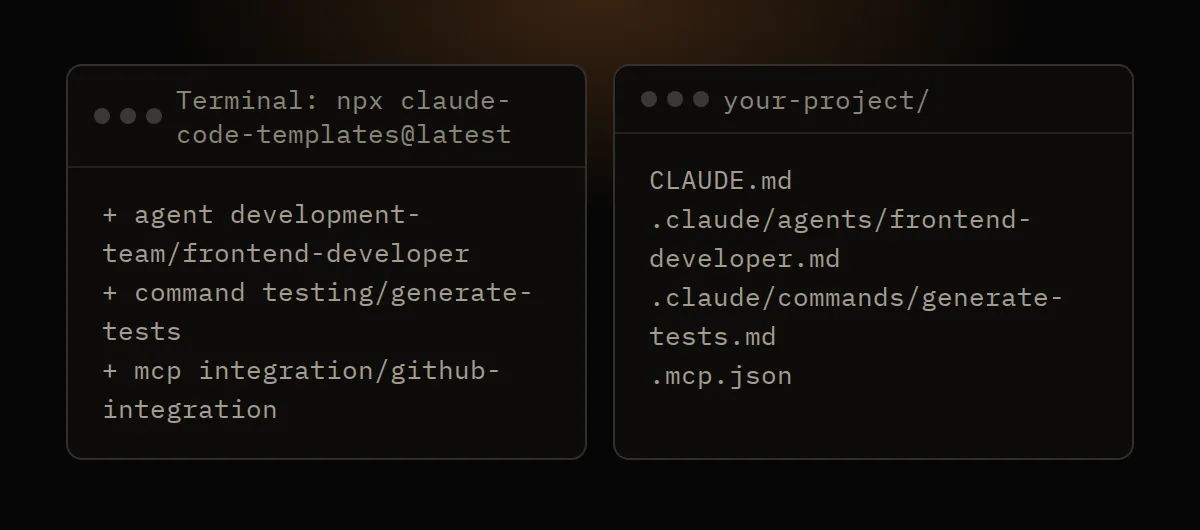
npx claude-code-templates@latest --skill creative-design/frontend-designOr install a small stack in one command, here a frontend developer subagent, a test-writing command and the GitHub MCP integration:
npx claude-code-templates@latest \--agent development-team/frontend-developer \--command testing/generate-tests \--mcp integration/github-integration
Add --yes to skip the confirmation prompt. Every component page on aitmpl.com shows its exact install command, and you can search from the terminal too:
npx claude-code-templates@latest --search "code review"Run these from the root of the project you want to change, then start Claude Code there. Open /agents, type / to see new commands and skills, or run /mcp to check that a new MCP server connected.
Source: davila7/claude-code-templates on GitHub
What is in the catalog
The README breaks the catalog down by type. These were the counts on 23 November 2026; the project keeps live counts in its repository.
| Type | Count | What it is | Examples |
|---|---|---|---|
| Skills | 918 | Reusable capabilities that load only when needed | PDF processing, frontend design, code review |
| Agents | 422 | Subagents specialised in one domain | Security auditor, frontend developer, database architect |
| Commands | 288 | Custom slash commands | /generate-tests, /optimize-bundle-size, /security-audit |
| MCPs | 119 | Connections to outside services | GitHub, PostgreSQL, Stripe, Supabase, Sentry |
| Settings | 80 | Claude Code configuration | Timeouts, permissions, status lines |
| Hooks | 63 | Automation triggers | Conventional commits, blocking direct pushes |
| Mods | 50 | Changes to Claude Code's own interface and behaviour | Secret redaction, protected paths |
| Loops | 18 | Autonomous workflows with a goal, an interval and a stop condition | Docs sweep, build-test-fix |
| Templates | 14 | Complete project configurations | Language and framework setups |
| Sandboxes | 11 | Launchers that run Claude Code in an isolated environment | E2B, Cloudflare, Docker |
Note the naming: the project is called Claude Code Templates, but inside it, Templates is also one category, the 14 complete project setups for a language or framework. The rest are single components you mix and match.
Source: davila7/claude-code-templates on GitHub
Local tools in claude-code-templates
The same CLI ships three local tools. --analytics opens a real-time session and usage dashboard at localhost:3333, --chats opens a searchable, phone-friendly view of your conversations at localhost:9876, and --health-check diagnoses your Claude Code installation and project setup:
npx claude-code-templates@latest --health-checkThe two dashboards listen on 127.0.0.1 only, because they serve your conversation history. To reach one from another device, the project suggests forwarding the port over SSH rather than opening it to your network.
Source: davila7/claude-code-templates on GitHub
Are Claude Code templates safe?
Treat a template like code, because some of it is. Anthropic's plugin security guide says a plugin can carry content that runs code on your machine with your user privileges and content that enters Claude's context as instructions. The same is true of the loose pieces: a hook runs a shell command every time it fires, an MCP server is a program with access to whatever you connect it to, and an agent or skill file steers what Claude does.
- Preview every file before installing. aitmpl.com shows each file a component writes.
- Read hooks closely. Check exactly which command runs and on which event.
- Check what an MCP server can reach and which credentials it asks for.
- Install into a project first, not your home folder, so a component only affects one repository while you try it.
- Commit before installing, so git diff shows exactly what changed and you can undo it.
Claude Code Templates checks every pull request with Claude Code's plugin validator and scans it with NVIDIA SkillSpector, which helps, but a scan is not a substitute for reading what you install.
Source: Plugin security and trust, Anthropic
Source: davila7/claude-code-templates on GitHub
Write your own Claude Code templates
You do not need a catalog. The formats are short and documented, and a template you write around your own project usually fits better than a general one. Here are copy-ready starting points for each file, based on Anthropic's documentation.
CLAUDE.md template
The fastest start is /init inside Claude Code: it analyses your codebase and writes a CLAUDE.md with build commands, test instructions and the conventions it finds, or suggests improvements if one already exists. Then add what Claude could not discover on its own. A simple shape:
# CLAUDE.md

## Commands
- Install: npm install
- Test: npm test
- Lint before every pull request: npm run lint

## Conventions
- TypeScript strict mode; no any.
- One component per file in src/components.
- Tests sit next to the file they test, named *.test.ts.

## Never
- Edit files in vendor/ or generated/.
- Commit .env files.

See @docs/architecture.md for how the services fit together.
Anthropic recommends keeping each CLAUDE.md under 200 lines, because longer files use more context and are followed less reliably. The @docs/architecture.md line imports another file. For personal preferences you do not want to commit, use CLAUDE.local.md and add it to .gitignore.
Source: Claude Code memory and CLAUDE.md, Anthropic
settings.json template
Save this as .claude/settings.json to let Claude run your lint and test commands without asking, while blocking it from reading your .env files:
{
  "$schema": "https://json.schemastore.org/claude-code-settings.json",
  "permissions": {
    "allow": [
      "Bash(npm run lint)",
      "Bash(npm run test *)"
    ],
    "deny": [
      "Read(./.env)",
      "Read(./.env.*)"
    ]
  }
}
The $schema line gives you autocomplete and validation in VS Code, Cursor and other editors that support JSON schemas. Run /status in Claude Code to confirm the file loaded.
Source: Claude Code settings, Anthropic
Subagent template
Save this as .claude/agents/code-reviewer.md for one project, or in ~/.claude/agents/ to use it everywhere:
---
name: code-reviewer
description: Reviews code for quality and best practices
tools: Read, Glob, Grep
model: sonnet
---

You are a code reviewer. When invoked, analyze the code and provide
specific, actionable feedback on quality, security, and best practices.
The tools line limits it to reading, so a reviewer cannot edit your files. Ask Claude to use the code-reviewer subagent, or let it delegate when a task matches the description.
Source: Claude Code subagents, Anthropic
Skill and slash command template
Custom commands have been merged into skills. Save this as .claude/skills/generate-tests/SKILL.md, and the folder name becomes the command, so you type /generate-tests. Older .claude/commands/ files keep working, but skills can also hold scripts and other supporting files.
---
name: generate-tests
description: Write unit tests for a file or function. Use when asked to add tests or raise coverage.
---

1. Read the file and find its public functions.
2. Match the test style already used in the repository.
3. Cover the normal case, the edge cases and one failure case per function.
4. Run the tests and fix any that fail before you finish.
Source: Claude Code skills, Anthropic
Hook template
This hook from Anthropic's guide formats every file Claude edits with Prettier. It runs on the PostToolUse event, matched to the Edit and Write tools. Add it to .claude/settings.json:
{
  "hooks": {
    "PostToolUse": [
      {
        "matcher": "Edit|Write",
        "hooks": [{ "type": "command", "command": "f=$(jq -r '.tool_input.file_path') && npx prettier --write --ignore-unknown \"$f\"" }]
      }
    ]
  }
}
Source: Claude Code hooks guide, Anthropic
.mcp.json template
A .mcp.json file at the project root shares MCP servers with everyone who works in the repository. Its shape is a list of servers under mcpServers:
{
  "mcpServers": {
    "example": {
      "command": "npx",
      "args": ["-y", "@example/mcp-server"]
    }
  }
}
You rarely need to write it by hand. Adding a server with the project scope creates or updates the file for you, and you then commit it so the whole team gets the same tools:
claude mcp add --transport http shared-server --scope project https://example.com/mcpKeep keys out of the file. Reference environment variables with ${VAR} instead, and give each one a ${VAR:-default} fallback where it makes sense. If a variable is missing, Claude Code warns you in /mcp and claude mcp list rather than failing silently.
Source: Claude Code MCP, Anthropic
Project templates or personal templates
Most of these files can live in two places, and the choice decides who gets them. Files inside the project, such as CLAUDE.md, .claude/settings.json, .claude/agents and .claude/skills, are committed with the code, so everyone on the team starts with them. The same kinds of files in your home folder, ~/.claude/CLAUDE.md, ~/.claude/agents and ~/.claude/skills, follow you into every project but stay private to you. A good rule: project rules and shared tools go in the repository, your personal habits go in your home folder, and anything private to one project goes in CLAUDE.local.md.
Source: Claude Code memory and CLAUDE.md, Anthropic
Share your templates as a plugin
Once your templates work, a plugin is the official way to share them. A plugin is a folder of components with a manifest at .claude-plugin/plugin.json: skills, agents, hooks and MCP servers together, installed in one step. A marketplace is a repository with a .claude-plugin/marketplace.json file listing plugins, so your team adds the marketplace once and installs plugins from it by name. That beats copying files between repositories, because an update reaches everyone who installed the plugin.
Source: Claude Code plugins, Anthropic
Which Claude Code templates to start with
- A CLAUDE.md with your real commands and the three or four rules people keep breaking. This one template does the most good.
- A settings.json that allows your test and lint commands and denies secret files, so Claude asks less and touches less.
- One review subagent with read-only tools, for a second opinion before you commit.
- One skill for the task you repeat most, such as tests, release notes or a migration.
- A formatting hook, so every edit matches your style without asking.
Add more only when you notice yourself typing the same instruction twice. A small set you understand beats a large one you installed in one go.
Templates across many sessions
Good templates make every Claude Code session start the same way, which pays off most when several run at once. 10u is an AI coding agent dashboard that shows every Claude Code and Codex session side by side, each in its real terminal, marked Needs you, Working, Waiting or Parked. They do the building. You decide what gets built.

Questions people ask
- What are Claude Code templates?
- Ready-made configuration files for Claude Code, such as CLAUDE.md, settings, subagents, skills, hooks and MCP servers, that you drop into a project instead of writing from scratch.
- How do I install Claude Code templates?
- Run npx claude-code-templates@latest in your project to browse and install from the aitmpl.com catalog, or add one component with a flag such as --agent or --skill.
- Is Claude Code Templates free?
- Yes. Claude Code Templates is open source under the MIT licence and runs with npx. You still need your own Claude Code plan to use what it installs.
- Is aitmpl made by Anthropic?
- No. aitmpl.com and claude-code-templates are a community project by Daniel Avila. Anthropic documents the file formats and runs its own plugin marketplaces.
- How do I make a CLAUDE.md template?
- Run /init in Claude Code to generate one from your codebase, then add your commands, conventions and rules. Keep it under 200 lines.