
tmux alternatives for running AI coding agents
If you use tmux to keep several Claude Code or Codex agents running, the main alternatives are Zellij, a terminal workspace that marks which pane needs you; WezTerm, a terminal with built-in multiplexing; GNU Screen; Claude Code's own agent view; the Codex desktop app; and a dedicated agent dashboard such as 10u. tmux is excellent at keeping programs alive. What it does not do on its own is tell you which agent has stopped to ask you something.
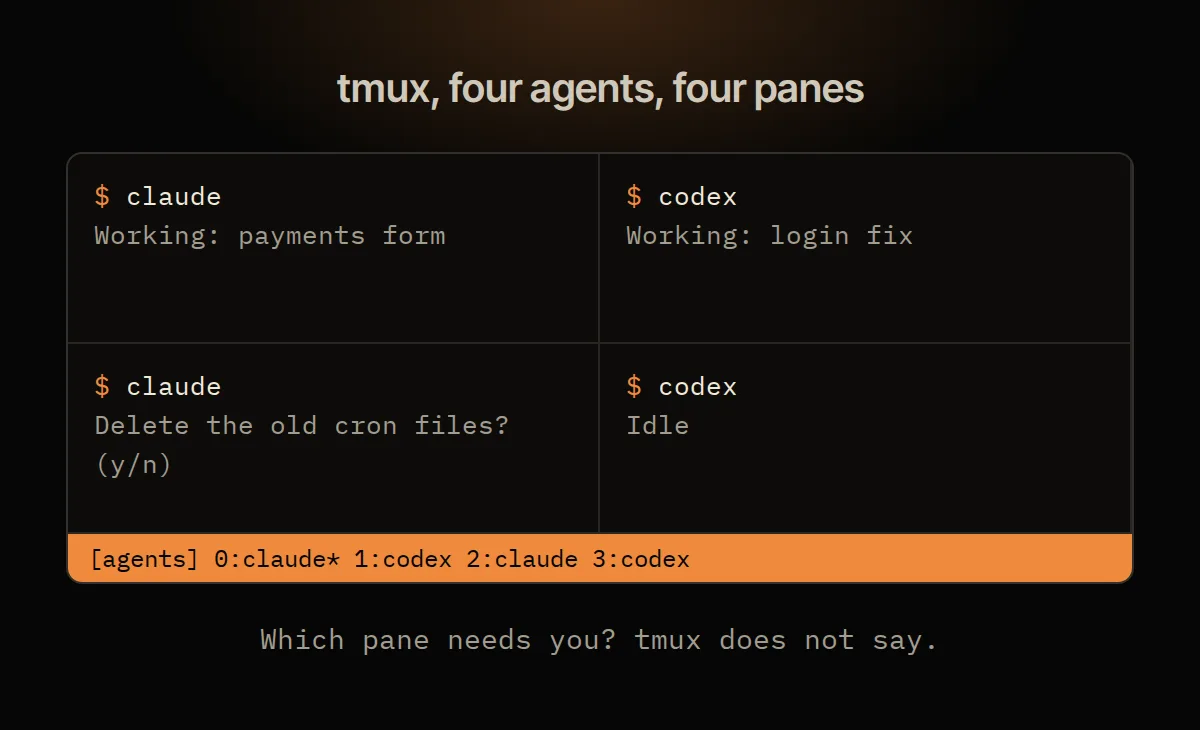
What tmux does well
tmux is a terminal multiplexer. In its own words, it lets you switch easily between several programs in one terminal, detach them so they keep running in the background, and reattach them to a different terminal. That is why so many people run coding agents in it: start four agents, split the window into panes, detach, and come back later from another machine over SSH. Claude Code even uses it: with tmux installed, agent teams can open each teammate in its own tmux pane.
Source: tmux wiki
Source: Orchestrate teams of Claude Code sessions, Anthropic
Where tmux gets hard with many agents
- Panes look the same whether the agent is working or waiting for you, so you check each one by hand.
- A waiting agent in a window you are not looking at can sit idle for a long time.
- Key bindings and config take time to learn, and more to share with a team.
- Past four or five panes, each one gets too small to read.
Every alternative below fixes some of this. Which one is right depends on whether you want a better terminal or a view built around agents.
tmux alternatives compared
| Tool | What it is | Shows which agent needs you | Runs Claude Code and Codex |
|---|---|---|---|
| Zellij | Terminal workspace with panes, tabs, sessions and an inbox | Yes, a Needs you state in its inbox | Yes, as terminal programs |
| WezTerm | Terminal emulator with built-in multiplexing | Not built for it | Yes, as terminal programs |
| GNU Screen | The older terminal multiplexer | No | Yes, as terminal programs |
| Claude Code agent view | Anthropic's screen for background Claude Code sessions | Yes, Needs input state | Claude Code only |
| Codex in the ChatGPT desktop app | OpenAI's app with parallel chats and worktrees | Within the app | Codex only |
| 10u | AI coding agent dashboard | Yes, Needs you on top | Both, each in its real terminal |
1. Zellij
Zellij calls itself a terminal workspace with batteries included, and it is free and open source. Like tmux it has panes, tabs, sessions and layouts, but it is easier to start with, and it has a feature aimed squarely at agent users: an inbox. Zellij tracks what each pane needs and gives it a state: Needs you when a program is waiting for approval, a question, a login or a notification; Failed, Done, Working, Gone quiet and New output. The inbox collects these across every session on the machine, and a corner indicator counts how many need you.
Zellij picks states up from programs that report their own status, from desktop notifications and the terminal bell, and from shell prompt markers, so many programs work with no setup. It can also run in its own window as the Zellij terminal, with a tray icon showing what needs you and desktop notifications, on Linux, macOS and Windows.
Choose Zellij if you like a terminal multiplexer and want it to tell you which pane needs you.
Source: Inbox and Attention, Zellij User Guide
Source: Zellij Terminal, Zellij User Guide
2. WezTerm
WezTerm is a terminal emulator with multiplexing built in. Out of the box it keeps local tabs and windows until you close them, and with a little configuration it offers multiplexing similar to tmux or Screen. It organises this into domains, sets of windows and tabs it can start or connect to, and attaches them to its own window, so mouse, clipboard and scrollback behave naturally.
Choose WezTerm if you want tmux-style sessions without running a second program inside your terminal.
Source: Multiplexing, WezTerm docs
3. GNU Screen
GNU Screen is the older terminal multiplexer that tmux is often compared with. It does the core job, keeping programs running after you disconnect and letting you reattach, and it is already installed on many servers. It has fewer modern conveniences than tmux or Zellij, and nothing that tracks agent state.
Choose Screen when it is what the server already has and you only need sessions that survive a disconnect.
4. Claude Code's agent view
If your agents are all Claude Code, Anthropic has its own answer. Agent view, opened with claude agents, lists every background Claude Code session grouped by state: Working, Needs input, Idle, Completed, Failed and Stopped, with the ones that need you near the top. Press Space to peek at a session and reply to its question in place, or Enter to attach. Send any session to the background with /bg.
claude agentsChoose agent view if you only run Claude Code. It does not show Codex or other agents.
Source: Manage multiple agents with agent view, Anthropic
5. Codex in the ChatGPT desktop app
For Codex users, Codex in the ChatGPT desktop app runs several chats in one project, each optionally in its own Git worktree, and can hand a chat between a worktree and your local checkout. It replaces a set of tmux panes with a window of chats. It only shows Codex.
Source: Worktrees in Codex, OpenAI
6. An agent dashboard: 10u
10u is built for the job many people use tmux for: running several Claude Code and Codex agents at once. Each agent runs in its real terminal, side by side, and is marked Needs you, Working, Waiting or Parked. When one stops to ask you something, it moves to the top. You answer it there and it carries on. It runs on the Claude and ChatGPT subscriptions you already have.
Choose 10u if you run both Claude Code and Codex and want one screen sorted by what each agent needs from you.
Which tmux alternative fits you
| If you... | Try |
|---|---|
| Like tmux but want to see which pane needs you | Zellij |
| Want sessions built into your terminal | WezTerm |
| Only have what is on the server | GNU Screen or tmux |
| Run only Claude Code | Claude Code's agent view |
| Run only Codex | The Codex desktop app |
| Run Claude Code and Codex together | 10u |
Keep tmux where it shines
You do not have to give tmux up. It remains a great way to keep agents alive on a remote server over SSH, and Claude Code's agent teams can use it to show teammates in panes. Many people keep tmux for servers and use a view built around agents on their own computer. Whatever you choose, give each agent that writes files its own Git worktree, so two agents never edit the same files. They do the building. You decide what gets built.

Questions people ask
- What is the best tmux alternative for AI agents?
- Zellij if you want a multiplexer that marks which pane needs you, Claude Code's agent view if you only run Claude Code, and a dashboard such as 10u if you run Claude Code and Codex together.
- Is Zellij better than tmux?
- Zellij is easier to start with and has an inbox that marks panes needing you. tmux is older, very widely installed and endlessly configurable.
- Can I run Claude Code in tmux?
- Yes. Claude Code runs in any terminal, and agent teams can open each teammate in its own tmux pane.
- How do I know which agent in tmux needs me?
- tmux does not track that by itself. Zellij's inbox, Claude Code's agent view or 10u show waiting agents for you.