
Claude Code vs Devin: a coding agent you steer, or an AI software engineer you delegate to?
Claude Code is Anthropic's coding agent: you work with it in your terminal, editor, desktop app or browser, it reads your code, edits files and runs commands, and you steer it as it goes. Devin is Cognition's autonomous AI software engineer: you hand it a ticket, a Slack thread or a task, it works in its own cloud machine with a shell, editor and browser, and comes back with a pull request. Choose Claude Code if you want a fast, capable agent you direct closely on your own machine; choose Devin if you want to delegate well-defined tickets to an agent that works on its own and reports back. Both companies now offer local and cloud versions, so the line is blurring.
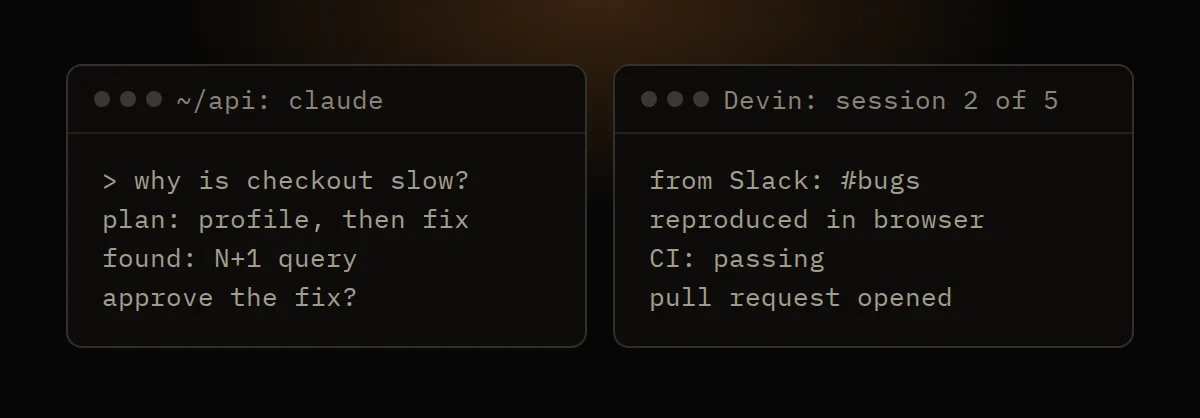
Details come from Anthropic's and Cognition's documentation, read on 23 November 2026. Plans and features change often, so check the linked pages before deciding.
Claude Code and Devin at a glance
| Claude Code | Devin | |
|---|---|---|
| Made by | Anthropic | Cognition |
| Pitched as | An agentic coding tool | An autonomous AI software engineer |
| Main way of working | You direct it and review as it goes | You delegate a task and review the pull request |
| Where it runs | Terminal, VS Code and JetBrains, desktop app, web, cloud sessions | Devin Cloud in its own virtual machine, plus Devin CLI and Devin Desktop locally |
| Starting a task | A prompt in a session; Slack and GitHub Actions too | Web app, Slack, Microsoft Teams, Linear or Jira tickets, API, CLI |
| Models | Claude models | A mix of providers, with Cognition's Adaptive router |
| Parallel work | Parallel sessions, subagents, agent teams | Many cloud sessions at once, subagents in the CLI |
| Instructions | CLAUDE.md | Rules, AGENTS.md, knowledge and playbooks |
| Free option | No | A free plan with a light quota |
What Devin is
Cognition describes Devin as an autonomous AI software engineer that can write, run and test code, built to help engineering teams clear their backlogs. Its own rule of thumb is that if you can do a task in three hours, Devin can most likely do it. Each Devin session runs in a workspace with its own shell, an embedded code editor and a browser, and you can follow along or take over at any point.
Source: Introducing Devin, Devin Docs
Cognition lists four kinds of work where Devin does best:
- Many tasks in parallel before they reach your backlog: Linear and Jira tickets, whole features, bug reports and app testing.
- Code migrations, refactors and modernisation, such as JavaScript to TypeScript or a framework upgrade.
- Common, repetitive engineering work: pull request review, codebase questions, reproducing and fixing bugs, unit tests and documentation.
- Customer engineering support: new integrations, custom demos, prototypes and internal tools.
The most successful workflows, according to Cognition, include tagging Devin on a Slack or Microsoft Teams thread about a bug, delegating a bigger task through the web app and taking over in Devin's editor once it has a good first draft, and starting the day by carving tasks off the to-do list and returning to draft pull requests.
Devin CLI, Devin Desktop and Devin Review
Devin is no longer cloud-only. Cognition now groups its products as Devin Cloud, Devin Desktop, Devin CLI and Devin Review. Devin Desktop is the new name for the Windsurf editor, since 2 June 2026. Devin CLI is a local command-line coding agent with subagents, skills, plugins, hooks and MCP servers, and a /handoff command that sends a longer task from your terminal to a cloud Devin session and brings its pull request back to your machine.
Source: Devin CLI quickstart, Devin Docs
Source: Hand off to cloud Devins, Devin Docs
Source: Devin Desktop FAQ, Devin Docs
What Claude Code is
Claude Code is Anthropic's agentic coding tool. It reads your codebase, edits files, runs commands and works with your development tools. It runs in the terminal, in VS Code and JetBrains, in a desktop app that runs several sessions side by side and starts cloud sessions, and on the web. Most people work with it interactively: give it a task, watch the plan, approve or redirect, and review the changes.
- Plan mode has Claude research and propose a plan before editing anything.
- Permission modes run from Manual, where it asks before acting, to Auto, where a classifier blocks risky actions instead of asking.
- Subagents do focused side jobs in their own context and report back.
- Agent teams, an experimental mode, let a lead session coordinate teammates through a shared task list.
- Hooks, skills, plugins and MCP servers add your own checks, know-how and tools.
- Claude Code in GitHub Actions runs automated pull request reviews, issue triage and scheduled maintenance, and mentioning @Claude in Slack can turn a bug report into a pull request on Pro, Max and Ultra plans.
Source: Claude Code overview, Anthropic
Source: Claude Code platforms and integrations, Anthropic
The main differences
Steering versus delegating
The core difference is how you work with each. Claude Code is built for a tight loop: you and the agent in the same session, with you reviewing a plan, answering its questions and checking diffs as it goes. Devin is built for delegation: you describe a task with clear completion criteria, it works in its own machine, and you review the pull request it opens. Both can do the other style, but each is at its best in its own.
Where the work runs
Claude Code works on your machine by default, with your tools, files and environment, and can run cloud sessions when you want work to continue without your laptop. Devin's home is the cloud: each session gets its own virtual machine with a shell, editor and browser, and Devin CLI and Devin Desktop add a local option that can hand off to the cloud.
How tasks arrive
Devin plugs into where teams already talk about work: Slack and Microsoft Teams threads, Linear and Jira tickets, its web app and an API. Claude Code is mostly started by a developer in a session, with Slack and GitHub Actions as additional routes. For a team that wants to assign tickets to an agent the way it assigns them to a person, Devin is closer out of the box.
Models
Claude Code runs Anthropic's Claude models and gets new Claude features as soon as they ship. Devin uses models from several providers and Cognition's Adaptive router, which picks a model for each task, plus Fusion in the CLI, which pairs a frontier lead model with a cheaper sidekick.
Control and review
With Claude Code you see every step as it happens, and permission modes decide what it can do without asking. With Devin you can watch a session live and take over in its editor, but the normal review point is the pull request. Both approaches need the same discipline: clear tasks, tests that prove the work, and a human reading the change before it merges.
Source: Choose a permission mode, Anthropic
Pricing: Claude Code vs Devin
| Claude Code | Devin | |
|---|---|---|
| Free | No free plan | Free: a light quota and limited models |
| Individual | Pro: US$17 a month billed annually or US$20 monthly | Pro: US$20 a month, with access to cloud agents |
| Heavy use | Max: US$100 a month; Ultra: US$200 a month | Max: US$200 a month, much higher quotas |
| Teams | Team: US$20 per seat a month billed annually, or US$25 monthly | Teams: US$80 a month, shared credits for up to 100 members |
| Enterprise | US$20 per seat a month plus usage at API rates | Contact sales |
Source: Plans and pricing, Claude
Source: Plans and pricing, Devin
The list prices look similar; the real difference is how fast each plan's allowance goes. Long autonomous cloud sessions use more than short interactive ones on either product, so run the same small set of real tasks on both during a trial and compare what each one cost and how much review it needed.
Claude Code vs Devin by task
| Task | Better fit | Why |
|---|---|---|
| Exploring an unfamiliar codebase with you | Claude Code | Fast back-and-forth in your own environment |
| A batch of well-defined tickets | Devin | Delegated in parallel, each returns a pull request |
| A risky change you want to watch closely | Claude Code | Plan mode and step-by-step permissions |
| A framework or language migration | Either | Both handle multi-step refactors; Devin is pitched at them |
| A bug reported in a Slack thread | Devin, or Claude Code in Slack | Both can turn a thread into a pull request |
| Work that needs your local tools and data | Claude Code | Runs where your environment already is |
| Automated review on every pull request | Either | Devin Review, or Claude Code in GitHub Actions |
A day with each
With Claude Code, you start the morning in the terminal on the bug that's been bothering the team. You ask for a plan, see that Claude wants to profile the slow endpoint first, agree, and watch it find a repeated database query. You approve the fix, it runs the tests, and you read the diff before committing. In the afternoon a second session in its own worktree writes the tests for a new feature while you review a teammate's change, and agent view shows you when it needs an answer.
With Devin, you start the morning by assigning five small tickets from Linear, each with a clear definition of done. A teammate tags Devin in a Slack thread about a broken signup form. By lunch there are draft pull requests waiting: you approve three, ask for changes on one, and take over the fifth in Devin's editor because it misread the ticket. The work happened while you were doing something else; your time went into writing good tickets and reviewing results.
Security and access
Both agents can run commands and change code, so access deserves care. Claude Code runs with your permissions on your machine, limited by its permission modes, a sandbox for shell commands and any rules your organisation sets through managed settings. Devin works in its own cloud machine and needs access to your repositories and any services a task touches, which your admins grant and can scope. In both cases, give the agent only the access a task needs, keep secrets out of prompts and repositories, and require a human review before anything reaches production. Cognition and Anthropic both publish security and data-handling details for their enterprise plans, worth reading before connecting production systems.
Which should you choose?
- You want to pair closely with an agent and review as it works: Claude Code.
- You want to hand tickets to an agent and review pull requests later: Devin.
- Your team runs on Slack, Teams, Linear or Jira and wants an agent assigned like a teammate: Devin.
- You want Anthropic's newest models and features, including agent teams, hooks and plugins: Claude Code.
- You already pay for a Claude plan: Claude Code, at no extra cost.
- You want to try for free first: Devin's Free plan.
Using Claude Code and Devin together
Some teams use both: Claude Code for interactive work on their own machines, and Devin for a queue of smaller, well-defined tickets that can run in the cloud while everyone else works. A few habits make that easier.
- Keep conventions in AGENTS.md, which Devin reads, and add an @AGENTS.md line to CLAUDE.md so Claude Code reads it too.
- Write tickets for Devin with explicit completion criteria and a way to verify them, such as passing CI.
- Keep the work Claude Code does interactively and the work Devin does in the cloud on separate branches.
- Review every pull request the same way, whichever agent wrote it.
Writing tasks either agent can finish
Whichever you choose, the quality of the task decides the quality of the result. Cognition's own advice for Devin applies equally to Claude Code: write clear prompts with explicit completion criteria, make the result easy to verify, such as CI passing, and break harder work into well-scoped steps with context or examples. A good task names the goal, the files or area involved, how to prove it works and what not to touch.
Keeping track of every agent
Devin's web app and Devin Desktop's Agent Command Center show Devin's own sessions. Claude Code and Codex sessions live in terminals, editors and apps across your machines. 10u shows every Claude Code and Codex session side by side under the goal it's working toward, marks the ones waiting on you, and lets you answer from one screen on your laptop or phone, so an agent never sits idle for an hour waiting on a yes.

Questions people ask
- What is the difference between Claude Code and Devin?
- Claude Code is Anthropic's coding agent that you direct closely in your terminal, editor, desktop app or browser. Devin is Cognition's autonomous AI software engineer that takes tasks from tickets, Slack or its web app, works in its own cloud machine and returns a pull request.
- Is Devin better than Claude Code?
- They suit different ways of working. Devin is built for delegating well-defined tasks that run on their own. Claude Code is built for a tight loop where you steer and review as it works, on your own machine.
- Is Devin free?
- Devin has a Free plan with a light quota and limited models. Pro was US$20 a month and Max US$200 a month on 23 November 2026. Claude Code has no free plan.
- Can Devin use Claude models?
- Devin uses models from several providers, chosen by Cognition's Adaptive router, and its plans list frontier models from OpenAI, Anthropic, Google and others.
- Does Claude Code work in Slack like Devin?
- Yes. Mentioning @Claude in a Slack channel can turn a bug report into a pull request on Pro, Max and Ultra plans, and Claude Code in GitHub Actions handles automated reviews and issue triage.
- Is Windsurf part of Devin now?
- Yes. On 2 June 2026 the Windsurf editor became Devin Desktop, alongside Devin Cloud, Devin CLI and Devin Review.