
Codex AGENTS.md: write instructions Codex follows in every repository
AGENTS.md is a plain Markdown file of instructions that Codex reads before it does any work. Put one in ~/.codex/AGENTS.md for rules that apply everywhere, one at the root of each repository for that project, and more in subfolders for rules that only apply there. Codex joins them from the top down, so the file nearest your current folder has the last word.
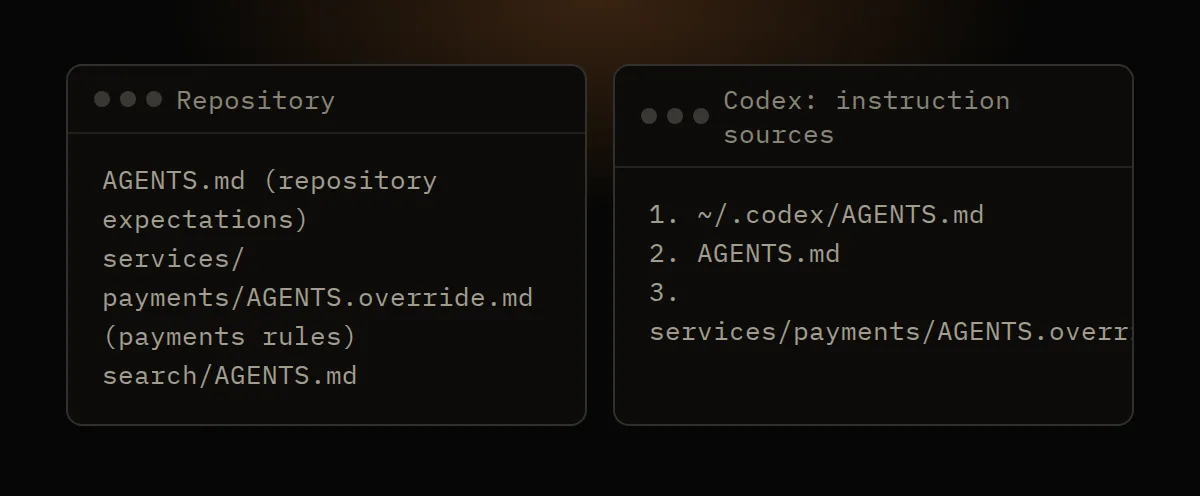
How Codex finds AGENTS.md files
Codex builds its chain of instructions once per run, which in the interactive terminal app means once per session. It looks in this order:
- Global: in your Codex home folder, ~/.codex unless you set CODEX_HOME, Codex reads AGENTS.override.md if it exists, otherwise AGENTS.md. It uses only the first one that is not empty.
- Project: from the project root, usually the Git root, Codex walks down to the folder you are working in. In each folder it checks AGENTS.override.md, then AGENTS.md, then any fallback names you set. It takes at most one file per folder.
- Merge: Codex joins the files from the root down, separated by blank lines. Later files appear later in the prompt, so rules closer to your folder override broader ones.
Empty files are skipped. Codex stops adding files once the combined size reaches project_doc_max_bytes, which is 32 KiB by default. If you hit that limit, raise it or split your instructions across nested folders.
Source: Custom instructions with AGENTS.md, OpenAI
Create a global AGENTS.md for Codex
Global guidance is for habits you want in every repository: how you like tests run, which package manager to use, what to ask before doing.
mkdir -p ~/.codex# then create ~/.codex/AGENTS.md
# ~/.codex/AGENTS.md
## Working agreements
- Always run npm test after modifying JavaScript files.
- Prefer pnpm when installing dependencies.
- Ask for confirmation before adding new production dependencies.
Then check that Codex loads it:
codex --ask-for-approval never "Summarize the current instructions."Codex should quote the items from your global file before it proposes any work. When you need a temporary change to your global rules, create ~/.codex/AGENTS.override.md instead of editing the base file, and delete the override to go back.
Source: Custom instructions with AGENTS.md, OpenAI
Add project and folder instructions
An AGENTS.md at the root of a repository tells Codex how that project works, while still inheriting your global defaults. Keep it to what Codex cannot guess from the code: the commands to run, the conventions to follow and the things never to touch.
# AGENTS.md
## Repository expectations
- Run npm run lint before opening a pull request.
- Document public utilities in docs/ when you change behavior.
When one part of a repository has different rules, add a file in that folder. An override file replaces the regular AGENTS.md in the same folder:
# services/payments/AGENTS.override.md
## Payments service rules
- Use make test-payments instead of npm test.
- Never rotate API keys without notifying the security channel.
codex --cd services/payments --ask-for-approval never "List the instruction sources you loaded."Started from the payments folder, Codex reports the global file first, the root AGENTS.md second and the payments override last. Codex stops searching at your current folder, so put overrides as close as possible to the specialised work.
| File | Where | What it is for |
|---|---|---|
| AGENTS.md | ~/.codex/ | Your personal defaults in every repository |
| AGENTS.override.md | ~/.codex/ | A temporary replacement for your global file |
| AGENTS.md | Repository root | Project setup, commands and conventions for everyone |
| AGENTS.md or AGENTS.override.md | A subfolder | Rules for one service or package, read last |
Source: Custom instructions with AGENTS.md, OpenAI
Use a different file name
If your repository already keeps instructions in another file, such as TEAM_GUIDE.md, add it to the fallback list in your Codex config so Codex treats it like AGENTS.md:
# ~/.codex/config.toml
project_doc_fallback_filenames = ["TEAM_GUIDE.md", ".agents.md"]
project_doc_max_bytes = 65536
Codex now checks each folder for AGENTS.override.md, AGENTS.md, TEAM_GUIDE.md and .agents.md, in that order. Names not on the list are ignored. Restart Codex after changing the config so it loads.
Source: Codex advanced configuration, OpenAI
Code review rules in AGENTS.md
For Codex code review on GitHub, add a section headed Code Review Rules to the AGENTS.md closest to the code those rules cover. Put checks for the whole repository at the root and service rules in nested files. Keep each rule short, say what to flag and what the safe path is, and leave formatting and lint checks to your CI.
## Code Review Rules
### Experiment cohorts
- Do not filter treatment comparisons on post-exposure behavior, including conversion or retention.
  Safe path: build cohorts from assignment or exposure; report conversion as an outcome.
Source: Custom instructions with AGENTS.md, OpenAI
Check which instructions Codex loaded
- Run codex --ask-for-approval never "Summarize the current instructions." from the repository root. Codex should repeat the guidance from your global and project files in order.
- Run Codex from a subfolder with --cd to confirm a nested override replaces the broader rules.
- For a record of what loaded, turn on a plain-text log with codex -c log_dir=./.codex-log and read ./.codex-log/codex-tui.log.
- If instructions look out of date, restart Codex in the folder. It rebuilds the chain on every run, so there is no cache to clear.
Source: Custom instructions with AGENTS.md, OpenAI
When Codex ignores your AGENTS.md
Nothing loads
Check you are in the repository you think you are in, and that codex status reports the workspace root you expect. Make sure the file has content, because empty files are skipped.
The wrong rules appear
Look for an AGENTS.override.md higher in the folder tree or in your Codex home. An override takes the place of the regular file in its folder.
Instructions are cut off
Your files add up to more than project_doc_max_bytes. Raise the limit, or move detail into nested files so the important rules stay in.
You edited the wrong file
Run echo $CODEX_HOME before starting Codex. A value other than the default means Codex is reading a different home folder from the one you edited.
Source: Custom instructions with AGENTS.md, OpenAI
AGENTS.md in Claude Code
AGENTS.md is not only for Codex. Claude Code version 2.1.277 and later can read AGENTS.md as your project instructions, so a repository set up for Codex works in Claude Code without a separate CLAUDE.md. By default, Claude reads AGENTS.md only when there is no CLAUDE.md, .claude/CLAUDE.md or CLAUDE.local.md in your working folder or above it. If you have both, Claude reads only the CLAUDE.md files.
To keep one source of truth for both tools, write your rules in AGENTS.md and import it from CLAUDE.md:
# CLAUDE.md
@AGENTS.md
You can also change which files Claude reads with the Project instructions setting in /config. Claude Code does not read AGENTS.override.md or AGENTS.local.md, so those stay Codex-only.
Source: CLAUDE.md and AGENTS.md in Claude Code, Anthropic
Writing an AGENTS.md that works
- Lead with the commands: how to install, test, lint and build. Codex runs them, so they must be exact.
- Say what not to do as clearly as what to do, such as never edit generated files or never add a production dependency without asking.
- Keep it short. Every line is read on every run and counts toward the 32 KiB limit.
- Move rules for one service into that folder, where they only load when Codex works there.
- Treat it as code: commit it, review changes to it, and update it when your setup changes.
One set of rules, many agents
A good AGENTS.md makes every Codex session start the same way, which matters most when several run at once. 10u is an AI coding agent dashboard that shows every Codex and Claude Code session side by side, each in its real terminal, marked Needs you, Working, Waiting or Parked. They do the building. You decide what gets built.

Questions people ask
- What is AGENTS.md in Codex?
- A Markdown file of instructions Codex reads before any work. Codex combines a global file in ~/.codex with files from your project root down to your current folder.
- Where do I put AGENTS.md for Codex?
- Put personal defaults in ~/.codex/AGENTS.md, project rules in AGENTS.md at the repository root, and folder-specific rules in an AGENTS.md inside that folder.
- What is AGENTS.override.md?
- A file that replaces the regular AGENTS.md in the same folder. Use it for a temporary global change or for a folder that needs different rules.
- How big can AGENTS.md be?
- Codex stops adding files once the combined size reaches project_doc_max_bytes, 32 KiB by default. You can raise it in config.toml.
- Does Claude Code read AGENTS.md?
- Yes, from version 2.1.277, when your repository has no CLAUDE.md. You can also import AGENTS.md from a CLAUDE.md with @AGENTS.md.