
Claude Code vs Codex: two coding agents, compared plainly
Claude Code is Anthropic's coding agent and Codex is OpenAI's. Both read your codebase, edit files and run commands for you, in a terminal, an editor or a desktop app. The biggest practical differences are which company's models you want, which subscription you already pay for, and where you like to work. Many developers run both.
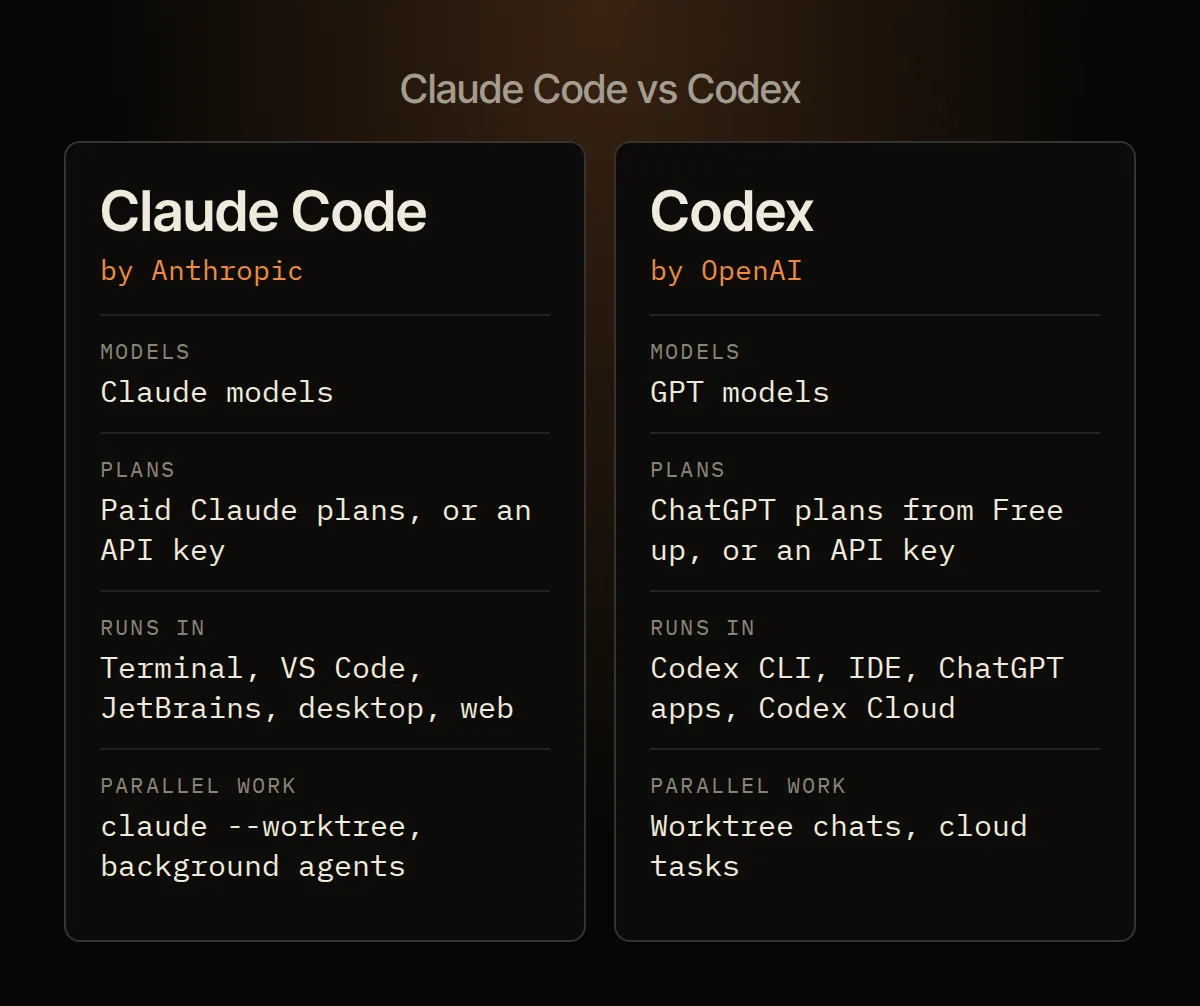
Claude Code vs Codex in short
- Claude Code runs Anthropic's Claude models. Codex runs OpenAI's GPT models.
- Claude Code comes with paid Claude plans. Codex comes with ChatGPT plans, including a limited Free tier.
- Both work in the terminal, in editors, in a desktop app and on the web, and both can hand work to the cloud.
- Both read a project instruction file: CLAUDE.md for Claude Code, AGENTS.md for Codex. Claude Code can read AGENTS.md too.
- Both run several agents in parallel through git worktrees, and both support MCP, skills, hooks and subagents.
- The Codex CLI is open source. Claude Code is not.
Claude Code and Codex side by side
| Claude Code | Codex | |
|---|---|---|
| Made by | Anthropic | OpenAI |
| Models | Anthropic's Claude models, such as Opus, Sonnet and Haiku | OpenAI's GPT models, such as GPT-6.2 Sol and GPT-6 Luna |
| Where it runs | Terminal, VS Code, JetBrains, a desktop app and the web | Terminal (the Codex CLI), an IDE extension, the ChatGPT desktop, web and mobile apps, and Codex Cloud |
| Which plans include it | Paid Claude plans (Pro, Max, Ultra, Team, Enterprise), or an API key | ChatGPT plans from Free upward, or an API key |
| Usage limits | A session limit that resets every five hours, plus weekly limits | Limits per five-hour period on some plans, and weekly limits may apply |
| Project instructions | CLAUDE.md, or an existing AGENTS.md | AGENTS.md |
| Permission controls | Permission modes, from asking every time to auto mode | An OS-enforced sandbox plus an approval policy |
| Parallel work | Git worktrees with claude --worktree, plus background agents | Worktree chats in the desktop app, plus cloud tasks |
| Code review on GitHub | GitHub Code Review and GitHub Actions | @Codex reviews in pull requests and automatic reviews |
| Open source | No | The Codex CLI is open source under Apache 2.0 |
What each one is
Claude Code
Anthropic describes Claude Code as an AI-powered coding assistant that understands your entire codebase and works across multiple files and tools to get things done. You describe what you want in plain language; it plans the approach, writes the code across files and checks it works. It also works directly with git: it stages changes, writes commit messages, creates branches and opens pull requests.
Source: Claude Code overview, Anthropic
Codex
Codex is OpenAI's coding agent. The Codex CLI lets it inspect files, make edits and run the tools already installed on your machine, against your local repository. You choose the model, reasoning effort, permissions and commands for each task, and you can run it interactively or call codex exec from scripts and CI. The same agent runs in the ChatGPT apps and in Codex Cloud.
Source: Codex CLI, OpenAI
Where they work
In the terminal
Both started in the terminal and both still treat it as home. Claude Code is the claude command; Codex is the codex command. Each starts in your project folder, reads the code and works there.
claudecodex
In your editor
Claude Code has a VS Code extension, which also installs in Cursor, with inline diffs, @-mentions, plan review and conversation history, plus a plugin for IntelliJ IDEA, PyCharm, WebStorm and other JetBrains IDEs. Codex has an IDE extension too, alongside the CLI.
In a desktop app
Claude Code is a tab in the Claude desktop app, where you can review diffs visually, run several sessions side by side, schedule recurring tasks and start cloud sessions. Codex lives in the ChatGPT desktop app, which is also where its worktree chats and Handoff live.
On the web and your phone
Claude Code runs in the browser at claude.ai/code with no local setup, and in the Claude app for iOS and Android. Remote Control lets you continue a local session from your phone. Codex runs on the web and in the ChatGPT mobile app, which can start, guide, approve and review chats on a connected computer.
In the cloud
Both can run long tasks on their maker's machines while your computer does something else. Claude Code can start a cloud session from the terminal with claude --cloud and pull web sessions back with claude --teleport. Codex Cloud runs chats in a configured environment, and codex cloud lets you submit work and apply the result to your local repo from the terminal.
Installing Claude Code and Codex
On macOS, Linux and WSL, each has a one-line installer:
curl -fsSL https://claude.ai/install.sh | bashcurl -fsSL https://chatgpt.com/codex/install.sh | sh
Claude Code also installs with Homebrew (brew install --cask claude-code) and WinGet, and its native install updates itself in the background. Codex also installs with npm (npm install -g @openai/codex) and Homebrew (brew install --cask codex). On first run, Claude Code asks you to log in to your Claude account, and Codex asks you to sign in with ChatGPT or another method.
Models
Claude Code uses Anthropic's Claude models. Anthropic's own advice is that Sonnet handles most coding tasks well and costs less than Opus, with Opus kept for complex architectural decisions or multi-step reasoning, and Haiku for simple subagent tasks. You switch with /model, and set how hard the model thinks with /effort.
Codex uses OpenAI's GPT models. On Plus and Business the current line-up includes GPT-6.2 Astra, GPT-6.2 Sol, GPT-6.1 Sol, GPT-6.1 Terra, GPT-6 Sol and GPT-6 Luna. Free and Go plans get GPT-6 Luna at Standard speed in the desktop app. Codex also offers Fast and Ultrafast speeds, which use your allowance faster.
Both companies publish benchmark results, such as SWE-bench, for new models. We do not repeat the scores here, because they change with every model release and the better test is your own codebase. Try the same task in both and compare the result.
Plans and pricing
Claude Code
Claude Code comes with paid Claude plans: Pro, Max, Ultra, Team and Enterprise. Bigger plans have bigger usage allowances, and current prices are on claude.com/pricing. You can also use Claude Code with an Anthropic Console account and an API key, paying per token, and the terminal, VS Code and JetBrains versions also work through third-party providers.
Codex
Codex comes with ChatGPT plans:
| Plan | Price | Codex |
|---|---|---|
| Free | $0 a month | GPT-6 Luna in the desktop app, subject to rollout |
| Go | $8 a month | GPT-6 Luna in the desktop app, subject to rollout |
| Plus | $20 a month | Web, CLI, IDE extension and iOS, with code review and Slack |
| Pro | $100, $200 or $500 a month | Everything in Plus, with no five-hour limit for now |
| Business | $20 a user a month billed yearly, $25 monthly | Larger cloud machines and admin controls |
| API key | API pricing | CLI, SDK and IDE extension, without cloud features |
Source: Codex pricing and usage limits, OpenAI
Usage limits compared
Both share one allowance across their maker's products. Claude Code shares its allowance with claude.ai and Claude Desktop. Codex shares its allowance with ChatGPT Work.
| Claude Code | Codex | |
|---|---|---|
| Five-hour limit | Yes, starting from your first message. Verified Ultra accounts have none | Yes on Plus and Business. Pro plans currently have none |
| Weekly limits | Yes, at a fixed time assigned to your account | May apply |
| Check it | /usage, or Settings, Usage on claude.ai | /status, or the usage dashboard |
| When you run out | Wait, upgrade, or turn on usage credits | Finish the turn, then wait, buy credits or use an API key |
Neither publishes a fixed message count. In both, the model, the size of your context and the effort or reasoning you ask for decide how fast you use it. Our guides to Claude Code usage and Codex usage cover each one step by step.
Source: How usage and length limits work, Claude Help Center
Project instructions: CLAUDE.md vs AGENTS.md
Both read a markdown file of standing instructions at the start of a session: your coding standards, preferred libraries, how to run the tests.
- Claude Code reads CLAUDE.md from your project root at the start of every session. If your repo already has an AGENTS.md for other agents, Claude Code can read that instead. It also builds auto memory as it works.
- Codex reads AGENTS.md files before doing any work: a global one in ~/.codex, then one per folder from the project root down to where you are, with closer files taking priority. It stops adding files once they reach 32 KiB by default.
If you use both agents on one repo, a single AGENTS.md can serve both.
Source: Custom instructions with AGENTS.md, OpenAI
Permissions and safety
Claude Code permission modes
Claude Code decides what runs without asking through a permission mode:
| Mode | What runs without asking | Best for |
|---|---|---|
| default | File reads and actions that need no approval | Sensitive work, unfamiliar code |
| acceptEdits | Reads, file edits and common filesystem commands | Iterating on code you are reviewing |
| plan | Reads; edits wait until you approve a plan | Exploring a codebase before changing it |
| auto | Everything, with background safety checks | Long tasks, fewer prompts |
| dontAsk | Reads and pre-approved tools only; everything else is denied | Locked-down CI and scripts |
| bypassPermissions | Everything | Isolated containers and VMs only |
Source: Choose a permission mode, Anthropic
Codex sandbox and approvals
Codex combines an OS-enforced sandbox, which limits what it can touch, usually to the current workspace, with an approval policy that decides when it must stop and ask. By default network access is off. In the Auto preset (--sandbox workspace-write --ask-for-approval on-request) Codex reads files, makes edits and runs commands in the working folder on its own, and asks before editing outside it or using the network. Switch to read-only with /permissions to chat or plan without changes.
Source: Agent approvals and security, OpenAI
Going further in each
Claude Code has a built-in Bash sandbox on macOS, Linux and WSL2. Run /sandbox and pick auto-allow, and sandboxed commands run with fewer prompts while your deny rules still apply. Skipping all checks with --dangerously-skip-permissions is meant only for a container or VM, run as a non-root user.
Codex can drop approval prompts with --ask-for-approval never, and --sandbox danger-full-access lets it edit, run commands and use the network without asking. OpenAI marks both as settings to use with caution. Network access, when you turn it on, can be limited to the domains you allow.
Extending them
Both connect to outside tools through MCP, the Model Context Protocol, so either can read design docs, update tickets or use your own tooling. Both package repeatable workflows as skills, and both have hooks. Claude Code hooks run shell commands before or after its actions, such as formatting after every edit. Both can split work across subagents, and both offer an SDK for building your own agents: the Claude Agent SDK and the Codex SDK.
Running several agents at once
Both support parallel work through git worktrees, separate checkouts of the same repo so two agents never edit the same files. In Claude Code you start one with claude --worktree and a name, and background agents let you run several full sessions and watch them from one screen. In the ChatGPT desktop app you pick Worktree under the message box before you send a Codex task, and scheduled tasks can run on their own background worktrees. Our guide to Claude Code worktrees covers the setup step by step.
Automation and CI
Claude Code follows the Unix habit of doing one job and fitting into pipes. claude -p runs a prompt without the interactive screen, so you can pipe logs into it or run it in CI:
git diff main --name-only | claude -p "review these changed files for security issues"It also runs in GitHub Actions and GitLab CI/CD for code review and issue triage, and on a schedule with cloud or desktop scheduled tasks. Codex does the same job with codex exec, a non-interactive mode for scripts and pipelines, plus a GitHub Action. With an API key, Codex suits shared places such as CI.
Code review
Claude Code can review every pull request automatically through GitHub Code Review, or in your own pipeline through GitHub Actions. Codex reviews pull requests when you tag @Codex or turn on automatic reviews, and the CLI can run a local review against uncommitted changes, a commit or a base branch without touching your working tree.
Where your code runs
On your own computer, both agents work on the repo where it already is, and run commands with the tools you have installed. Nothing has to be uploaded first. Cloud work is different: Claude Code on the web can work on repos you do not have locally, and Codex Cloud runs chats in an environment you configure on OpenAI's machines. Use local sessions for work that needs your own setup, and cloud sessions for long tasks you want to leave running.
Other integrations
Claude Code can debug live web apps through Chrome, and its Channels feature pushes events from Telegram, Discord, iMessage or your own webhooks into a running session. Its cloud scheduled tasks can start on GitHub events. Codex lists integrations with GitHub, GitLab (in beta), Slack and Linear, so you can hand it work from the tools your team already uses.
Team chat
Both work from Slack. Mention @Claude in Slack with a bug report and Claude Code can send back a pull request. Codex on Plus and above includes a Slack integration among its cloud features.
Long sessions and memory
Both have to fit your conversation into the model's context window. Claude Code compacts automatically, summarizing earlier history as it nears the limit, and you can run /compact yourself with a note on what to keep. On paid Claude plans the newest models support up to a 1M token context window, and others 500K or 200K. Claude Code also keeps auto memory, saving what it learns across sessions without you writing anything.
Codex starts each run by reading your AGENTS.md chain, so standing knowledge lives in those files. GPT-6.1 Sol usage drawn from a ChatGPT subscription has no long-context surcharge in Codex. In both, a long session costs more of your allowance than a fresh one, so starting a new chat when you change topic helps either tool.
Speed
Codex lets you trade allowance for speed. Fast mode uses included usage 2 to 2.5 times faster than Standard, and Ultrafast 6 to 8 times faster, depending on the model. Ultrafast comes with Pro $500. In Claude Code, speed mostly follows the model and effort you pick: a lighter model or a lower /effort setting answers sooner and uses less.
Picking up where you left off
Both keep your sessions so you can return to them. Claude Code reopens a session with claude --resume or the most recent one with --continue, and /rename gives a session a name you can find later. Codex reopens a recent chat from the current repo with codex resume, or searches across local chats for older work.
Claude Code also moves sessions between places: /desktop continues a terminal session in the desktop app, claude --teleport pulls a web or phone session into your terminal, and Dispatch lets you message a task from your phone and open the desktop session it creates. In Codex, Handoff moves a chat between your local checkout and a worktree, and the ChatGPT mobile app controls chats on your connected computer.
Screenshots and web search
Both take images. In Codex, codex --image passes an error screenshot, diagram or design with the first prompt, or you paste one into the composer. In Claude Code you can paste screenshots into the prompt to show what you expect.
Codex uses a web search cache by default: an OpenAI-maintained index of results, so it reads pre-indexed pages rather than fetching live ones, which reduces exposure to prompt injection from arbitrary pages. Pass --search for live browsing, or turn web search off in your config.
Scheduled and recurring work
Claude Code runs work on a schedule three ways: cloud scheduled tasks that keep running when your computer is off and can trigger on API calls or GitHub events, desktop scheduled tasks that run on your machine with your local files, and /loop to repeat a prompt inside a session. Codex scheduled tasks run on dedicated background worktrees in git repos, so they do not clash with what you are doing.
What they cost on an API key
On a subscription you pay a flat monthly price and work within limits. On an API key you pay for every token, so the bill depends on how you work.
- Claude Code: across enterprise deployments Anthropic puts the average at about $13 per developer per active day and $150 to $250 per developer per month, with 90% of users below $30 per active day. /usage shows an estimated cost for the current session.
- Codex: API-key sessions follow OpenAI API pricing. For usage-based billing in US dollars, GPT-6.2 Sol at Standard speed costs $2 per million input tokens, $0.10 per million cached input tokens and $10 per million output tokens, and GPT-6.2 Astra costs $8, $0.40 and $40.
Model choice is one of the biggest factors in both: a lighter model for routine work and a heavier one for hard problems keeps either one cheaper.
Source: Track your Claude Code usage, Anthropic
For teams and companies
Claude Code comes with Claude Team and Enterprise plans. Administrators can set managed settings for the whole organization, including a pricing table so cost estimates use contracted rates, and can set spend limits on usage credits for members. Usage-based Enterprise plans are billed on consumption.
Codex comes with ChatGPT Business, Enterprise and Edu. Business adds a dedicated workspace with SAML SSO and MFA, larger cloud machines, and no training on your business data by default. Enterprise and Edu add SCIM, EKM, role-based access control, audit logs and usage monitoring through the Compliance API, and data retention and residency controls.
Windows, macOS and Linux
Both run on all three. Claude Code has installers for macOS, Linux and WSL, plus Windows PowerShell and CMD. On native Windows, Anthropic recommends Git for Windows so Claude Code can use its Bash tool; without it, Claude Code uses PowerShell instead. The Claude desktop app runs on macOS and Windows, with a Linux beta on Ubuntu and Debian. Codex has installers for macOS and Linux and a PowerShell installer for Windows, with its own Windows sandbox and WSL support.
Using both in one day
Plenty of developers keep both open. A few ways to split the work:
- Plan with one and build with the other, then ask the first to review the result.
- Give each agent its own worktree and its own task, so a feature and a bug fix move at the same time.
- When one hits its five-hour limit, carry on in the other on a fresh branch.
- Use the one your team already pays for in CI, and the other for local work.
- Keep one AGENTS.md so both follow the same rules in the same repo.
The catch is attention. Two agents in two terminals means two places to check for a question, a finished task or a failed test.
Getting started with each
Claude Code
- Install it with the one-line installer, Homebrew or WinGet.
- Open your project folder and run claude.
- Log in with your Claude account, or approve an API key.
- Ask it to explain the project, then give it a small, clear task.
Codex
- Install it with the one-line installer, npm or Homebrew.
- Open your project folder and run codex.
- Choose Sign in with ChatGPT, or another sign-in method.
- Try "Tell me about this project", then a focused change. OpenAI suggests making git checkpoints before and after each task so you can revert.
Which one should you pick?
Pick Claude Code if
- You already pay for Claude, or prefer Claude's models.
- You want deep control in the terminal through hooks, permission modes and settings.
- You want the same CLAUDE.md, settings and MCP servers to work across the terminal, editor, desktop app and web.
Pick Codex if
- You already pay for ChatGPT, or want to start on the Free plan.
- You want an open source CLI you can read and change.
- You want to start and approve tasks from the ChatGPT mobile app.
Pick both if
- One runs out of room while you are mid-task and you want to keep going.
- You like a second opinion from a different model on the same change.
- Different parts of your work suit different models.
If you are new to coding agents
Start with the one your current subscription already includes, so the first week costs nothing extra. Begin on a small repo, or a branch you do not mind throwing away. Start in a mode where the agent cannot change anything until you agree: plan mode in Claude Code, or read-only in Codex through /permissions. Ask it to explain the project first, then hand it one small, clear task and read every change it makes. Once you trust how it works, give it more room.
Switching between Claude Code and Codex
Moving between them is easier than it looks. Both work on ordinary git repos, so your branches and history are the same whichever one you open. Keep your standing instructions in AGENTS.md and both will read them. Both copy ignored files such as .env into new worktrees from the same .worktreeinclude file. What does not carry over is each tool's own settings, hooks and memory.
Running Claude Code and Codex together
Running both is common, and that is where a dashboard helps. 10u is an AI coding agent dashboard: every Claude Code and Codex agent you run, side by side on your own machine, sorted by what each one needs from you, with the one waiting on your answer on top. Each agent keeps its own live terminal, on your own subscriptions. They do the building. You decide what gets built.

Questions people ask
- Is Claude Code better than Codex?
- Neither wins everywhere. They use different models, plans and tools, so the better one is the one that fits your work and the subscription you already have. Many developers use both.
- Is Codex free?
- ChatGPT Free and Go plans include GPT-6 Luna in the desktop app, subject to rollout. Codex in the CLI, IDE extension and web starts with Plus at $20 a month, or with an API key.
- Is Claude Code free?
- No. Claude Code needs a paid Claude plan, such as Pro, or an Anthropic Console account billed by usage.
- Can I use Claude Code and Codex on the same repo?
- Yes. Give each agent its own git worktree so their edits never collide, then merge the branches you want.
- Can Claude Code read AGENTS.md?
- Yes. If your repo has an AGENTS.md for other agents, Claude Code can read it in place of a CLAUDE.md.
- Which is cheaper, Claude Code or Codex?
- It depends on the plan you already have and how much you use it. Codex has Free and $8 Go tiers with limited access and Plus at $20 a month. Claude Code starts with the Pro plan; see claude.com/pricing for current prices.
- Do Claude Code and Codex work on Windows?
- Yes. Both have Windows installers. Claude Code works best on Windows with Git for Windows installed, and Codex has its own Windows sandbox and WSL support.
- Which is easier for beginners?
- Both start with one command in your project folder. Pick the one your current subscription includes, and start in plan mode in Claude Code or read-only in Codex so nothing changes until you approve it.
- Do I need to pay for both?
- No. Claude Code needs a paid Claude plan or an API key, and Codex comes with ChatGPT plans or an API key. Use whichever you already have.