
Claude Code agent teams: how to set one up and keep it on track
Claude Code agent teams let one Claude Code session lead several others. The lead splits the work into tasks, teammates claim them from a shared task list, and teammates can message each other directly. Agent teams are experimental and turned off by default, so you switch them on with one setting before you start.
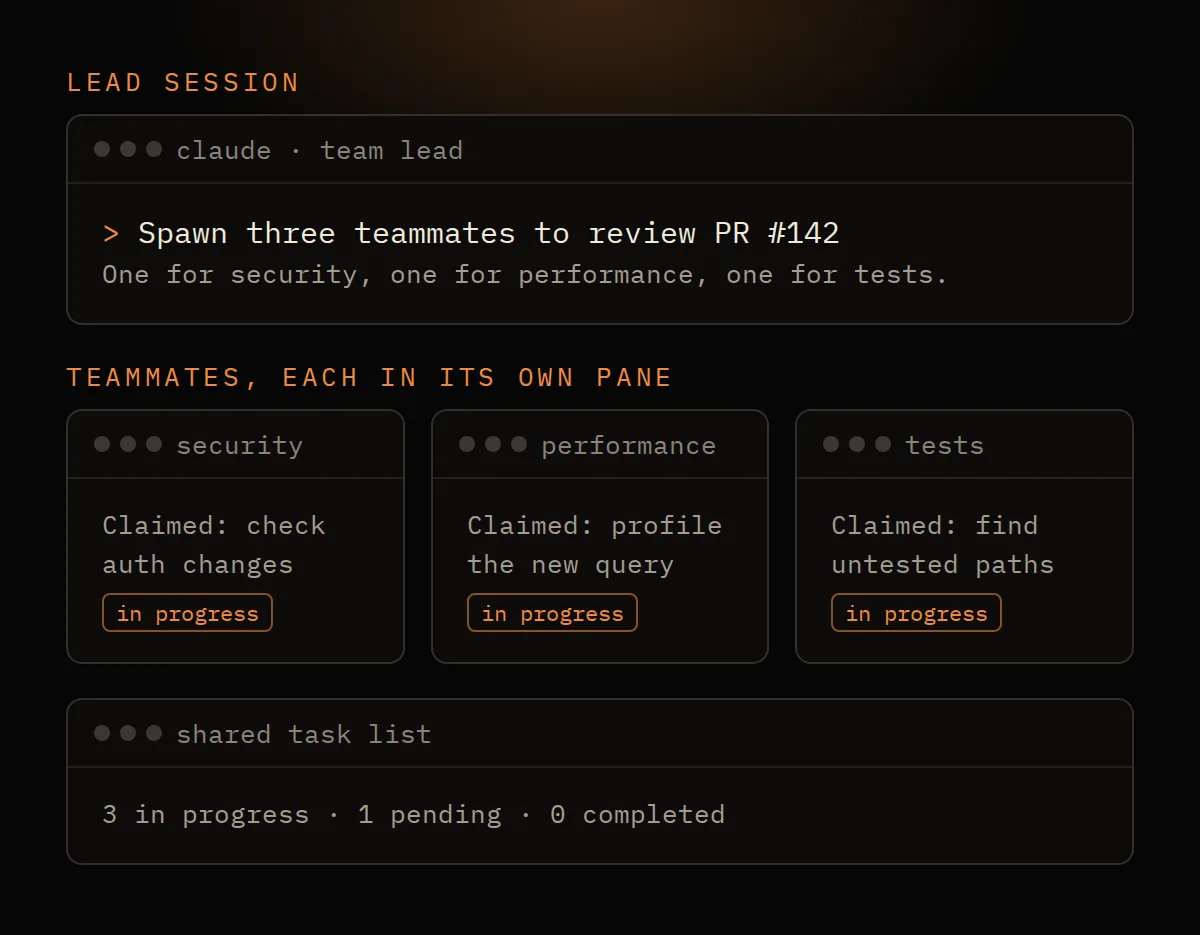
What an agent team is
An agent team has four parts. The team lead is the session you started, which spawns teammates and coordinates the work. Teammates are separate Claude Code sessions, each with its own context window. The task list holds the work items teammates claim and complete. The mailbox carries messages between agents.
| Part | What it does |
|---|---|
| Team lead | The main Claude Code session. It spawns teammates, creates tasks and pulls the results together |
| Teammates | Separate Claude Code sessions that each work on the tasks they are given or claim |
| Task list | A shared list of work items with three states: pending, in progress and completed |
| Mailbox | How agents send each other messages, delivered without the lead having to check |
Each teammate is a full Claude Code session. You can talk to any of them directly, give one more instructions, or redirect its approach, without going through the lead.
Source: Orchestrate teams of Claude Code sessions, Anthropic
Agent teams or subagents?
Both let Claude work on more than one thing at a time, but they suit different jobs. A subagent works inside your session and hands its result back to the main agent. Teammates in an agent team are fully independent, share a task list, and talk to each other.
| Subagents | Agent teams | |
|---|---|---|
| Context | Own context window; results go back to the caller | Own context window; fully independent |
| Talking | Report a result to the main agent | Teammates message each other directly |
| Coordination | The main agent manages all the work | Self-coordination plus a shared task list |
| Best for | Focused tasks where only the result matters | Complex work that needs discussion |
| Token cost | Lower, because results are summarised back | Higher, because each teammate is a separate Claude |
Anthropic suggests checking whether a lighter option does the job before you set up a team. Use subagents when you need quick, focused workers that report back. Use an agent team when teammates need to share findings, challenge each other and coordinate on their own.
When an agent team is worth it
Agent teams work best when the parts of the job can run side by side without waiting on each other. Anthropic names four strong uses:
- Research and review. Several teammates look at different sides of a problem, then share and challenge what they found.
- New modules or features. Each teammate owns a separate piece, so nobody steps on anyone else.
- Debugging with competing ideas. Teammates test different theories at the same time and close in on the answer faster.
- Changes across layers. Frontend, backend and tests each get their own teammate.
For work that has to happen in order, edits to the same file, or jobs with many dependencies, one session or a few subagents is usually the better choice. A team adds coordination overhead and uses a lot more tokens.
How to turn on agent teams
Set the CLAUDE_CODE_EXPERIMENTAL_AGENT_TEAMS environment variable to 1, either in your shell or in settings.json:
{
  "env": {
    "CLAUDE_CODE_EXPERIMENTAL_AGENT_TEAMS": "1"
  }
}
Teammates only start in an interactive session. If you run Claude Code with the -p flag, including through the Agent SDK, Claude does not spawn teammates and a named subagent runs as an ordinary subagent.
Turning teams on also changes ordinary delegation. While agent teams are enabled, a subagent that Claude names launches as a teammate, so a team can form even when you did not ask for one. If you would rather have plain subagents for a piece of work, turn the setting off again; Claude Code picks up the change the next time it spawns a subagent.
Start your first agent team
Once teams are on, describe the task and the teammates you want in plain words. A good first team has roles that can work without waiting on each other. Anthropic gives this example:
I'm designing a CLI tool that helps developers track TODO comments across
their codebase. Spawn three teammates to explore this from different angles:
one on UX, one on technical architecture, one playing devil's advocate.
Claude fills in the shared task list, spawns a teammate for each angle, lets them explore, and pulls their findings together. Sometimes Claude uses subagents instead of a team. Subagents show in the same agent panel, so the panel alone does not prove a team formed. If that happens, ask again and say you want teammates.
Choose how many teammates and which model
Claude decides how many teammates to spawn from your task, or you can say exactly what you want, such as "Spawn 4 teammates to refactor these modules in parallel. Use Sonnet for each teammate." Claude Code takes each teammate's model from the first of these that applies: the model your prompt names for that teammate, the model in the subagent definition it was spawned from, the CLAUDE_CODE_SUBAGENT_MODEL setting, and finally the lead's own model.
Reuse a subagent definition
If you already have subagents defined, a teammate can use one: "Spawn a teammate using the security-reviewer agent type to audit the auth module." Claude Code applies that definition's tool list and model to the teammate, so you can keep reusable roles in one place instead of writing them out each time.
Source: Orchestrate teams of Claude Code sessions, Anthropic
Split panes or in-process mode
Agent teams have two ways to show teammates:
- In-process. Every teammate runs inside your main terminal. Use the up and down arrows in the agent panel to pick a teammate, press Enter to view it and type to message it. It works in any terminal with no extra setup.
- Split panes. Each teammate gets its own pane, so you can see everyone at once and click into a pane to talk to it. This needs tmux, or iTerm2 with the it2 command.
Teammates run in-process until you change the teammateMode setting. Set it to auto in ~/.claude/settings.json and teammates open in split panes when you run Claude Code inside tmux or iTerm2, and in-process anywhere else:
{
  "teammateMode": "auto"
}
To set it for one session only, start Claude Code with this flag:
claude --teammate-mode autoIf you run Claude Code outside tmux but have tmux installed, set teammateMode to tmux. The panes open in a separate tmux session, and the View teammates line at the prompt gives the command to watch them from a second terminal. Anthropic notes tmux traditionally works best on macOS, and suggests tmux -CC inside iTerm2 as the way in.
Keys for in-process teammates
- Up and down arrows select a teammate in the agent panel.
- Enter opens the selected teammate so you can read its work and message it.
- Escape clears the selection. While you are viewing a teammate, Escape interrupts its current turn.
- x stops the selected teammate.
- Ctrl+T shows or hides the task list.
While you are viewing a teammate, plain text and skills go to that teammate, but built-in commands go to the lead. Claude Code asks before running /compact, /clear or /rewind from that view, because they act on the lead's conversation.
How the shared task list works
The lead creates tasks and teammates work through them. A task can depend on other tasks and shows as blocked until they are done; when a teammate finishes a task others depend on, Claude Code unblocks them by itself. Work reaches teammates in two ways:
- The lead assigns it. Tell the lead which task goes to which teammate.
- A teammate claims it. After finishing a task, a teammate picks up the next unassigned, unblocked task on its own.
Claiming uses file locking, so two teammates cannot grab the same task at the same moment. When a teammate finishes and stops, it tells the lead and includes its final answer, so the lead does not have to keep checking.
Have teammates plan first
For risky work you can ask for a teammate that plans before it edits, such as "Spawn an architect teammate to refactor the authentication module." A teammate spawned while the lead is in plan mode also starts in plan mode and sends a plan approval request when it is ready.
Add quality checks with hooks
Hooks can enforce your own rules at three points. TeammateIdle runs when a teammate is about to go idle, TaskCreated when a task is being created, and TaskCompleted when a task is being marked complete. Exiting a hook with code 2 sends feedback and blocks the step, for example to keep a teammate working until the tests pass.
Shut a teammate down
Refer to the teammate by name, such as "Ask the researcher teammate to shut down." The lead sends a shutdown request, and the teammate either exits cleanly or explains why it is not done. A teammate finishes its current request or tool call first, so this can take a moment. The team's shared folders are cleaned up when the session ends.
Source: Orchestrate teams of Claude Code sessions, Anthropic
Two example teams
A parallel code review
One reviewer tends to fix on one kind of problem at a time. Splitting the review into separate lenses means security, speed and test coverage all get a proper look at once. Each teammate reads the same pull request through a different filter, and the lead pulls the findings together when all three finish:
Spawn three teammates to review PR #142:
- One focused on security implications
- One checking performance impact
- One validating test coverage
Have them each review and report findings.
Competing ideas about a bug
When the cause of a bug is unclear, one agent tends to find one plausible explanation and stop looking. Anthropic's example makes the teammates argue: each one tests its own theory and also tries to knock down the others, and the findings document ends up with whatever survives.
Users report the app exits after one message instead of staying connected.
Spawn 5 agent teammates to investigate different hypotheses. Have them talk to
each other to try to disprove each other's theories, like a scientific
debate. Update the findings doc with whatever consensus emerges.
The debate is what makes this work. When one theory is explored first, everything after it tends to lean towards it. Running the theories side by side, with teammates allowed to challenge each other, avoids that.
Source: Orchestrate teams of Claude Code sessions, Anthropic
How many teammates to start with
There is no hard limit, but Anthropic suggests 3 to 5 teammates for most work. Token cost grows with every teammate, coordination gets harder, and after a point more teammates stop making the job faster. If you have 15 independent tasks, 3 teammates is a good start, and about 5 or 6 tasks per teammate keeps everyone busy. Three focused teammates often do better than five scattered ones.
Size the tasks well
- Too small, and the coordination costs more than the work.
- Too large, and a teammate works too long without checking in, so a wrong turn wastes more.
- Just right is a self-contained piece with a clear result, such as a function, a test file or a review.
Avoid two teammates on one file
Two teammates editing the same file overwrite each other. Split the work so each teammate owns a different set of files.
Give each teammate enough context
Teammates do not see the lead's conversation history, so the spawn prompt should carry what they need: which folder to look in, what to focus on and what the code already does. A line such as "Review the authentication module at src/auth/ for security problems, focusing on token handling and input validation" gives a teammate far more to work with than "check the auth code".
Agent team token use
Agent teams use far more tokens than one session. Each teammate has its own context window, so token use rises with every active teammate. Anthropic's cost guide says agent teams use about 7 times more tokens than a standard session when teammates run in plan mode. For research, review and new feature work Anthropic says the extra tokens are usually worth it; for routine tasks, one session costs less.
- Use Sonnet for teammates when the work does not need the biggest model.
- Keep teams small. Token use is roughly in line with team size.
- Shut teammates down when their work is done, because each active teammate keeps using tokens until it exits or the session ends.
- Keep spawn prompts focused. Teammates load CLAUDE.md, MCP servers and skills by themselves, and everything in the spawn prompt adds to their context from the start.
Source: Track your Claude Code usage, Anthropic
Known limits
Agent teams are experimental, and Anthropic lists these limits today:
- /resume and /rewind do not bring back in-process teammates. After resuming, the lead may try to message teammates that no longer exist; tell it to spawn new ones.
- Task status can lag. A teammate sometimes forgets to mark a task done, which blocks the tasks after it.
- One team per session, and no nested teams. Teammates cannot spawn their own teammates.
- The lead is fixed for the life of the session. You cannot hand leadership to a teammate.
- Split panes need tmux or iTerm2. The in-process mode works in any terminal.
When the team gets bigger than one screen
An agent team lives inside one Claude Code session. Many people also run several separate sessions at once, some with teams and some without, plus Codex. That is where it gets hard to see which one has stopped to ask you something. 10u is an AI coding agent dashboard that shows every Claude Code and Codex session side by side, marked Needs you, Working, Waiting or Parked, so the one waiting on you is always on top. They do the building. You decide what gets built.

Questions people ask
- How do I turn on Claude Code agent teams?
- Set CLAUDE_CODE_EXPERIMENTAL_AGENT_TEAMS to 1 in your shell or in the env block of settings.json, then ask Claude to spawn teammates in an interactive session.
- What is the difference between agent teams and subagents?
- Subagents work inside your session and report a result back. Teammates are separate Claude Code sessions that share a task list and message each other.
- How many teammates should I use?
- Anthropic suggests starting with 3 to 5 teammates, with about 5 or 6 tasks each.
- Do agent teams need tmux?
- No. The default in-process mode works in any terminal. Split panes, where each teammate gets its own pane, need tmux or iTerm2.
- Do agent teams cost more?
- Yes. Each teammate is a separate Claude with its own context window. Anthropic says teams use about 7 times more tokens than a standard session when teammates run in plan mode.
- Can a teammate spawn its own team?
- No. Only the lead manages the team, and there is one team per session.