
Claude Code loop guide: /loop, the Ralph loop, /goal and routines
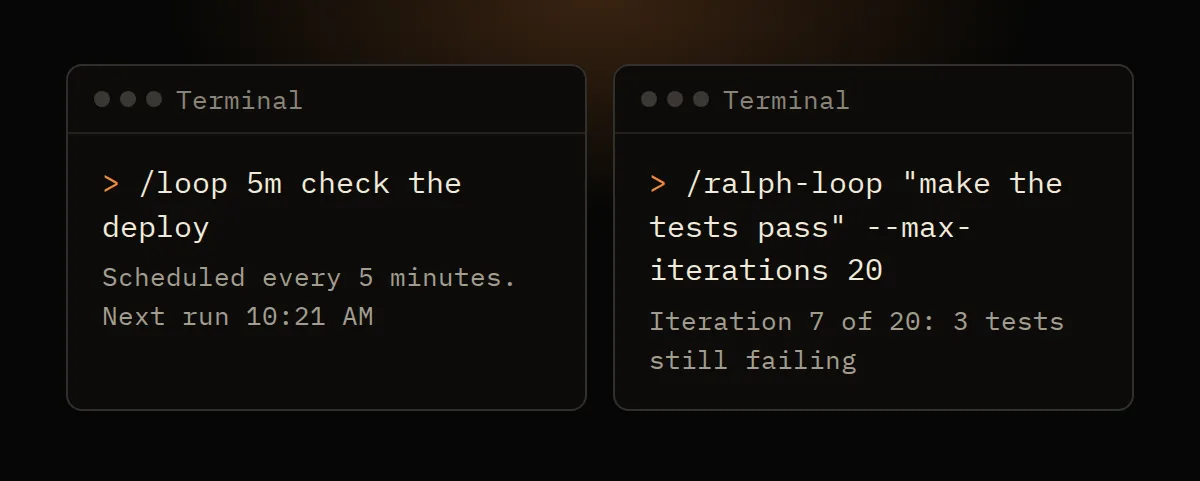
There are four ways to put Claude Code in a loop, and they answer different questions. /loop re-runs a prompt on a timer while your session is open, such as /loop 5m check the deploy. The Ralph loop, from Anthropic's ralph-loop plugin, feeds Claude the same prompt again every time it tries to stop, until it prints a completion phrase. /goal keeps Claude taking turns until a condition you set is met. And cloud scheduled tasks, which Anthropic used to call routines, run on Anthropic's machines on a schedule, from an API call or on GitHub events, with your computer off.
Which Claude Code loop should you use?
| Loop | The next run starts when | It stops when | Best for |
|---|---|---|---|
| /loop | A time interval passes | You cancel it, it expires after 7 days, or Claude ends a self-paced loop | Polling a deploy, babysitting a pull request |
| Ralph loop | Claude tries to stop | Claude prints your completion phrase, or the iteration limit is hit | Grinding a well-defined task until tests pass |
| /goal | The previous turn finishes | A model confirms your condition is met, or judges it impossible | Migrations and backlogs with a checkable end state |
| Cloud scheduled tasks (routines) | A schedule, an API call or a GitHub event | You turn the task off | Nightly or weekly jobs that must run without your machine |
Source: Keep Claude working toward a goal, Claude Code docs
Run a prompt on repeat with /loop
/loop is a bundled skill that re-runs a prompt while the session stays open. Both the interval and the prompt are optional, and what you give it decides how it behaves:
| You type | What happens |
|---|---|
| /loop 5m check the deploy | Your prompt runs on a fixed schedule |
| /loop check the deploy | Your prompt runs at an interval Claude picks each time |
| /loop | The built-in maintenance prompt runs, or your loop.md if you have one |
Intervals can lead the prompt (30m) or trail it (every 2 hours), in s, m, h or d. Claude turns the interval into a cron schedule, so seconds round up to a minute, and odd intervals like 7m or 90m round to the nearest clean step, which Claude tells you. You can loop a skill too, such as /loop 20m /review-pr 1234.
/loop 5m check if the deployment finished and tell me what happened/loop check whether CI passed and address any review comments/loop 15m
Source: Run prompts on a schedule, Claude Code docs
Let Claude choose the interval
Leave the interval out and Claude picks a delay between one minute and one hour after each run, based on what it saw: short waits while a build is finishing or a pull request is busy, longer waits when nothing is pending. Claude can also end a self-paced loop on its own once the task is done.
The built-in maintenance loop and loop.md
A bare /loop works through three things each time: continue any unfinished work from the conversation, tend to the current branch's pull request (review comments, failed CI runs, merge conflicts), and run cleanup passes such as bug hunts or simplification when nothing else is pending. Every run still goes through your permission checks before it pushes or deletes anything.
To replace that default with your own, write a loop.md file in .claude/loop.md for one project or ~/.claude/loop.md for all of them. Write it as if you were typing the prompt. Edits take effect on the next run, and anything past 25,000 bytes is cut off.
Check the `release/next` PR. If CI is red, pull the failing job log,
diagnose, and push a minimal fix. If new review comments have arrived,
address each one and resolve the thread. If everything is green and
quiet, say so in one line.
Source: Run prompts on a schedule, Claude Code docs
Stop a loop
For a self-paced loop, press Esc on an empty prompt while it waits, or Ctrl+C while Claude is idle. For a fixed-interval loop such as /loop 5m, ask Claude to cancel it, for example "cancel the deploy check loop"; Esc and Ctrl+C do not stop those. Ask "what scheduled tasks do I have?" to list them. Under the hood Claude uses the CronCreate, CronList and CronDelete tools, and a session can hold up to 50 tasks.
How /loop timing works
- Tasks fire between your turns, never mid-response, in your local time zone.
- Runs are spread out to avoid everyone calling at once: hourly or daily tasks start up to 30 minutes late, and /loop 5m runs every 4 minutes 45 seconds.
- Recurring tasks expire 7 days after you create them, firing one last time first.
- Nothing fires once you close the terminal, and missed runs are not caught up; a busy session fires once when it is free.
- Set CLAUDE_CODE_DISABLE_CRON=1 to turn the scheduler off entirely.
For a one-off, just say it: "remind me at 3pm to push the release branch" or "in 45 minutes, check whether the integration tests passed". Claude schedules a single run that deletes itself.
Source: Run prompts on a schedule, Claude Code docs
The Ralph Wiggum loop in Claude Code
The Ralph loop is a technique named after the Simpsons character, for persistent iteration despite setbacks. As Geoffrey Huntley, who coined it, puts it: "Ralph is a Bash loop", a simple while-true that keeps feeding an AI agent the same prompt so it improves its own work. Anthropic's official ralph-loop plugin does this inside your session with a Stop hook: when Claude tries to finish, the hook blocks the exit and feeds the same prompt back. The prompt never changes, but Claude's earlier work stays in the files and git history, so each pass sees what the last one did.
/plugin install ralph-loop@claude-plugins-officialThen start a loop with a clear finish line:
/ralph-loop "Build a REST API for todos. Requirements: CRUD operations, input validation, tests. Output <promise>COMPLETE</promise> when done." --completion-promise "COMPLETE" --max-iterations 50--completion-promise is the exact phrase that ends the loop, and --max-iterations stops it after that many passes (it is unlimited by default). Run /cancel-ralph to stop an active loop.
Source: Ralph Loop plugin, Anthropic official plugins
Writing a good Ralph loop prompt
- Clear completion criteria: list what done means, such as all endpoints working, tests passing and a README, then the promise line.
- Incremental goals: break big work into phases, each with tests, instead of "build a complete e-commerce platform".
- Self-correction: tell Claude to write failing tests, implement, run them, and fix until green.
- An escape hatch: always set --max-iterations, and say what to do if stuck, such as documenting what is blocking progress after 15 passes.
Because the completion phrase is an exact text match, you cannot use it for two outcomes such as SUCCESS and BLOCKED, so the iteration limit is your main safety net. The plugin's README says Ralph suits well-defined tasks with automatic checks like tests and linters, and greenfield work you can walk away from. It does not suit tasks needing human judgement or design decisions, one-shot jobs, unclear success criteria, or production debugging.
On Windows, the plugin's Stop hook needs Git for Windows. If bash resolves to WSL and the hook fails, point the plugin's hooks.json at C:/Program Files/Git/bin/bash.exe, as the README describes.
Source: Ralph Loop plugin, Anthropic official plugins
Loop until it is done with /goal
/goal is Claude Code's built-in way to keep working toward a condition. After each turn, a separate model checks whether the condition holds; if not, Claude starts another turn instead of handing back to you. It stops when the condition is met, when the model judges it impossible, or when you clear it.
/goal all tests in test/auth pass and the lint step is cleanSetting a goal starts work straight away, and a goal active indicator shows how long it has run. Run /goal on its own to see the condition, turns so far, token spend and the evaluator's latest reason, and /goal clear to stop. A goal does not change your permission mode, so run it in auto mode if you want it unattended. One goal can be active per session, and it is restored when you resume.
Write the condition as something Claude's own output can prove, since the evaluator reads the conversation rather than running commands: one measurable end state, a stated check such as "npm test exits 0", and any constraints, such as "no other test file is modified". Add "or stop after 20 turns" to cap it. Conditions can be up to 4,000 characters.
Source: Keep Claude working toward a goal, Claude Code docs
/goal or the Ralph loop?
Both keep Claude going after each turn. The Ralph loop repeats a fixed prompt and stops on an exact phrase or an iteration count. /goal is built in, needs no plugin, and uses a model to judge a plain-language condition, reporting progress each turn. A Stop hook in your settings is the third option, for when your own script should decide.
Source: Keep Claude working toward a goal, Claude Code docs
Claude Code routines: loops that run in the cloud
Cloud scheduled tasks, formerly called routines, are saved Claude Code setups (a prompt, one or more repositories and some connectors) that run on Anthropic's infrastructure, so they keep working with your laptop closed. Each can have one or more triggers: a schedule (hourly, nightly, weekly or once), an API call to its own endpoint, or a GitHub event such as a pull request or release. They are a research preview on Pro, Max, Ultra, Team and Enterprise plans.
/schedule daily PR review at 9am/schedule in 2 weeks, open a cleanup PR that removes the feature flag/schedule list
Create them at claude.ai/code/routines, in the desktop app, or with /schedule in the CLI (/routines still works as another name). Each run clones the repositories fresh, works on claude/ branches, and opens as a full session you can review. Anthropic's examples include nightly backlog labelling, alert triage from your monitoring tool, a custom pull request review checklist, deploy verification and weekly docs-drift checks.
| Limit | Value |
|---|---|
| Shortest schedule | 1 hour |
| Scheduled runs per account | 100 an hour |
| Run now and API fires per task | 30 an hour |
| Usage | Counts against your subscription like an interactive session |
Source: Automate work with scheduled tasks, Claude Code docs
/loop, desktop or cloud?
| Cloud | Desktop app | /loop | |
|---|---|---|---|
| Runs on | Anthropic's cloud | Your machine | Your machine |
| Machine must be on | No | Yes | Yes |
| Session must be open | No | No | Yes |
| Local files | No, a fresh clone | Yes | Yes |
| Shortest interval | 1 hour | 1 minute when Claude sets it | 1 minute |
Anthropic's rule of thumb: cloud tasks for work that must run reliably without your machine, desktop tasks when you need local files and tools, and /loop for quick polling during a session.
Source: Run prompts on a schedule, Claude Code docs
Watch every loop at once
Loops are how one person ends up with several Claude Code sessions working at the same time, and the hard part becomes noticing which one has finished or needs you. 10u is an AI coding agent dashboard that shows every Claude Code and Codex session side by side, each in its real terminal, marked Needs you, Working, Waiting or Parked. They do the building. You decide what gets built.

Questions people ask
- How do I make Claude Code loop?
- Type /loop with an interval and a prompt, such as /loop 5m check the deploy. Leave out the interval and Claude picks one; type /loop alone for the built-in maintenance loop.
- What is the Ralph Wiggum loop in Claude Code?
- A technique that feeds Claude the same prompt every time it tries to stop, so it keeps improving its work. Anthropic's ralph-loop plugin runs it with /ralph-loop and a completion phrase.
- How do I stop a Claude Code loop?
- Press Esc on an empty prompt for a self-paced /loop, ask Claude to cancel a fixed-interval one, run /cancel-ralph for a Ralph loop, or /goal clear for a goal.
- What are Claude Code routines?
- The earlier name for cloud scheduled tasks: saved prompts that run on Anthropic's cloud on a schedule, from an API call or on GitHub events. Create them with /schedule.
- How long does /loop run?
- Recurring tasks expire after 7 days, and they only fire while the session is open and idle.
- Is /goal the same as a Ralph loop?
- Similar idea. /goal is built in and uses a model to judge a plain-language condition; the Ralph loop is a plugin that repeats a fixed prompt until an exact phrase appears.