
Claude Code status: how to tell if it is down, and what to do
To check whether Claude Code is down, open status.claude.com, Anthropic's official status page. It lists Claude Code as its own service alongside claude.ai, the Claude API and the cloud platforms, with any current incident at the top and past incidents below. If the page shows all systems operational but Claude Code still fails, the problem is usually closer to you: your network, a proxy, your sign-in or a usage limit. The error message Claude Code shows tells you which.
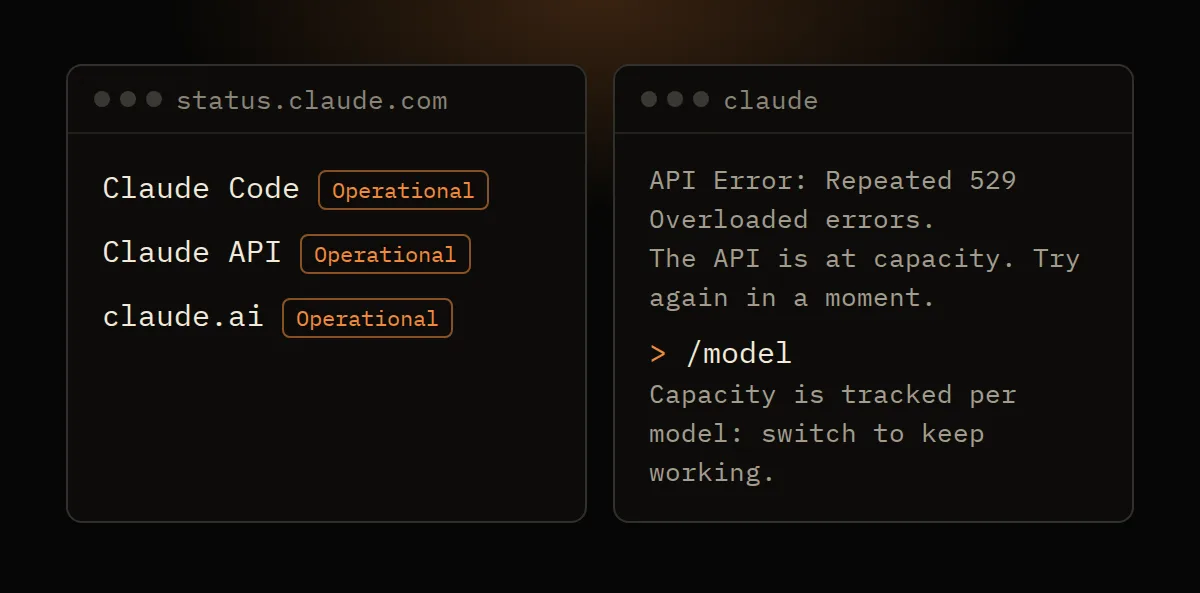
Check Claude Code status in 30 seconds
- Open status.claude.com and find the Claude Code row and the Claude API row. Claude Code runs on the API, so an API incident affects it too.
- If either shows an incident, read the latest update. That is the outage, and there is nothing to fix on your side.
- If both look normal, read the exact error in Claude Code. Each one points to a different cause, covered below.
- Run /status inside Claude Code to see your version, model, account and connection.
- Run claude doctor in your shell for a read-only check of your installation and settings.
The status page covers claude.ai, the Claude Console, the Claude API, Claude Code, Claude Cowork, Claude for Government and the cloud platforms, including Claude Platform on AWS, Claude in Microsoft Foundry and Claude on Google Cloud. Use Subscribe to Updates on the page to get notified by email when Anthropic posts an incident, instead of checking by hand.
Source: Claude status page, Anthropic
What Claude Code errors mean
Claude Code retries passing failures up to 10 times, with growing gaps between tries, before it shows you an error. So when you see one, it has already tried. Match the message to the cause:
| Message | What it means | Is it an outage? |
|---|---|---|
| API Error: 500 Internal server error | An unexpected failure inside the API, not caused by your prompt or settings | Possibly; check the status page |
| API Error: Repeated 529 Overloaded errors | The API is at capacity for everyone; it does not count against your usage | A capacity problem, usually short |
| Request timed out | No answer before the deadline, 10 minutes by default | Usually your network or proxy |
| No response from API | The request got no reply within the first-byte deadline | Often a proxy holding responses |
| Unable to connect to API | The connection failed, such as refused, no route or DNS failure | Your network, VPN, firewall or proxy |
| You've hit your session limit / weekly limit | Your plan's usage window is used up | No; wait for the reset or add usage credits |
| Server is temporarily limiting requests / 429 | A temporary throttle | No; Claude Code retries these |
| Not logged in / Invalid API key | A sign-in problem | No; run /login |
Source: Error reference, Claude Code docs
API Error: 500
A 500 means something failed inside the API itself. Anthropic's advice: check status.claude.com, wait a minute and send your message again. Your message is still in the conversation, so for a long prompt you can type "try again" instead of pasting it all. If it keeps happening with no incident posted, run /feedback so Anthropic can look at your request. A 502 Bad Gateway or similar usually comes from a proxy or gateway between you and Anthropic.
API Error: Repeated 529 Overloaded
A 529 means the API is temporarily at capacity across all users, and Claude Code has already retried several times. It is not your usage limit. Capacity is tracked per model, so the fastest workaround is /model to switch, for example from Opus to Sonnet; Claude Code suggests this itself when one model is under heavy load. Otherwise, try again in a few minutes.
Request timed out and No response from API
The default request timeout is 10 minutes. If timeouts are frequent while the rest of your internet is fine, the cause is often a proxy or company gateway that holds responses until they finish. The error message names the setting to raise, such as API_TIMEOUT_MS or CLAUDE_STREAM_FIRST_BYTE_TIMEOUT_MS. On a slow network or proxy, updating to v2.1.328 or later also helps.
Unable to connect to API
The connection never completed. The message names the kind of failure: connection refused (a firewall or proxy may be blocking it), cannot reach the API server (check your internet or DNS), no internet route (check your connection or VPN), or a proxy that refused the tunnel. These are local problems: test your connection, turn your VPN off and on, or ask your network team to allow Anthropic's addresses.
Source: Error reference, Claude Code docs
"The response above may be incomplete"
This appears when a response fails partway, after Claude had already finished some text or a tool call. Claude Code keeps what arrived instead of re-sending the request, because re-sending could run the same tool calls twice. The variants say what happened: a server error mid-response, a lost connection, your computer going to sleep, the response stopping, or part of it never arriving. Check whether the last step finished, then ask Claude to continue.
"Agent terminated early due to an API error"
A subagent's request failed for good, for example because a usage limit was reached or retries for a server error ran out, so it stopped before finishing. The text after the colon names the underlying error; fix that, then ask Claude to retry the task or resume the subagent.
Not logged in, or invalid API key
"Not logged in · Please run /login" means no valid credential is available. Run /login to sign in with your Claude plan or Console account. If you expected an API key to sign you in, check that ANTHROPIC_API_KEY is set and exported in the shell where you started claude; for CI, Anthropic suggests an apiKeyHelper script that fetches a key at startup. If you are asked to log in again and again, check your computer's clock is correct.
Source: Error reference, Claude Code docs
What you see while Claude Code retries
While it retries, the spinner shows a countdown such as "Retrying in 8s · attempt 3/10" after a short label. For problems you can act on straight away, such as your network being down or a rate limit, the label names the reason. If the failure is a 529 overload, the line below the countdown names where to check service status: status.claude.com on the Anthropic API, or your cloud provider or gateway otherwise.
A banner reading "Waiting for API response · will retry in … · check your network" means Claude Code has waited at least 20 seconds without receiving any data. The request has not failed yet. It clears on its own when data resumes or a retry works; if it appears on every attempt, treat it as a network problem.
Source: Error reference, Claude Code docs
Make Claude Code ride out outages by itself
For long or unattended runs, a few environment variables change how Claude Code handles errors:
| Variable | Default | What it does |
|---|---|---|
| CLAUDE_CODE_MAX_RETRIES | 10 | How many times to retry before showing an error; lower it to see failures sooner |
| CLAUDE_CODE_RETRY_WATCHDOG | Off | Set to 1 in CI and other unattended jobs to keep retrying 429 and 529 capacity errors instead of failing |
| CLAUDE_CODE_OVERLOADED_RETRY_BASE_DELAY_MS | 500 | The first wait between retries after a 529, in milliseconds |
| CLAUDE_CODE_OVERLOADED_RETRY_MAX_DELAY_MS | 32000 | The longest wait between retries after a 529 |
| API_TIMEOUT_MS | 600000 (10 minutes) | How long each attempt waits for the response to start; raise it on slow networks or proxies |
| CLAUDE_STREAM_FIRST_BYTE_TIMEOUT_MS | Not set | The deadline for the first byte of a streaming reply, from v2.1.242 |
CLAUDE_CODE_RETRY_WATCHDOG is the one that matters most for overnight jobs: a short capacity blip then delays the job instead of ending it. Related settings cap how long a request waits for capacity, or for a plan usage limit to reset.
Source: Error reference, Claude Code docs
Is it a Claude Code outage or your usage limit?
Many "Claude Code is down" moments are actually usage limits. On a Pro, Max or Ultra plan, "You've hit your session limit" or "You've hit your weekly limit" means your plan's window is used up; the message shows when it resets. Switching models does not help with these, because the window is shared across models. Run /usage to see your bars. Your options are to wait, turn on usage credits with /usage-credits, or move to a bigger plan. On recent versions, Claude Code can wait for the reset and carry on with the interrupted task by itself.
Source: Error reference, Claude Code docs
What to do while Claude Code is down
- Switch models with /model if only one model is overloaded.
- Leave the session open. Your conversation stays put, and you can type "try again" once the incident clears.
- Use the time to review the changes already made: git diff shows them.
- If you have another coding agent, such as OpenAI's Codex, carry on there. Many developers keep a second agent for exactly this.
- Subscribe to updates on status.claude.com so you hear when it is fixed.
Check your own setup with /status and claude doctor
When the status page is clear, two built-in checks find most local problems. /status inside Claude Code opens Settings on the Status tab, showing your version, model, account and connectivity; recent versions also list broken agent, skill or command files, an unavailable sandbox and ignored permission settings. claude doctor in your shell prints read-only installation and settings diagnostics without starting a session, including install health, settings file errors and warnings with suggested fixes. Inside a session, /doctor runs a fuller setup checkup.
claude doctorSource: Commands, Claude Code docs
Status on Amazon Bedrock, Google Cloud and Microsoft Foundry
If you run Claude Code through a cloud provider, most server errors come from that provider's service, not Anthropic's. Claude Code's error messages say so: on Bedrock, Google Cloud's Agent Platform or Microsoft Foundry, the line that would point to status.claude.com names that provider's service status instead, and with a custom ANTHROPIC_BASE_URL it names your gateway. Check the status page it names. Anthropic's status page also has rows for Claude Platform on AWS, Claude in Microsoft Foundry and Claude on Google Cloud.
Report a Claude Code problem
If an error keeps happening and no incident is posted, run /feedback inside Claude Code so Anthropic can investigate with your request details. Include the full error message. Before you report, run claude doctor and update Claude Code, since many errors are fixed in a later version; the error reference often names the version that fixed a problem.
Source: Error reference, Claude Code docs
Claude Code download
If you came here to download Claude Code, there are two things you can install: the command-line tool, and the Claude desktop app, which has Claude Code in its Code tab. Both need a Pro, Max, Ultra, Team or Enterprise plan, or a Console account for the command-line tool; the Free plan does not include Claude Code.
Download the Claude Code command-line tool
| System | Install command |
|---|---|
| macOS, Linux and WSL | curl -fsSL https://claude.ai/install.sh | bash |
| Windows PowerShell | irm https://claude.ai/install.ps1 | iex |
| Windows CMD | curl -fsSL https://claude.ai/install.cmd -o install.cmd && install.cmd && del install.cmd |
| Homebrew | brew install --cask claude-code |
| WinGet | winget install Anthropic.ClaudeCode |
The installer shows no progress while it downloads. When it finishes, open a new terminal and run claude --version; a working install prints a version number. Then go to your project folder and run claude to sign in. The native install updates itself in the background. Claude Code needs macOS 13 or later, Windows 10 1809 or later, Ubuntu 20.04, Debian 10 or Alpine 3.19 or later, and 4 GB of memory.
Source: Advanced setup, Claude Code docs
When the Claude Code download fails
The installer downloads from downloads.claude.ai. To check you can reach it, run this; a first line showing 200 means the server answered:
curl -sI https://downloads.claude.ai/claude-code-releases/latestOn Windows PowerShell, type curl.exe instead of curl, because PowerShell's own curl rejects those options. A 403 usually means a proxy or network filter is blocking the download, or Claude Code is not available in your country. A 5xx is usually a temporary service problem: wait a few minutes. No output, Could not resolve host or a timeout means the connection failed, often because a company firewall blocks downloads.claude.ai.
If the install command fails with "syntax error near unexpected token '<'", or PowerShell errors full of HTML, the install address returned a web page instead of the install script. If that page says "App unavailable in region", Claude Code is not offered in your country. Otherwise retry after a few minutes, or install with Homebrew or WinGet instead, remembering that those do not update themselves by default. If claude is not found after a successful install, open a new terminal window so your PATH is reloaded.
Source: Troubleshoot installation and login, Claude Code docs
Download the Claude desktop app
The desktop app gives you Claude Code without a terminal: you point it at a folder, ask for changes and review them. Download it for macOS (one build for Intel and Apple Silicon) or Windows (x64, with a separate ARM64 installer) from Anthropic's desktop quickstart, or install it on Ubuntu and Debian with apt (beta). Open the app, sign in, and click the Code tab at the top of the sidebar.
Source: Get started with the desktop app, Claude Code docs
Keep working when one agent is down
An outage, a 529 on your favourite model or a used-up weekly limit all stop one agent at a time. Developers who run Claude Code and Codex side by side keep going on whichever is up. 10u is an AI coding agent dashboard that shows every Claude Code and Codex session side by side, each in its real terminal, marked Needs you, Working, Waiting or Parked, so you see at a glance which sessions are stuck on an error. It runs on the subscriptions you already have. They do the building. You decide what gets built.

Questions people ask
- Does a 529 error use up my Claude plan?
- No. Anthropic says a 529 Overloaded error is not your usage limit and does not count against your quota. It means the API is at capacity for everyone at that moment.
- How many times does Claude Code retry before showing an error?
- Up to 10 times by default, with growing gaps between attempts. You can change that with CLAUDE_CODE_MAX_RETRIES, or set CLAUDE_CODE_RETRY_WATCHDOG to 1 in unattended jobs to keep retrying capacity errors.
- Why does Claude Code say Waiting for API response?
- It has waited at least 20 seconds without receiving any data. The request has not failed yet; the banner clears when data resumes or a retry works. If it shows on every attempt, check your network.
- Is Claude Code down right now?
- Check status.claude.com, Anthropic's official status page. It lists Claude Code and the Claude API separately, with any current incident at the top.
- What does Claude Code error 529 mean?
- Repeated 529 Overloaded errors mean the API is at capacity for everyone. It does not count against your usage limit. Switch models with /model or try again in a few minutes.
- Why does Claude Code say I hit my limit when it is not down?
- Session and weekly limit messages mean your plan's usage window is used up, not an outage. The message says when it resets; run /usage to see where you stand.
- How do I check my Claude Code status and version?
- Run /status inside Claude Code to see your version, model, account and connection, or claude --version in your shell.
- Where do I download Claude Code?
- Install the command-line tool with curl -fsSL https://claude.ai/install.sh | bash on macOS, Linux or WSL, or irm https://claude.ai/install.ps1 | iex in Windows PowerShell. The Claude desktop app has Claude Code in its Code tab.