
Claude Code workflows: dynamic workflows plus the everyday recipes
Claude Code workflows mean two things. In Anthropic's docs, a dynamic workflow is a JavaScript script Claude writes that runs many subagents at once in the background, for jobs like a codebase-wide bug sweep, a 500-file migration or research that needs sources cross-checked. You start one with /deep-research, by typing ultracode or use a workflow in your prompt, or by turning on /effort ultracode. More loosely, a Claude Code workflow is the everyday routine you follow: explore, plan, change, check. This page covers both, from Anthropic's documentation.
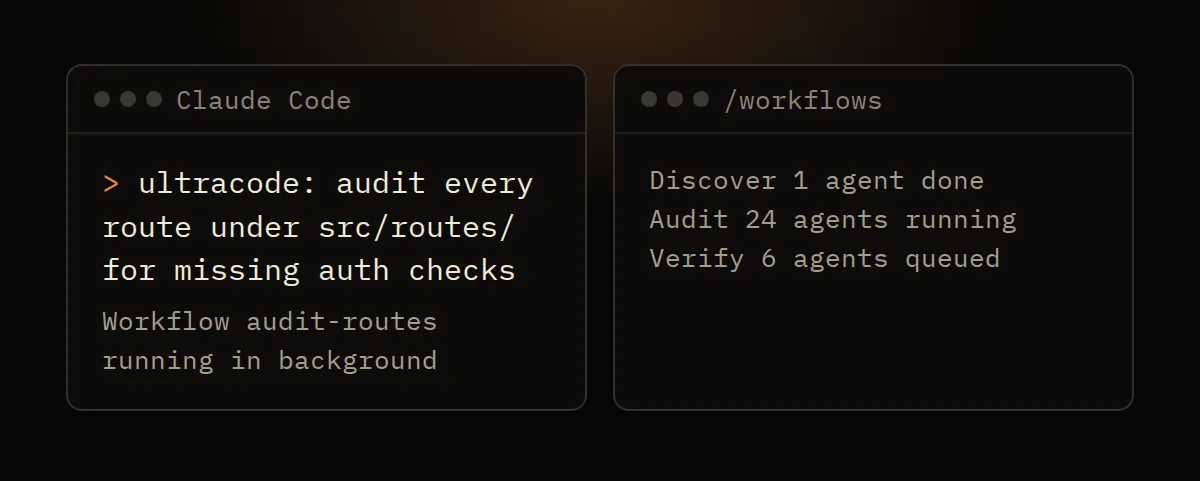
Source: Orchestrate subagents at scale with dynamic workflows, Claude Code docs
What a dynamic workflow is
A dynamic workflow moves the plan out of Claude's head and into code. With subagents, skills and agent teams, Claude decides turn by turn what to start next, and every result lands in a context window. A workflow script holds the loop, the branching and the intermediate results itself, so Claude's context only holds the final answer. Because the plan is code, a workflow can also apply a quality pattern, such as having independent agents adversarially check each other's findings before they are reported.
| Subagents | Skills | Agent teams | Workflows | |
|---|---|---|---|---|
| What it is | A worker Claude spawns | Instructions Claude follows | A lead agent supervising peer sessions | A script the runtime executes |
| Who decides what runs next | Claude, turn by turn | Claude, following the prompt | The lead agent | The script |
| Where results live | Claude's context | Claude's context | A shared task list | Script variables |
| Scale | A few tasks per turn | Same as subagents | A handful of long-running peers | Dozens to hundreds of agents per run |
| If interrupted | Restarts the turn | Restarts the turn | Teammates keep running | Resumable in the same session |
Dynamic workflows are on every paid plan, with Anthropic API access, and on Amazon Bedrock, Google Cloud's Agent Platform and Microsoft Foundry. On Pro you turn them on from the Dynamic workflows row in /config.
Source: Orchestrate subagents at scale with dynamic workflows, Claude Code docs
Try a workflow: /deep-research
The quickest way to see one is the bundled /deep-research workflow. It fans out web searches across several angles, fetches and cross-checks the sources, votes on each claim, and returns a cited report with claims that did not survive cross-checking filtered out. It needs the WebSearch tool.
/deep-research What changed in the Node.js permission model between v20 and v22?- Run the command, then allow the workflow when Claude Code asks.
- The run starts in the background, so your session stays free. Run /workflows to open the progress view, or press the down arrow to focus the one-line progress summary under the input box.
- When it finishes, the report appears in your session. Claims the checkers could not verify, for example after a rate limit, are listed as unverified rather than counted as wrong.
Source: Orchestrate subagents at scale with dynamic workflows, Claude Code docs
Ask Claude to write a workflow
For your own task, include the keyword ultracode in your prompt, or just say use a workflow or run a workflow. Claude writes a workflow script instead of working through the task turn by turn. The keyword only changes how Claude structures the work; every agent's tool calls still go through the same permission checks and sandboxing.
ultracode: audit every API endpoint under src/routes/ for missing auth checksThe keyword only counts in a prompt you type yourself, at the terminal, in an IDE panel or a Remote Control client. It does not start a workflow from a -p prompt, a scheduled task, or a webhook or pull request comment. If you did not mean it, press Option+W on macOS or Alt+W on Windows and Linux to dismiss the highlight, or turn off the Ultracode keyword trigger in /config.
Let Claude decide with /effort ultracode
Ultracode is a session setting that makes Claude plan a workflow for each substantive task without being asked. One request can become several workflows in a row: one to understand the code, one to make the change and one to verify it. That means every request uses more tokens and takes longer, so turn it off with /effort ultracode off when you go back to routine work.
/effort ultracodeclaude --effort ultracode starts a session with it on and sets effort to xhigh. While ultracode is on, the Large workflow warning does not appear, the session's concurrent subagent limit is not enforced, and in auto mode you are not asked to approve the first workflow launch.
Source: Orchestrate subagents at scale with dynamic workflows, Claude Code docs
Example Claude Code workflow prompts
A workflow fits best when the task is bigger than one agent can hold in context, or when the same step must run across many items. You describe the job; Claude writes the script.
| Shape | Prompt |
|---|---|
| Audit many files | use a workflow to audit every route handler under src/routes/ for missing authentication checks, and adversarially verify each finding before reporting it |
| Fix until a check passes | use a workflow to run npx tsc --noEmit and keep fixing the reported errors until the type check passes or two rounds in a row make no progress |
| Migrate in parallel | use a workflow to migrate every component under src/components/ from JavaScript to TypeScript, working on each file in its own isolated copy |
| Review a pull request | use a workflow to review every file changed in this PR for correctness issues, then merge the per-file findings into one ranked summary |
| Research many sources | use a workflow to research how our three competitors handle rate limiting: read their public docs and recent changelog entries in parallel, then compare the approaches |
| Search until nothing new | use a workflow to find flaky tests in this repo: run the suite repeatedly, record which tests fail intermittently, and stop once two rounds in a row find nothing new |
Source: Orchestrate subagents at scale with dynamic workflows, Claude Code docs
Approve, watch and steer a run
Before a run starts, the CLI shows the planned phases with these choices: Yes, run it; Yes, and don't ask again for this workflow in this project (offered for bundled, saved and plugin workflows); View raw script; and No. Ctrl+G opens the script in your editor.
| Permission mode | When you are asked |
|---|---|
| Auto | First launch only; skipped entirely with ultracode on |
| Manual or accept edits | Every run, unless you chose don't ask again for that workflow |
| Bypass permissions | Never; it starts straight away |
| claude -p and the Agent SDK | Never asked; normal permission rules decide, so allow Workflow or Workflow(<name>) |
Agents in the run use your permission rules, so add the tools they need to your allow rules before a long run to avoid prompts. In the Desktop app, an approval card shows the workflow name, its phases and a token-usage caution, with Once, Always and Deny buttons, and progress appears in the Background tasks side pane.
The /workflows view
| Key | Action |
|---|---|
| Up and down | Select a phase or agent |
| Enter or right | Drill into a phase, then an agent's prompt, tool calls and result |
| Esc or left | Back out one level |
| f | Filter agents by status |
| p | Pause or resume the run |
| x | Stop the selected agent, or the whole workflow |
| r | Restart the selected running agent |
| s | Save the run's script as a command |
Source: Orchestrate subagents at scale with dynamic workflows, Claude Code docs
Save a workflow as your own command
When a run does what you wanted, open /workflows, select it and press s. Save it to .claude/workflows/ to share it with everyone who clones the repo, or ~/.claude/workflows/ to keep it for yourself across projects. It then runs as /<name> in future sessions, and shows in / autocomplete next to /deep-research. If a project and a personal workflow share a name, the project one runs. To share across teams, put the script in a plugin's workflows/ folder, where it runs as /<plugin>:<name>.
Saved workflows can take input through args, which the script reads as a global. Claude passes structured data, so this works directly:
Run /triage-issues on issues 1024, 1025, and 1030What the saved script looks like
export const meta = {
  name: 'audit-routes',
  description: 'Audit every route handler for missing auth checks',
}

const found = await agent('List every .ts file under src/routes/.', {
  schema: { type: 'object', required: ['files'], properties: { files: { type: 'array', items: { type: 'string' } } } },
})

const audits = await pipeline(found.files, file =>
  agent(`Audit ${file} for missing authentication checks.`, { label: file }),
)

return audits.filter(Boolean)
The body is plain JavaScript with top-level await. agent() starts one subagent, pipeline() runs one per item in a list, parallel() runs a set at once and waits for all, phase() groups agents under a title in the progress view, and log() shows a message. Passing a schema makes that agent return JSON in that shape. An agent you stop, or one that hits an unrecoverable error, returns null, which is why the example filters those out. Date.now(), Math.random() and new Date() throw inside the script so a relaunched run repeats the same agent calls. Before editing a saved script, run /workflow-authoring to load the reference Claude works from, then /reload-skills to pick up your changes.
Source: Orchestrate subagents at scale with dynamic workflows, Claude Code docs
How a workflow runs and its limits
The runtime runs the script in an isolated environment, separate from your conversation, and writes the run's script to a file under your session's folder in ~/.claude/projects/ so you can read or diff it. It tracks each agent's result, which is what makes a run resumable within the same session.
| Limit | Detail |
|---|---|
| No input mid-run | A run only pauses for agent permission prompts or a usage-limit wait; run stages as separate workflows if you want to sign off between them |
| No direct file or shell access from the script | Agents read, write and run commands; the script only coordinates them |
| No module loading | A script with import() fails before it starts |
| Concurrent agents | Up to 16 by default, fewer on machines with fewer CPUs; CLAUDE_CODE_WORKFLOW_MAX_CONCURRENT_AGENTS sets 1 to 256 |
| Items per call | Up to 4,096 in one parallel() or pipeline() call |
| Agents per run | 1,000 in total, to prevent runaway loops |
Agents in the same run can share a prompt cache when they use the same model, effort, agent type, tools, schema and folder. When several matching agents start together, Claude Code holds all but the first for up to 5 seconds so the rest read its cached prefix instead of each processing it from scratch. A workflow agent's cache lasts five minutes by default, even on a subscription; set subagentPromptCacheTtl to 1h to keep it longer, at a higher cache-write rate.
Pauses, usage limits and stalls
Resume a paused run from /workflows with p, or ask Claude to relaunch a stopped one with the same script. On relaunch, completed agents return their saved results until the first agent whose prompt changed; that one and every agent after it run again. When an agent hits your claude.ai usage limit in an interactive session, the run pauses and carries on by itself shortly after the limit resets, as long as the reset is within 24 hours and the run has not already waited twice. A stalled agent is restarted with a fresh attempt; files it already changed stay changed.
Source: Orchestrate subagents at scale with dynamic workflows, Claude Code docs
When an agent goes quiet
An agent whose output stops arriving for long enough starts over from the same prompt; in /workflows its name gains (retry 1). It restarts at most five times, counting restarts you ask for with r. If the sixth attempt stalls too, the agent() call fails: inside parallel() or pipeline() the run carries on with null in its place, while an agent awaited directly ends the run. For an agent that legitimately works quietly for a long time, pass stallMs on its call, such as 1800000 for 30 minutes, or set CLAUDE_ASYNC_AGENT_STALL_TIMEOUT_MS for every agent.
If you leave the session
A run does not carry on by itself if you exit or background the session. It continues only when Claude relaunches it, replaying from its saved results. If you chose Exit and stop tasks, the saved results stay under that session's folder in ~/.claude/projects/: resume with claude --resume and ask Claude to relaunch the workflow. A failed agent in the middle of a fan-out reruns the agents after it too, so relaunching a run that started A, B, C and D with B failed returns A from cache and runs B, C and D again.
Source: Orchestrate subagents at scale with dynamic workflows, Claude Code docs
What Claude Code workflows cost
A workflow starts many agents, so one run can use meaningfully more tokens than doing the same task in conversation, and it counts toward your plan's usage and rate limits. Anthropic suggests running it on a small slice first, such as one directory instead of the whole repository, and watching each agent's token use in /workflows, where you can stop at any time.
- A Large workflow warning appears when a run schedules more than 25 agents or its projected total passes 1.5 million tokens. It is advice only and does not stop the run.
- Each agent picks its model the same way subagents do; with nothing set, it uses your session's model, so check /model before a big run.
- Ask Claude to use a smaller model for stages that do not need the strongest one.
Set a size guideline
| Setting | Agents Claude aims for |
|---|---|
| small | Fewer than 5 |
| medium (default; small on Pro) | Fewer than 10 |
| large | Fewer than 50 |
| unrestricted | Sized to the task |
Change it with /config workflowSizeGuideline=small, or the workflowSizeGuideline key in a settings file. It is advice to Claude, not a cap; the runtime limits above still apply. To turn workflows off, toggle Dynamic workflows off in /config, set "disableWorkflows": true in ~/.claude/settings.json, or set CLAUDE_CODE_DISABLE_WORKFLOWS=1. That also removes ultracode.
Source: Orchestrate subagents at scale with dynamic workflows, Claude Code docs
The everyday Claude Code workflow
Most days you do not need a dynamic workflow. Anthropic's common workflows page gives prompt recipes for the routine jobs, and its best-practices guide adds the habits that make them land.
Understand a new codebase
Start Claude Code in the project root and go from broad to narrow: give me an overview of this codebase, then explain the main architecture patterns used here, what are the key data models? and how is authentication handled? To find code, ask find the files that handle user authentication, then trace the login process from front-end to database. A code intelligence plugin for your language gives Claude precise go-to-definition.
Fix a bug
Share the error and the command that reproduces it, such as I'm seeing an error when I run npm test, then ask for options and apply one. Tell Claude whether the error is intermittent or consistent. Best practice is to name the file, describe the symptom and say what fixed looks like, and to ask Claude to write a failing test first.
Refactor safely
Find the old code (find deprecated API usage in our codebase), ask how to modernise one file, apply it while keeping behaviour the same, and then run tests for the refactored code. Work in small, testable steps.
Add tests and open a pull request
Ask find functions in NotificationsService.swift that are not covered by tests, then add tests for the notification service and add test cases for edge conditions. When the work is ready, ask Claude to create a pull request; with the gh CLI signed in, it opens pull requests and reads review comments without extra setup.
Source: Common workflows, Claude Code docs
Write documentation
Find the gaps first with find functions without proper JSDoc comments in the auth module, then add JSDoc comments to the undocumented functions in auth.js, then improve the generated documentation with more context and examples, and finally check if the documentation follows our project standards. Say which style you want, such as JSDoc or docstrings, and ask for examples. Claude Code also works in folders that are not code, such as a notes vault or a docs folder full of Markdown, where it searches, edits and reorganises files the same way.
Work from screenshots and mockups
Drag an image into the window, paste it with Ctrl+V (Alt+V on Windows and WSL), or give a path. Then ask Here's a screenshot of the error. What's causing it?, Describe the UI elements in this screenshot, or Generate CSS to match this design mockup. Images help most when a text description would be unclear, and you can use several in one conversation.
Point Claude at exact files
Type @ to include a file or folder without waiting for Claude to find it: Explain the logic in @src/utils/auth.js or What's the structure of @src/components?. A file is included when it fits the Read tool limit, 25,000 tokens by default; a folder shows its listing, not its contents. @ references also bring in any CLAUDE.md in that file's folder and the folders above it. Because no tool call is made, PreToolUse hooks do not run on them, so use a Read deny rule for paths that must never be included.
Run a workflow on a schedule
| Option | Where it runs | Best for |
|---|---|---|
| Cloud scheduled tasks | Anthropic's cloud | Jobs that should run with your computer off, or on API calls and GitHub events |
| Desktop scheduled tasks | Your machine, through the desktop app | Jobs that need local files, tools or uncommitted changes |
| GitHub Actions | Your CI pipeline | Jobs tied to repository events, such as a new pull request |
| /loop | The current CLI session | Quick polling while a session is open |
A scheduled task runs on its own and cannot ask you questions, so spell out what success looks like and what to do with the results, for example which label to review and where to leave comments.
Find the session behind a pull request
Ask create a pr for my changes, or go step by step: summarize the changes I've made to the authentication module, then create a pr, then enhance the PR description with more context about the security improvements. Review the pull request before submitting and ask Claude to point out risks. Later, claude --from-pr 1234 opens the session picker filtered to sessions linked to that pull request.
Source: Common workflows, Claude Code docs
Plan, delegate, run in parallel
| Habit | How |
|---|---|
| Plan before editing | claude --permission-mode plan, or Shift+Tab until plan mode is on; Claude proposes a plan and edits nothing until you approve |
| Delegate research | use a subagent to investigate how our auth system handles token refresh, so only the findings come back |
| Run sessions in parallel | claude --worktree feature-auth in one terminal and another name in a second, so edits never collide |
| Pick up later | claude --continue for the latest session here, or claude --resume to choose |
| Script it | git log --oneline -20 | claude -p "summarize these recent commits" |
Source: Common workflows, Claude Code docs
Make the workflow check itself
Anthropic's best-practices guide says the single biggest improvement is giving Claude something that comes back pass or fail, such as a test command, so it can make the change, run the check and fix what broke without you. Ask for the command and its output as evidence, not just all tests pass. For long or unattended work, /goal or a Stop hook makes sure it keeps going until the check passes, and /code-review gets a reviewer that never saw the code being written.
Source: Best practices for Claude Code, Anthropic
Which Claude Code workflow for which job?
| Job | Reach for |
|---|---|
| A quick fix or small feature | A plain prompt in one session, with a test to check against |
| Noisy research inside a task | A subagent |
| Several independent changes at once | Parallel sessions in git worktrees |
| The same step across hundreds of files | A dynamic workflow |
| A cited answer from many sources | /deep-research |
| A process you repeat on every branch | A saved workflow command |
Keeping track when the workflow is many agents
Between workflows, worktrees and background sessions, a Claude Code workflow can quickly mean many agents at once. 10u is an AI coding agent dashboard that shows every Claude Code and Codex session side by side, each in its real terminal, marked Needs you, Working, Waiting or Parked. They do the building. You decide what gets built.

Questions people ask
- Can Claude Code tell me what it can do?
- Yes. Ask questions such as can Claude Code create pull requests? or how does Claude Code handle permissions?. It looks the answers up in the current Claude Code documentation, so they are not limited to the version you run.
- What are dynamic workflows in Claude Code?
- Scripts Claude writes that run many subagents at once in the background, for audits, large migrations and cross-checked research. Results stay in the script, so your conversation only gets the final answer.
- How do I start a workflow in Claude Code?
- Run /deep-research with a question, include ultracode or use a workflow in your prompt, or turn on /effort ultracode for the session.
- How do I save a Claude Code workflow?
- Open /workflows, select the run and press s. Save to .claude/workflows/ for the project or ~/.claude/workflows/ for yourself; it then runs as /<name>.
- How many agents can a workflow run?
- Up to 16 at once by default and 1,000 in total per run. A Large workflow warning appears past 25 agents or 1.5 million projected tokens.
- Are workflows available on the Pro plan?
- Yes. Turn them on from the Dynamic workflows row in /config. On Pro the default size guideline is small, fewer than 5 agents.