
Claude Code statusline: show context, cost and git status under the prompt
The Claude Code statusline is a bar at the bottom of the screen that runs any shell script you choose. Claude Code sends the script JSON about the session on standard input, and shows whatever the script prints: the model, how full the context window is, the session cost, your git branch, your plan usage, or anything else. The quickest way to set one up is to type /statusline followed by what you want to see. It runs on your machine and uses no API tokens.
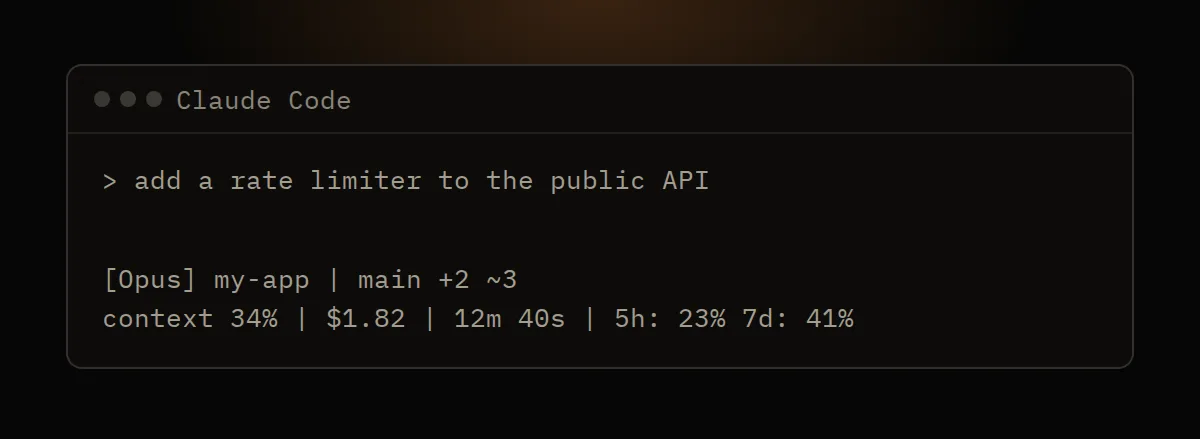
/statusline show model name and context percentage with a progress barSource: Customize your status line, Claude Code docs
What a Claude Code status line is good for
- Watching context window usage as you work, so you know when to /clear or /compact.
- Tracking the estimated session cost and how long the session has run.
- Telling sessions apart when you run several at once, by folder, worktree or session name.
- Keeping the git branch and changed-file counts in view.
- Seeing how much of your five-hour and weekly plan limits you have used.
The status line sits in its own row above the built-in footer badges and does not replace them. With one set up, Claude Code stops showing some footer hints, such as ? for shortcuts.
Source: Customize your status line, Claude Code docs
Set up a status line with /statusline
The /statusline command takes plain-English instructions. Claude Code writes a script into ~/.claude/ and updates your settings for you; approve the file edits if it asks. Run it without anything after it and it configures a status line from your shell prompt. To remove it, run /statusline delete, /statusline clear or /statusline remove it, or delete the statusLine field from settings.json yourself.
Source: Customize your status line, Claude Code docs
Set up a Claude Code statusline by hand
Doing it yourself takes three steps on macOS or Linux. The script below uses jq, a command-line JSON tool you may need to install.
1. Write a script that reads JSON and prints a line
Save this as ~/.claude/statusline.sh:
#!/bin/bash
input=$(cat)
MODEL=$(echo "$input" | jq -r '.model.display_name')
DIR=$(echo "$input" | jq -r '.workspace.current_dir')
PCT=$(echo "$input" | jq -r '.context_window.used_percentage // 0' | cut -d. -f1)
echo "[$MODEL] ${DIR##*/} | ${PCT}% context"
The // 0 gives a fallback when a field is empty, and ${DIR##*/} keeps only the folder name.
2. Make it executable
chmod +x ~/.claude/statusline.sh3. Point your settings at it
Add a statusLine field to ~/.claude/settings.json for every project, or to a project's settings for just that one:
{
  "statusLine": {
    "type": "command",
    "command": "~/.claude/statusline.sh",
    "padding": 2
  }
}
Claude Code reloads settings automatically and runs the script as soon as you save. The command runs in a shell, so a one-line jq command works too, with no script file:
{
  "statusLine": {
    "type": "command",
    "command": "jq -r '\"[\\(.model.display_name)] \\(.context_window.used_percentage // 0)% context\"'"
  }
}
Source: Customize your status line, Claude Code docs
statusLine settings
| Setting | What it does |
|---|---|
| type | Set to "command", meaning run this shell command |
| command | A script path or an inline shell command |
| padding | Extra horizontal spacing in characters, default 0 |
| refreshInterval | Also re-run the command every N seconds, minimum 1; use it for a clock or data that changes while the session is idle |
| hideVimModeIndicator | Hide the built-in -- INSERT -- text when your script shows the vim mode itself |
Source: Customize your status line, Claude Code docs
How the Claude Code statusline updates
Your script runs when a session starts or resumes, then again when:
- a new assistant message arrives
- /compact finishes
- the permission mode or vim mode changes
- you change the command in your statusLine settings
- a refreshInterval timer elapses, if you set one
- a plan-limit window or a warm prompt cache in the last data reaches its reset or expiry time
Updates are batched over 300 milliseconds, so rapid changes run the script once. If a new update arrives while the script is still running, Claude Code cancels the old run. While the main session sits idle, for example waiting on background subagents, the event-driven updates can go quiet, which is what refreshInterval is for. The status line also hides briefly during the help menu and permission prompts.
What your script can print
- Several lines: each echo or print becomes its own row.
- Colours: ANSI escape codes such as \033[32m for green, if your terminal supports them.
- Clickable links: OSC 8 escape sequences, in terminals such as iTerm2, Kitty and WezTerm.
Claude Code captures the output instead of passing the terminal through, so tput cols cannot read the width. Read the COLUMNS and LINES environment variables instead.
Source: Customize your status line, Claude Code docs
Every field the status line receives
| Field | What it holds |
|---|---|
| model.id, model.display_name | The current model |
| workspace.current_dir, workspace.project_dir | Where you are now, and where Claude Code was started |
| workspace.added_dirs | Folders added with /add-dir or --add-dir |
| workspace.git_worktree | The git worktree name, when inside a linked worktree |
| workspace.repo.host, .owner, .name | The repository, read from the origin remote |
| cost.total_cost_usd | Estimated session cost at list price; may differ from your bill and resets on /clear |
| cost.total_duration_ms, cost.total_api_duration_ms | Session running time, and time spent waiting on the API |
| cost.total_lines_added, cost.total_lines_removed | Lines of code changed |
| context_window.used_percentage, .remaining_percentage | How full the context window is |
| context_window.context_window_size | The maximum context size in tokens |
| context_window.current_usage | Input, output, cache-write and cache-read tokens from the last call |
| exceeds_200k_tokens | Whether the last response passed a fixed 200k-token mark |
| fast_mode, effort.level, thinking.enabled | Fast mode, the session effort level, and extended thinking |
| rate_limits.five_hour, rate_limits.seven_day | Percent of each plan-limit window used, and when it resets |
| rate_limits.spend_limit | Spend against a limit, behind a Claude apps gateway |
| prompt_cache | Cache hit ratio, misses, and whether the cache is warm |
| session_id, session_name, transcript_path | Which session this is, its name, and its transcript file |
| version, output_style.name, vim.mode, agent.name | Claude Code version, output style, vim mode and agent |
| pr.number, pr.url, pr.review_state | The open pull request for the branch and its review state |
| worktree.name, .path, .branch | The active worktree, during a worktree session |
Fields can be empty before the first reply in a session, so give every read a fallback. The used_percentage figure counts input tokens only: input, cache-write and cache-read tokens, not output. rate_limits only appears for claude.ai Pro, Max and Ultra subscribers, or behind a gateway with spend limits, and only after the first response.
Source: Customize your status line, Claude Code docs
Claude Code statusline examples
To use any of these, save the script, make it executable with chmod +x, and point your settings at it.
Model, cost and duration
#!/bin/bash
input=$(cat)
MODEL=$(echo "$input" | jq -r '.model.display_name')
COST=$(echo "$input" | jq -r '.cost.total_cost_usd // 0')
DURATION_MS=$(echo "$input" | jq -r '.cost.total_duration_ms // 0')
COST_FMT=$(printf '$%.2f' "$COST")
DURATION_SEC=$((DURATION_MS / 1000))
echo "[$MODEL] $COST_FMT | $((DURATION_SEC / 60))m $((DURATION_SEC % 60))s"
Context window progress bar
This script reads used_percentage and draws a 10-character bar, with filled blocks for the share of the context window in use. printf -v makes a run of spaces and ${var// /▓} swaps each space for a block, so it needs nothing beyond Bash and jq.
#!/bin/bash
input=$(cat)
MODEL=$(echo "$input" | jq -r '.model.display_name')
PCT=$(echo "$input" | jq -r '.context_window.used_percentage // 0' | cut -d. -f1)
BAR_WIDTH=10
FILLED=$((PCT * BAR_WIDTH / 100))
EMPTY=$((BAR_WIDTH - FILLED))
BAR=""
[ "$FILLED" -gt 0 ] && printf -v FILL "%${FILLED}s" && BAR="${FILL// /▓}"
[ "$EMPTY" -gt 0 ] && printf -v PAD "%${EMPTY}s" && BAR="${BAR}${PAD// /░}"
echo "[$MODEL] $BAR $PCT%"
Two lines with colour that changes as context fills
Each echo becomes its own row. This one puts the model, folder and branch on the first line, and a context bar, cost and running time on the second. The bar is green under 70 percent, yellow from 70 to 89 and red from 90, so you can see at a glance when it is time to /compact.
#!/bin/bash
input=$(cat)
MODEL=$(echo "$input" | jq -r '.model.display_name')
DIR=$(echo "$input" | jq -r '.workspace.current_dir')
COST=$(echo "$input" | jq -r '.cost.total_cost_usd // 0')
PCT=$(echo "$input" | jq -r '.context_window.used_percentage // 0' | cut -d. -f1)
DURATION_MS=$(echo "$input" | jq -r '.cost.total_duration_ms // 0')
CYAN='\033[36m'; GREEN='\033[32m'; YELLOW='\033[33m'; RED='\033[31m'; RESET='\033[0m'
if [ "$PCT" -ge 90 ]; then BAR_COLOR="$RED"
elif [ "$PCT" -ge 70 ]; then BAR_COLOR="$YELLOW"
else BAR_COLOR="$GREEN"; fi
FILLED=$((PCT / 10)); EMPTY=$((10 - FILLED))
printf -v FILL "%${FILLED}s"; printf -v PAD "%${EMPTY}s"
BAR="${FILL// /█}${PAD// /░}"
MINS=$((DURATION_MS / 60000)); SECS=$(((DURATION_MS % 60000) / 1000))
BRANCH=""
git rev-parse --git-dir > /dev/null 2>&1 && BRANCH=" | $(git branch --show-current 2>/dev/null)"
echo -e "${CYAN}[$MODEL]${RESET} ${DIR##*/}$BRANCH"
COST_FMT=$(printf '$%.2f' "$COST")
echo -e "${BAR_COLOR}${BAR}${RESET} ${PCT}% | ${YELLOW}${COST_FMT}${RESET} | ${MINS}m ${SECS}s"
Git branch with staged and changed counts
#!/usr/bin/env python3
import json, sys, subprocess, os
data = json.load(sys.stdin)
model = data['model']['display_name']
folder = os.path.basename(data['workspace']['current_dir'])
GREEN, YELLOW, RESET = '\033[32m', '\033[33m', '\033[0m'
try:
    branch = subprocess.check_output(['git', 'branch', '--show-current'], text=True, stderr=subprocess.DEVNULL).strip()
    staged = subprocess.check_output(['git', 'diff', '--cached', '--numstat'], text=True).strip()
    changed = subprocess.check_output(['git', 'diff', '--numstat'], text=True).strip()
    s = len(staged.split('\n')) if staged else 0
    m = len(changed.split('\n')) if changed else 0
    status = (f"{GREEN}+{s}{RESET}" if s else "") + (f"{YELLOW}~{m}{RESET}" if m else "")
    print(f"[{model}] {folder} | {branch} {status}")
except Exception:
    print(f"[{model}] {folder}")
git status runs on every update, so on a large repository Anthropic suggests caching slow commands to avoid lag.
Plan usage: five-hour and weekly limits
#!/bin/bash
input=$(cat)
MODEL=$(echo "$input" | jq -r '.model.display_name')
FIVE_H=$(echo "$input" | jq -r '.rate_limits.five_hour.used_percentage // empty')
WEEK=$(echo "$input" | jq -r '.rate_limits.seven_day.used_percentage // empty')
LIMITS=""
[ -n "$FIVE_H" ] && LIMITS="5h: $(printf '%.0f' "$FIVE_H")%"
[ -n "$WEEK" ] && LIMITS="${LIMITS:+$LIMITS }7d: $(printf '%.0f' "$WEEK")%"
[ -n "$LIMITS" ] && echo "[$MODEL] | $LIMITS" || echo "[$MODEL]"
The // empty prints nothing when you are not on a subscription, so the script still works with an API key.
Source: Customize your status line, Claude Code docs
A clickable link to your repository
This reads the origin remote, turns an SSH address into an https one, and wraps the repository name in an OSC 8 link, so Cmd-click on macOS or Ctrl-click on Windows and Linux opens it in your browser. It uses printf '%b' because that handles escape codes more reliably than echo -e across shells.
#!/bin/bash
input=$(cat)
MODEL=$(echo "$input" | jq -r '.model.display_name')
REMOTE=$(git remote get-url origin 2>/dev/null | sed 's/[email protected]:/https:\/\/github.com\//' | sed 's/\.git$//')
if [ -n "$REMOTE" ]; then
    REPO_NAME=$(basename "$REMOTE")
    printf '%b' "[$MODEL] \e]8;;${REMOTE}\a${REPO_NAME}\e]8;;\a\n"
else
    echo "[$MODEL]"
fi
Cache slow git commands
The script runs often while you work, and git status or git diff can be slow in a large repository. This version saves the git details to a temporary file and only refreshes them every 5 seconds. The file name uses session_id from the JSON, because it has to stay the same between runs in one session but differ between sessions, so two sessions in different repositories never read each other's branch. A process ID such as $$ would change on every run and defeat the cache.
#!/bin/bash
input=$(cat)
MODEL=$(echo "$input" | jq -r '.model.display_name')
DIR=$(echo "$input" | jq -r '.workspace.current_dir')
SESSION_ID=$(echo "$input" | jq -r '.session_id')
CACHE_FILE="/tmp/statusline-git-cache-$SESSION_ID"
CACHE_MAX_AGE=5
cache_is_stale() {
    [ ! -f "$CACHE_FILE" ] || \
    [ $(($(date +%s) - $(stat -c %Y "$CACHE_FILE" 2>/dev/null || stat -f %m "$CACHE_FILE" 2>/dev/null || echo 0))) -gt $CACHE_MAX_AGE ]
}
if cache_is_stale; then
    if git rev-parse --git-dir > /dev/null 2>&1; then
        BRANCH=$(git branch --show-current 2>/dev/null)
        STAGED=$(git diff --cached --numstat 2>/dev/null | wc -l | tr -d ' ')
        MODIFIED=$(git diff --numstat 2>/dev/null | wc -l | tr -d ' ')
        echo "$BRANCH|$STAGED|$MODIFIED" > "$CACHE_FILE"
    else
        echo "||" > "$CACHE_FILE"
    fi
fi
IFS='|' read -r BRANCH STAGED MODIFIED < "$CACHE_FILE"
[ -n "$BRANCH" ] && echo "[$MODEL] ${DIR##*/} | $BRANCH +$STAGED ~$MODIFIED" || echo "[$MODEL] ${DIR##*/}"
Source: Customize your status line, Claude Code docs
Context, cache and spend fields in detail
Context window numbers
The context_window object describes the live context from the most recent API response. total_input_tokens is the sum of input_tokens, cache_creation_input_tokens and cache_read_input_tokens, and total_output_tokens is the output from the latest response. current_usage breaks the same counts out by type, which is what you want if you need cache hits apart from fresh input. It is null before the first call in a session, and null or all zeros right after /compact until the next call, so treat both as empty. If you work out a percentage yourself, use the same input-only sum so it matches used_percentage.
Prompt cache numbers
From Claude Code v2.1.251, the prompt_cache object summarises how the main conversation is using the prompt cache. It is worked out from the cache token counts in each response, so it works on every provider, and it ignores subagent requests. A short status line usually shows warm and hit_ratio, which sum up the cache state most directly.
| Field | Meaning |
|---|---|
| warm | Whether the cached conversation is still inside its lifetime |
| ttl, expires_at | Cache lifetime, 5m or 1h, and when it goes cold |
| hit_ratio | Cache reads as a share of all input tokens this session, from 0 to 1 |
| misses | Requests that re-processed content the cache already held |
| last_miss_cause | The likely cause of the last miss, such as tools_changed or ttl_expired_5m |
| recache_tokens_if_cold | Tokens the next request re-caches if the cache has gone cold |
The same figures appear on the Prompt cache (main) line of /usage.
Spend limit numbers
Behind a Claude apps gateway with spend limits, rate_limits.spend_limit holds used_percentage and resets_at on every response, plus used_usd, limit_usd and period (daily, weekly or monthly). The dollar figures are estimates from token counts, not billed amounts, and can arrive after the percentage, so read each with a fallback such as jq -r '.rate_limits.spend_limit.used_usd // empty'.
Source: Customize your status line, Claude Code docs
Claude Code statusline on Windows
On Windows, Claude Code runs the status line through Git Bash when it is installed, and through PowerShell otherwise. Write paths in the command with forward slashes, because Git Bash eats unquoted backslashes and the command then fails without an error. To run a PowerShell script, call it through powershell, which works either way:
{
  "statusLine": {
    "type": "command",
    "command": "powershell -NoProfile -File C:/Users/username/.claude/statusline.ps1"
  }
}
$input_json = $input | Out-String | ConvertFrom-Json
$model = $input_json.model.display_name
$used = $input_json.context_window.used_percentage
$dirname = Split-Path $input_json.cwd -Leaf
if ($used) { Write-Host "$dirname [$model] ctx: $used%" } else { Write-Host "$dirname [$model]" }Source: Customize your status line, Claude Code docs
Tips and ready-made status lines
- Test with fake input before you wire it up: echo '{"model":{"display_name":"Opus"},"workspace":{"current_dir":"/home/user/project"},"context_window":{"used_percentage":25}}' | ./statusline.sh
- Keep output short, because a long line gets cut off or wraps.
- Keep the script fast: a slow script holds the status line on stale output until it finishes.
- Community projects such as ccstatusline and starship-claude offer ready-made status lines with themes.
npx -y ccstatusline@latestSource: ccstatusline on GitHub
Tell parallel sessions apart
If you run several sessions, show what makes each one different. session_name holds the name you set with --name or /rename, or the generated session title; workspace.git_worktree holds the worktree name when you are in a linked worktree; and pr.number holds the open pull request for the branch, the same one as the PR badge in the footer. Each is absent when it does not apply, so the // empty fallbacks keep the line tidy.
#!/bin/bash
input=$(cat)
NAME=$(echo "$input" | jq -r '.session_name // empty')
TREE=$(echo "$input" | jq -r '.workspace.git_worktree // empty')
DIR=$(echo "$input" | jq -r '.workspace.current_dir')
PR=$(echo "$input" | jq -r '.pr.number // empty')
LINE="${NAME:-${DIR##*/}}"
[ -n "$TREE" ] && LINE="$LINE | tree: $TREE"
[ -n "$PR" ] && LINE="$LINE | PR #$PR"
echo "$LINE"
Source: Customize your status line, Claude Code docs
ccstatusline: a ready-made Claude Code status line
If you would rather not write a script, ccstatusline is a popular open-source status line you configure in a menu in your terminal. It needs no install: run it with npx or bunx and it opens a configuration screen where you can build several separate status lines, add, remove and reorder widgets, pick colours for each one, set Claude Code's refresh interval, preview the result live, and install it into your Claude Code settings.
bunx -y ccstatusline@latest- Usage widgets for the 5-hour block and weekly limits, with countdowns to each reset and forecasts of when you will hit the limit at your recent pace.
- Prompt cache widgets that show cache misses, the last miss and a cache timer.
- Spend limit widgets for gateway users, and session cost per hour.
- Git branch and worktree widgets, with links that open the folder in an editor.
- A context bar, thinking effort, fast mode and session name.
Its documentation notes that npx and bunx add start-up time on every refresh, and suggests a pinned global install if the status line feels slow.
Source: ccstatusline on GitHub
Notifications and the status line row
Outside fullscreen rendering, notifications share the status line's row; in fullscreen they get a row of their own. System notices such as MCP server errors and auto-updates show on the right, and short-lived warnings such as low context cycle through there too. Verbose mode adds a token counter showing your context size from the last response. On a narrow terminal these notices can cut off the end of your status line, which is another reason to keep it short. Complex escape codes can also garble the line when they overlap other screen updates, and multi-line status lines with colours are more prone to it, so drop back to plain text if you see corrupted characters.
Source: Customize your status line, Claude Code docs
Claude Code statusline not showing
| Problem | Fix |
|---|---|
| Nothing appears | chmod +x the script, make sure it prints to standard output not standard error, and run it by hand |
| Blank in a new folder | Accept the workspace trust dialog; the status line runs a shell command, so it waits for trust like hooks do |
| Blank after an error | The output only shows when the script exits with code 0 and prints something |
| Shows -- or empty values | Fields are empty before the first reply; add fallbacks such as // 0 |
| Context percent differs from /context | /context adds an estimate for messages since the last reply; the status line uses the last reply's counts |
| Links not clickable | Use a terminal with OSC 8 support, or start with FORCE_HYPERLINK=1 claude; Terminal.app does not support them |
| Fails on Windows | Use forward slashes in the command path |
| Disappeared at work | An organisation setting such as allowManagedHooksOnly allows only a managed status line |
Run claude --debug to log your script's errors on every run and its exit code on the first. If the folder is not trusted yet, the log says Status line command skipped: workspace trust not accepted.
Source: Customize your status line, Claude Code docs
One status line per session, or one screen for all of them
A status line tells you about the session you are looking at. When several Claude Code and Codex sessions run at once, 10u is an AI coding agent dashboard that shows every session side by side, each in its real terminal, marked Needs you, Working, Waiting or Parked. They do the building. You decide what gets built.

Questions people ask
- Can the Claude Code status line show my plan usage?
- Yes, on claude.ai Pro, Max and Ultra plans. Read rate_limits.five_hour.used_percentage and rate_limits.seven_day.used_percentage, with resets_at giving when each window resets. They appear after the first reply in a session.
- Why is my Claude Code status line blank?
- Usually the script is not executable, printed to standard error, exited with an error, or the folder has not been trusted yet. Run the script by hand with sample JSON, then run claude --debug to see its errors.
- How do I add a status line to Claude Code?
- Type /statusline followed by what you want shown, such as /statusline show model name and context percentage. Claude Code writes the script and updates your settings.
- Where is the Claude Code statusline configured?
- In the statusLine field of ~/.claude/settings.json, or a project's settings, with type set to command and command pointing at your script.
- Does the status line use tokens?
- No. It runs locally on your machine and does not consume API tokens.
- How do I show context usage in the Claude Code status line?
- Read context_window.used_percentage from the JSON your script receives, for example with jq -r '.context_window.used_percentage // 0'.
- How do I remove the Claude Code status line?
- Run /statusline delete, or delete the statusLine field from your settings.json.