
Kiro vs Claude Code: which AI coding agent fits how you work?
Kiro is an AI coding agent built around one shared agent harness that runs the same agent across the Kiro IDE, the Kiro CLI, a web app, mobile apps and other editors. Its signature feature is specs: structured requirements, design and task files the agent writes before it builds. Kiro gives you a choice of models from Anthropic, OpenAI and others, paid for in credits. Claude Code is Anthropic's own coding agent, running Claude models in the terminal, VS Code and JetBrains, a desktop app and the web. This page compares the two on what each vendor documents.
Source: How Kiro works, Kiro docs
Kiro and Claude Code at a glance
| Kiro | Claude Code | |
|---|---|---|
| Surfaces | Kiro IDE, Kiro for VS Code, Kiro CLI, web, Android and iOS, ACP editors such as JetBrains and Zed | Terminal CLI, VS Code and JetBrains extensions, desktop app, web |
| Models | Claude, GPT-5.6, Grok, Kimi, DeepSeek, Qwen and others, or Auto routing | Claude models; third-party providers in the CLI, VS Code and JetBrains |
| How you pay | Credits: five tiers from Free to Power, with model multipliers | A Claude subscription or Anthropic Console account |
| Planning | Specs: requirements.md, design.md and tasks.md, plus plan mode | Plan mode |
| Project instructions | Steering files in .kiro/steering/, and AGENTS.md | CLAUDE.md, or AGENTS.md |
| Permissions | permissions.yaml rules per capability: deny, ask, allow, evaluate | Allow, ask and deny rules in settings.json, plus permission modes |
| Hooks | JSON files in .kiro/hooks/, shell command or agent prompt actions | A hooks block in settings.json, about 30 events |
| Sandbox | Local command sandbox, or a managed cloud sandbox on web | Sandboxed Bash tool, turned on with /sandbox |
| Cloud | Cloud sessions you can start on one surface and pick up on another | Claude Code on the web runs tasks in the cloud |
What Kiro is
Kiro describes itself as one agent available everywhere you work. At its centre is a unified agent harness, a standalone process that runs the conversation, executes tools, manages context, checks permissions and talks to the model providers. Every Kiro surface, the IDE, CLI, Web and Mobile apps, talks to that harness through the open Agent Client Protocol, which is also how JetBrains IDEs and Zed can use Kiro as their agent. Because the harness is shared, a permission rule denies the same thing in the CLI as in the IDE, and a steering file shapes the agent the same way everywhere.
In the IDE and CLI the harness runs on your machine, using your shell, toolchain and credentials. On Web and Mobile it runs in a managed cloud sandbox: Kiro clones your connected repository, works there and delivers changes as pull or merge requests. A cloud session belongs to your account, so Kiro says you can close your laptop, check the session from your phone and pick it up in the IDE the next morning.
Source: How Kiro works, Kiro docs
The Kiro agent loop
- Context is assembled from your prompt, the conversation, your steering files and attachments, and Prompt Submit hooks can add more.
- The request goes to your chosen model, or Auto picks one, and comes back with text, tool calls or both.
- Every tool call is checked against permission rules, where deny beats ask and ask beats allow, plus kiroignore patterns, and Pre Tool Use hooks run.
- Tools run: file edits, shell commands, web search, MCP servers, Powers and sub-agents.
- Results feed back to the model until the task is done, and Agent Stop hooks fire.
- Compaction summarises older history as the conversation nears the context limit.
Source: How Kiro works, Kiro docs
Install Kiro and Claude Code
Download the Kiro IDE from kiro.dev for macOS, Windows 10 or 11 on x64 or ARM64, or Linux such as Ubuntu 24 or Debian 13 and later, then sign in with Google, GitHub, AWS Builder ID or your organisation's identity. You can import your VS Code settings and extensions on first run. Kiro for VS Code needs VS Code 1.145 or later. The Kiro CLI installs with brew install kiro-cli on macOS, curl -fsSL https://cli.kiro.dev/install | bash on macOS and Linux, or irm 'https://cli.kiro.dev/install.ps1' | iex in PowerShell on Windows 11. Run kiro-cli to sign in, then kiro-cli chat in a project. On Linux with glibc older than 2.34, use the musl build, and Amazon Linux has an RPM repository for dnf.
Source: Installation, Kiro docs
Claude Code installs with curl -fsSL https://claude.ai/install.sh | bash on macOS, Linux and WSL, or irm https://claude.ai/install.ps1 | iex on Windows, with Homebrew and WinGet as alternatives. Run claude in a project and sign in. The VS Code extension and desktop app are separate downloads, and the desktop app includes Claude Code.
Source: Claude Code overview, Anthropic
Specs: Kiro's planning workflow
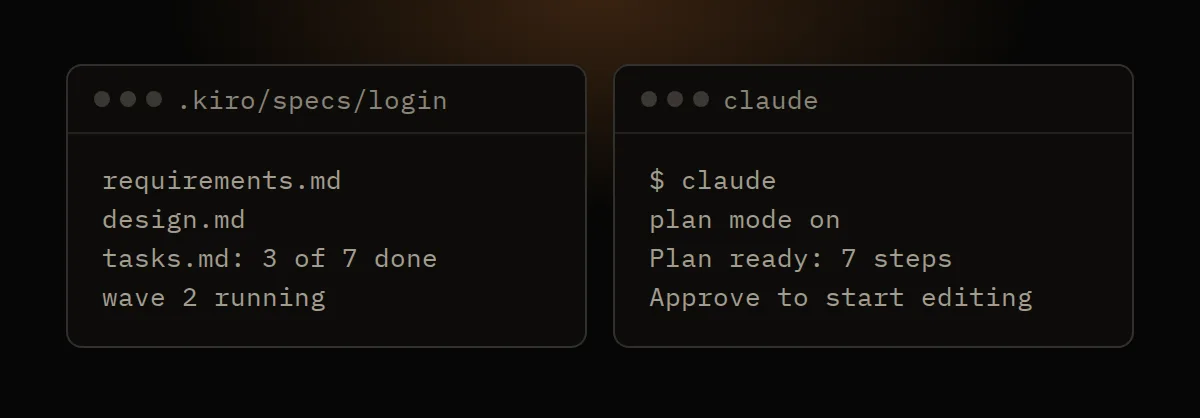
A Kiro spec turns an idea into three files in .kiro/specs/<name>/: requirements.md, or bugfix.md for a bug, with user stories and acceptance criteria; design.md, with architecture, sequence diagrams, error handling and testing strategy; and tasks.md, a list of discrete, trackable tasks. Kiro offers Feature Specs, in a requirements-first or design-first order, Bugfix Specs that record current, expected and unchanged behaviour, and Quick Spec, which writes all three in one pass without approval gates.
When you run all the tasks, Kiro builds a dependency graph from tasks.md and runs independent tasks at the same time in waves: wave 1 is everything with no dependencies, wave 2 everything those unblock, and so on. In the CLI, /spec run <name> opens a full-screen view of progress; in the IDE, tasks update in place as in progress or completed. Specs work in the IDE, CLI, Web and Mobile; requirements analysis works in the IDE and CLI, and property-based correctness testing in the IDE.
Source: Specs, Kiro docs
Claude Code has no spec files of its own. Its plan mode has Claude read the code and propose a plan before it edits anything, and you approve the plan to start; you can also ask Claude to write a plan or design document into the repository first.
Source: Choose a permission mode, Anthropic
Project instructions: steering and CLAUDE.md
Kiro's steering files are markdown files that give the agent standing knowledge of your project. Workspace steering lives in .kiro/steering/ and global steering in ~/.kiro/steering/, and workspace instructions win when they conflict. Kiro can generate three foundation files, product.md for the product's purpose and users, tech.md for your stack, and structure.md for file layout and naming, which are included in every interaction by default. Teams can push global steering files to machines through device management. Kiro reads AGENTS.md on every surface too.
Source: Steering, Kiro docs
Claude Code reads CLAUDE.md files at the start of every session, at the project, user and organisation level, and can read AGENTS.md instead. It also keeps auto memory, notes it saves as it learns how a project works.
Source: How Claude remembers your project, Anthropic
Models and credits
Kiro offers models from Anthropic, OpenAI and other providers, and an Auto option that routes each request. Each model has a credit multiplier relative to Auto at 1.0x, so the same task costs more credits on a larger model:
| Model | Credits relative to Auto | On the Free tier |
|---|---|---|
| Auto | 1.0x | Yes |
| Claude Opus 5.5 | 2.0x | No |
| Claude Sonnet 5.5 | 1.3x | No |
| Claude Sonnet 4.5 | 1.3x | Yes |
| Claude Haiku 5.5 | 0.06x for shorter requests | No |
| GPT-5.6 Sol, Terra, Luna | 4.4x, 2.2x, 0.6x for shorter requests | No |
| DeepSeek 3.2 | 0.25x | Yes |
| Qwen3 Coder Next | 0.05x | Yes |
Kiro gives the example that a task costing 10 credits on Auto costs 20 on Opus 5.5. Its five tiers are Free with 50 credits, Pro with 1,000, Pro+ with 2,000, Pro Max with 5,000 and Power with 10,000, and paid tiers can buy add-on credits. Credits are used fractionally, so simple edits cost less than long tasks. From November 1, 2026, your first upgrade from Free includes the rest of that month on Pro free and 500 trial credits.
Source: Models, Kiro docs
Source: Billing, Kiro docs
Claude Code runs Claude models only, with usage tied to your Claude plan or your Anthropic Console account rather than to a credit multiplier per model.
Source: Claude Code overview, Anthropic
Permissions
Kiro uses capability-based permissions written in YAML: ~/.kiro/settings/permissions.yaml for every project and a workspace file for one. Each rule names a capability, such as fs_read, fs_write, shell, web_fetch, mcp or subagent, optional match and exclude patterns, and an effect: deny, ask, allow, or evaluate, where Kiro judges the action itself. Priority runs deny, then ask, then allow, then evaluate:
rules:
  - capability: shell
    match: ["git *", "npm *", "npx *"]
    effect: allow
  - capability: fs_write
    match: ["src/**", "tests/**"]
    effect: allow
  - capability: fs_read
    effect: allow
On Kiro Web there are no permission prompts; the agent runs in an isolated cloud sandbox and approves every action.
Source: Permissions, Kiro docs
Claude Code writes allow, ask and deny rules in settings.json, such as Bash(npm run *) or Edit(/src/**/*.ts), and adds permission modes on top: Manual, acceptEdits, plan, auto, dontAsk and bypassPermissions, cycled with Shift+Tab.
Source: Configure permissions, Anthropic
Hooks
Kiro hooks run a shell command or inject an agent prompt when an event happens. Each hook is a JSON file in .kiro/hooks/, and Kiro CLI V3 also loads global hooks from ~/.kiro/hooks/. This one runs ESLint whenever the agent saves a TypeScript file:
{
  "version": "v1",
  "hooks": [{
    "name": "Lint on save",
    "trigger": "PostFileSave",
    "matcher": "\\.(ts|tsx)$",
    "action": { "type": "command", "command": "npx eslint --fix" }
  }]
}
Kiro's triggers include Prompt Submit, Agent Stop, Session Start, Pre and Post Tool Use, Permission Request, Pre and Post Compaction, File Create, File Save, File Delete, and Pre and Post Task Execution for spec tasks, with availability varying by surface. Command actions receive session context as JSON on stdin.
Source: Hooks, Kiro docs
Source: Hook types, Kiro docs
Matching tools in a Kiro Pre Tool Use hook
A Pre Tool Use hook fires when the agent is about to call a tool and can validate or block the call. Its tool pattern can be an exact tool ID, a regular expression, or a built-in category: read for file reads, write for file writes, shell, web, and spec for the spec tools. Source selectors narrow it further: @mcp for every MCP tool, @powers for Powers tools, @builtin for built-in tools, @postgres for every tool on one MCP server, or @postgres/query for one tool. Hook JSON files also accept * and ? wildcards. A Run Command hook can return hookSpecificOutput.updatedInput to replace the tool's whole input, and Kiro still checks the replacement against your permission rules.
Source: Hook types, Kiro docs
Claude Code's hooks sit in a hooks block in settings.json, with about 30 events from SessionStart to SessionEnd, and handlers that can be shell commands, HTTP calls, MCP tools, or prompt and agent checks. A PreToolUse hook that denies a call holds in every permission mode.
Source: Automate actions with hooks, Anthropic
Sandbox, agents and cloud work
Kiro's local command sandbox limits what shell commands and child processes can reach on your machine and controls their network access, with sandbox_network permission rules naming allowed hosts; Web and Mobile always run in a cloud sandbox. Kiro also has custom agents, sub-agent delegation, Agent Skills, Powers, which bundle an MCP server with knowledge loaded on demand, checkpoints and rewind, and Kiro Crew for orchestrating teams of agents.
Source: How Kiro works, Kiro docs
Claude Code's sandboxed Bash tool uses Seatbelt on macOS and bubblewrap on Linux and WSL2, and you turn it on with /sandbox. Subagents are markdown files in .claude/agents/ that run side tasks in their own context, and they can be reused as agent team teammates.
Source: Configure the sandboxed Bash tool, Anthropic
Source: Create custom subagents, Anthropic
Which should you choose?
- You want the agent to write requirements, a design and a task list before it builds, and run independent tasks in parallel: Kiro's specs.
- You want one subscription covering many model makers, including OpenAI and open-weight models, with Auto routing: Kiro.
- You want sessions that move from laptop to phone to IDE: Kiro's cloud sessions.
- You want Claude models straight from Anthropic, a large hook system and the same agent in the terminal, VS Code, JetBrains, desktop and web: Claude Code.
- You already use Claude in Kiro: Kiro offers Claude Opus, Sonnet and Haiku models, so you can compare both agents on the same model.
Watching both at once
If you run Kiro and Claude Code side by side, you end up with more sessions to keep an eye on. 10u is an AI coding agent dashboard that shows every Claude Code and Codex session side by side, each in its real terminal, marked Needs you, Working, Waiting or Parked. They do the building. You decide what gets built.

Questions people ask
- Does Kiro use Claude?
- Yes. Kiro offers Claude Opus, Sonnet and Haiku models among others, each with a credit multiplier, and an Auto option that picks a model per request.
- What are Kiro specs?
- Three files Kiro writes before building: requirements.md or bugfix.md, design.md and tasks.md, stored in .kiro/specs/. Kiro then runs the tasks, in parallel where they do not depend on each other.
- Is Kiro free?
- Kiro Free is a permanent tier with 50 credits and a smaller set of models. Paid tiers run from Pro with 1,000 credits to Power with 10,000.
- Is there a Kiro CLI?
- Yes. Install it with brew install kiro-cli or the script at cli.kiro.dev, then run kiro-cli chat in a project.
- Does Claude Code have specs like Kiro?
- Not as a built-in file format. Claude Code's plan mode proposes a plan for you to approve before it edits, and you can ask Claude to write requirements or design files first.