
Claude Code for teams: seats, shared setup, admin controls and agent teams
Claude Code for teams means two different things, and this guide covers both. The first is a team of people: developers who all use Claude Code on one codebase, usually on a Claude Team or Enterprise plan, with a shared CLAUDE.md, a shared settings.json and admin controls on top. The second is agent teams, an experimental Claude Code feature where one session leads several teammate sessions that share a task list and message each other. Most teams want the first and try the second once the basics work.
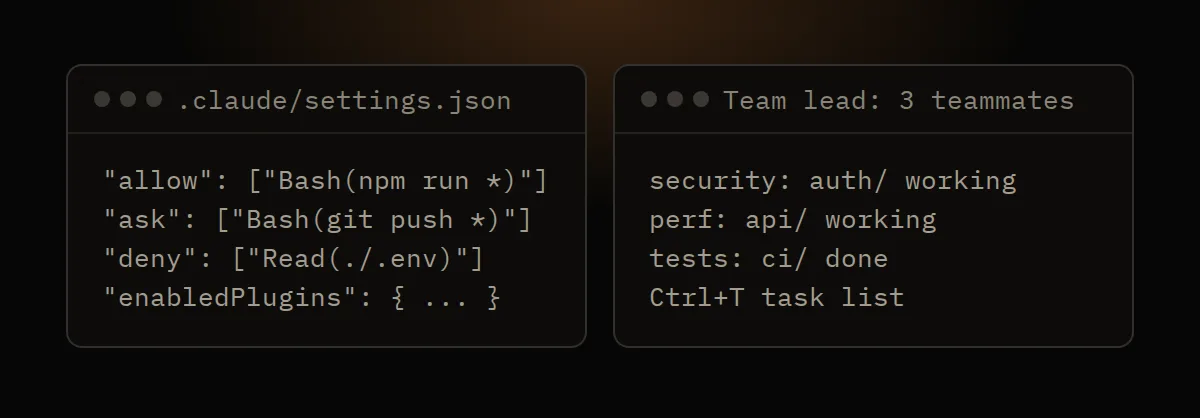
The short version: buy a seat for each developer, commit a CLAUDE.md and a .claude/settings.json to the repository so every session starts the same way, push anything that must not be changed through managed settings, and watch adoption and spend in the analytics dashboard. Everything below is from Anthropic's own documentation and pricing page as of 23 November 2026.
Two meanings of Claude Code for teams
| Meaning | What it is | Who sets it up | Where to start |
|---|---|---|---|
| A team of people | Several developers using Claude Code on the same code, with shared files and one bill | A team lead or admin | Team or Enterprise plan, shared CLAUDE.md and settings.json |
| Agent teams | One Claude Code session leading several teammate sessions on one task | Any developer, per session | CLAUDE_CODE_EXPERIMENTAL_AGENT_TEAMS=1 |
The two fit together. A team of people gets more out of agent teams when the shared files already tell every session how the project works, because each teammate loads the same CLAUDE.md, MCP servers and skills as a normal session.
Claude Code on the Team and Enterprise plans
Claude Code is included with every Team plan seat. On new and self-serve Enterprise plans it is included with the single Enterprise seat. Older Enterprise plans split seats into Chat and Chat + Claude Code (usage-based) or Standard and Premium (seat-based), so check that each developer has a seat type that includes Claude Code. One subscription covers Claude on the web, desktop and mobile plus Claude Code in the terminal, the Claude Desktop Code tab and the IDE extensions.
| Plan | Seat price on 23 Nov 2026 | Seats | How usage works |
|---|---|---|---|
| Team, Standard seat | US$20 per seat per month billed annually, US$25 monthly | 2 to 150 | Allowance above Pro, shared with chat and Cowork |
| Team, Premium seat | US$100 per seat per month billed annually, US$125 monthly | Mix with Standard | 5x the usage of a Standard seat |
| Enterprise | US$20 per seat per month plus usage at API rates, billed annually | 20 seat minimum | No per-seat limits on usage-based plans; admins set spend limits |
Team plans also come with up to US$500 a month in pooled API credits, but Anthropic's help article is explicit that those monthly API credits can't be used in Claude Code or the Claude apps, including for extra usage. They are for your own API calls only.
Source: Claude plans and pricing, Anthropic
Source: Use Claude Code with your Team or Enterprise plan, Claude Help Center
How usage limits work on a team seat
On Team and seat-based Enterprise plans, each member's Claude Code usage draws from a per-seat allowance that resets on a rolling five-hour window and a weekly window. The same allowance covers Claude chat and Cowork, so a developer who spends the morning in chat has less left for coding. Premium seats exist for the people who run Claude Code all day.
When someone runs out, the seat allowance is the ceiling by default. An Owner can turn on usage credits so members keep working past it, and set spend limits for the whole organization, a group or a single member. A developer who hits a limit sees one of a few messages, and they mean different things:
- You've hit your session limit or weekly limit: the seat's window is used up across all models. Switching models with /model doesn't help; the message shows the reset time.
- You've hit your Opus limit or Sonnet limit: one model family is used up, so switching to the other family with /model keeps them working.
- Individual spend limit, monthly spend limit or the team's shared budget: usage credits hit a cap an admin set. Raise it under Organization settings, Usage.
- A context or auto-compact warning: not a usage limit at all. The conversation is close to the point where Claude Code summarizes older history.
Developers on Claude Code v2.1.234 or later can also tell Claude Code to wait for the reset and continue the interrupted task automatically, and admins can control that for everyone with the autoContinueAtUsageLimit setting.
Source: Manage costs effectively, Claude Code docs
Team plan, Console API or a cloud provider
A Team or Enterprise seat is Anthropic's default recommendation for organizations, but it isn't the only way in. Claude Code can authenticate through five kinds of provider, and the choice decides billing, compliance posture and which features developers get.
| Provider | Choose it when | Billing |
|---|---|---|
| Claude for Teams or Enterprise | You want Claude Code and claude.ai under one per-seat subscription with no infrastructure | Per seat, plus usage credits or API-rate usage |
| Claude Console | You are API-first or want pay-as-you-go | Per token to the organization |
| Amazon Bedrock | You want to keep AWS compliance controls and billing | Your AWS bill |
| Google Cloud's Agent Platform | You want to keep Google Cloud controls and billing | Your Google Cloud bill |
| Microsoft Foundry | You want to keep Azure controls and billing | Your Azure bill |
Some Claude Code features need a claude.ai account and don't work with Console API keys or cloud credentials alone: cloud sessions, cloud scheduled tasks, Code Review, Remote Control and the Chrome extension. If you deploy through a cloud provider, decide early whether developers also need Team or Enterprise seats for those.
Source: Set up Claude Code for your organization, Anthropic
Sign every developer in to the team
Once a developer has a seat, the fastest start is Claude Desktop: sign in with the Team or Enterprise account, open the Code tab, and Claude Code is already there under that account. In the terminal it takes four steps:
- Install Claude Code and run claude in the project folder.
- At the login prompt, pick Claude account with subscription. If you are already signed in to a personal account, run /login to switch.
- In the browser, choose the Team or Enterprise organization and click Authorize.
- Back in the terminal, run /status and check that the account and organization are the team ones.
If the team option is missing, run /logout, then claude update, restart the terminal completely and sign in again. A developer who sees You haven't been added to your organization yet has a seat that doesn't include Claude Code, and an admin has to change it in the admin console.
Since Claude Code v2.1.273, skills and plugins the organization provides on claude.ai load in Claude Code automatically after sign-in, which is the simplest way to hand every developer the same tools without touching their machines. The same seat covers the VS Code, Cursor and JetBrains extensions, with IDE usage billed exactly like terminal usage.
Source: Use Claude Code with your Team or Enterprise plan, Claude Help Center
Source: Claude Code authentication, Anthropic
Share one Claude Code setup through the repository
The biggest win for a team is not the plan, it is the shared files. Claude Code reads its setup from plain files in the project, so anything you commit to git reaches every teammate's clone and every cloud session that starts in that repository. A typical shared setup looks like this:
your-repo/
  CLAUDE.md                  shared instructions, loaded every session
  .mcp.json                  MCP servers everyone gets
  .claude/
    settings.json            shared permissions, hooks and plugins (committed)
    settings.local.json      one person's overrides (not committed)
    agents/reviewer.md       a shared subagent
    skills/release-notes/
      SKILL.md               a shared skill, run as /release-notes
Each file has one job. CLAUDE.md is instructions Claude reads at the start of every session. The shared .claude/settings.json sets permissions, hooks and plugins for everyone. .claude/settings.local.json is the personal escape hatch: Claude Code applies it over the shared file and writes standing approvals into it, and it stays out of git. .mcp.json lists MCP servers the whole team connects to. Files in .claude/agents and .claude/skills are subagents and skills the whole team can call.
Source: Claude Code settings, Anthropic
What goes in a team CLAUDE.md
A team CLAUDE.md is the onboarding doc you wish every new hire read, written for Claude. Keep it short and specific: the commands to build, test and lint, the conventions people get wrong, and the things nobody should ever do. Run /init once to have Claude draft one from the codebase, then edit it by hand.
# CLAUDE.md## Commands- Install: pnpm install- Test one package: pnpm --filter <name> test- Lint before every pull request: pnpm lint## How we work- Branch from main, one change per pull request.- Every new endpoint gets a test in the same pull request.- Ask before adding a dependency.## Never- Edit generated/ or vendor/.- Commit .env files or real customer data.Architecture notes: @docs/architecture.md
Anthropic's guidance is to keep each CLAUDE.md under 200 lines, because every line loads into every session. Long reference material belongs in separate files that CLAUDE.md points to with an @ import, or in a skill that loads only when needed. Each person can keep their own preferences in ~/.claude/CLAUDE.md, which applies only to them.
For rules that must reach every developer regardless of the repository, an organization can deploy a managed policy CLAUDE.md to a fixed path on each machine. It is guidance for Claude rather than an enforced rule, so pair it with managed settings for anything that has to hold.
Source: Claude Code memory and CLAUDE.md, Anthropic
Shared permissions and plugins in settings.json
The shared settings.json is where a team agrees what Claude Code may do without asking. This example, adapted from Anthropic's own team file, lets anyone run the project's npm scripts, asks before any git push, blocks secret files and installs one plugin from a company marketplace:
{"permissions": {"allow": ["Bash(npm run *)"],"ask": ["Bash(git push *)"],"deny": ["Read(./.env)","Read(./.env.*)","Read(./secrets/**)"]},"extraKnownMarketplaces": {"acme-tools": {"source": {"source": "github","repo": "acme-corp/claude-plugins"}}},"enabledPlugins": {"code-formatter@acme-tools": true}}
Two details catch teams out. First, allow rules and extraKnownMarketplaces entries in a repository file only apply after each teammate trusts that folder in Claude Code; until then they still see prompts and don't get the plugins. Deny and ask rules apply straight away, trusted or not. Second, rules match the command as written, so Bash(git push *) doesn't match git -C . push. For secrets, a deny rule on Read(./.env) stops the file tools but not every shell command, which is why Anthropic's example also turns on the sandbox.
Some keys never apply from a repository file at all, such as the OpenTelemetry exporter variables. Telemetry settings belong in managed settings or each person's own file.
Source: Example settings files, Claude Code docs
Shared MCP servers, skills and subagents
To give everyone the same outside tools, add MCP servers with project scope. Claude Code writes them to .mcp.json in the repository root, and each teammate approves the server the first time it loads:
claude mcp add --transport http shared-server --scope project https://example.com/mcpSkills and subagents work the same way. A folder in .claude/skills with a SKILL.md becomes a slash command for everyone who clones the repository, and a file in .claude/agents becomes a specialist any session can hand work to. Start with the job your team repeats most: release notes, a migration checklist, or a review pass with read-only tools.
When the same tools should reach many repositories, package them as a plugin in a company marketplace and enable it from each repository's settings.json, as in the example above, or push the marketplace through managed settings.
Admin controls: managed settings for the whole organization
Shared project files are a convention, not a lock: any developer can change their local file. Managed settings are the lock. They take precedence over everything a developer sets, and Claude Code checks four managed sources in priority order:
| Source | How it is delivered | Priority |
|---|---|---|
| Server-managed | claude.ai admin console (Team or Enterprise), or a self-hosted Claude apps gateway | Highest |
| plist or registry policy | macOS com.anthropic.claudecode plist, Windows HKLM\SOFTWARE\Policies\ClaudeCode | High |
| File-based managed | managed-settings.json at a fixed path on each machine | Medium |
| Windows user registry | HKCU\SOFTWARE\Policies\ClaudeCode | Lowest |
Server-managed settings are the easy route for a Team or Enterprise organization: an admin edits them in the claude.ai admin console, Claude Code fetches them at startup and refreshes them hourly during a session, and there is no device management to run. Only the Primary Owner and Owner roles can change them, because a change applies to every user in the organization.
For file-based delivery, through your MDM or a configuration tool, the file goes here:
macOS:          /Library/Application Support/ClaudeCode/managed-settings.json
Linux and WSL:  /etc/claude-code/managed-settings.json
Windows:        C:\Program Files\ClaudeCode\managed-settings.json
The macOS plist and the HKLM registry key need admin rights to write, which makes them tamper-resistant. The HKCU registry key does not, so Anthropic describes it as a convenience default rather than an enforcement channel.
Source: Configure server-managed settings, Claude Code docs
What admins usually lock down
This managed settings file, based on Anthropic's organization example, forces sign-in through your own claude.ai organization, limits the model picker to Opus and Sonnet, blocks curl and secret files, turns off bypass permissions mode and makes managed rules the only permission rules that count:
{"forceLoginMethod": "claudeai","forceLoginOrgUUID": ["xxxxxxxx-xxxx-xxxx-xxxx-xxxxxxxxxxxx"],"availableModels": ["opus","sonnet"],"enforceAvailableModels": true,"permissions": {"deny": ["Bash(curl *)","Read(./.env)","Read(./secrets/**)"],"disableBypassPermissionsMode": "disable"},"allowManagedPermissionRulesOnly": true}
The full list of controls is long. These are the ones most teams reach for first:
- Permission rules and lockdown: permissions.allow and permissions.deny, plus allowManagedPermissionRulesOnly and permissions.disableBypassPermissionsMode to stop --dangerously-skip-permissions.
- Starting permission mode: permissions.defaultMode, or permissions.disableAutoMode to remove auto mode.
- Sandboxing: sandbox.enabled and sandbox.network.allowedDomains for operating-system-level file and network isolation.
- MCP servers: allowedMcpServers, deniedMcpServers, allowManagedMcpServersOnly or managedMcpServers.
- Plugins: strictKnownMarketplaces and blockedMarketplaces to control where plugins come from.
- Hooks: allowManagedHooksOnly and allowedHttpHookUrls.
- Sign-in: forceLoginMethod and forceLoginOrgUUID, which also block sessions that use a personal API key.
- Models and effort: availableModels with enforceAvailableModels, and maxEffortLevel.
- Versions: minimumVersion to stop downgrades, or requiredMinimumVersion and requiredMaximumVersion to refuse to start outside an approved range.
- Telemetry: CLAUDE_CODE_DISABLE_NONESSENTIAL_TRAFFIC set to 1 in env to turn off Anthropic-bound metrics, error reports and surveys.
Permission rules and the sandbox cover different layers. Denying WebFetch blocks Claude's fetch tool, but if Bash is allowed, curl and wget can still reach any address; the sandbox's network allowlist closes that gap at the operating-system level. Enterprise organizations that sign in through claude.ai can also restrict models, set a default model and cap effort per role from the admin settings, enforced on the server, without deploying any file.
To check that policy reached a machine, have a developer run /status. On the Status tab, the Setting sources line shows Enterprise managed settings followed by the source that won.
Source: Set up Claude Code for your organization, Anthropic
Track adoption and spend for the team
Team and Enterprise organizations get a Claude Code analytics dashboard at claude.ai/analytics/claude-code, visible to Admins and Owners. It shows lines of code accepted, the suggestion accept rate, daily active users and sessions, a leaderboard of the top 10 contributors and a CSV export of everyone.
Contribution metrics, which count merged pull requests and lines that Claude Code helped write, are in public beta and need GitHub connected. The setup takes four steps:
- A GitHub admin installs the Claude GitHub app on the organization at github.com/apps/claude.
- A Claude Owner enables Claude Code analytics at claude.ai/admin-settings/claude-code.
- On the same page, the Owner turns on the GitHub analytics toggle.
- The Owner completes the GitHub sign-in and picks which GitHub organizations to include.
Data usually appears within 24 hours and updates daily. Anthropic calls these numbers deliberately conservative: only lines and pull requests with high confidence of Claude Code's involvement count, and only effective lines of more than three characters. Contribution metrics are not available with Zero Data Retention, and repositories on GitHub Enterprise Server show usage metrics only.
Money is reported separately. On Team and Enterprise, usage inside the seat allowance isn't metered in dollars. Once usage credits are on, the spend report in the organization's analytics settings lists token usage and estimated spend per user and per model, updated daily with a CSV export. Enterprise organizations can pull per-user usage and cost over the Enterprise Analytics API with a key that has the read:analytics scope. OpenTelemetry export works on every plan and is the only option that streams per-user token and cost metrics into your own monitoring in near real time.
For budgeting, Anthropic's cost guide gives a starting point from enterprise deployments: about US$13 per developer per active day, US$150 to US$250 per developer per month, and under US$30 per active day for 90% of users. Run a small pilot group first and set your own baseline before rolling out to everyone.
Source: Track team usage with analytics, Claude Code docs
Source: Manage costs effectively, Claude Code docs
Agent teams: several Claude Code sessions working as one team
Agent teams are the other meaning of Claude Code for teams. One Claude Code session acts as the team lead: it splits the work, spawns teammates, assigns tasks and pulls the results together. Each teammate is a full, independent Claude Code session with its own context window, and teammates message each other directly instead of only reporting back to the lead. You can also talk to any teammate yourself.
Agent teams are experimental and off by default. Turn them on with an environment variable, in your shell or in settings.json:
{"env": {"CLAUDE_CODE_EXPERIMENTAL_AGENT_TEAMS": "1"}}
Spawning teammates needs an interactive session. In non-interactive mode with -p, including Agent SDK sessions, Claude doesn't spawn teammates even with the variable set.
Source: Orchestrate teams of Claude Code sessions, Claude Code docs
Start an agent team
With agent teams enabled, describe the task and the teammates you want in plain language. Work with clear boundaries that doesn't need code written is the best first try, such as a review:
Spawn three teammates to review pull request 142: one on security,one on performance, one checking the tests. Have them share findingsand challenge each other before you write the summary.
Claude fills a shared task list, spawns the teammates and has them work through it. Tasks are pending, in progress or completed, and a task can depend on others and show as blocked until they finish. The lead can assign tasks, or a teammate that finishes picks up the next unassigned, unblocked task on its own; claiming uses file locking so two teammates can't grab the same task.
If Claude spawns ordinary subagents instead, which can happen, ask again and request an agent team explicitly. Teammates appear in an agent panel below the prompt: arrow keys select one, Enter opens its transcript so you can message it, x stops it and Ctrl+T toggles the task list. To end a teammate cleanly, ask the lead to shut it down by name.
Display modes: in-process or split panes
By default every teammate runs in-process inside your main terminal, which works anywhere. If you run Claude Code inside tmux or iTerm2, teammates can each get their own pane so you see everyone's output at once. Set teammateMode in settings.json:
{"teammateMode": "auto"}
With auto, teammates open in split panes inside tmux or iTerm2 and run in-process anywhere else. You can force tmux or iterm2 instead, or set the mode for one session with the experimental --teammate-mode flag.
Agent teams compared with subagents
| Subagents | Agent teams | |
|---|---|---|
| Context | Own context window; results return to the caller | Own context window; fully independent |
| Communication | Return a result to the caller | Teammates message each other directly |
| Coordination | The main agent manages all work | Shared task list plus messages |
| Best for | Focused jobs where only the result matters | Work that needs discussion and challenge |
| Token cost | Lower: results are summarized back | Higher: each teammate is a separate Claude instance |
Anthropic's advice is to check whether a lighter option does the job first. For sequential tasks, edits to the same file or work with many dependencies, a single session or subagents are more effective. Agent teams earn their cost on research and review, new modules that split cleanly, debugging with competing theories, and changes that span frontend, backend and tests.
Team size, cost and limits
There is no hard limit on teammates, but Anthropic suggests starting with three to five, with five or six tasks per teammate. Token use scales roughly linearly with team size because every teammate has its own context window, so use Sonnet for teammates, keep spawn prompts focused and shut teammates down when their work is done. Three focused teammates often beat five scattered ones.
Hooks give a team quality gates: TeammateIdle runs when a teammate is about to go idle, TaskCreated when a task is created and TaskCompleted when one is marked done. Exiting a hook with code 2 sends feedback and keeps the teammate working or blocks the task change. A teammate starts with the lead's permission mode, including bypass permissions mode, so set the lead's mode with care before you spawn.
Because the feature is experimental, it has real limits today:
- /resume and /rewind don't restore in-process teammates, so after resuming, tell the lead to spawn new ones.
- Task status can lag when a teammate forgets to mark a task complete, which blocks the tasks that depend on it.
- One team per session, no nested teams, and the lead can't hand leadership to a teammate.
- Two teammates editing the same file overwrite each other, so split work by file.
- Split panes need tmux or iTerm2; in-process mode works in any terminal.
Source: Orchestrate teams of Claude Code sessions, Claude Code docs
Data, privacy and compliance on team plans
On Team, Enterprise, Claude API and cloud provider plans, Anthropic doesn't train models on your code or prompts by default. Retention and compliance depend on the provider you sign in through. Qualified Enterprise accounts can get Zero Data Retention, where nothing is stored after a request completes, and HIPAA-ready Enterprise plans can apply a HIPAA configuration to Claude Code in local mode; without it, Claude Code isn't covered by the Business Associate Agreement and shouldn't be used with protected health information.
For request-level audit logs or routing by data sensitivity, Anthropic recommends putting a gateway between developers and the provider. Its self-hosted Claude apps gateway records a per-request audit log with the identity from your identity provider.
Source: Claude Code data usage, Anthropic
A simple rollout plan for a small team
- Buy seats for a pilot group of three to five developers, Premium for anyone who codes with Claude most of the day.
- Commit a short CLAUDE.md and a .claude/settings.json with your test, lint and secret-file rules.
- Add the MCP servers and one or two skills the team needs, with project scope, and commit them.
- Turn on server-managed settings for the few rules that must hold, such as blocking bypass permissions mode.
- Connect GitHub for contribution metrics and turn on usage credits with a spend limit per member.
- After two weeks, compare the analytics and spend report with your baseline, then roll out to the rest of the team.
- Once the shared setup is stable, let developers try agent teams on reviews and research before implementation work.
Seeing a whole team's Claude Code sessions at once
The more of a team runs Claude Code, and the more sessions each person runs, the harder it is to know which session is waiting for a person. 10u is an AI coding agent dashboard that shows every Claude Code and Codex session side by side, each in its real terminal, marked Needs you, Working, Waiting or Parked, so nobody leaves an agent stuck on a question for an hour. They do the building. You decide what gets built.

Questions people ask
- Is Claude Code included in the Team plan?
- Yes. Claude Code is included with every Team plan seat, Standard or Premium. Premium seats give five times the usage of a Standard seat for heavier users.
- How much does Claude Code for teams cost?
- On 23 November 2026 a Team Standard seat was US$20 per month billed annually or US$25 monthly, and a Premium seat US$100 or US$125. Enterprise was US$20 per seat per month plus usage at API rates, with a 20 seat minimum.
- How do I share Claude Code settings with my team?
- Commit CLAUDE.md, .claude/settings.json and .mcp.json to the repository. Everyone who clones it gets the same instructions, permissions, hooks and MCP servers, and each person can override settings in .claude/settings.local.json.
- What are Claude Code agent teams?
- An experimental feature where one Claude Code session leads several teammate sessions. Teammates share a task list, claim work and message each other. Enable it with CLAUDE_CODE_EXPERIMENTAL_AGENT_TEAMS=1.
- Can admins enforce Claude Code settings for everyone?
- Yes. Managed settings override every developer setting. Team and Enterprise Owners can push them from the claude.ai admin console, or IT can deploy managed-settings.json, a macOS plist or a Windows registry policy.
- Can Team plan API credits pay for Claude Code?
- No. The monthly API credits included with Team plans can't be used in Claude Code or the Claude apps, including for extra usage. Claude Code draws on the seat allowance and usage credits.