
Codex skills: how to create, install and use them
A Codex skill is a folder with a SKILL.md file that teaches Codex one repeatable job, such as writing release notes or fixing a failing CI run. Codex loads skills from .agents/skills in your repository, from ~/.agents/skills for your own, and from a few system locations. Type $ followed by a skill name, or run /skills, to use one directly, or let Codex pick it when your request matches its description. Create one with $skill-creator, or add curated ones with $skill-installer.
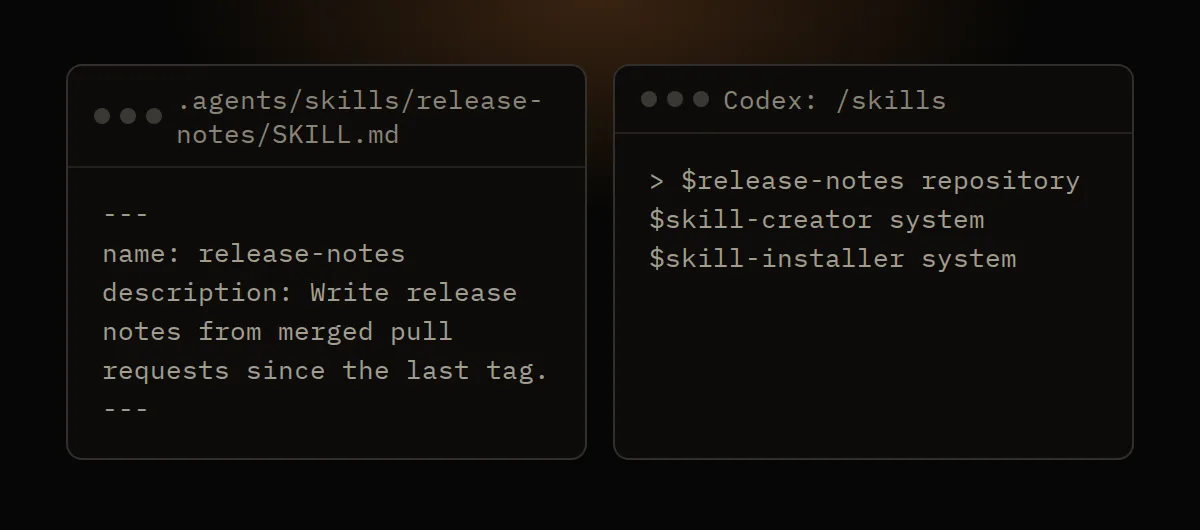
What a Codex skill is
A skill packages instructions and supporting resources for a specific task or workflow, so you stop pasting the same prompt, template or checklist into every chat. Skills build on the open Agent Skills standard, the same format other AI coding tools read, so a well-written skill is portable.
A skill can combine three things: a name and description that tell Codex when the skill applies, workflow instructions that define the steps and the expected result, and supporting resources such as templates, examples, schemas or scripts. They are most useful when a good result depends on doing things the same way every time.
my-skill/
  SKILL.md            required: instructions and metadata
  scripts/            optional: code the skill can run
  references/         optional: documentation
  assets/             optional: templates and resources
  agents/openai.yaml  optional: appearance, policy and dependencies
Only SKILL.md is required, and it must include a name and a description. Everything else is optional.
Source: Build skills for ChatGPT and Codex, OpenAI
Source: Agent Skills open standard
Skills and plugins: what is the difference?
A skill is the authoring format for one workflow. A plugin is an installable bundle that can hold one or more skills plus MCP servers, which add tools and context from services such as GitHub, Google Drive or Slack, and lifecycle hooks. Use a skill when you need reusable instructions for a focused task. Use a plugin when you want to share it widely, bundle several skills, or ship a skill together with a connection to another service.
Standalone skills work in the ChatGPT desktop app, the Codex CLI and the IDE extension. Skills inside plugins also work in Chat and Work across ChatGPT on the web, desktop and mobile. ChatGPT and Codex share one plugin directory.
Source: Skills and plugins, OpenAI
How Codex uses skills
Codex can start a skill in two ways:
- Explicitly: run /skills, or type $ and the skill name in your prompt, in the Codex CLI or IDE extension. In the ChatGPT desktop app, skills also appear in the Skills section of the sidebar.
- Implicitly: Codex picks a skill by itself when your task matches the skill description.
Skills use progressive disclosure to save context. At the start, Codex only sees each skill name, description and file path. It reads the full SKILL.md only when it decides to use that skill. By default that first list uses at most 2% of the model context window, or 8,000 characters when the window size is unknown.
If you install many skills, Codex shortens descriptions first, and for very large sets it may leave some skills out of the list and show a warning. You can change the budget, up to 10,000 tokens:
[skills]
max_context_tokens = 10000
The budget only covers the starting list. Once Codex chooses a skill, it still reads the whole SKILL.md.
Source: Build skills for ChatGPT and Codex, OpenAI
Codex skills or AGENTS.md: which one to use
Both give Codex instructions, but they load at different times. Codex reads AGENTS.md files before doing any work: a global file in ~/.codex, then one file per folder from the project root down to where you started, joined together, up to 32 KiB by default. Everything in AGENTS.md is in the prompt for every task, whether the task needs it or not.
A skill is the opposite. Only its name, description and path sit in the prompt until Codex decides the skill fits, and only then does it read the full SKILL.md instructions. That makes the split simple:
- Put rules that apply to every task in AGENTS.md: the test command, the lint step before a pull request, naming conventions, folders never to touch.
- Put a procedure you only need sometimes in a skill: releasing, writing a changelog, migrating a database, fixing a failing CI run.
- If AGENTS.md keeps growing toward its size limit with step-by-step procedures, move each procedure into its own skill and leave a one-line rule behind.
Source: Custom instructions with AGENTS.md, OpenAI
Source: Build skills for ChatGPT and Codex, OpenAI
Create a Codex skill
With the skill creator
$skill-creatorThe built-in creator asks what the skill does, when it should trigger, and whether it should be instructions only or include scripts. Instructions only is the default. Start with a task you already repeat, such as a weekly update, a pull request review or a meeting follow-up. Note what you normally start with and what a finished result looks like, then describe the steps, the format and anything the skill must always include or avoid. Add a template or a good example if you have one.
If a workflow is easier to show than to describe, Record and Replay can watch you do it once and draft a skill from the recording.
By hand
Make a folder and put a SKILL.md file in it:
---
name: skill-name
description: Explain exactly when this skill should and should not trigger.
---

Skill instructions for ChatGPT or Codex to follow.
Codex notices new and changed skills automatically. If an update does not show up, restart Codex.
Source: Build skills for ChatGPT and Codex, OpenAI
An example Codex skill
Here is a complete skill for writing release notes. Save it as .agents/skills/release-notes/SKILL.md in your repository so everyone on the team gets it:
---
name: release-notes
description: Write release notes from merged pull requests since the last tag. Use when asked for release notes, a changelog entry or a summary of what shipped. Not for commit messages.
---

1. Find the latest tag with git describe --tags --abbrev=0.
2. List the commits and merged pull requests since that tag.
3. Group the changes under Added, Changed, Fixed and Removed.
4. Write one plain sentence per change, naming the user-facing effect.
5. Leave out internal refactors unless they change behaviour.
6. Return Markdown ready to paste into CHANGELOG.md.
Notice three things. The description says when to use the skill and when not to, with the trigger words near the start, so Codex can still match it if descriptions get shortened. The steps are short imperative sentences with a clear input and output. And there is no script, because the job does not need one: instructions are easier to read, review and change. With it in place, type $release-notes, or just ask Codex for release notes since the last tag.
Source: Build skills for ChatGPT and Codex, OpenAI
When a Codex skill should include a script
The skill creator starts instruction-only by default, and OpenAI advises preferring instructions over scripts unless you need deterministic behaviour or external tooling. A script earns its place when the same input must always give the same output, such as parsing a file format, calling an API with exact parameters, or checking a result against a schema. Put the code in the scripts/ folder and tell Codex in SKILL.md when to run it and what to do with its output.
Longer background material belongs in references/, and templates or sample files in assets/. Keeping SKILL.md itself short means Codex reads less when it loads the skill, and anyone reviewing the skill can see the workflow at a glance. The curated GitHub CI repair, PDF and Linear skills in openai/skills are good models of how much to put where.
Source: Build skills for ChatGPT and Codex, OpenAI
Source: openai/skills on GitHub
Where Codex loads skills from
Codex reads skills from repository, user, admin and system locations. In a repository, it scans .agents/skills in every folder from where you started Codex up to the repository root.
| Scope | Location | Use it for |
|---|---|---|
| Repository | $CWD/.agents/skills, the folder where you start Codex | Skills for one service or module |
| Repository | $CWD/../.agents/skills, folders above it inside the repository | Skills for a shared area of a monorepo |
| Repository | $REPO_ROOT/.agents/skills, the repository root | Skills for everyone working in the repository |
| User | $HOME/.agents/skills | Your own skills, in every repository |
| Admin | /etc/codex/skills | Machine-wide skills for automation, SDK scripts or every user on a machine |
| System | Bundled with Codex | skill-creator and skill-installer, on by default |
Codex follows symbolic links in these folders, so you can keep a skill in one place and link it into several repositories. If two skills share the same name, Codex does not merge them: both can appear in the picker, so give each skill a distinct name.
Source: Build skills for ChatGPT and Codex, OpenAI
Install curated Codex skills
$skill-installer linearThe skill installer adds curated skills beyond the built-in ones to your local setup, and can also download skills from other repositories when you ask it to. OpenAI keeps its curated skills in the openai/skills repository on GitHub, including skills for repairing GitHub CI runs, working with PDF files and Linear. Read a skill before you install it, the same way you would read a script, because its instructions steer what Codex does and its scripts run on your machine.
The installer is meant for local setup and experiments. To share your own skills with other people, package them as a plugin instead.
Source: Build skills for ChatGPT and Codex, OpenAI
Source: openai/skills on GitHub
Turn Codex skills on and off
To switch a skill off without deleting it, add an entry to ~/.codex/config.toml:
[[skills.config]]
path = "/path/to/skill/SKILL.md"
enabled = false
Each entry takes exactly one selector. An absolute path matches one SKILL.md file, and a name matches every skill with that name. When several entries match the same skill, the last one wins. To turn off all the bundled system skills for one project, put this in its trusted .codex/config.toml:
[skills.bundled]
enabled = false
Restart Codex after changing the configuration.
Source: Build skills for ChatGPT and Codex, OpenAI
Optional skill settings in agents/openai.yaml
An agents/openai.yaml file inside the skill folder controls how the skill looks in the ChatGPT desktop app, when it may run, and which tools it depends on:
interface:
  display_name: "Optional user-facing name"
  short_description: "Optional user-facing description"
  brand_color: "#3B82F6"
  default_prompt: "Optional surrounding prompt to use the skill with"
policy:
  allow_implicit_invocation: false
dependencies:
  tools:
    - type: "mcp"
      value: "openaiDeveloperDocs"
      description: "OpenAI Docs MCP server"
      transport: "streamable_http"
      url: "https://developers.openai.com/mcp"
The most useful setting is allow_implicit_invocation. It is true by default. Set it to false for a skill that should only run when you ask for it by name, such as a deployment or anything with side effects: Codex then never picks it on its own, but $skill-name still works. Declaring an MCP server under dependencies tells Codex which tool the skill expects, so the setup is smoother for whoever installs it.
Source: Build skills for ChatGPT and Codex, OpenAI
Share Codex skills with your team
- Inside one repository, commit the skill to .agents/skills at the root, or in the folder of the service it belongs to. Everyone who clones the repository gets it.
- Across repositories on your own machine, keep skills in ~/.agents/skills, or link one folder into several projects.
- For a whole machine or container, an administrator can place skills in /etc/codex/skills.
- Beyond that, package the skills as a plugin, which can also bundle MCP connections and presentation assets, and publish it to the plugin directory when it is ready for review.
In ChatGPT workspaces, you can also share a skill with teammates when your workspace settings allow it.
Source: Skills and plugins, OpenAI
How to write Codex skills that work
- Keep each skill focused on one job. Two jobs means two skills.
- Write the description first, because it decides when the skill runs. Put the main use case and trigger words at the start, and say what the skill is not for.
- Prefer instructions over scripts unless you need exact, repeatable behaviour or outside tooling.
- Write imperative steps with clear inputs and outputs.
- Test the trigger: try prompts that should start the skill and prompts that should not, and adjust the description until both behave.
- Try each new skill on a realistic request, and refine it when the result misses a step or drifts from the format you want.
Source: Build skills for ChatGPT and Codex, OpenAI
When a Codex skill does not run
The skill does not appear at all
Check that the folder holds a file named exactly SKILL.md with name and description in its front matter, and that it sits in one of the scanned locations. Restart Codex if it still does not show.
Codex never picks it by itself
The description probably does not match how you phrase the request. Rewrite it with the words you actually use, near the start. Also check that allow_implicit_invocation is not set to false.
Codex uses the wrong skill
Two descriptions overlap. Make each one narrower, and say in each what it is not for. If two skills share a name, rename one.
Some skills are missing from a long list
With many skills installed, the starting list can run past its budget. Raise skills.max_context_tokens, or turn off skills you do not use.
Source: Build skills for ChatGPT and Codex, OpenAI
Good first Codex skills
OpenAI suggests starting with a task you already repeat, where the steps and the format should stay the same each time. For coding work, that usually means one of these:
- Release notes or changelog entries in your team format.
- A pull request review checklist: what to check, in what order, and how to report it.
- Fixing a failing CI run, starting from the failed job log.
- Scaffolding a new module, endpoint or component the way your codebase already does it.
- A weekly status update gathered from the same tools each week.
- Applying a team writing standard to documentation.
The same skills work in ChatGPT, where you type @ to pick a skill and use @skill-creator to make one, so a workflow written once can serve both the people who code and the people who do not.
Source: Skills and plugins, OpenAI
Codex skills and Claude Code skills
Claude Code reads the same Agent Skills format. Its skills also live in a folder with a SKILL.md file holding a name and a description, but in different places: ~/.claude/skills for your own and .claude/skills in a project. Claude Code adds extras of its own, such as disable-model-invocation to stop Claude starting a skill by itself, which plays the same role as allow_implicit_invocation: false in Codex. Because the format is shared, one skill folder can serve both agents if you link it into both locations.
Source: Claude Code skills, Anthropic
Skills across many sessions
A good skill makes every session do a job the same way, which matters most when several agents run at once. 10u is an AI coding agent dashboard that shows every Codex and Claude Code session side by side, each in its real terminal, marked Needs you, Working, Waiting or Parked. They do the building. You decide what gets built.

Questions people ask
- What are Codex skills?
- Folders with a SKILL.md file that give Codex instructions and resources for one repeatable task. Codex uses them when you mention them with $ or when your request matches their description.
- Where do Codex skills go?
- In .agents/skills inside a repository, in ~/.agents/skills for your own skills, or in /etc/codex/skills for a whole machine.
- How do I create a Codex skill?
- Type $skill-creator in Codex and describe the task, or make a folder with a SKILL.md file that has a name, a description and instructions.
- How do I list the skills in Codex?
- Run /skills in the Codex CLI or IDE extension, or type $ to see skills you can mention. The ChatGPT desktop app lists them under Skills in the sidebar.
- Do Codex skills work in Claude Code?
- Both follow the Agent Skills standard with a SKILL.md file, so a skill can work in both, but each tool loads skills from its own folders.