
Claude Code orchestrator: how to coordinate many agents
A Claude Code orchestrator is whatever hands work to several Claude Code agents and keeps track of them. Claude Code now has orchestration built in: subagents for helpers inside one session, agent teams for a lead with teammates, agent view for many background sessions, and cross-session messaging so sessions can tell each other what changed. For full control, a script can run claude -p in separate worktrees. Here is how each one works and which to pick.
| Option | Who orchestrates | Good for |
|---|---|---|
| Subagents | Claude, inside one session | Splitting one task into focused side jobs |
| Agent teams | A lead session | One big task whose parts need to talk |
| Agent view | You | Many unrelated background sessions |
| Cross-session messaging | The sessions themselves | Passing findings between sessions you run |
| Scripts with claude -p | Your own code | Repeatable pipelines and CI |
| A multi-agent dashboard | You | Claude Code and Codex together on one screen |
1. Subagents: Claude orchestrates inside one session
The simplest orchestrator is Claude itself. In any session, Claude can hand a job to a subagent: a helper with its own context window, its own instructions and, if you like, a limited set of tools. The subagent does the work away from the main conversation and only its result comes back, so the main conversation stays focused.
Claude Code has built-in subagents it uses by itself, such as Explore for searching a codebase and Plan for research in plan mode. You can add your own as Markdown files in .claude/agents/ for one project or ~/.claude/agents/ for all of them. Most subagents Claude spawns from your main conversation run in the background, so you can keep talking while they work.
---
name: test-writer
description: Writes missing tests. Use after a feature is built.
tools: Read, Edit, Bash
model: sonnet
---

Write focused tests for the code you are given. Run them and report
which pass. Do not change the code under test.
Choose subagents when only the result matters and the helpers do not need to talk to each other. They cost the least of the options here, because only their summaries come back into the main context.
Source: Create custom subagents, Anthropic
Subagent settings that matter for orchestration
A subagent file's frontmatter decides how much freedom each worker gets. Only name and description are required; the rest let you shape a worker for its job:
| Field | What it does for an orchestrator |
|---|---|
| tools, disallowedTools | Give a reviewer read-only tools, or deny a command such as git push |
| model, effort | Run routine workers on a cheaper model and lower effort |
| permissionMode | Set how the worker handles permissions, for example plan to research without editing |
| maxTurns | Stop a worker after a set number of turns so it cannot run on forever |
| isolation: worktree | Run the worker in a temporary Git worktree, so its edits never touch your checkout |
| background | Keep the worker in the background even when Claude would wait for it |
| memory | Give the worker persistent memory across sessions, at user, project or local scope |
| skills, mcpServers, hooks | Preload know-how, connect tools and add checks just for this worker |
isolation: worktree is the one most orchestrators want: each writing worker gets its own copy of the files, so two workers never overwrite each other.
2. Agent teams: a lead session orchestrates teammates
Agent teams are Claude Code's built-in orchestrator for bigger jobs. One session is the team lead. It spawns teammates, each a full Claude Code session with its own context, puts the work on a shared task list, and the teammates claim tasks and message each other directly. Teams are experimental and off by default; turn them on by setting CLAUDE_CODE_EXPERIMENTAL_AGENT_TEAMS to 1 in your environment or in the env block of settings.json.
Spawn three teammates to review PR #142:
- One focused on security implications
- One checking performance impact
- One validating test coverage
Have them each review and report findings.- The task list tracks pending, in-progress and completed work, and blocked tasks unblock themselves when the tasks they depend on finish.
- Teammates can show in your main terminal, or each in its own pane with tmux or iTerm2.
- Hooks named TeammateIdle, TaskCreated and TaskCompleted let you enforce checks, such as keeping a teammate working until the tests pass.
- Anthropic suggests 3 to 5 teammates for most work, with about 5 or 6 tasks each.
Teams use far more tokens than one session: Anthropic's cost guide puts it at about 7 times a standard session when teammates run in plan mode. There is one team per session, teammates cannot start their own teams, and /resume does not bring back in-process teammates.
Source: Orchestrate teams of Claude Code sessions, Anthropic
Source: Track your Claude Code usage, Anthropic
Steering the team
- Choose the team: Claude picks how many teammates to spawn, or you say exactly, for example "Spawn 4 teammates to refactor these modules in parallel. Use Sonnet for each teammate."
- Plan first: a teammate spawned while the lead is in plan mode works in plan mode too, and sends a plan approval request to the lead before it builds.
- Talk to any teammate: each is a full Claude Code session. In the main terminal, select one in the agent panel and press Enter to message it, x to stop it, and Ctrl+T to show the task list. In split panes, click into its pane.
- Assign or self-claim: the lead can hand a task to a named teammate, or teammates pick up the next unassigned, unblocked task when they finish. Claiming uses file locking so two teammates never grab the same task.
- Shut down by name: "Ask the researcher teammate to shut down" sends a shutdown request the teammate can accept or decline with a reason. Shared team folders are cleaned up when the session ends.
Two patterns that work well
Parallel review is the easiest place to start: one teammate per lens, such as security, performance and tests, each reporting findings. Anthropic also suggests competing hypotheses for hard bugs: spawn several teammates, give each a different theory, and have them try to disprove each other's, like a scientific debate. A single agent tends to find one plausible explanation and stop; the theory that survives several investigators trying to knock it down is much more likely to be the real cause.
Users report the app exits after one message instead of staying connected.
Spawn 5 agent teammates to investigate different hypotheses. Have them talk to
each other to try to disprove each other's theories, like a scientific
debate. Update the findings doc with whatever consensus emerges.
Getting team size and task size right
There is no hard limit on teammates, but each has its own context window, so token costs grow with every one you add, and so does the coordination. Anthropic's advice is to start with 3 to 5 teammates; with 15 independent tasks, 3 is a good start, and three focused teammates often beat five scattered ones. Tasks should be self-contained pieces with a clear result, such as a function, a test file or a review. Too small and the coordination costs more than it saves; too big and a teammate works too long without checking in. If the lead starts doing the work itself, tell it to wait for its teammates to finish.
3. Agent view: you orchestrate many background sessions
When the work is several unrelated tasks rather than one big one, run each as its own Claude Code session and orchestrate them yourself. Agent view, opened with claude agents, is Anthropic's screen for this. It lists every background session grouped by state, with pinned sessions and the ones that need you at the top.
claude agents- States are Working, Needs input, Idle, Completed, Failed and Stopped.
- Press Space on a row to peek: for a waiting session you see its exact question and can reply in place.
- Press Enter to attach to the full session; Claude posts a short recap of what happened while you were away.
- Type /bg in any session, or press the left arrow on an empty prompt, to send it to the background.
- claude agents --json gives the same state to a script.
Source: Manage multiple agents with agent view, Anthropic
Dispatching work from agent view
Agent view is also where you start new workers. Type a prompt in the box at the bottom and press Enter to dispatch a new background session, named automatically from the prompt. A few prefixes shape how it starts:
| Type | What happens |
|---|---|
| <agent-name> <prompt> | Runs your custom subagent of that name as the session's main agent, with its frontmatter settings |
| @<repo> | Runs the session in that repository |
| ! <command> | Runs a shell command as a background job you can attach to and watch |
| #<number> or a pull request link | Selects the session already working on that pull request instead of starting another |
Each row carries a one-line summary of what the session is doing, the question it is asking, or what it produced, written by a small Haiku-class model and refreshed every few minutes during long turns. When a session opens or works on a pull request, its number appears on the row, coloured yellow while waiting on checks or review, green when checks pass, purple once merged and grey for drafts or closed ones.
4. Cross-session messaging: sessions coordinate themselves
Separate sessions do not share a conversation, but they can send each other messages. When one session finds a breaking change or settles a decision, Claude can pass a short summary to the session working on the affected area, instead of you copying it between terminals. It works between sessions on the same machine and can reach your sessions on other machines or in the cloud. It needs Claude Code v2.1.224 or later on macOS and Linux, and v2.1.234 or later on Windows, and it is on with nothing to set up.
Anthropic lists four good uses: handing over a finding, coordinating sessions working in separate worktrees of one repository, getting status from long-running work, and reaching a session on another machine. You can ask for it in plain words:
Ask the session running in my other terminal whether the migration finishedA message is only text one Claude writes to another; it never carries the sender's conversation history or files. To move a whole conversation, resume the session instead.
Wait for another session without watching it
A session can ask another of your sessions on the same machine to send back one notice when it next goes idle or exits, for example "Tell me when the migration session finishes what it's working on". Asking costs nothing in the watched session, and if no notice comes within 12 hours the request is dropped so Claude does not wait forever. Messages between sessions on one machine travel over a local socket or named pipe, never through Anthropic's servers; messages to your other machines or cloud sessions go through Anthropic's servers.
Source: Message your other Claude Code sessions, Anthropic
5. Your own orchestrator with claude -p and worktrees
For full control, write the orchestrator yourself. claude -p runs Claude Code without the interactive screen: it takes a prompt, does the work and exits, so a script or CI job can start as many runs as you like.
claude -p "Find and fix the bug in auth.py" --allowedTools "Read,Edit,Bash"Add --output-format for structured output a script can read, and --bare to skip loading your hooks, skills, plugins and MCP servers so runs start faster and behave the same everywhere. Anthropic recommends --bare for scripted calls and says it will become the default for -p in a future release.
To run several at once without them colliding, give each its own Git worktree. A simple pattern:
- Your script reads a list of tasks.
- For each task, it creates a worktree on a new branch.
- It starts claude --bare -p with that task inside the worktree, in the background.
- It waits for the runs to finish, collects the results, and opens a pull request per branch for you to review.
Note that teammates are not spawned in -p mode, so a scripted orchestrator gives each run one job rather than asking it to form a team.
Following up on a scripted run
An orchestrator often needs a second step on the same work, such as "now fix what you found". --continue picks up the most recent conversation, and --resume continues a specific one by session ID, which you can capture from the JSON output. Claude Code finds the session by its ID from any folder on the same machine.
session_id=$(claude -p "Start a review" --output-format json | jq -r '.session_id')claude -p "Continue that review" --resume "$session_id"
With --output-format json the result also includes the cost of the run and a breakdown by model, so a script can track what each job spent. Add --json-schema with a JSON Schema to get output in exactly the shape your orchestrator expects, and stream-json for newline-delimited events while a run is in progress.
Source: Run Claude Code programmatically, Anthropic
Source: Run parallel sessions with worktrees, Anthropic
6. A dashboard when Codex is in the mix
Everything above orchestrates Claude Code. If you also run OpenAI's Codex, its sessions live in their own terminals or app, and agent view does not show them. 10u is an AI coding agent dashboard that puts every Claude Code and Codex session side by side, each in its real terminal, marked Needs you, Working, Waiting or Parked, with the one waiting on you on top. It does not replace subagents or teams inside a session; it is the screen you watch all your sessions from.
Which orchestrator to pick
| If you need to... | Use |
|---|---|
| Split one task and only want the result | Subagents |
| Run one big task whose parts must compare notes | An agent team |
| Run several separate tasks and answer them as they need you | Background sessions in agent view |
| Let sessions warn each other about changes | Cross-session messaging |
| Run the same job across many repositories or in CI | A script with claude -p and worktrees |
| Watch Claude Code and Codex sessions together | A dashboard such as 10u |
These combine. A common setup is several background sessions, each in its own worktree, some of which use subagents for reviews, with cross-session messaging passing along anything that affects the others.
A worked example: one feature, orchestrated
Say you are adding team accounts to an app. One way to run it with the tools above:
- In your main session, switch to plan mode and ask for a plan that splits the work into the database change, the API, the settings screen and the tests.
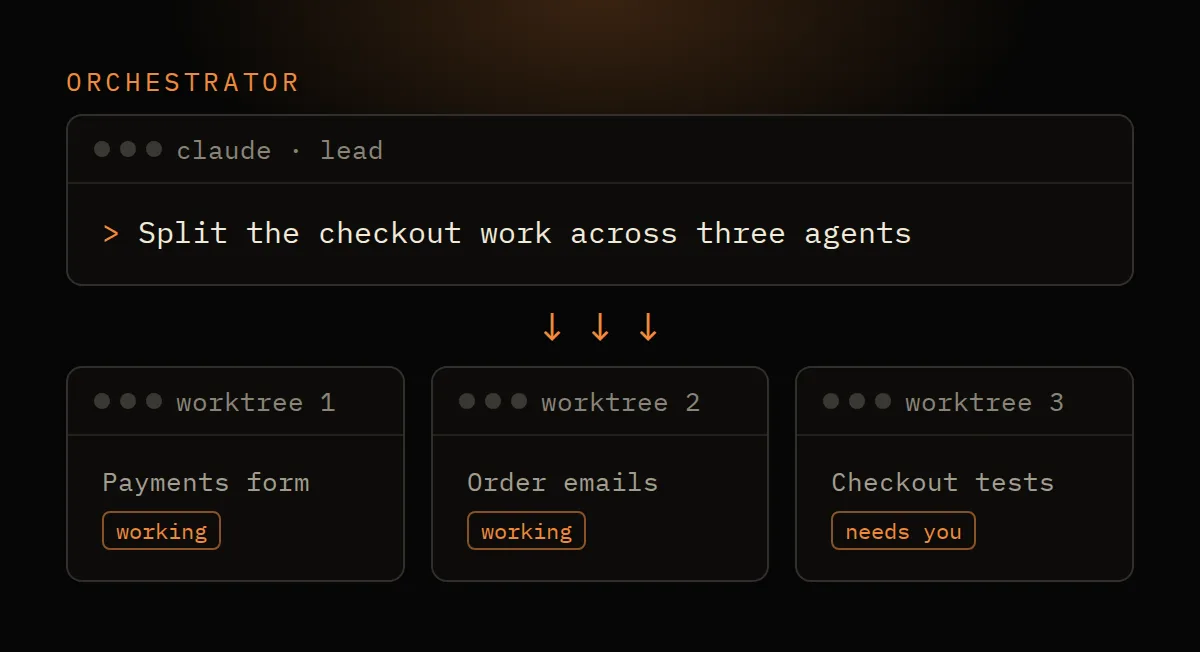
- Dispatch three background sessions from agent view, one per piece, each with its slice of the plan and its own worktree.
- In the API session, use a read-only reviewer subagent with isolation: worktree to check each change before it is committed.
- When the database session changes the schema, cross-session messaging tells the API session what changed, instead of you copying it across.
- Answer each session from agent view as it asks for input; peek with Space to see the exact question.
- When all three finish, start a small agent team to review the combined branch: one teammate for security, one for performance, one for test coverage.
- Merge one branch at a time and run the tests after each.
No single feature does all of this. The skill is choosing the right one for each step, and keeping every worker on a separate set of files.
Rules that make orchestration work
- One task per agent, with a clear end, such as "the checkout tests pass".
- One worktree per agent that writes files. Two agents in one checkout overwrite each other.
- Give every agent the context it needs in its prompt. Teammates and subagents do not see your main conversation.
- Use cheaper models for routine workers. A subagent can set model: haiku or model: sonnet.
- Review before you merge, ideally with an agent that did not write the code.
- Shut down agents when their work is done. Every active teammate keeps using tokens until it exits.
Troubleshooting agent teams
Teammates do not appear
In the main terminal, teammates show in the agent panel below the prompt; idle rows hide after 30 seconds and come back on the teammate's next turn. Claude decides whether a task needs a team, so a simple task may not get one. For split panes, check tmux is installed and on your PATH, or for iTerm2 that the it2 CLI is installed and its Python API is on.
Claude starts teammates when you wanted subagents
While teams are on, a subagent Claude names in the lead's session launches as a teammate. Set CLAUDE_CODE_EXPERIMENTAL_AGENT_TEAMS to 0 in the env block of settings.json and the next one launches as a subagent again, without restarting the session.
Too many permission prompts
Teammates' permission requests go up to the lead. Pre-approve common operations in your permission settings before you spawn the team.
A teammate or the lead stops early
Teammates can stop after an error instead of recovering. Open the teammate, give it more instructions or spawn a replacement. If the lead decides the team is finished before every task is done, tell it to keep going.
A tmux session is left behind
If a tmux session survives after Claude Code ends, list sessions with tmux ls and end the team's one with tmux kill-session -t and its name.
Source: Orchestrate teams of Claude Code sessions, Anthropic
What orchestration costs
Every agent you add is another Claude using your plan. Subagents are the cheapest, because only their results come back. Agent teams cost the most per task. Background sessions each count as a full session. Anthropic's advice for keeping costs down applies to all of them: keep teams small, keep spawn prompts focused, use Sonnet for teammates when the job allows, and stop agents as soon as their work is finished. Check where your usage went with /usage.
Source: Track your Claude Code usage, Anthropic
Common problems
Claude used subagents when I wanted a team
Subagents show in the same agent panel as teammates, so the panel alone does not prove a team formed. Check teams are turned on, then ask again and say you want teammates.
Two agents changed the same file
Split the work so each agent owns a different set of files, and give each writing agent its own worktree.
An agent sat waiting and nobody noticed
Use agent view or a dashboard that moves waiting sessions to the top, or add a Notification hook so Claude Code alerts you when it needs input.
You decide; they build
Orchestration is about keeping many agents moving without losing track of what each one is doing or waiting on. 10u keeps every Claude Code and Codex session on one screen, sorted by what each one needs from you, so the next thing to answer is always first. They do the building. You decide what gets built.

Questions people ask
- Does Claude Code have a built-in orchestrator?
- Yes. Agent teams let a lead session spawn and coordinate teammates with a shared task list, and subagents let one session hand side jobs to helpers. Agent view manages many background sessions.
- How do I orchestrate multiple Claude Code agents?
- Use subagents for side jobs inside one session, an agent team for one big task, or separate sessions in worktrees that you watch in agent view.
- What is the difference between an agent team and subagents?
- Subagents report a result back to one session. Teammates are separate sessions that share a task list and message each other.
- Can I script Claude Code agents?
- Yes. claude -p runs Claude Code without the interactive screen, so a script can start runs in separate worktrees and collect the results.
- Can one tool orchestrate Claude Code and Codex together?
- Anthropic's and OpenAI's own tools each show their own agent. A dashboard such as 10u shows Claude Code and Codex sessions side by side.