
Claude Code for product managers: prototypes, research, specs and data in one place
Claude Code for product managers turns a coding agent into a product workbench. Instead of asking engineers for a quick prototype, waiting for an analyst to pull numbers or spending a day tagging interview notes, a PM can describe the job in plain words and have Claude Code build the prototype, run the analysis or synthesise the research from files in a folder. The PM still makes every product decision. Claude Code does the legwork that sits between the decision and the evidence.
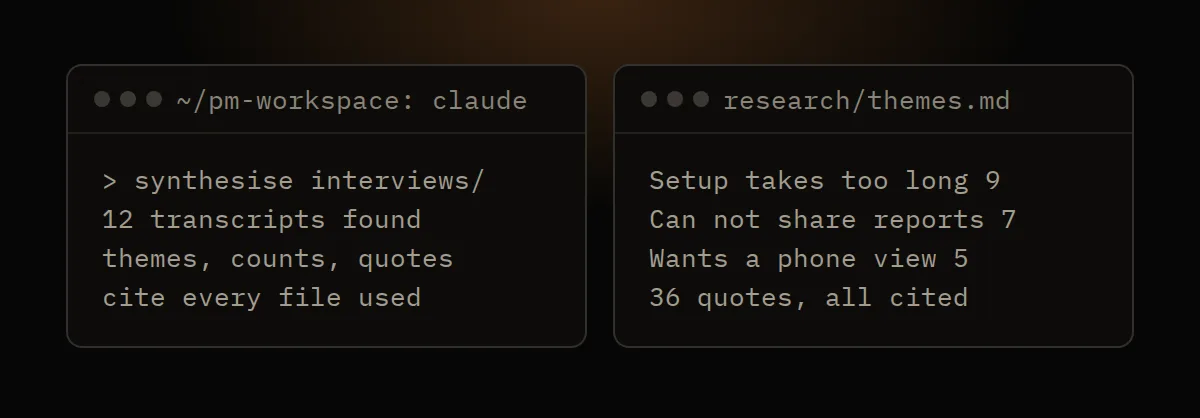
This guide covers what product managers actually use Claude Code for, how to set up a PM workspace, the CLAUDE.md and skills that make it reliable, connecting tools such as Jira, Linear and Notion through MCP servers, and the limits to respect. It draws on Anthropic's documentation and its published account of how its own teams use Claude Code, both read on 23 November 2026.
Why product managers are using a coding agent
Most AI tools for product management are chat assistants: you paste in notes and get a summary back. Claude Code works differently. It runs on your computer or in the cloud, reads every file in a folder, writes new files, runs small programs to check its work and keeps going until a job is finished. That makes it good at the parts of product management that involve lots of material and lots of steps.
Anthropic's own write-up of how its teams use Claude Code describes the pattern well: agentic coding is dissolving the boundary between technical and non-technical work, turning anyone who can describe a problem into someone who can build a solution. For an AI PM, or any PM, that means less waiting and more evidence in every conversation.
Source: How Anthropic teams use Claude Code, Anthropic
| Job | Before | With Claude Code |
|---|---|---|
| Prototype an idea | Mockups, or a request to engineering | A clickable prototype the same afternoon |
| Synthesise 15 interviews | A day of tagging and copying quotes | Themes with counts and quotes in under an hour, then your review |
| Answer a data question | A ticket for the analyst | A chart from the CSV export, with the method shown |
| Write a PRD | A blank page | A first draft in your template, grounded in your research files |
| Understand how a feature works | Ask an engineer | Ask Claude to read the code and explain it plainly |
| Map edge cases | Found during development | Listed before design is final |
What product managers use Claude Code for
Working prototypes, not just mockups
The most popular use is prototyping. Describe the flow, the screens and the states, and Claude Code builds a working version you can click through in a browser. A prototype that actually responds to input tests an idea far better than static screens, and it gives engineers something concrete to react to. Anthropic's Product Design team feeds Figma files to Claude Code and lets it write and iterate on the code, then reviews the result before refining it.
Edge cases and error states before development
The same team found an unexpected use: asking Claude Code to map out error states, logic flows and system statuses during design, so edge cases surface before development instead of during it. For a PM this is a cheap, high-value habit. Point Claude at a spec and ask what happens when the network drops, the list is empty, the user has no permission or two people edit the same thing.
Customer research synthesis
Put interview transcripts, survey exports and support tickets in a folder and ask Claude Code for the recurring themes, how many customers mentioned each one and the strongest quotes, with the file each came from. Because every claim points to a source file, you can check it. This is far more reliable than pasting a few transcripts into a chat window, which loses track once the material gets long.
Product data analysis
Export a CSV from your analytics tool and ask a question in plain words: which plan has the best 30-day retention, where do new users drop out of onboarding, did last month's release change usage. Claude Code writes and runs the analysis, produces charts and explains the method so you can sanity-check it. Keep a metrics.md file that defines every metric so the numbers match what your team already reports.
PRDs, specs and release notes
With your template, strategy and research in the folder, Claude Code can draft a PRD that cites real evidence instead of generic filler. It's equally good at turning a merged set of changes into release notes, writing help articles and producing a stakeholder update from your tracker.
Understanding the codebase
Product managers often need to know how something works today: what triggers a notification, which plans can access a feature, what happens to data when an account is deleted. With read access to the code, Claude Code can answer in plain words, and point to the files involved so an engineer can confirm. Anthropic's Product Engineering team calls Claude Code its first stop for understanding where to look.
Competitive and market research
Give Claude Code a list of competitors and ask it to summarise their pricing pages, changelogs and help docs into a comparison table, noting the date each page was read. It's a fast way to keep a competitive brief current, as long as you check anything that will drive a product strategy decision against the source page.
Setting up a PM workspace
Claude Code works best with a folder it can treat as your product brain. A simple structure like this one keeps context, evidence and outputs apart, so Claude always knows where to look and where to write.
pm-workspace/
  CLAUDE.md                 product, users, metrics, how I write specs
  context/
    strategy.md             this year's product strategy and bets
    personas.md             who we build for
    metrics.md              definitions of every metric we report
  research/
    interviews/             one transcript per customer call
    tickets/                support ticket exports (personal details removed)
  specs/                    one folder per feature: PRD, open questions, decisions
  data/                     CSV exports from analytics
  prototypes/               clickable prototypes Claude builds
  .claude/skills/
    prd/SKILL.md            writes a PRD in our template
    synthesis/SKILL.md      turns interviews into themes with quotes
If you don't use the terminal, the Claude desktop app has Claude Code built into its Code tab: choose this folder, type your request and review each change as a before and after. Claude Code needs a paid plan: Pro, Max, Ultra, Team or Enterprise.
Source: Get started with the desktop app, Claude Code docs
CLAUDE.md for product managers
CLAUDE.md is a file Claude Code reads at the start of every session. For a PM it should hold the context you'd otherwise repeat every time: what the product is, who it's for, the current strategy, how you define success and how you like documents written. Keep it short and point to the longer files in context/ rather than pasting them in.
- The product in two sentences, and the main user types.
- This quarter's goals and the metric each one moves.
- Where research, data and specs live in the folder.
- Your writing style: short, plain, decisions first, no filler.
- Rules: cite the source file for every claim, never invent numbers, list assumptions as open questions.
- What Claude must not do: edit research files, contact anyone, change anything outside this folder.
Source: Memory and CLAUDE.md, Claude Code docs
Skills: your PM playbook, written once
A skill is a saved set of instructions Claude Code follows whenever you ask for that job. The jobs a PM does every week, such as PRDs, research synthesis, launch checklists and stakeholder updates, are ideal. You write the steps once, and every future draft follows your template and your rules. Here is a simple PRD skill.
---
name: prd
description: Write a product requirements document in our template. Use when asked for a PRD, spec or feature brief.
---

1. Read context/strategy.md, context/personas.md and context/metrics.md.
2. Ask for the problem, the target user and the evidence if they are missing.
3. Search research/ for quotes and tickets about this problem. Cite file names.
4. Write specs/<feature>/prd.md with: Problem, Evidence, Users, Goals and
   non-goals, Success metric (from metrics.md only), Requirements,
   Edge cases and error states, Open questions, Rollout.
5. List every assumption you made under Open questions. Never invent data.
Other useful PM skills include a synthesis skill that always reports how many customers raised each theme, a launch checklist skill that checks a spec against your release process, and a metrics skill that refuses to report any number not defined in metrics.md.
Source: Skills, Claude Code docs
Connecting Jira, Linear, Notion and Figma with MCP servers
MCP, the Model Context Protocol, is the standard way to connect Claude Code to other tools. Many tools product teams rely on, including Jira, Linear, Notion and Figma, publish MCP servers. Once connected, Claude Code can read tickets, search docs or look at designs directly, so you can ask for things like: summarise every open bug tagged onboarding, or compare this spec with the Figma frames and list the differences.
Connect read access first. Letting an agent create or edit tickets is useful, but start by having it draft changes for you to apply, then allow writes once you trust the results. Add servers with the claude mcp add command, and remove any you no longer use.
Source: Connect Claude Code to tools via MCP, Claude Code docs
Prompts that work for product work
- Read every file in research/interviews and list the top five problems customers describe, with how many people mentioned each and two quotes per problem, citing the file names.
- Using data/signups.csv, show where new users drop out of onboarding by week for the last 12 weeks. Explain your method before showing the chart.
- Build a clickable prototype of the new invite flow in prototypes/invite. Include the empty, loading, error and success states.
- Read specs/bulk-edit/prd.md and list every edge case and error state it doesn't cover.
- Explain in plain words what happens in the code when a user downgrades from Team to Pro. Point to the files involved.
- Turn the changes merged this week into release notes for customers, grouped by what they can now do.
- Draft a one-page update for leadership from specs/ and data/, decisions first, risks last.
Plan mode: agree the approach first
Plan mode makes Claude Code propose an approach without changing anything. For product managers it's the natural way to start any bigger job: ask for the plan, push back on anything that misses the point, then let it build. It mirrors how you'd brief a person, and it catches misunderstandings before they cost an afternoon.
Source: Permission modes, Claude Code docs
Limits and guardrails
- It doesn't replace product judgement. Claude Code can gather evidence and draft options; deciding what to build and why is still the PM's job.
- Check numbers before you present them. Ask it to show the method, and spot-check a few figures against the source.
- Remove personal details from interview and ticket exports before they go in the folder.
- Prototypes are for learning, not shipping. Make clear to engineers which parts are throwaway.
- Don't merge code into the product on your own. If a prototype becomes a real change, it goes through your team's normal review.
- Keep permission prompts on for anything that touches shared tools, such as creating tickets or posting messages.
Working well with engineers
The fastest way to lose engineering goodwill is to arrive with a pile of AI-generated code and ask for it to be shipped. The fastest way to gain it is to arrive with sharper questions, a prototype that shows the intent and a spec that already lists the edge cases. Use Claude Code to make your work clearer, ask engineers what format of prototype or spec helps them most, and share your skills and CLAUDE.md so the team can see how drafts are produced.
Running several PM workstreams at once
Product managers rarely have one job on the go. A typical day might have Claude Code synthesising research in one session, building a prototype in another and drafting a PRD in a third. Each one stops at some point to ask you a question or wait for a decision, and it's easy to lose track of which.
10u is the control room for exactly that. It shows every Claude Code and Codex session side by side under the goal it's working toward, marks the ones waiting on you, and lets you answer from one screen on your laptop or phone, including between meetings. Your sessions keep running where they are; 10u shows you where each one is up to.
A first week for a product manager
- Day 1: set up the folder structure above, add a short CLAUDE.md and ask Claude to explain back what it now knows about your product.
- Day 2: drop in last month's interview notes and ask for themes with counts and quotes. Check five of the quotes against the files.
- Day 3: export one CSV from analytics and answer a question you've been meaning to ask.
- Day 4: build a prototype of a feature you're currently specifying, including its error states.
- Day 5: write a PRD skill from your team's template and draft one real spec with it.
- Day 6: connect one tool through MCP with read-only access, such as your issue tracker.
- Day 7: share what worked with your team, along with the CLAUDE.md and skills, so others can reuse them.

Questions people ask
- How do product managers use Claude Code?
- To build clickable prototypes, synthesise customer interviews, analyse product data from CSV exports, draft PRDs and release notes, map edge cases and understand how existing features work in the code.
- Do product managers need to code to use Claude Code?
- No. You describe what you want in plain words and review the result. The Claude desktop app's Code tab means you don't need the terminal either.
- Can Claude Code connect to Jira, Linear or Notion?
- Yes, through MCP servers, the standard way to connect Claude Code to other tools. Start with read access and let it draft changes for you to apply.
- Is Claude Code better than ChatGPT for product management?
- For long, multi-step work on many files, such as synthesising dozens of interviews or building a prototype, an agent that works on files directly is usually more reliable than pasting material into a chat.
- What should a PM put in CLAUDE.md?
- The product and its users, this quarter's goals and metrics, where research and data live, your writing style and clear rules such as citing sources and never inventing numbers.
- Will Claude Code replace product managers?
- No. It speeds up the evidence gathering, drafting and prototyping, but deciding what to build, for whom and why remains the product manager's job.