
OpenAI Codex pricing: plans, usage limits, credits and API costs
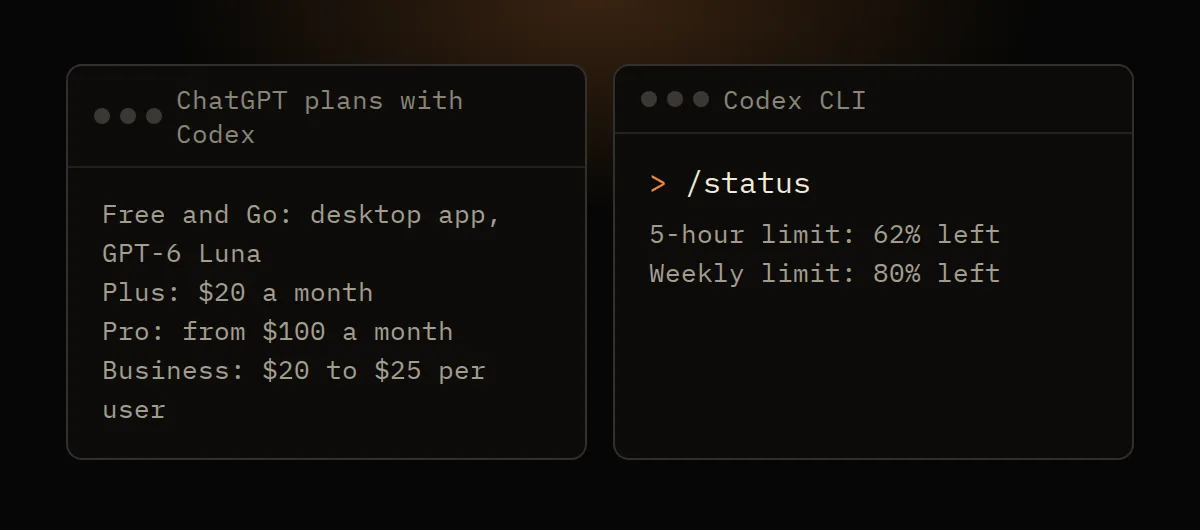
OpenAI Codex has no separate price: it comes with ChatGPT plans. Free and Go include a light taste in the desktop app, Plus at $20 a month includes Codex in the app, CLI, IDE extension and web, Pro starts at $100 a month with much higher limits, and Business is $20 to $25 per user a month. Each plan includes a usage allowance; when it runs out you can buy credits, or run Codex with an OpenAI API key and pay API rates instead. Codex and ChatGPT Work share the same pricing, credits and limits. Prices below are in US dollars, from OpenAI's Codex pricing docs.
Source: Pricing, OpenAI ChatGPT and Codex docs
Codex pricing by plan
| Plan | Price | Codex on this plan |
|---|---|---|
| Free | $0 | GPT-6 Luna at Standard speed in the desktop app, subject to rollout |
| Go | $8 a month | GPT-6 Luna at Standard speed in the desktop app, subject to rollout |
| Plus | $20 a month | Codex on the web, CLI, IDE extension and iOS; automatic code review and Slack; GPT-6.1 Sol and GPT-6 Luna; extend with credits |
| Pro | $100, $200 or $500 a month | Everything in Plus with higher limits, no five-hour limit, and Ultrafast mode on Pro $500 |
| Business | $20 per user a month billed yearly, or $25 monthly (2+ users) | ChatGPT and Codex on desktop and mobile, larger cloud machines, credits, admin controls, SAML SSO, no training on business data by default |
| Enterprise and Edu | Contact sales | Everything in Business plus priority processing, SCIM, EKM, RBAC, audit logs and data residency |
| API key | Pay per token at API prices | Codex in the CLI, SDK or IDE extension only, with no cloud features such as GitHub code review or Slack |
Source: Pricing, OpenAI ChatGPT and Codex docs
Is Codex free?
Partly. The ChatGPT Free and Go plans include Codex in the desktop app with the GPT-6 Luna model at Standard speed, while OpenAI rolls it out. For the CLI, IDE extension, cloud tasks, automatic code review and the stronger GPT-6.1 Sol model, you need Plus or above. Open-source maintainers can also apply to OpenAI's Codex for Open Source programme, which offers API credits, six months of ChatGPT Pro with Codex, and Codex Security.
Source: Codex for Open Source, OpenAI
ChatGPT Pro for Codex: Pro 100, Pro 200 or Pro 500?
ChatGPT Pro comes in three tiers, at $100, $200 and $500 a month. All include Pro models, Codex, deep research, image creation, memory and file uploads. Pro 200 includes more usage than Pro 100, and Pro 500 has the highest included usage of the three. OpenAI recently doubled the Work and Codex allowance on Pro 100 and Pro 500, and brought every Pro 200 subscription up to the same higher allowance, at the same prices. Plus usage did not change.
| Pro tier | Price | Codex usage | Ultrafast |
|---|---|---|---|
| Pro 100 | $100 a month | More than Plus | No |
| Pro 200 | $200 a month | More than Pro 100 | No |
| Pro 500 | $500 a month | The highest of the three | Yes, GPT-6 Astra and GPT-6.1 Sol, plus GPT-6.2 models |
Among Pro plans, only Pro 500 gets Ultrafast, and buying credits on Pro 100 or Pro 200 does not unlock it. OpenAI also notes that a bigger allowance does not guarantee twice as many finished tasks, because usage still depends on the model, the task and your settings. Any unlimited access on Pro is subject to abuse guardrails.
Source: About ChatGPT Pro tiers, OpenAI Help Center
Pro billing details
Pro is billed monthly only; there is no annual option. Cancel through wherever you bought it (ChatGPT, Apple or Google Play) and you keep access to the end of the billing period. If you move from Pro 200 down to Pro 100 partway through a week, usage already counted that week is compared with the new, smaller weekly allowance, so you may have little left until it resets. You can keep a personal Pro plan while joining a ChatGPT Business workspace, as long as you keep the personal workspace separate.
Source: About ChatGPT Pro tiers, OpenAI Help Center
How much Codex can you use on each plan?
OpenAI does not promise a fixed number of messages. How far your allowance goes depends on the model, the size and complexity of each task, and whether it runs locally or in the cloud. A small script may use a fraction of a message's worth, while big projects, long tasks or sessions that hold lots of context use much more. These are OpenAI's estimates of local messages per five-hour window on Plus and Standard Business:
| Model | Plus and Standard Business, local messages per 5 hours |
|---|---|
| GPT-6.2 Astra | 6 to 50 |
| GPT-6.2 Sol | 17 to 180 |
| GPT-6 Astra | 5 to 45 |
| GPT-6.1 Sol | 15 to 160 |
| GPT-6.1 Terra | 35 to 285 |
| GPT-6 Sol | 15 to 150 |
| GPT-6 Luna | 350 to 3,000 |
Local messages and cloud chats share the same allowance, cloud tasks can use more of it than local messages, and weekly limits may apply as well. Pro plans currently have no five-hour limit. Enterprise and Edu workspaces on flexible pricing have no fixed rate limits and scale with credits; those without flexible pricing get the same per-seat limits as Plus for most features. GPT-6.1 Sol has no long-context surcharge when it is drawn from your subscription.
Source: Pricing, OpenAI ChatGPT and Codex docs
Codex credits and token rates
Credits are what you spend once you pass your included limits, on Plus, Pro and credit-based Business, Enterprise and Edu plans. Everything Codex reads and writes is counted in tokens: your prompt, files, chat history, tool results and its reply. Credits are charged per million tokens at these Standard-speed rates:
| Model | Input | Cached input | Output |
|---|---|---|---|
| GPT-6.2 Astra | 200 credits | 10 credits | 1,000 credits |
| GPT-6 Astra | 250 credits | 25 credits | 1,250 credits |
| GPT-6.2 Sol | 50 credits | 2.5 credits | 250 credits |
| GPT-6.1 Sol | 50 credits | 2.5 credits | 250 credits |
| GPT-6.1 Terra | 25 credits | 1.25 credits | 125 credits |
| GPT-6 Sol | 50 credits | 5 credits | 250 credits |
| GPT-6 Luna | 2.5 credits | 0.25 credits | 12.5 credits |
There is no separate charge for writing to the cache. What a credit costs, and any discount, depends on your plan or agreement. For USD usage-based billing, OpenAI lists GPT-6.2 Astra at $8 per million input tokens, $0.40 cached and $40 output, and GPT-6.2 Sol at $2, $0.10 and $10. Credit prices alone do not tell you how much your subscription includes, so check your usage dashboard.
Source: Pricing, OpenAI ChatGPT and Codex docs
Buying Codex credits on Plus or Pro
When you hit a limit in Codex on Plus or Pro, you see an option to add credits. You can also check your balance and buy credits in Settings, Usage in ChatGPT, or Usage and Billing in the Codex app. Your plan's included usage is always used first; credits only pay for what comes after. Credits work across Codex, ChatGPT Work, and ChatGPT for Word, Excel and PowerPoint, but not every ChatGPT model or feature.
- Automatic reload buys credits for you when your balance drops below a minimum you choose, topping it back up to a target, and a monthly limit you set can cap it.
- A long task can push your balance below zero if other work uses it up meanwhile; the next purchase pays that off first.
- Telling ChatGPT to "ask me before using credits" does not add a billing approval step: once your allowance is used, available credits are spent automatically.
- Auto-review safety checks are free when you are signed in with ChatGPT and do not count toward your limits.
- You can share your subscription usage, including credits, with eligible partner tools by signing in with ChatGPT there; it is off by default.
Source: Using credits for flexible usage in ChatGPT, OpenAI Help Center
Codex credit rules worth knowing
- Credits expire 12 months after purchase (180 days for credits bought in Japan after 13 November 2026), and unused credits do not roll over.
- Credits are non-refundable unless the law, a contract or an approved exception says otherwise, such as a verified billing error or unauthorised use.
- ChatGPT credits are not OpenAI API credits; the two balances are separate.
- Credits bought through Codex can pay for other supported features, such as ChatGPT for Excel, once included usage is gone.
- Credit purchases are rolling out to a limited group of Free and Go users; buying them does not raise those plans' included limits.
- If your account is compromised and credits are used without permission, report it to OpenAI support, which restores credits when misuse is confirmed.
Source: Using credits for flexible usage in ChatGPT, OpenAI Help Center
Fast and Ultrafast cost more
Faster modes multiply usage compared with Standard speed on the same model:
| Mode | Models | Included usage | Credits or pay-as-you-go |
|---|---|---|---|
| Fast | GPT-6.2 Astra, GPT-6.2 Sol | 2x | 2x |
| Fast | GPT-6.1 Sol, GPT-6.1 Terra, GPT-6 Astra, GPT-6 Sol, GPT-6 Luna | 2.5x | 2x |
| Ultrafast | GPT-6.2 Astra, GPT-6.2 Sol | 6x | 3x until 28 February 2027, then 6x |
| Ultrafast | GPT-6 Astra, GPT-6.1 Sol | 8x | 6x |
What you get for it: Fast generates tokens at about 1.5 times Standard speed on GPT-6.2 Astra, and works in the Codex CLI and IDE extension when you sign in with ChatGPT. Ultrafast generates tokens at up to 4.5 times Standard speed on GPT-6.2 Astra and GPT-6.2 Sol, and GPT-6 Astra reaches up to eight times. Ultrafast is available on Pro 500 and in eligible Enterprise and Edu workspaces, where it is a separate permission an owner must turn on. In the CLI, type /fast or /ultrafast to switch, and repeat the command to go back to Standard. With an API key you pay API token rates instead, and these multipliers do not apply.
Source: Fast and Ultrafast modes, OpenAI
Codex with an API key
You can sign in to the Codex CLI, SDK or IDE extension with an OpenAI API key instead of a ChatGPT account. Usage is then billed at OpenAI API prices and does not touch your ChatGPT allowance. OpenAI suggests it for automation in shared environments such as CI. The trade-offs: no cloud features such as GitHub code review or Slack, and the models you can use are whatever your key has access to. Any user who hits their plan limits can also keep running local chats with an API key, charged at standard API rates. OpenAI notes that API prices are not a guide to how many tasks a plan includes.
Source: Pricing, OpenAI ChatGPT and Codex docs
What happens when you hit Codex usage limits
OpenAI lets work in progress finish: if you reach your limit during an active turn, Codex can complete that turn, subject to fair use. After that, Plus and Pro users can buy additional credits to keep working without upgrading, Business, Edu and Enterprise workspaces on flexible pricing can buy workspace credits, and anyone can switch to an API key. Otherwise you wait for the limit to reset.
A usage limit does not end your subscription or restrict your account. You can switch to another available model or wait for the reset, and ChatGPT shows the reset time where it can. You cannot raise a limit through a setting, and OpenAI support cannot reset limits for you, though it can investigate if usage was counted wrongly.
Source: About ChatGPT Pro tiers, OpenAI Help Center
Check your Codex usage
Your current limits and reset times are on the usage dashboard at chatgpt.com/codex/settings/usage. Inside a Codex CLI session, run /status to see what is left. OpenAI suggests checking every week or two to understand your pace, and trying a smaller model or a tighter task when usage runs high.
/statusSource: Pricing, OpenAI ChatGPT and Codex docs
What else counts toward your Codex allowance
- Image generation: counts toward the same limits, using them 3 to 5 times faster on average than similar turns without images. Not on the Free plan.
- Code Review: only reviews Codex runs through GitHub, such as tagging @Codex on a pull request or automatic reviews, count as Code Review; reviews run locally count as general usage.
- Voice in the desktop app: uses your Codex budget at $0.05 a minute, or 1.25 credits a minute on credit-based workspaces, plus the tokens for the task itself.
- ChatGPT for Excel on Plus and Pro shares the same limits.
Source: Pricing, OpenAI ChatGPT and Codex docs
How to make Codex usage last longer
- Control the size of your prompts: precise instructions, no unnecessary context.
- Limit source material to the files that matter, and narrow sources or date ranges where you can.
- Match the output to the need: say the audience, format and length, and separate required work from optional extras.
- Keep AGENTS.md small; on big projects, nest AGENTS.md files in folders so only relevant instructions load.
- Turn off MCP servers you are not using, since each one adds context to every message.
- Choose a lighter model, such as GPT-6 Luna or GPT-6.1 Terra, for routine tasks, and save Astra for the hard ones.
Source: Pricing, OpenAI ChatGPT and Codex docs
Codex for teams: Business, Enterprise and Edu
Business costs $20 per user a month billed yearly, or $25 billed monthly, for two or more users. It adds larger virtual machines for faster cloud chats, a dedicated workspace with admin controls, SAML single sign-on and multi-factor authentication, and no training on your business data by default. Enterprise and Edu add priority processing, SCIM, encryption key management, user analytics, domain verification, role-based access control, audit logs through the Compliance API, and data retention and residency controls. GPT-6.2 Astra and GPT-6.2 Sol are off by default in Enterprise and Edu until an admin turns them on. Eligible users can also invite friends or coworkers from the app's profile menu for referral rewards, though not on Enterprise.
Source: Pricing, OpenAI ChatGPT and Codex docs
Codex pricing vs Claude Code pricing
| OpenAI Codex | Claude Code | |
|---|---|---|
| Entry plan with the CLI | ChatGPT Plus, $20 a month | Claude Pro, $20 a month |
| Heavy-use plans | ChatGPT Pro, $100, $200 or $500 a month | Claude Max, $100 a month; Claude Ultra, $200 a month |
| Free option | Free and Go in the desktop app, light model | None for Claude Code |
| Past the limit | ChatGPT credits or an API key | Usage credits or an API key |
| Pay per token | OpenAI API key | Claude Console API key |
Both companies change plans often, so check OpenAI's and Anthropic's pricing pages before you buy. Our Claude Code pricing guide covers Anthropic's plans in detail.
Source: Plans and pricing, Claude
Getting more from two subscriptions
Plenty of developers keep a ChatGPT plan for Codex and a Claude plan for Claude Code, and switch when one hits its limit. 10u is an AI coding agent dashboard that shows every Codex and Claude Code session side by side, each in its real terminal, marked Needs you, Working, Waiting or Parked. It runs on the subscriptions you already have. They do the building. You decide what gets built.

Questions people ask
- Do Codex credits expire?
- Yes. Credits expire 12 months after purchase, or 180 days for credits bought in Japan after 13 November 2026, and unused credits do not roll over.
- Can I pay for ChatGPT Pro yearly?
- No. OpenAI bills Pro monthly only, at $100, $200 or $500 a month.
- How much does OpenAI Codex cost?
- Codex comes with ChatGPT plans: limited use on Free and Go, full use on Plus at $20 a month, Pro from $100 a month, and Business at $20 to $25 per user a month. You can also pay per token with an API key.
- Is Codex included in ChatGPT Plus?
- Yes. Plus includes Codex on the web, in the CLI, the IDE extension and iOS, with automatic code review and Slack, and lets you buy credits when you run out.
- Does ChatGPT Pro have Codex limits?
- OpenAI says Pro plans currently have no five-hour limit. Your usage dashboard shows your current limits and reset times.
- How do I check my Codex usage?
- Open chatgpt.com/codex/settings/usage, or run /status in a Codex CLI session.
- What happens when I run out of Codex usage?
- You can finish the turn in progress, then buy credits on Plus or Pro, use workspace credits on flexible Business and Enterprise plans, switch to an API key, or wait for the reset.
- Is Codex cheaper with an API key?
- It depends on how much you use. An API key bills every token at API prices and drops cloud features; a subscription includes a set allowance. OpenAI notes API prices are not a guide to how much a plan includes, so compare against your usage dashboard.