
Codex config: how to set up config.toml
Codex keeps its settings in a TOML file at ~/.codex/config.toml, shared by the Codex CLI and the IDE extension. Add a .codex/config.toml inside a repository to override settings for that project. The keys people change most are model, approval_policy, sandbox_mode, model_reasoning_effort and web_search, plus [mcp_servers] tables for tools. For a single run, override any key with codex --config key=value, and save whole alternative setups as profiles you pick with --profile.
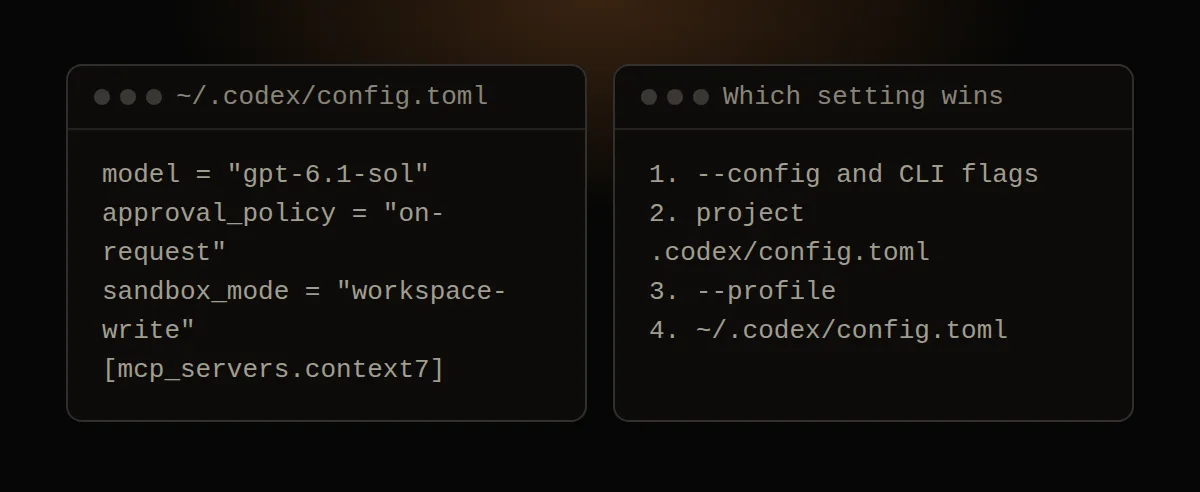
Where the Codex config file lives
Your user-level configuration is ~/.codex/config.toml. Codex keeps the rest of its local state in the same folder, CODEX_HOME, which defaults to ~/.codex:
| File | What it is |
|---|---|
| config.toml | Your local configuration |
| auth.json | Saved credentials, if you use file-based storage rather than the system keychain |
| history.jsonl | Saved session transcripts, if history is on |
| hooks.json | Lifecycle hooks, if you keep them in their own file |
| rules/ | Command rules such as default.rules |
| <name>.config.toml | A profile you select with --profile <name> |
In the IDE extension, open the file from the gear icon at the top right: Codex Settings, then Open config.toml. Because the CLI and the extension read the same layers, a change made in one shows up in the other.
Treat auth.json like a password. It is your sign-in, so never commit it or paste it anywhere, and keep the whole ~/.codex folder out of shared backups you do not control.
Source: Codex config basics, OpenAI
Source: Codex advanced configuration, OpenAI
A good starter Codex config
Here is a sensible ~/.codex/config.toml to begin from, built only from keys in OpenAI's documentation. The first line gives you autocomplete and error checking in VS Code or Cursor with the Even Better TOML extension:
#:schema https://developers.openai.com/codex/config-schema.json

# ~/.codex/config.toml
model = "gpt-6.1-sol"
model_reasoning_effort = "medium"
approval_policy = "on-request"
sandbox_mode = "workspace-write"
web_search = "cached"
file_opener = "vscode"

[sandbox_workspace_write]
network_access = false

[history]
max_bytes = 104857600

[mcp_servers.context7]
command = "npx"
args = ["-y", "@upstash/context7-mcp"]
It picks a default model and effort, keeps Codex inside your project with the network off and asks before going further, uses cached web search, makes file citations open in VS Code, caps the history file at 100 MiB, and adds one MCP server for current library docs. Change the model to one your account can use; OpenAI's own examples use GPT-6.1 Sol and note that it needs access for your account or workspace.
Source: Codex config basics, OpenAI
Source: Codex configuration reference, OpenAI
Configuration precedence: which setting wins
Codex combines several layers. When two set the same key, the higher one in this list wins:
1. CLI flags and --config overrides
2. Project .codex/config.toml files, root down to your folder (closest wins; trusted projects only)
3. A profile chosen with --profile name (~/.codex/name.config.toml)
4. Your user config: ~/.codex/config.toml
5. Cloud-managed config.toml defaults for your workspace
6. System config: /etc/codex/config.toml on Unix
7. Built-in defaults
The practical rule is to keep shared defaults in ~/.codex/config.toml, put project-specific settings in the repository, keep profiles to just the values that differ, and use --config for one-off runs. On managed machines, an organisation can also enforce limits with a requirements.toml file, for example disallowing approval_policy = "never" or sandbox_mode = "danger-full-access". Requirements constrain what you can choose; configuration only supplies defaults.
If you mark a project as untrusted, Codex skips its .codex/ layer entirely, including its config, hooks and rules. Your user and system config still load.
Source: Codex config basics, OpenAI
The Codex config options people change most
Default model
Choose the model Codex uses by default in the CLI and the IDE:
model = "gpt-6.1-sol"Switch for one session with /model, or start with codex --model. Our Codex models guide compares the current models.
Approval prompts
Control when Codex stops to ask before running commands:
approval_policy = "on-request"on-request asks before going beyond the sandbox, never does not ask, and a granular table lets you choose per kind of request. The older untrusted policy is no longer supported.
Sandbox level
Set how much file and network access Codex has while running commands:
sandbox_mode = "workspace-write"read-only lets Codex look but not change anything, workspace-write lets it edit inside your project with the network off, and danger-full-access removes the limits. Our Codex sandbox guide explains each mode.
Reasoning effort
Tune how much the model reasons, where the model supports it:
model_reasoning_effort = "medium"Web search
Codex turns web search on by default for local chats and serves results from a cache, an index of web results OpenAI maintains. That returns pre-indexed results rather than fetching live pages, which reduces exposure to prompt injection from arbitrary pages:
web_search = "cached"  # default; serves results from the web search cache
# web_search = "indexed" # gate external web access through the search index
# web_search = "live"    # fetch the most recent data from the web (same as --search)
# web_search = "disabled"
Communication style
To drop the built-in personality instructions from the model's base prompt, set:
personality = "none"The older friendly and pragmatic values no longer select a style, and the /personality command has gone.
Keyboard shortcuts
Customise terminal shortcuts under tui.keymap. An empty list unbinds an action:
[tui.keymap.global]
open_transcript = "ctrl-t"

[tui.keymap.composer]
submit = ["enter", "ctrl-m"]

[tui.keymap.chat]
interrupt_turn = "f12"
Log directory
Change where Codex writes local logs. Setting log_dir also turns on the plain-text log codex-tui.log in that folder:
log_dir = "/absolute/path/to/codex-logs"Source: Codex config basics, OpenAI
Codex feature flags
Optional and experimental capabilities sit in a [features] table. Leave a key out to keep its default:
| Key | Default | What it does |
|---|---|---|
| apps | true | App (connector) integrations |
| goals | true | Persisted goals and automatic continuation |
| hooks | true | Lifecycle hooks from hooks.json or inline [hooks] |
| fast_mode | true | Fast mode selection |
| memories | false | Memories across sessions |
| multi_agent | true | Subagent collaboration tools |
| remote_plugin | true | The remote plugin catalog |
| shell_snapshot | true | Snapshots your shell environment to speed up repeated commands |
| shell_tool | true | Command execution tools |
| unified_exec | true | Resumable command execution |
[features]
memories = true
shell_snapshot = true
From the CLI, turn a feature on for one run with --enable, repeated for several:
codex --enable memoriesThe old web_search, web_search_cached and web_search_request feature flags are deprecated; use the top-level web_search setting instead.
Source: Codex config basics, OpenAI
Project config: .codex/config.toml
Codex also reads .codex/config.toml files inside your repository. It walks from the project root to the folder you started in and loads every one it finds; when two set the same key, the one closest to you wins. Relative paths inside a project config resolve from the .codex/ folder that holds it.
For safety, project config only loads in trusted projects, and some keys are ignored there even then, with a warning at startup: openai_base_url, chatgpt_base_url, model_provider, model_providers, notify, profile, profiles and otel among them. Those keys could redirect your credentials or run commands on your machine, so a repository you clone cannot set them. Put provider, notification and telemetry settings in your own ~/.codex/config.toml.
Codex finds the project root by looking for a .git folder. To use other markers, set project_root_markers; an empty list treats the current folder as the root:
project_root_markers = [".git", ".hg", ".sl"]Source: Codex advanced configuration, OpenAI
Codex profiles
Profiles are named configuration layers you switch between from the CLI. With --profile deep-review, Codex loads ~/.codex/config.toml and then overlays ~/.codex/deep-review.config.toml. Each profile is its own file of top-level keys:
# ~/.codex/deep-review.config.toml
model = "gpt-6.1-sol"
model_reasoning_effort = "medium"
approval_policy = "on-request"
codex --profile deep-reviewcodex exec --profile deep-review "review this change"Because a profile sits above your user config, it only needs the values that differ. Profile names can use letters, numbers, hyphens and underscores. Note a recent change: from Codex 0.134.0, --profile no longer reads [profiles.name] tables inside config.toml, and the top-level profile = "name" selector is gone. Move any old profile tables into their own name.config.toml files.
Source: Codex advanced configuration, OpenAI
One-off overrides with --config
For a single run, prefer a dedicated flag when one exists, such as --model. For any other key, use -c or --config. The value is parsed as TOML, not JSON:
# Dedicated flag
codex --model gpt-6.1-sol

# Generic key/value override (value is TOML, not JSON)
codex --config model='"gpt-6.1-sol"'
codex --config sandbox_workspace_write.network_access=true
codex --config 'shell_environment_policy.include_only=["PATH","HOME"]'
Use dot notation for nested keys, such as mcp_servers.context7.enabled=false. Quote values so your shell does not split them on spaces. If a value does not parse as TOML, Codex treats it as a string.
Source: Codex advanced configuration, OpenAI
Approval and sandbox settings in config.toml
The fuller form of the approval and sandbox settings looks like this:
approval_policy = "on-request"
approvals_reviewer = "user"     # or "auto_review"
sandbox_mode = "workspace-write"
allow_login_shell = false

[sandbox_workspace_write]
exclude_tmpdir_env_var = false  # allow $TMPDIR
exclude_slash_tmp = false       # allow /tmp
writable_roots = ["/Users/YOU/.pyenv/shims"]
network_access = false          # opt in to outbound network
approvals_reviewer = "auto_review" sends approval requests to a separate reviewer agent instead of you. allow_login_shell = false is optional hardening that stops shell tools using login shells. The [sandbox_workspace_write] table adds writable folders and turns outbound network on or off. To switch the sandbox off completely, which OpenAI says to do only if your environment already isolates processes:
sandbox_mode = "danger-full-access"Even in workspace-write, some environments keep .git/, .agents/, .codex/ and .aws/ read-only, which is why git commit can still ask for approval. Codex also supports named permission profiles: the built-in :read-only, :workspace and :danger-full-access, and your own in [permissions.name] tables picked with default_permissions. For control over specific commands, use rules files rather than the sandbox.
Source: Codex advanced configuration, OpenAI
Source: Codex sandbox, OpenAI
Source: Codex command rules, OpenAI
Custom permission profiles
A permission profile bundles file and network access into a named setup you can reuse. Each one is a [permissions.name] table, can build on a parent with extends, and is selected with default_permissions. This one starts from the built-in :workspace profile and allows network access to two domains only:
[permissions.web-dev]
description = "Workspace access plus npm and GitHub"
extends = ":workspace"

[permissions.web-dev.network]
enabled = true
mode = "limited"

[permissions.web-dev.network.domains]
"registry.npmjs.org" = "allow"
"*.github.com" = "allow"
default_permissions = "web-dev"| Key | What it does |
|---|---|
| permissions.<name>.description | A readable description; not inherited through extends |
| permissions.<name>.extends | A parent profile applied first: another named profile, :read-only or :workspace |
| permissions.<name>.filesystem | File rules keyed by absolute path or a special token such as :workspace_roots |
| permissions.<name>.workspace_roots | Extra folders treated as part of the workspace |
| permissions.<name>.network.enabled | Network access for commands in this profile |
| permissions.<name>.network.mode | limited or full |
| permissions.<name>.network.domains | allow or deny rules for exact hosts or wildcards such as *.example.com |
Two things are easy to get wrong. A profile cannot extend :danger-full-access, so full access is always a deliberate choice. And domain rules are only enforced when the network proxy is running, through features.network_proxy or administrator-managed networking, so network.enabled on its own is not a domain filter. Check that the proxy is active before relying on an allow list.
Source: Codex configuration reference, OpenAI
Shell environment policy: keep secrets away from commands
shell_environment_policy decides which environment variables Codex passes to the commands it runs. Start from nothing with inherit = "none", or from a trimmed set with inherit = "core", then add values and filters:
[shell_environment_policy]
inherit = "core"
set = { MY_FLAG = "1" }
ignore_default_excludes = false

[shell_environment_policy.filters]
"AWS_*" = "exclude"
"AZURE_*" = "exclude"
Patterns are case-insensitive and support * and ?. "exclude" removes matching variables, and once any pattern uses "include", Codex keeps only variables that match an include. Watch one default closely: ignore_default_excludes is true out of the box, which means Codex does not automatically remove variables whose names contain KEY, SECRET or TOKEN. Set it to false to have those stripped before your own filters run. If you keep cloud or API credentials in your shell, this is the setting that stops them reaching every command Codex starts.
Source: Codex advanced configuration, OpenAI
MCP servers in config.toml
Each MCP server gets a [mcp_servers.name] table. A local server runs a command:
[mcp_servers.context7]
command = "npx"
args = ["-y", "@upstash/context7-mcp"]
env_vars = ["LOCAL_TOKEN"]

[mcp_servers.context7.env]
MY_ENV_VAR = "MY_ENV_VALUE"
A remote server needs only a URL, with an [mcp_servers.name.oauth] table if it signs in with OAuth:
[mcp_servers.example]
url = "https://mcp.example.com"
You can also add servers with codex mcp add rather than editing the file. env_vars passes named variables from your environment to the server, while the env table sets fixed values. Our Codex MCP guide covers adding, signing in to and limiting servers.
Source: Codex MCP, OpenAI
MCP server keys worth knowing
The [mcp_servers.name] table takes many more keys than command and url. These are the ones that solve real problems:
| Key | What it does |
|---|---|
| command, args, cwd | How to start a local (stdio) server, and the folder it runs in |
| env | Fixed environment variables passed to a local server |
| url | The endpoint of a remote (streamable HTTP) server |
| bearer_token_env_var | The environment variable holding a bearer token for a remote server, so the token never sits in the file |
| http_headers, env_http_headers | Fixed headers, or headers filled from environment variables |
| enabled | Switch a server off without deleting its configuration |
| enabled_tools, disabled_tools | An allow list of tools the server exposes, and a deny list applied after it |
| startup_timeout_sec | Override the default 10-second startup timeout |
| tool_timeout_sec | Override the default 60-second timeout per tool call |
| default_tools_approval_mode | auto, prompt, writes or approve for the server's tools |
| tools.<tool>.approval_mode | The same, for one tool only |
| tools.<tool>.output_token_limit | A token budget for one tool's output |
| supports_parallel_tool_calls | Mark every tool as safe to run in parallel; off by default |
| scopes | OAuth scopes to request when signing in |
Put together, a remote server limited to two tools, with its token in the environment and a prompt before each call, looks like this:
[mcp_servers.github]
url = "https://api.githubcopilot.com/mcp/"
bearer_token_env_var = "GITHUB_TOKEN"
enabled_tools = ["get_issue", "list_pull_requests"]
tool_timeout_sec = 120
default_tools_approval_mode = "prompt"
Limiting a server to the tools you need is the single best MCP change: fewer tools means a shorter tool list in every request and fewer ways for a tool call to surprise you.
Source: Codex configuration reference, OpenAI
Custom model providers
A model provider tells Codex how to reach a model: base URL, wire API, authentication and optional headers. Define your own and point model_provider at it:
model = "gpt-6.1-sol"
model_provider = "proxy"

[model_providers.proxy]
name = "OpenAI using LLM proxy"
base_url = "http://proxy.example.com"
env_key = "OPENAI_API_KEY"

[model_providers.local_ollama]
name = "Ollama"
base_url = "http://localhost:11434/v1"
Codex reserves some provider IDs, including openai, ollama, lmstudio, amazon-bedrock, amazon-bedrock-runtime and gcp, so choose a unique ID for yours. If you only need to send the built-in OpenAI provider through a proxy, router or data-residency project, set openai_base_url instead of defining a new provider:
openai_base_url = "https://us.api.openai.com/v1"Providers can add request headers with http_headers and env_http_headers, sign in through your organisation's identity provider with gateway OAuth, or fetch tokens from a helper program through an auth table with a command, arguments and refresh interval.
Source: Codex advanced configuration, OpenAI
Amazon Bedrock
Set model_provider to amazon-bedrock for the Bedrock Mantle endpoint or amazon-bedrock-runtime for the Runtime endpoint, and choose credentials and region in the aws table. Leave out profile to use the standard AWS credential chain:
model_provider = "amazon-bedrock"
model = "<bedrock-model-id>"

[model_providers.amazon-bedrock.aws]
profile = "default"
region = "eu-central-1"
Google Cloud Vertex AI
model_provider = "gcp"

[model_providers.gcp]
project_id = "my-project"
location = "global"
If you leave out project_id or location, Codex reads GOOGLE_CLOUD_PROJECT or GOOGLE_CLOUD_LOCATION; location defaults to global. For authentication, install the Google Cloud CLI and run gcloud auth application-default login; Codex then gets access tokens from it.
Azure OpenAI
[model_providers.azure]
name = "Azure"
base_url = "https://YOUR_PROJECT_NAME.openai.azure.com/openai"
env_key = "AZURE_OPENAI_API_KEY"
query_params = { api-version = "2025-04-01-preview" }
wire_api = "responses"
request_max_retries = 4
stream_max_retries = 10
stream_idle_timeout_ms = 300000
The retry and timeout keys work on any provider, which helps on slow or unreliable networks. Do not create a [model_providers.openai] table to change the OpenAI endpoint: built-in provider IDs cannot be overridden, so use openai_base_url.
Local models with --oss
Codex can run against a local open-source provider such as Ollama or LM Studio when you pass --oss. Pick one for a run with --local-provider, or set a default:
oss_provider = "ollama" # or "lmstudio"If neither is set, the interactive CLI asks you to choose, and codex exec exits with an error.
Source: Codex advanced configuration, OpenAI
Model output settings
model_reasoning_summary = "none" # disable summaries
model_verbosity = "low"          # shorten responses
model_context_window = 128000    # context window size
model_reasoning_summary controls the reasoning summaries Codex shows, model_verbosity shortens or lengthens answers on providers that use the Responses API, and model_context_window tells Codex how big the model's context window is, which matters for custom providers. model_auto_compact_token_limit sets the token count that triggers automatic history compaction; leave it unset to use the model's default. hide_agent_reasoning hides reasoning events in both the terminal UI and codex exec output.
Source: Codex advanced configuration, OpenAI
Source: Codex configuration reference, OpenAI
Subagent settings: [agents]
Codex can spawn subagents for parallel or focused work, and the [agents] table controls how. You can also declare your own agent roles, each with a description Codex reads when deciding which kind of agent to start, and its own config layer:
[agents]
max_concurrent_threads_per_session = 4
default_subagent_model = "gpt-6.1-sol"
default_subagent_reasoning_effort = "low"

[agents.reviewer]
description = "Reviews a diff for bugs and missing tests"
config_file = "agents/reviewer.config.toml"| Key | What it does |
|---|---|
| agents.enabled | Turn the multi-agent tools on or off; on by default |
| agents.max_concurrent_threads_per_session | The most spawned agents open at once, not counting the main one |
| agents.default_subagent_model | The model spawned agents use unless a spawn names one |
| agents.default_subagent_reasoning_effort | The effort spawned agents use unless a spawn sets one |
| agents.interrupt_message | Leave a note the model can see when an agent turn is interrupted; on by default |
| agents.<name>.description | Guidance Codex reads when choosing that role |
| agents.<name>.config_file | A TOML config layer for that role, relative to the file that declares it |
A cheaper default model and lower effort for subagents is the easiest way to make parallel work go further, because helper agents mostly read and search. agents.max_threads is the older name for the concurrency limit.
Source: Codex configuration reference, OpenAI
Memories settings
Memories let Codex carry what it learned from earlier sessions into new ones. The feature is off by default; turn it on under [features], then tune it in a [memories] table:
[features]
memories = true

[memories]
use_memories = true
generate_memories = true
disable_on_external_context = true
max_unused_days = 30| Key | What it does |
|---|---|
| memories.use_memories | false stops Codex putting existing memories into new sessions |
| memories.generate_memories | false stops new sessions being used to create memories |
| memories.disable_on_external_context | true keeps sessions that used MCP tools, web search or tool search out of memory generation |
| memories.max_unused_days | Days since a memory was last used before it is dropped from consolidation; 30 by default |
| memories.max_rollout_age_days | The oldest sessions considered for new memories; 30 days by default |
| memories.min_rollout_idle_hours | How long a session must sit idle before it is mined for memories; 6 hours by default |
| memories.min_rate_limit_remaining_percent | Memory generation waits until at least this share of your rate limit is left; 25% by default |
| memories.extract_model, memories.consolidation_model | Optional models for extracting and merging memories |
disable_on_external_context is worth setting to true if your sessions read web pages or third-party tools, because it keeps content from outside your project out of what Codex remembers. The rate-limit floor means memory generation never eats the last of your allowance.
Source: Codex configuration reference, OpenAI
Hooks in Codex config
Codex loads lifecycle hooks from hooks.json files or inline [hooks] tables in config.toml, next to each active config layer. The four most useful places are ~/.codex/hooks.json, ~/.codex/config.toml, and the same two inside a repository's .codex/ folder. Inline hooks use the same structure as hooks.json:
[[hooks.PreToolUse]]
matcher = "^Bash$"

[[hooks.PreToolUse.hooks]]
type = "command"
command = '/usr/bin/python3 "$(git rev-parse --show-toplevel)/.codex/hooks/pre_tool_use_policy.py"'
timeout = 30
statusMessage = "Checking Bash command"
This one runs a policy script before every shell command, with a 30-second timeout and a status message while it checks. Project hooks only load in trusted projects; your user hooks always load. If one layer has both hooks.json and inline [hooks], Codex loads both and warns, so pick one per layer.
Source: Codex advanced configuration, OpenAI
Hook events and options
Hooks can attach to events such as PreModelRequest, PostModelRequest, PreToolUse, PermissionRequest, PostToolUse, PreCompact, PostCompact, SessionStart and SessionEnd. Command hooks and MCP tool hooks run; prompt and agent hook handlers are read but skipped. Two handler options are worth knowing: async = true runs a command hook in the background without holding up what triggered it (SessionEnd always runs in the foreground), and commandWindows gives a separate command for Windows machines.
Source: Codex configuration reference, OpenAI
Notifications
notify runs an external program whenever Codex emits a supported event, currently only agent-turn-complete. It suits desktop notifications, chat webhooks or CI updates:
notify = ["python3", "/path/to/notify.py"]The program receives the event as a JSON argument. For notifications inside the terminal itself, use the built-in tui.notifications instead, which can filter by event type such as agent-turn-complete and approval-requested. tui.notification_method chooses auto, osc9 or bel, and tui.notification_condition chooses whether they fire only when the terminal is unfocused or always. In auto mode Codex prefers OSC 9, an escape sequence some terminals show as a desktop notification, and falls back to a bell.
Source: Codex advanced configuration, OpenAI
Plugins and marketplaces in config.toml
Plugin marketplaces can be defined in system, cloud-managed, user or trusted-project config, from a Git repository or a local folder. Installed plugins can then be switched on or off by default, and each plugin's MCP servers can be limited like any other:
[marketplaces.team]
source_type = "git"
source = "https://github.com/your-org/codex-plugins"
ref = "main"

[plugins._default]
enabled = false| Key | What it does |
|---|---|
| marketplaces.<name>.source_type | git or local |
| marketplaces.<name>.source | The repository location, or an absolute path to a local marketplace |
| marketplaces.<name>.ref | A branch, tag or commit to pin the marketplace to |
| plugins._default.enabled | Whether installed plugins start enabled |
| plugins.<plugin>.enabled | Turn one plugin on or off, keyed as plugin-name@marketplace-name |
| plugins.<plugin>.mcp_servers.<server>.enabled | Turn off an MCP server a plugin bundles, without editing the plugin |
| plugins.<plugin>.mcp_servers.<server>.enabled_tools | Limit which tools a plugin's MCP server exposes |
Pinning ref to a tag or commit means a marketplace update cannot change what your team installs until you move the pin on purpose.
Source: Codex configuration reference, OpenAI
Telemetry with OpenTelemetry
Codex can export logs and metrics through OpenTelemetry, which suits teams that already collect telemetry from their tools. The [otel] table sets the environment tag, the exporter and whether raw prompts are included:
[otel]
environment = "staging"
exporter = "otlp-http"
log_user_prompt = false
The exporter can be none, otlp-http or otlp-grpc, with endpoint, protocol, headers and TLS certificate settings for each. log_user_prompt is off by default; leave it off unless you have a reason to store what people type, because prompts often contain code and sometimes secrets. Note that otel is one of the keys Codex ignores in project config, so telemetry is always a user or administrator decision, never a repository's.
Source: Codex configuration reference, OpenAI
Source: Codex advanced configuration, OpenAI
History, citations and terminal options
Codex saves local session transcripts in history.jsonl by default. To turn that off:
[history]
persistence = "none"
Or cap the file with history.max_bytes; when it is full, Codex drops the oldest entries. file_opener makes file citations clickable in your editor: set it to vscode, cursor, windsurf, vscode-insiders or none, and a citation such as main.py:42 becomes a link that opens that line. Other terminal options live under [tui], including tui.animations, tui.alternate_screen (set never to keep your terminal scrollback) and tui.show_tooltips.
Source: Codex advanced configuration, OpenAI
Terminal UI settings: [tui]
| Key | What it does |
|---|---|
| tui.notifications | Turn terminal notifications on, or limit them to certain event types |
| tui.notification_method | auto, osc9 or bel; auto by default |
| tui.notification_condition | unfocused (default) or always |
| tui.animations | Welcome screen, shimmer and spinner animations; on by default |
| tui.alternate_screen | auto, always or never; never keeps your terminal scrollback |
| tui.collapse_turn_details | Fold tool calls and finished activity under each prompt, keeping answers visible |
| tui.resume_cwd | current or session: which folder to use when you resume a session from somewhere else |
| tui.vim_mode_default | Start the composer in Vim normal mode; toggle with /vim |
| tui.raw_output_mode | Start in raw scrollback mode for easy copying; toggle with /raw or Alt+R |
| tui.auto_recap | Write automatic recaps while the terminal is unfocused; /recap still works when off |
| tui.show_tooltips | Onboarding tooltips on the welcome screen |
If you copy output out of Codex a lot, tui.raw_output_mode and tui.alternate_screen = "never" make that much easier. If you run several sessions at once, tui.notification_condition = "unfocused" with notifications on tells you when a session in another window needs you.
Source: Codex configuration reference, OpenAI
Other top-level keys worth knowing
| Key | What it does |
|---|---|
| review_model | A different model for /review; defaults to the session model |
| plan_mode_reasoning_effort | A separate reasoning effort for plan mode |
| service_tier | fast or another tier the model offers, for new turns |
| model_catalog_json | A JSON model catalog loaded at startup; profiles can override it |
| tool_output_token_limit | Token budget for storing each tool output in history |
| model_post_turn_compact_threshold_percent | Compact after an answer once context passes this percentage |
| compact_prompt | Your own prompt for history compaction |
| show_raw_agent_reasoning | Show raw reasoning when the model emits it |
| cli_auth_credentials_store | file, keyring, auto or ephemeral: where the CLI keeps your sign-in |
| mcp_oauth_credentials_store | auto, file or keyring for MCP sign-ins |
| forced_login_method | Limit Codex to ChatGPT or API key sign-in |
| forced_chatgpt_workspace_id | Limit ChatGPT sign-in to one workspace |
| sqlite_home | Where Codex keeps its SQLite state for agent jobs and resumable runs |
| mcp_optional_startup_grace_ms | How long to wait for optional MCP servers at startup; 1000 ms by default |
cli_auth_credentials_store = "keyring" is a good choice on a personal machine, because your sign-in then lives in the operating system's credential store rather than in a plain auth.json file. forced_chatgpt_workspace_id is useful on a work laptop, so Codex can only ever sign in to your company workspace.
Source: Codex configuration reference, OpenAI
App and connector settings
Apps, also called connectors, have their own controls. apps._default sets the defaults for all apps and apps.<id> overrides them for one:
| Key | What it does |
|---|---|
| apps.<id>.enabled | Turn one app on or off; on by default |
| apps._default.destructive_enabled | Allow or block app tools that declare they are destructive |
| apps._default.open_world_enabled | Allow or block app tools that reach the wider internet |
| apps._default.default_tools_approval_mode | auto, prompt, writes or approve for app tools |
| apps.<id>.tools.<tool>.enabled | Turn one tool in one app on or off |
| apps.<id>.tools.<tool>.approval_mode | Approval behaviour for one tool |
Blocking destructive tools by default and allowing them per app is the cautious setup: a new connector can read, but cannot delete or overwrite anything until you decide it should.
Source: Codex configuration reference, OpenAI
Instructions: AGENTS.md and config keys
Your standing instructions to Codex usually live in AGENTS.md files rather than in config.toml, but several config keys shape how they load. project_doc_max_bytes sets the most Codex reads from AGENTS.md files when building project instructions, 32 KiB by default. project_doc_fallback_filenames lists other file names to try when a folder has no AGENTS.md. developer_instructions adds extra instructions to every session, and model_instructions_file replaces the built-in instructions with a file of your own, which is a much bigger change. The old experimental_instructions_file key has been renamed to model_instructions_file.
Skills have their own settings too, such as skills.max_context_tokens for the size of the skill list, and [[skills.config]] entries for turning individual skills off.
Source: Codex configuration reference, OpenAI
Source: Custom instructions with AGENTS.md, OpenAI
Source: Build skills, OpenAI
Codex config for teams
For a team, the layers do most of the work. Commit a .codex/config.toml with project defaults, such as the sandbox mode, MCP servers everyone needs and project hooks, so everyone who trusts the repository gets them. Keep personal choices such as model, effort and keyboard shortcuts in each person's ~/.codex/config.toml. Administrators can ship system config in /etc/codex/config.toml, deliver cloud-managed defaults for a ChatGPT workspace, and enforce limits with requirements.toml, which users cannot override. Business and Enterprise workspaces can also apply requirements fetched from the cloud.
check_for_update_on_startup is worth knowing here: set it to false only when updates are managed centrally, so individual machines are not prompted to update on their own.
Source: Codex config basics, OpenAI
Source: Codex configuration reference, OpenAI
Keys administrators can enforce
requirements.toml uses its own keys, which constrain what users may choose rather than setting defaults:
| Key | What it enforces |
|---|---|
| allowed_approval_policies | Which approval policies people may use |
| allowed_sandbox_modes | Which sandbox modes people may use |
| allowed_approvals_reviewers | Whether people may route approvals to Auto-review |
| allowed_permission_profiles | The complete list of permission profiles allowed |
| allowed_login_methods | ChatGPT sign-in, API keys, or both |
| allowed_chatgpt_workspaces | Which ChatGPT workspaces people may sign in to |
| additional_developer_instructions | Company instructions added to every session, up to about 10,000 tokens |
| enforce_residency | Require Codex traffic to use a data residency region; currently us |
| model_provider, model_providers | Force the model provider and its definition |
Because these sit above every user layer, a setting that will not change on a work machine is often blocked here. Ask your administrator rather than fighting it in config.toml.
Source: Codex configuration reference, OpenAI
Managed network access for sandboxed commands
The [network_proxy] table is how an administrator decides which hosts sandboxed commands can reach. Codex 0.166.0 accepts it under that name or the older alias [experimental_network], one name per requirements file. A tight setup allows a few known hosts and stops users widening the list:
[network_proxy]
enabled = true
managed_allowed_domains_only = true

[network_proxy.domains]
"**.github.com" = "allow"
"registry.npmjs.org" = "allow"
"pastebin.com" = "deny"
The domain patterns are worth reading carefully. An exact host matches only itself, *.example.com matches subdomains but not example.com, and **.example.com matches both. When several patterns match, deny wins. review_domains sends matching hosts through a network approval even when an allow rule covers them, and approved requests still go through DNS and private-address checks.
These rules cover commands run in the sandbox only. They do not apply to web search, apps or MCP servers, which have their own settings. And enabling the proxy does not by itself grant network access: if the active sandbox keeps networking off, commands stay offline. Two keys carry "dangerously" in their names for a reason: dangerously_allow_non_loopback_proxy can expose the proxy listener beyond the local machine, and dangerously_allow_all_unix_sockets drops the socket allow list.
Source: Codex configuration reference, OpenAI
Enforced command rules
Command rules normally live in .rules files, but an administrator can add rules in requirements.toml that every user gets. These requirement rules can only make Codex ask first or refuse; they cannot allow a command, so a team policy can only ever make Codex more careful:
[[rules.prefix_rules]]
pattern = [{ token = "git" }, { token = "push" }]
decision = "prompt"
justification = "Pushes need a human to approve them"

[[rules.prefix_rules]]
pattern = [{ token = "rm" }, { any_of = ["-rf", "-fr"] }]
decision = "forbidden"
Each pattern is a list of tokens matched from the start of the command. A token is either a literal word (token) or a set of alternatives (any_of). The justification text appears in the approval prompt or rejection message, which saves people guessing why a command was stopped.
Source: Codex configuration reference, OpenAI
Source: Codex command rules, OpenAI
Skills settings
Skills are folders with a SKILL.md file that Codex loads when a task matches. A few config keys control how many of them Codex considers and which are switched on:
[skills]
max_context_tokens = 4000

[[skills.config]]
name = "legacy-deploy"
enabled = false| Key | What it does |
|---|---|
| skills.bundled.enabled | Load the skills that ship with Codex; defaults to true |
| skills.include_instructions | Include the automatic skills instructions in the model context; defaults to true |
| skills.max_context_tokens | Token budget for the list of available skills; defaults to 2% of the context window, capped at 10,000 when set |
| skills.config | Turn individual skills on or off by name or by the absolute path to a SKILL.md; the last matching rule wins |
If you install many skills and Codex stops noticing some of them, the skills list may be over its token budget. Raising max_context_tokens helps, but trimming skill descriptions so they are short and specific usually helps more, because a sharper description is also what Codex uses to pick the right skill.
Source: Codex configuration reference, OpenAI
Source: Build skills, OpenAI
Windows sandbox settings
On native Windows, windows.sandbox chooses how Codex isolates commands: mxc, elevated or unelevated. Choosing mxc explicitly fails if MXC is unavailable or blocked by managed requirements, rather than quietly falling back. Administrators have matching requirement keys: allowed_sandbox_implementations limits the legacy choices, allow_mxc = false prohibits MXC, and require_mxc = true rejects anything else. When both legacy options are allowed and nothing is selected, Codex prefers elevated.
Source: Codex configuration reference, OpenAI
Sign-in and update settings
cli_auth_credentials_store decides where the CLI keeps its cached sign-in: file stores it in auth.json inside CODEX_HOME, keyring uses the operating system credential store, auto uses the keyring and falls back to a file if it is unavailable, and ephemeral keeps credentials in memory for the current process only, so you sign in again next time. On a shared or managed machine, keyring is the safer choice because the token is not sitting in a plain file. Administrators can enforce this key too, through the local system requirements file or macOS device management; a value sent from cloud-managed configuration is ignored, because the credential store has to be settled before Codex signs in at all. If Codex keeps asking you to sign in on every launch, check whether this is set to ephemeral, or whether keyring is required on a machine whose credential store is locked or missing.
check_for_update_on_startup controls whether Codex looks for a new version each time it starts. Leave it on unless updates are rolled out centrally; turning it off on a personal machine just means running an old version without noticing. feedback.enabled turns the /feedback command on or off, and sqlite_home moves the folder where Codex keeps the database for resumable runs and agent jobs.
Source: Codex configuration reference, OpenAI
A company configuration server
Larger teams can point Codex at a configuration server instead of copying files to every machine. The administrator enrols a base URL and Codex fetches its configuration bundle from that address with /codex/config/bundle added on the end:
[config_server]
base_url = "https://config.example.com"
If the server needs company sign-in, an optional config_server.oauth table holds the authorisation URL, token URL and public client ID, with optional scopes, a resource identifier and a fixed callback port. Leave credentials, query strings and fragments out of the base URL itself.
Source: Codex configuration reference, OpenAI
When your Codex config does not work
A setting is ignored
Something higher in the precedence order is winning: a CLI flag, a --config override, a project .codex/config.toml or a profile. Check each in order. If the key is in a project config, check the project is trusted and that the key is not one Codex ignores in project config.
Codex will not start after an edit
The TOML probably does not parse. Common causes are a missing quote around a string, a table header repeated twice, or JSON syntax where TOML is expected. Adding the #:schema line at the top and editing in an editor with a TOML extension shows the error where it is.
My profile stopped working
From Codex 0.134.0, profiles must be separate ~/.codex/name.config.toml files. Move the old [profiles.name] table into its own file and remove the profile selector from config.toml.
Commands cannot reach the network
workspace-write has the network off by default. Set network_access = true under [sandbox_workspace_write] for trusted projects, or approve network requests as they come.
Source: Codex config basics, OpenAI
Source: Codex advanced configuration, OpenAI
Codex config across many sessions
A careful config.toml means every Codex session starts with the same model, limits and tools, which matters most when several run at once. 10u is an AI coding agent dashboard that shows every Codex and Claude Code session side by side, each in its real terminal, marked Needs you, Working, Waiting or Parked. They do the building. You decide what gets built.

Questions people ask
- Where is the Codex config file?
- Your user config is ~/.codex/config.toml. A repository can add its own .codex/config.toml, which applies to that project when you trust it.
- How do I change the model in Codex config?
- Set model = "model-name" in ~/.codex/config.toml, or override it for one run with codex --model.
- What are Codex profiles?
- Named settings files such as ~/.codex/deep-review.config.toml that Codex layers on top of your config when you run codex --profile deep-review.
- How do I add an MCP server to Codex config?
- Add a [mcp_servers.name] table with a command and args for a local server, or a url for a remote one, or run codex mcp add.
- Does the Codex CLI and IDE extension share config?
- Yes. Both read the same configuration layers, starting with ~/.codex/config.toml.