
Claude Code permissions: rules, modes and settings explained
Claude Code permissions decide which tools Claude can use without asking you. You write allow, ask and deny rules in a settings.json file or through /permissions, in the form Tool or Tool(specifier), such as Bash(npm run *) or Read(./.env). Rules are checked in a fixed order, deny, then ask, then allow, and the first match wins. On top of the rules, a permission mode such as Manual, acceptEdits, plan or auto sets how much runs without a prompt. Anthropic is clear that these rules are enforced by Claude Code itself, not by the model: instructions in CLAUDE.md shape what Claude tries, but they do not change what it is allowed to do.
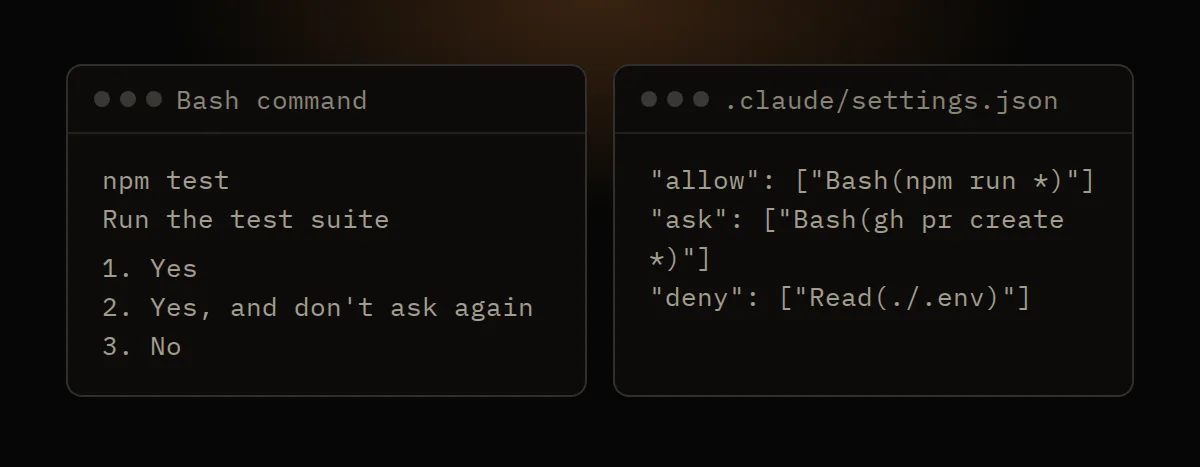
Source: Configure permissions, Claude Code docs
What asks for permission by default
| Tool type | Example | Asks in Manual mode? | Yes, and don't ask again lasts |
|---|---|---|---|
| Read-only | File reads, Grep | No, inside your working folders | Not needed |
| Bash commands | Shell execution | Yes, apart from a built-in set of read-only commands | Permanently, per repository and command |
| File changes | Edit and Write | Yes, apart from files such as Claude's own plan and memory files | Until the session ends |
| Web fetch | WebFetch | Yes, apart from preapproved documentation domains | Permanently, per repository and domain |
| Web search | WebSearch | Yes | Permanently, per repository |
When a Yes, and don't ask again saves permanently, Claude Code writes the rule to .claude/settings.local.json at the root of the git repository. Some prompts offer only a one-time approval: Claude Code only shows the broader options when the prompt can show you everything they would allow.
Add a note when you answer
On most prompts, move to Yes or No and press Tab to open a comment field, type, then Enter. With Yes, Claude runs the action and then reads your comment. With No, your comment goes to Claude as the reason and it carries on working; a plain No with no comment stops the turn.
Source: Configure permissions, Claude Code docs
Allow, ask and deny rules
- Allow rules let Claude use the tool without asking.
- Ask rules make Claude Code prompt every time.
- Deny rules stop Claude using the tool.
Order beats specificity. A broad deny such as Bash(aws *) blocks every matching call, including one that also matches a narrower allow such as Bash(aws s3 ls); an allow rule cannot carve an exception out of a deny. A deny rule naming a bare tool, such as Bash, removes the tool from Claude's context entirely, so Claude never sees it.
Run /permissions to see every rule and the settings file each one comes from. You can open it while Claude is working, and rule changes apply straight away. When auto mode is available, the same dialog has an Auto mode tab for the classifier's rules and a Recently blocked tab.
{
  "permissions": {
    "allow": [
      "Bash(npm run *)",
      "Bash(git commit *)"
    ],
    "deny": [
      "Bash(git push *)"
    ]
  }
}
With that configuration, Claude runs npm scripts and git commits without asking and is refused any command that starts with git push.
Source: Configure permissions, Claude Code docs
Claude Code permission rule syntax
| Rule | Matches |
|---|---|
| Bash | Every Bash command (Bash(*) is the same) |
| WebFetch | Every web fetch |
| Read | Every file read |
| Bash(npm run build) | Exactly npm run build |
| Read(./.env) | Reading .env in the current folder |
| WebFetch(domain:example.com) | Fetches to example.com |
Wildcards in Bash rules
A * matches any text, spaces included, and can go at the start, middle or end. Put it after the subcommand: Claude Code matches everything before the first * as written.
| You write | Matches | Does not match |
|---|---|---|
| Bash(npm run build) | npm run build | npm run build --watch |
| Bash(npm run *) | npm run build, npm run test --watch, npm run | npm install |
| Bash(git log * main) | git log --oneline main, git log -5 main | git log main, git push origin main |
| Bash(* --version) | node --version | node -v |
| Bash(ls *) | ls -la, ls | lsof |
| Bash(ls*) | ls -la, lsof |
A trailing * after a space also matches the bare command, so Bash(ls *) covers ls. The space matters: Bash(ls *) skips lsof, Bash(ls*) does not. Bash(ls:*) is an older way to write the same trailing wildcard. Anthropic warns about rules like Bash(git * main): the * stands in for the subcommand, so it also matches git push origin main and git -c options that make git run a program you name.
Match a tool's settings
Deny and ask rules can match one top-level input on a built-in tool with Tool(param:value):
| Rule | Matches |
|---|---|
| Agent(model:opus) | Subagents that request the Opus tier |
| Agent(isolation:worktree) | Subagents that ask for a git worktree |
| Bash(run_in_background:true) | Bash commands run in the background |
Each rule names one parameter, the value can use *, and a parameter Claude leaves out never matches. It cannot match a tool's main field, such as a Bash command or a file path; use the normal specifier for those. To see the exact inputs Claude sends, run claude -p "Use a subagent on Opus to list the test files" --output-format stream-json --verbose and read the tool_use block.
Tool name wildcards
Deny and ask rules accept globs in the tool name: "*" matches every tool and "mcp__*" every MCP tool on every server. Allow rules accept a glob only after a named server, such as mcp__puppeteer__*. A deny or ask rule naming a tool that does not exist triggers a start-up warning, to catch typos.
Source: Configure permissions, Claude Code docs
Bash permission rules in detail
Chained commands
Claude Code understands shell operators, so Bash(safe-cmd *) does not approve safe-cmd && other-cmd. It splits on &&, ||, ;, |, |&, & and new lines, and every part must be allowed. Deny and ask rules apply when any part matches, including inside a subshell, a command substitution or a for loop, so an ask rule for Bash(git clean *) still prompts for cd /tmp && git clean -fd. When you approve a chained command with Yes, and don't ask again, Claude Code saves a separate rule for each part that needed approval.
Wrappers Claude Code looks through
Before matching, Claude Code strips timeout, time, nice, nohup and stdbuf, so Bash(npm test *) also matches timeout 30 npm test. It also strips known-safe variable assignments such as NODE_ENV=test, and a bare xargs with no flags. The list is fixed. Runners such as npx, direnv exec, devbox run, mise exec and docker exec are not stripped, so an allow rule for one of them approves whatever it runs. Exec wrappers such as watch, setsid and flock, and find with -exec or -delete, always prompt in Manual mode unless an exact rule matches the whole command.
What a Bash rule does not catch
| Rule | Stops | Does not stop |
|---|---|---|
| Bash(curl *) | curl https://example.com | /usr/bin/curl https://example.com, sh -c 'curl https://example.com' |
| Bash(rm *) | rm -rf build/ | /bin/rm -rf build/, bash -c 'rm -rf build/' |
| Bash(git push *) | git push origin main | git -C . push origin main |
Rules match the text Claude writes, not the program. For limits that do not depend on command text, use the Bash sandbox; to inspect commands with your own logic, use a PreToolUse hook. Anthropic gives the example of Bash(curl http://github.com/ *): it misses curl -X GET http://github.com/..., https URLs, redirects and variables. Its advice is to deny curl and wget and allow WebFetch(domain:github.com) instead.
Read-only commands run without asking
A built-in set of read-only commands runs without a prompt in every mode, and a cd inside your working folders counts too, so cd packages/api && ls runs straight away. In Manual mode some still prompt: commands with write-capable flags such as find, sort, sed and git when an unquoted glob appears, docker pointed at another daemon, ps arguments that would print environment variables, writes to PATH or IFS, cd combined with git into a different folder, and anything Claude Code cannot fully parse, including any command over 10,000 characters.
Redirects are checked as file writes
For > file, >> file and 2> file, Claude Code checks the target against your Edit rules, protected paths and working folders, as if Claude wrote the file. A rule such as Bash(git commit *) allows the command, not where its output goes. For < file it checks Read rules. tee targets are checked the same way. /dev/null, 2>&1 and here-docs are not checked.
Source: Configure permissions, Claude Code docs
PowerShell rules
{
  "permissions": {
    "allow": [
      "PowerShell(Get-ChildItem *)",
      "PowerShell(git commit *)"
    ],
    "deny": [
      "PowerShell(Remove-Item *)"
    ]
  }
}
PowerShell rules use the same shape as Bash rules. Common aliases are resolved first, so PowerShell(Get-ChildItem *) also matches gci, ls and dir, and matching ignores case. Claude Code parses the command and checks each part of a pipeline or chain on its own.
Source: Configure permissions, Claude Code docs
Read and Edit rules for files
To keep Claude's file tools away from a file or folder, add a Read deny rule such as Read(./.env) or Read(./secrets/**). A Read deny also blocks Edit and Write on that path, applies best-effort to Grep and Glob, and leaves matching files out of @-mentioned folders and pasted image paths. Edit rules cover every built-in tool that edits files. Write(path), Grep(path) and Glob(path) rules are accepted but never match: use Edit(path) for writes and Read(path) for searches.
Anthropic's warning: these rules cover Claude's file tools and commands Claude Code can analyse, such as cat, and redirect targets. They do not stop grep -r pattern . run from the folder that holds the file, or a Python script that opens it. Use the sandbox for that.
How path patterns work
| Pattern | Meaning | Example |
|---|---|---|
| //path | Absolute, from the filesystem root | Read(//Users/alice/secrets/**) |
| ~/path | From your home folder | Read(~/Documents/*.pdf) |
| /path | From the settings file's base, usually the project | Edit(/src/**/*.ts) |
| path or ./path | From the current folder | Read(*.env) |
The trap is the single slash: /Users/alice/file is not absolute, it starts from the settings source. In ~/.claude/settings.json a /path rule resolves to ~/.claude/path, so Read(/secrets/**) in user settings blocks ~/.claude/secrets, not your project's secrets folder. Use // or ~/ for rules that should apply in every project. On Windows paths become POSIX form, so C:\Users\alice is /c/Users/alice.
| Rule | Matches src/app.ts | Matches vendor/pkg/src/lib.js |
|---|---|---|
| Edit(src/**) as an allow rule | Yes | No |
| Edit(src/**) as a deny or ask rule | Yes | Yes |
| Edit(/src/**) | Yes | No |
| Edit(**/src/**) | Yes | Yes |
Patterns use gitignore syntax: * matches within one folder and ** across folders. A deny pattern starting with ! carves paths out of earlier rules in the same file, so Read(*.env) then Read(!sample.env) blocks every .env except sample.env, but it cannot reopen a file inside a folder blocked as a whole.
Symlinks and network paths
For a path through a symlink, an allow rule must match both the link and the file it points to, while a deny rule applies if either matches, so a link to a denied file is denied. The Edit and Write tools refuse to write to a path that is itself a symlink. Reads from network paths, such as a Windows UNC share, always prompt from v2.1.292, even with an allow rule or a hook that says allow; mount the share at a local path to avoid it.
Source: Configure permissions, Claude Code docs
WebFetch, MCP, subagent and /cd rules
WebFetch
WebFetch rules match the hostname with a domain: prefix. WebFetch(domain:example.com) matches only example.com; add WebFetch(domain:*.example.com) for subdomains at any depth. Anywhere other than a leading *. or a bare *, the wildcard only matches between two dots, so WebFetch(domain:example.*) matches example.org but not example.evil.com.
| Rule | In allow | In deny |
|---|---|---|
| WebFetch | Fetches without asking; sandboxed commands unchanged | Removes the tool entirely |
| WebFetch(domain:*) | Fetches without asking, and sandboxed commands can reach any host | Keeps the tool but refuses every fetch, and sandboxed commands reach no host |
Allowing WebFetch alone does not stop network access: if Bash is allowed, Claude can still reach any URL with curl or wget.
MCP tools
Write mcp__<server>__* for every tool from a server, or mcp__<server>__<tool> for one tool; mcp__puppeteer, mcp__puppeteer__* and mcp__puppeteer__puppeteer_navigate are the three forms. Write MCP allow rules without a specifier, because a rule that tries to allow only some calls matches none. Characters such as dots and spaces in server names become underscores, and plugin servers use mcp__plugin_<plugin>_<server>__*. If your organisation set a claude.ai connector tool to ask, Claude Code prompts every time, even in auto mode.
Subagents
{
  "permissions": {
    "deny": ["Agent(Explore)"]
  }
}
Agent(Explore), Agent(Plan) and Agent(my-custom-agent) match those subagents; deny them in settings or with --disallowedTools.
/cd
Cd rules control where your own /cd command can move a session; Claude cannot call it. A bare Cd deny turns /cd off, and adding any Cd allow rule switches it to an allowlist. Cd(~/code/*) matches ~/code/app but not ~/code/app/src; Cd(~/code/**) matches ~/code and everything under it.
Source: Configure permissions, Claude Code docs
Claude Code permission modes
| Mode | What runs without asking | Best for |
|---|---|---|
| default (Manual) | Reads in your working folders and actions that need no approval | Sensitive work, unfamiliar code |
| acceptEdits | Reads, file edits and mkdir, touch, mv, cp in your working folders | Iterating on code you are reviewing |
| plan | Reads and read-only commands; no edits until you approve a plan | Exploring first |
| auto | Everything, with a classifier reviewing each action | Long tasks, fewer prompts |
| dontAsk | Only pre-approved tools; anything that would prompt is denied | Locked-down CI and scripts |
| bypassPermissions | Everything apart from the few actions no mode approves | Isolated containers and VMs only |
Press Shift+Tab to cycle modes in the CLI, start with --permission-mode, or set permissions.defaultMode in settings. Deny rules apply in every mode, bypassPermissions included. No mode auto-approves explicit ask rules, tools that need your input such as AskUserQuestion, or rm and rmdir commands aimed at critical paths such as your home folder.
To stop a mode being used, set permissions.disableBypassPermissionsMode or permissions.disableAutoMode to "disable", usually in managed settings, though a user can set it to lock themselves out of bypass mode. To have unattended sessions deny anything that would wait on a prompt, set permissions.denyInsteadOfPrompting to true.
Source: Choose a permission mode, Claude Code docs
Common setups
| You want to | Start with |
|---|---|
| Answer every prompt yourself | claude --permission-mode default |
| Fewer prompts without a classifier | Manual mode plus /sandbox in auto-allow mode |
| Explore before changing anything | claude --permission-mode plan |
| Work hands-off | claude --permission-mode auto |
| CI with an exact allowlist | claude -p "run the test suite" --permission-mode dontAsk --allowedTools "Bash(npm test)" "Read" |
| Fully unattended | --dangerously-skip-permissions, only inside a container or VM as a non-root user |
Source: Choose a permission mode, Claude Code docs
Which mode a session starts in
A new terminal session takes its mode from the first of these that applies: the --permission-mode flag or --dangerously-skip-permissions, then permissions.defaultMode in a settings file, then the built-in default. From v2.1.283 the built-in default is auto in a terminal or VS Code, while claude -p and Agent SDK runs start in Manual, and any settings file with disableAutoMode set to "disable" forces Manual. If auto is chosen but not available to your account or model, the session starts in Manual instead.
{
  "permissions": {
    "defaultMode": "default"
  }
}
Saved in ~/.claude/settings.json, that makes every terminal session on your machine start in Manual mode, and the status bar shows manual mode on. A project's .claude/settings.json can set any default except auto and bypassPermissions, which only take effect from user or managed settings, so a cloned repository cannot quietly switch your safety checks off.
Why claude -p calls get denied
From v2.1.302, claude -p and Agent SDK runs with no mode set start in Manual, and with no one there to answer, calls that need approval are denied. Either list what Claude may do, such as --allowedTools "Bash(npm test)", or start in auto mode so a classifier reviews each call:
claude -p "Run the test suite and fix any failures" --permission-mode autoIn the SDKs the same setting is permissionMode: "auto" in TypeScript and permission_mode="auto" in ClaudeAgentOptions in Python.
Source: Choose a permission mode, Claude Code docs
acceptEdits mode
acceptEdits lets Claude create and edit files in your working folder without asking, and the status bar shows accept edits on. It also approves the common file commands mkdir, touch, rm, rmdir, mv, cp and sed on paths in scope, and with PowerShell enabled, Set-Content, Add-Content, Clear-Content and Remove-Item. Paths outside your working folders, protected paths, rm of critical paths and every other Bash command outside the read-only set still prompt. Anthropic suggests it when you would rather review changes in your editor or with git diff afterwards. Press Shift+Tab once from Manual, or start with claude --permission-mode acceptEdits.
Plan mode
Plan mode tells Claude to research and propose changes without making them: it reads files, runs commands to explore and writes a plan, but does not edit your source. When auto mode is available and useAutoModeDuringPlan is on, as it is by default, the classifier reviews exploration commands instead of prompting you. Enter it with Shift+Tab, by starting a prompt with /plan, or with claude --permission-mode plan. When the plan is ready you can choose Yes, and use auto mode, Yes, manually approve edits, or No, keep planning; Ctrl+G opens the plan in your editor first. At the approval prompt press Esc before Shift+Tab, because Shift+Tab there approves the plan.
dontAsk mode
dontAsk denies every call that would otherwise prompt, while still running reads in your working folders, read-only commands, calls your allow rules cover and calls a PreToolUse hook approves. Your ask rules, AskUserQuestion and MCP tools that need your input are denied, and nothing can approve critical-path removals or network-path reads. It is meant for locked-down CI and scripts; start it with claude --permission-mode dontAsk. Cloud sessions ignore a dontAsk default from settings files.
bypassPermissions mode
bypassPermissions turns off prompts and safety checks, including writes to protected paths, so calls run immediately; only the few actions no mode approves still prompt or are denied. Anthropic says to use it only in isolated environments such as containers, VMs or dev containers without internet access, and warns it offers no protection against prompt injection. You must enable it at launch with claude --permission-mode bypassPermissions or --dangerously-skip-permissions; the first interactive run asks you to accept responsibility. On Linux and macOS it refuses to start as root or under sudo, unless inside a recognised sandbox, and a session started with --restricted refuses it entirely. Cloud sessions ignore a bypassPermissions default from settings, so a checked-in repository cannot start one that way.
Source: Choose a permission mode, Claude Code docs
Protected paths
A small set of paths holds repository state and Claude's own configuration, so writes there get their own rule in each mode: Manual and acceptEdits prompt, auto sends them to the classifier, dontAsk denies, and bypassPermissions allows. Allow rules in settings do not pre-approve them, because this check runs first; an Edit(.claude/**) rule does nothing here. Instead the prompt offers to allow edits to the project's .claude folder for the session.
| Kind | Examples |
|---|---|
| Folders | .git, .vscode, .idea, .husky, .cargo, .devcontainer, .yarn, .mvn, .claude (apart from Claude's own worktrees, plans and memory) |
| Shell files | .bashrc, .bash_profile, .zshrc, .zprofile, .profile, .envrc |
| Package config | .npmrc, .yarnrc, .yarnrc.yml, bunfig.toml |
| Git and hooks | .gitconfig, .gitmodules, .pre-commit-config.yaml, lefthook.yml |
| Claude Code | .mcp.json, .claude.json, files passed with --settings, --mcp-config or --agents |
Source: Choose a permission mode, Claude Code docs
Critical paths: the rm commands no rule can approve
Critical paths are the folders Claude Code protects from rm and rmdir: the filesystem root, top-level folders such as /usr, /etc or /data, your home folder, Windows drive roots, and your working folder and its parents. No allow rule and no PreToolUse hook returning allow can approve a removal aimed at one. Claude Code also treats risky forms as critical, such as rm -rf "$DIR"/*, which removes from the root if the variable is empty, rm -rf "$(pwd)", and rm -rf ~/$(cmd), and it looks inside subshells and bash -c scripts.
| Mode | A critical-path removal |
|---|---|
| Manual, acceptEdits, plan | Asks you |
| auto | Asks in the terminal with a two-minute countdown; denied elsewhere |
| dontAsk | Denied |
| bypassPermissions | Asks in the terminal before a countdown runs out |
Anthropic's warning is that a command the check misses gets no special handling, so an allow rule, bypassPermissions or the sandbox's auto-allow mode could approve it. Deny rules and the sandbox still apply either way, but a sandboxed command can still delete your working folder.
Source: Choose a permission mode, Claude Code docs
Extend permissions with hooks
A PreToolUse hook runs your own command before the permission prompt and can deny the call, force a prompt, or skip the prompt. Hooks do not override rules: a matching deny still blocks and a matching ask still prompts even if the hook says allow. A blocking hook, one that exits with code 2, stops the call before rules are checked, so it wins even over an allow rule. In plan mode a hook's allow has no effect on edits or other calls that are not read-only.
Source: Configure permissions, Claude Code docs
Hooks, mods and rules together
A mod you install that handles tool checks answers after your PreToolUse hooks. With managed settings or a Team or Enterprise login, it cannot undo a deny, skip an ask rule's prompt, or approve a call a hook blocked. Without those, a mod can approve some calls a deny rule or hook would stop, so Anthropic says not to rely on a permission rule to stop a call a mod makes itself. Tools that need your input, such as AskUserQuestion, always prompt even when a mod approves.
Working folders
Claude can work with files in the folder you launched it from. Add more with --add-dir <path> at start-up, /add-dir during a session, or additionalDirectories in settings; they follow the same rules. Adding a folder grants file access, not configuration: from an --add-dir folder Claude Code loads skills, commands and subagents, but CLAUDE.md files only with CLAUDE_CODE_ADDITIONAL_DIRECTORIES_CLAUDE_MD=1. /cd <path> moves the whole session, keeping the conversation and loading the new folder's CLAUDE.md, settings, hooks and MCP servers.
To make the file tools refuse paths outside your working folders in every mode, bypassPermissions included, set permissions.blockReadsOutsideWorkingDirectories or permissions.blockWritesOutsideWorkingDirectories to true. The write setting does not limit shell commands or MCP tools.
Source: Configure permissions, Claude Code docs
Settings order and managed settings
Permission rules follow the normal settings order, with managed settings at the top: nothing, command-line flags included, can override a managed rule. A deny at any level cannot be allowed by another level, so a managed deny beats --allowedTools, and a user-level deny beats a project-level allow. Administrators can set allowManagedPermissionRulesOnly so that only managed settings supply permission rules.
Project rules need workspace trust
Allow rules and additionalDirectories in a project's .claude/settings.json only apply after you accept the workspace trust dialog for that folder, which lists them first. In a repository, trust covers the whole repository; started in your home folder, it lasts for that session only. Before running claude -p in a repository you did not write, Anthropic suggests --setting-sources user to ignore its settings and .mcp.json, --bare to skip its hooks, skills and plugins, or --settings '{"disableAllHooks": true}'.
Source: Configure permissions, Claude Code docs
What a repository can run before you trust it
| What the repository supplies | Trusted only a parent folder | claude -p or SDK, never trusted |
|---|---|---|
| Hooks in settings, the env block, apiKeyHelper | Used | Used |
| permissions.allow rules and additionalDirectories | Not used until you accept the trust dialog | Not used, with a warning |
| Frontmatter hooks in project subagents | Not used | Not used |
| Servers in .mcp.json | Claude Code asks before connecting them | Connected without asking |
That last column is why Anthropic suggests the --setting-sources user, --bare or disableAllHooks options above before running claude -p in someone else's repository, and a disabledMcpjsonServers entry to reject a named .mcp.json server in every session type. Your own .claude/settings.local.json normally applies without the trust step, but if it is tracked in git or .claude is a symlink, Claude Code treats it like repository settings.
Configuration from added folders
| Configuration | Loaded from an --add-dir folder |
|---|---|
| Skills in .claude/skills/ | Yes, with live reload |
| Commands in .claude/commands/ | Yes; your project's command wins on a name clash |
| Subagents in .claude/agents/ | Yes |
| .claude/settings.json | Only the enabledPlugins and extraKnownMarketplaces keys |
| CLAUDE.md and .claude/rules/ | Only with CLAUDE_CODE_ADDITIONAL_DIRECTORIES_CLAUDE_MD=1 |
Folders listed in permissions.additionalDirectories in a settings file grant file access only, without these exceptions. To share configuration across projects, put it in ~/.claude/, package it as a plugin, or launch Claude Code from the folder that holds it.
Source: Configure permissions, Claude Code docs
Permissions and the sandbox
Permissions decide which tools Claude can use and which files and domains it can touch. The sandbox is enforced by the operating system on what shell commands can reach. Anthropic recommends both, because sandbox limits still hold even if a prompt injection gets past Claude's judgement. With the sandbox on and auto-allow chosen, sandboxed Bash commands run without prompting even under a bare Bash ask rule, while content-scoped ask rules such as Bash(git push *) still prompt.
Source: Configure permissions, Claude Code docs
Claude Code permissions problems and fixes
| Problem | Fix |
|---|---|
| An allow rule does not stop the prompt | A deny or ask rule elsewhere matches first; check /permissions for every source |
| Read(/secrets/**) in user settings does nothing | A single slash starts from ~/.claude there; use ~/ or // instead |
| A Grep(docs/**) deny has no effect | Use Read(docs/**); Grep, Glob and Write rules with paths never match |
| Bash(git push *) misses some pushes | git -C or git -c forms do not match; use a hook or the sandbox for a firm limit |
| Edit(.claude/**) still prompts | Protected paths ignore allow rules; use the session option in the prompt |
| A project allow rule is ignored | Accept the workspace trust dialog for that folder |
| An MCP allow rule with a specifier never matches | Allow the whole tool and deny specific calls instead |
Source: Configure permissions, Claude Code docs
Fewer prompts across many sessions
Good permission rules are what let a Claude Code session run for long stretches without stopping, and that is when people start running several at once. 10u is an AI coding agent dashboard that shows every Claude Code and Codex session side by side, each in its real terminal, marked Needs you when one is waiting on a permission prompt. They do the building. You decide what gets built.

Questions people ask
- How do I stop Claude Code using a subagent?
- Add a deny rule such as Agent(Explore) to permissions.deny, or pass it with --disallowedTools. Agent(Plan) and Agent(your-agent-name) work the same way.
- Where are Claude Code permissions stored?
- In settings.json files: ~/.claude/settings.json for you, .claude/settings.json for a project, and .claude/settings.local.json for your own project rules, plus managed settings for an organisation.
- What order are permission rules checked in?
- Deny first, then ask, then allow. The first match wins, and a more specific allow rule cannot override a broader deny.
- How do I allow all npm scripts in Claude Code?
- Add Bash(npm run *) to permissions.allow. The trailing * after a space also matches the bare npm run.
- How do I stop Claude reading my .env file?
- Add Read(./.env) to permissions.deny. For shell commands as well, add the file to the sandbox's denyRead or credentials settings.
- Can CLAUDE.md change Claude Code permissions?
- No. CLAUDE.md shapes what Claude tries to do, but permission rules are enforced by Claude Code. Use /permissions or settings files to change access.