
Claude Code tutorial: from install to your first real change, step by step
This Claude Code tutorial takes you from nothing installed to Claude making real, reviewed changes in your own project. In short: install Claude Code with one command, open a terminal in your project folder, type claude, sign in, and ask in plain English. Claude reads your files as it needs them, proposes changes, and asks before acting unless you tell it not to. The steps below follow Anthropic's own quickstart and best-practice guides, with the prompts to type at each stage.
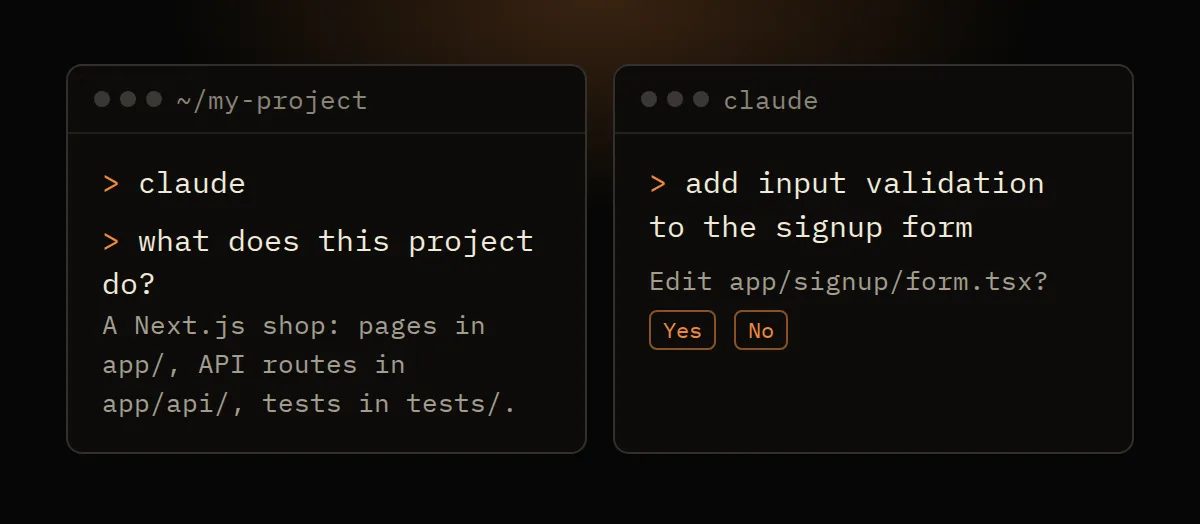
How Claude Code works, in one minute
Claude Code is an agent, not a chat box. When you give it a task, it works in a loop of three phases: gather context, take action, and check the result. A question might only need the first phase; a bug fix goes round all three several times. To do this it uses tools: it reads and edits files, searches your code, runs shell commands and tests, uses Git, and looks things up on the web. Each tool result tells it what to do next.
Anthropic's example: when you say "fix the failing tests", Claude might run the test suite, read the error output, search for the relevant source files, read them, edit the fix, and run the tests again to confirm. You stay part of the loop and can interrupt at any point to steer.
What Claude can reach
- Your project: files in the folder you started it in and below, and files elsewhere with your permission.
- Your terminal: any command you could run yourself, such as build tools, Git, package managers and scripts.
- Your Git state: the current branch, uncommitted changes and recent commits.
- Your CLAUDE.md and its own auto memory, covered in step 9.
- Anything you add: MCP servers, skills and subagents, covered in step 13.
That is why the permission modes in step 4 matter: Claude can do what you can do in a terminal, so you choose how much it does without asking.
Source: How Claude Code works, Claude Code docs
What you need before you start
- A terminal: Terminal on a Mac, PowerShell on Windows, or any Linux shell. Never used one? Anthropic has a terminal guide for beginners.
- A code project to work on. Any folder works, even a folder of notes.
- A paid Claude plan (Pro, Max, Ultra, Team or Enterprise) or a Claude Console account with prepaid credits. The Free plan does not include Claude Code.
Prefer not to use a terminal? Claude Code also runs in the Claude desktop app, in VS Code and JetBrains editors, and on the web at claude.ai/code. This tutorial uses the terminal because every other version builds on the same ideas.
Source: Quickstart, Claude Code docs
Where Claude Code can run
| Environment | Where the code runs | Good for |
|---|---|---|
| Local | Your computer | The default, with full access to your files and tools |
| Cloud | Machines Anthropic manages | Handing off tasks, or repos you do not have locally |
| Remote Control | Your computer, driven from a browser | Using the web interface while your files stay on your machine |
Source: How Claude Code works, Claude Code docs
Step 1: Install Claude Code
Run the installer for your system. It downloads Claude Code and keeps it updated in the background.
| System | Command |
|---|---|
| macOS, Linux and WSL | curl -fsSL https://claude.ai/install.sh | bash |
| Windows PowerShell | irm https://claude.ai/install.ps1 | iex |
| Homebrew | brew install --cask claude-code |
| WinGet | winget install Anthropic.ClaudeCode |
When it finishes, open a new terminal window and check it worked:
claude --versionA version number means you are ready. If you get "command not found", open a fresh terminal so your PATH reloads. Claude Code needs macOS 13 or later, Windows 10 1809 or later, or Ubuntu 20.04, Debian 10 or Alpine 3.19 or later, with 4 GB of memory.
Source: Advanced setup, Claude Code docs
Step 2: Start your first session
Go to your project folder and start Claude Code:
cd /path/to/your/projectclaude
The first time, it asks you to log in; follow the prompts and finish in your browser. Claude Code remembers the login. You can sign in with a Claude plan (Anthropic recommends this), a Console account, or, at work, Amazon Bedrock, Google Cloud's Agent Platform or Microsoft Foundry. Once you are in, the prompt shows your version, model and folder. Type /help to see the commands, or /resume to continue an earlier conversation.
Source: Quickstart, Claude Code docs
Step 3: Ask your first questions
Start by asking about the project. You do not need to paste any files; Claude reads what it needs.
what does this project do?what technologies does this project use?where is the main entry point?explain the folder structure
You can also ask Claude Code about itself, which is often quicker than searching the docs:
what can Claude Code do?how do I create custom skills in Claude Code?can Claude Code work with Docker?
Source: Quickstart, Claude Code docs
Step 4: Make your first code change
Try something small:
add a hello world function to the main fileClaude finds the right file and shows you the change. If it asks before making it, choose Yes. Whether it asks depends on the permission mode, which you switch at any time with Shift+Tab.
Permission modes, explained
| Mode | What Claude does | When to use it |
|---|---|---|
| Manual | Asks before every edit and every command that is not read-only | Learning, or a project where every change matters |
| Auto | A safety check reviews most actions instead of asking you, and blocks risky ones | Everyday work; it is the mode terminal and VS Code sessions start in |
| Accept edits | Edits files without asking, still asks before commands | When you trust the edits but want to see commands |
| Plan | Reads and proposes a plan, changes nothing until you approve | Bigger changes you want to review first |
| Bypass permissions | Approves everything your rules do not cover | Only in a throwaway container |
Auto mode blocks things like piping a script from the internet into your shell, production deploys and migrations, force pushes over other people's work, and sending sensitive data to outside services. When it blocks something you meant, approve it under Recently blocked in /permissions and Claude can retry.
Source: Best practices, Claude Code docs
Step 5: Use Git with Claude Code
Git becomes a conversation. Ask in plain words:
what files have I changed?commit my changes with a descriptive messagecreate a new branch called feature/quickstartshow me the last 5 commitshelp me resolve merge conflicts
Claude writes commit messages from the actual changes. Run /diff at any point to review everything in your working tree, including the edits Claude has made so far.
Source: Quickstart, Claude Code docs
Step 6: Fix a bug or add a feature
Describe what you want the way you would to a colleague:
add input validation to the user registration formthere's a bug where users can submit empty forms - fix it
Then try the other everyday jobs: refactoring, tests, documentation and review.
refactor the authentication module to use async/await instead of callbackswrite unit tests for the calculator functionsupdate the README with installation instructionsreview my changes and suggest improvements
Source: Quickstart, Claude Code docs
Step 7: Learn the essential commands
Commands you type in your terminal
| Command | What it does |
|---|---|
| claude | Start a conversation |
| claude "fix the build error" | Start with a first prompt |
| claude -p "explain this function" | Ask once, print the answer and exit |
| claude -c | Continue the latest conversation in this folder |
| claude -r | Pick an earlier conversation to resume |
Commands you type inside Claude Code
| Command | What it does |
|---|---|
| /help | List the commands available |
| /init | Write a starting CLAUDE.md for your project |
| /clear | Start a new conversation with empty context |
| /compact | Summarise the conversation so far to free up context |
| /context | Show what is using your context window |
| /model | Switch model, and effort level where supported |
| /plan | Enter plan mode, optionally with a task |
| /rewind | Roll the code, the conversation or both back to an earlier point |
| /diff | Review the changes in your working tree |
| /resume | Open an earlier conversation |
| /usage | See your plan usage and what is using it |
| /memory | Edit CLAUDE.md files and auto memory |
| /permissions | Manage allow, ask and deny rules |
| /mcp | Manage connections to outside tools |
| /exit | Leave Claude Code (or press Ctrl+D twice) |
Type / to see every command and skill available to you. Tab completes, the up arrow brings back earlier prompts, and Shift+Tab cycles permission modes.
Source: Commands, Claude Code docs
Step 8: Write prompts that work
The biggest jump in results comes from telling Claude what it cannot see. Claude starts every task by reading your code, so it finds your layout, conventions and test framework quickly. What it cannot find is what was never written down: a team decision, how deploys work, which approach you prefer.
| Instead of | Try |
|---|---|
| fix the login bug | users report login fails after the session times out. look at token refresh in src/auth/, write a failing test that reproduces it, then fix it |
| add a calendar widget | follow the pattern in HotDogWidget.php and build a calendar widget that lets you pick a month and page between years. no new libraries |
- Name the file, describe the symptom and say what fixed looks like.
- Hand over what you have: type @ and a path to include a file, paste a screenshot, or pipe in output such as cat error.log | claude -p "what's going on here".
- Break big jobs into numbered steps.
- Let Claude explore first, for example "analyze the database schema", before asking for changes.
- Add "be ambitious" when you want the fuller version; otherwise Claude tends to build the smallest thing that satisfies the request.
- Phrases like "think step by step" are just ordinary text. The real control for how hard Claude thinks is the effort level in /model.
Not sure what you want yet? Ask Claude to interview you: "I want to add rate limiting to the public API but haven't thought it through yet. Interview me until you could write the spec, then write it to SPEC.md." Then start a fresh session and build from that spec.
Source: Best practices, Claude Code docs
It is a conversation, so iterate
You do not need a perfect first prompt. Start with what you want, watch what Claude does, and correct it: "That's not quite right. The issue is in the session handling." You can press Esc to stop it, or type a correction and press Enter while it works; the message waits in a queue and Claude reads it as soon as its current tool calls finish, then adjusts.
Delegate rather than dictate. Anthropic's example gives context and direction and trusts Claude with the details: "The checkout flow is broken for users with expired cards. The relevant code is in src/payments/. Can you investigate and fix it?" You do not need to list which files to read or which commands to run.
Source: How Claude Code works, Claude Code docs
Step 9: Give Claude a CLAUDE.md
CLAUDE.md is a file in your project that Claude Code reads at the start of every session: your commands, conventions and gotchas. Run /init and Claude writes a starting version from your codebase; from there the work is mostly deleting lines. Anthropic's memory guide suggests staying under 200 lines, because every line takes a little of Claude's attention on every task.
Good things to include: the exact test, typecheck and lint commands; places where the code misleads, such as an old pattern new code must not copy; decisions that are not in the repo; and anything you have had to correct twice. A short example:
# Commands
- Install: pnpm install
- Run one test file: pnpm vitest run path/to/file.test.ts
- Typecheck: pnpm tsc --noEmit
# Conventions
- Use the error helpers in src/lib/errors.ts, never throw raw strings
- src/legacy/ is still live but don't copy its patterns into new code
# Gotchas
- Integration tests need DATABASE_URL set, see .env.example
Personal preferences go in CLAUDE.local.md, added to .gitignore so it stays out of the repo. Run /context all to confirm Claude loaded the file.
Source: Best practices, Claude Code docs
Where CLAUDE.md files can live
| Scope | Location | Shared with |
|---|---|---|
| You, in every project | ~/.claude/CLAUDE.md | Only you |
| The project | ./CLAUDE.md or ./.claude/CLAUDE.md | Everyone on the project, through Git |
| You, in this project | ./CLAUDE.local.md (add it to .gitignore) | Only you |
| Your organisation | A managed policy file your IT team installs | Everyone in the organisation |
Add to CLAUDE.md when Claude makes the same mistake twice, when a code review catches something Claude should have known, or when you type a correction you already typed last session. A multi-step procedure belongs in a skill instead. If your repository already has an AGENTS.md for other coding agents, Claude Code reads that when there is no CLAUDE.md, so you do not need both.
Auto memory: what Claude remembers by itself
Alongside the CLAUDE.md you write, Claude keeps its own notes as you work. Auto memory is on by default in local sessions and saves four kinds of note: your role and preferences, corrections you give and approaches you confirm, ongoing work and decisions it cannot work out from the code, and where to find things outside the project, such as your issue tracker. It skips anything it can read from the code. The first 200 lines or 25 KB of its MEMORY.md file load at the start of each session. Open /memory to browse, edit or turn it off.
Both CLAUDE.md and auto memory are guidance, not hard rules. To block an action whatever Claude decides, use a hook instead.
Source: How Claude remembers your project, Claude Code docs
Step 10: Steer, undo and start over
Anthropic's advice is to watch the first minute, press Esc the moment Claude drifts, and after two failed corrections run /clear and write a better prompt instead of a third. The controls worth knowing by heart:
| Control | What it does |
|---|---|
| Esc | Stops Claude mid-action and keeps everything so far, so you can redirect |
| /rewind, or Esc twice on an empty prompt | Rolls the code, the conversation or both back to an earlier prompt |
| /clear | Starts over with an empty context; a fresh prompt beats a third correction |
| /btw | Asks a quick side question without adding it to the conversation |
| /rename | Names a session so you can find it again for work spanning several days |
One catch: checkpoints cover files Claude edited with its own file tools. A file changed only by a shell command is not restored by /rewind, so commit to Git before risky work.
Source: Best practices, Claude Code docs
Step 11: Use plan mode for bigger changes
For changes you want to review before anything touches your files, use plan mode. Claude reads files and proposes a plan but makes no edits until you approve. Start a session in it, or press Shift+Tab until the status bar shows plan mode on, or type /plan with a task.
claude --permission-mode planSource: Common workflows, Claude Code docs
Step 12: Everyday workflows, with prompts
Understand a new codebase
give me an overview of this codebaseexplain the main architecture patterns used herewhat are the key data models?
Fix a bug
I'm seeing an error when I run npm testsuggest a few ways to fix the @ts-ignore in user.tsupdate user.ts to add the null check you suggested
Tell Claude the command that reproduces the problem, the steps to trigger it, and whether it happens every time or only sometimes.
Refactor safely
find deprecated API usage in our codebaserefactor utils.js to use ES2024 features while maintaining the same behaviorrun tests for the refactored code
Add tests
find functions in NotificationsService.swift that are not covered by testsadd test cases for edge conditions in the notification servicerun the new tests and fix any failures
Open a pull request
summarize the changes I've made to the authentication modulecreate a prenhance the PR description with more context about the security improvements
Review the pull request before you submit it, and ask Claude to point out risks. Later, claude --from-pr with the PR number finds the session that made it.
Work with images
Drag an image into the Claude Code window, paste it with Ctrl+V (Alt+V on Windows and WSL), or give its path. Screenshots of a design or an error are often the fastest way to explain what you want.
Source: Common workflows, Claude Code docs
Step 13: Extend Claude Code
Once the basics feel natural, a few features make Claude Code fit your work. Add them when you feel the need, not all at once.
| Feature | What it is | Add it when |
|---|---|---|
| CLAUDE.md | Rules and context loaded every session | Claude gets a convention or command wrong twice |
| Skill | A saved procedure or reference Claude can use, often run as a / command | You keep typing the same prompt, or paste the same playbook a third time |
| MCP server | A connection to an outside service such as your issue tracker or database | You keep copying data from a browser tab Claude cannot see |
| Subagent | A helper that works in its own context and reports back a summary | A side task floods your conversation with output you will not need again |
| Hook | A script that runs automatically on events, such as after every edit | You want something to happen every time without asking |
| Plugin | A package of skills, hooks and settings | A second repository needs the same setup |
An MCP server is one command away. For example, Anthropic's guide connects Notion like this, after which it appears under /mcp:
claude mcp add --transport http notion https://mcp.notion.com/mcpIf a tool has its own command-line program, that is usually easier still: with GitHub's gh installed and signed in, Claude can work with issues and pull requests directly. A hook can make Claude check its own work, for example by refusing to finish until your typecheck passes.
Source: Extend Claude Code, Claude Code docs
A first skill
A skill is a Markdown file with a short header. Claude sees the name and description in every session but reads the rest only when it uses the skill, which keeps it lighter than CLAUDE.md. Anthropic's example is a release procedure. The disable-model-invocation line means Claude cannot start it on its own; you run it as /release.
---
name: release
description: Cut a new release. Bumps the version, writes the changelog entry, tags it and pushes the tag so CI can publish.
disable-model-invocation: true
---
1. Make sure you're on main with a clean tree. If not, stop and ask.
2. Run `pnpm changeset version` and commit the result.
3. Summarize the PRs merged since the last tag into CHANGELOG.md, one line each, user-facing changes only.
4. Tag `v<new version>` and push the tag. CI publishes from there, never publish from your machine.
A first hook
A hook runs every time, whatever Claude decides. This one, in .claude/settings.json, stops Claude from finishing until the typecheck passes. Exit code 2 blocks the stop, and the compiler errors go back to Claude so it keeps fixing until the check is clean.
{
  "hooks": {
    "Stop": [
      {
        "hooks": [
          { "type": "command", "command": "pnpm tsc --noEmit 1>&2 || exit 2" }
        ]
      }
    ]
  }
}
Source: Best practices, Claude Code docs
Step 14: Run several sessions at once
When you have separate jobs going, give each its own copy of the code so edits cannot collide. A Git worktree is a separate checkout on its own branch, and Claude Code can make one for you:
claude --worktree feature-authRun the same command with a different name in a second terminal for a second, isolated session. A worktree starts without gitignored files such as .env, so list the small files you need in a .worktreeinclude file. When you exit an unnamed worktree session with nothing in it, Claude Code removes it for you.
To hand off research without filling your own conversation, ask for a subagent: "use a subagent to investigate how our auth system handles token refresh". It reads files in its own context and reports back a summary.
Source: Common workflows, Claude Code docs
Step 15: Let Claude work without you
Claude Code also runs from scripts, CI and schedules. Pipe something in and get an answer out:
git log --oneline -20 | claude -p "summarize these recent commits"| Option | Where it runs | Best for |
|---|---|---|
| Cloud scheduled tasks | Anthropic's cloud | Jobs that should run with your computer off |
| Desktop scheduled tasks | Your computer, through the desktop app | Jobs that need your local files and tools |
| GitHub Actions | Your CI pipeline | Jobs tied to repo events, such as a new pull request |
| /loop | The current session | Quick checks while a session is open |
Before a run goes unattended, Anthropic suggests five questions. Does it know what done looks like? Can it check its own work? What is it allowed to touch? What stops it, such as a turn or spend limit? And where does the result go, with a person approving anything you cannot take back?
Source: Best practices, Claude Code docs
Keep usage and context under control
Every request sends the whole conversation, so a long session costs more per message than a short one. Run /usage to see what is using your plan, broken down by skill, subagent, plugin and MCP server. Use /clear between unrelated tasks; it costs nothing. Use /compact with a focus, such as /compact keep the API changes and the test commands, when you want to keep going in the same conversation. Turn off MCP servers you are not using, because each adds its tools to every request.
Source: Best practices, Claude Code docs
Sessions and the context window
Claude Code saves each conversation on your computer as you work, which is what makes resuming, forking and rewinding possible. Each new session starts with a fresh context window, without the history of earlier ones; CLAUDE.md and auto memory carry what should persist. Sessions belong to the folder you started them in, and when you switch Git branches Claude sees the new branch's files but keeps the conversation.
As the context window fills, Claude Code summarises the conversation automatically. The summary keeps your requests and key code, but detailed instructions from early on can be lost, so put lasting rules in CLAUDE.md rather than in chat. Run /context to see what is using space.
Source: How Claude Code works, Claude Code docs
Choose a model and effort level
Claude Code offers several Claude models with different trade-offs. Anthropic's guide says Sonnet handles most coding tasks well and Opus gives stronger reasoning for complex architectural decisions. Switch with /model during a session; it also becomes your default for new sessions. On models that support it, use the left and right arrows in /model to set the effort level, which is the real control for how hard Claude thinks.
Source: How Claude Code works, Claude Code docs
Common beginner problems
| You see | What it means | What to do |
|---|---|---|
| command not found: claude | Your terminal has not picked up the new install | Open a new terminal window, then run claude --version |
| Not logged in · Please run /login | No valid sign-in for this session | Run /login and finish in your browser |
| You've hit your session limit | Your plan's usage window is used up | Wait for the reset time shown, or check /usage |
| Repeated 529 Overloaded errors | The API is busy for everyone; not your limit | Switch model with /model or try again shortly |
| API Error: 500 | A failure on Anthropic's side | Check status.claude.com, wait a minute, type "try again" |
| Claude keeps ignoring a rule | The rule is lost in a long CLAUDE.md, or needs enforcing | Shorten CLAUDE.md, or make it a hook |
Run /doctor inside Claude Code for a setup checkup that diagnoses installation and configuration problems and can fix many of them, or claude doctor in your shell for a read-only check.
Source: Error reference, Claude Code docs
Handle documentation
find functions without proper JSDoc comments in the auth moduleadd JSDoc comments to the undocumented functions in auth.jscheck if the documentation follows our project standards
Say which style you want, such as JSDoc or docstrings, and ask for examples. Claude Code also works in folders that are not code at all, such as a notes folder or a documentation site: it searches, edits and reorganises Markdown files the same way.
Source: Common workflows, Claude Code docs
Where to learn more
- Type /help inside Claude Code, or just ask it a "how do I" question.
- Take Claude Code 101 and other free self-paced courses on Claude Academy.
- Read Anthropic's best practices and common workflows guides, which most of this tutorial follows.
Source: Quickstart, Claude Code docs
After the tutorial: running several agents
Once Claude Code clicks, most people end up with several sessions going: one per worktree, maybe Codex beside them. The hard part becomes knowing which one is waiting on you. 10u is an AI coding agent dashboard that shows every Claude Code and Codex session side by side, each in its real terminal, marked Needs you, Working, Waiting or Parked, with the one waiting on you on top. It runs on the subscriptions you already have. They do the building. You decide what gets built.

Questions people ask
- Which model should a beginner use in Claude Code?
- Anthropic says Sonnet handles most coding tasks well, and Opus gives stronger reasoning for complex architectural decisions. Switch any time with /model, which also saves your choice as the default for new sessions.
- How do I run Claude Code on two tasks at once?
- Start each in its own Git worktree with claude --worktree and a name, in separate terminals. Each gets its own checkout and branch, so the edits cannot collide.
- How does Claude Code work?
- It works in a loop: gather context, take action, check the result. It uses tools to read and edit files, search code, run commands and tests, and use Git, and each result decides the next step. You can interrupt and steer at any point.
- Does Claude Code remember things between sessions?
- Each session starts fresh, but CLAUDE.md files load every time and auto memory keeps Claude's own notes on your preferences and corrections. Open /memory to see or edit them.
- How do I start using Claude Code?
- Install it with curl -fsSL https://claude.ai/install.sh | bash on macOS, Linux or WSL, or irm https://claude.ai/install.ps1 | iex in Windows PowerShell. Then open a terminal in your project folder, type claude, sign in, and ask a question in plain English.
- Is Claude Code free to learn?
- Anthropic's Claude Code 101 course on Claude Academy is free, but using Claude Code needs a paid Claude plan (Pro, Max, Ultra, Team or Enterprise) or a Claude Console account.
- What should I put in CLAUDE.md?
- Your exact test, typecheck and lint commands, misleading spots in the code, decisions that are not written down in the repo, and anything you have corrected twice. Run /init for a starting version and keep it under about 200 lines.
- How do I undo something Claude Code did?
- Press Esc to stop it mid-action, then use /rewind (or Esc twice on an empty prompt) to roll the code, the conversation or both back. Files changed only by shell commands are not restored, so commit to Git first.
- What is plan mode in Claude Code?
- Plan mode lets Claude read your files and propose a plan without changing anything until you approve. Press Shift+Tab until it shows, type /plan, or start with claude --permission-mode plan.
- Can I use Claude Code without the terminal?
- Yes. It also runs in the Claude desktop app, in VS Code and JetBrains editors, and on the web at claude.ai/code.