
Codex status: how to tell if Codex is down, and what to do
To check Codex status, open status.openai.com and look at the Codex rows: Codex, Codex API, Codex Web and Codex in ChatGPT Desktop. If they show an incident, Codex is having problems on OpenAI's side and the fix is to wait. If they are all green, the problem is more likely your usage limit, your sign-in or your own install, and /status inside Codex is the next place to look.
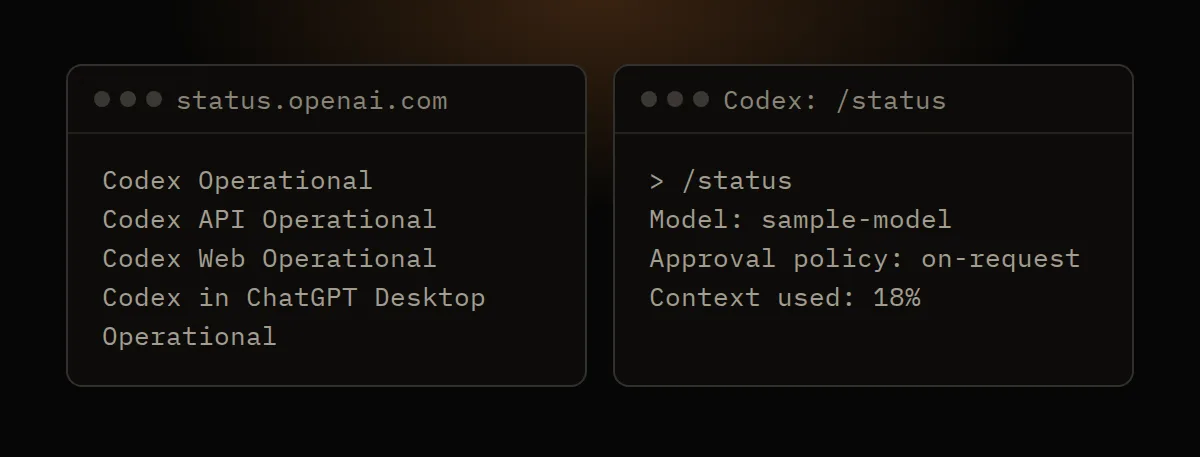
Check Codex status on the OpenAI status page
OpenAI lists Codex as its own group on its status page, separate from ChatGPT and the API, so you can see which part is affected:
| Component | What it covers |
|---|---|
| Codex | The Codex service as a whole |
| Codex API | Requests Codex sends to OpenAI models, used by the CLI and IDE extension |
| Codex Web | Codex cloud tasks you start in the browser |
| Codex in ChatGPT Desktop | Codex inside the ChatGPT desktop app |
Each row shows its uptime over the last 90 days and a bar for every day, and the page lists current and past incidents with updates as OpenAI works on them. On 23 November 2026 the page showed Codex at 99.94% uptime between 25 August and 23 November, with a full outage on one day. Incidents often name more than one product at once, such as elevated errors across ChatGPT and Codex, so read the incident title as well as the colour of the row.
Source: OpenAI status page
Is it an outage or your usage limit?
When Codex stops answering but the status page is green, the most common reason is that you reached your plan's usage limit. ChatGPT Work and Codex share pricing, credits and usage limits, so heavy use of one counts against the other.
- If you hit the limit during a turn, OpenAI lets the agent finish that turn, subject to fair use.
- Plus and Pro users who reach the limit can buy extra credits to keep working without changing plan.
- Business, Edu and Enterprise workspaces on flexible pricing can buy more workspace credits.
- Anyone can run extra local chats with an API key, charged at API rates.
Source: Codex pricing and usage limits, OpenAI
Check your own Codex session with /status
Inside the Codex CLI, type /status. It shows the session configuration and token usage, so you can confirm which model is active, the approval policy, the workspace root Codex is using and how much of your context you have used. If the model or account is not what you expect, that explains odd behaviour without any outage at all.
Source: Codex slash commands, OpenAI
What to do when Codex is down
- Confirm it on status.openai.com, and subscribe to updates on the incident so you hear when it is fixed.
- Save your place. Note what each session was doing, and commit any finished work so nothing is lost when you reconnect.
- Try another surface. An incident on Codex Web does not always affect the CLI, and the reverse.
- Switch tools for the moment. If you also use Claude Code, you can keep working there and return to Codex later.
- Restart Codex once the incident is resolved, so it opens a fresh connection.
When only your Codex is broken
If the status page is green, your limits are fine and Codex still fails, the cause is usually local. Check your version and update:
codex --versioncodex update
If codex is missing or broken, reinstall it with the standalone installer on macOS or Linux, then open a new terminal:
curl -fsSL https://chatgpt.com/codex/install.sh | shSign-in problems after an update are fixed by running codex again and choosing Sign in with ChatGPT.
Source: Codex CLI, OpenAI
Codex app download
Codex also runs inside the ChatGPT desktop app. Download ChatGPT for macOS or Windows from chatgpt.com/download, or follow the Linux installation guide, then open the app and sign in with your ChatGPT account. The app and the CLI share your plan and its usage limits, so the status checks above apply to both.
Source: ChatGPT desktop app, OpenAI
Keep working when one agent is down
When you run several agents, an outage in one is easier to ride out if you can see at a glance which sessions stopped. 10u is an AI coding agent dashboard that shows every Codex and Claude Code session side by side, each in its real terminal, marked Needs you, Working, Waiting or Parked. They do the building. You decide what gets built.

Questions people ask
- Is Codex down right now?
- Check status.openai.com and look at the Codex, Codex API, Codex Web and Codex in ChatGPT Desktop rows. Any incident there is listed with live updates.
- Why is Codex not working when the status page is green?
- Most often you have reached your usage limit, which Codex shares with ChatGPT Work. Otherwise check your sign-in and run codex update.
- What does /status do in Codex?
- It shows the session configuration and token usage, including the active model and approval policy.
- Where do I download the Codex app?
- Codex is in the ChatGPT desktop app, available at chatgpt.com/download for macOS and Windows, with a separate guide for Linux.