
Claude Code vs Kilo Code: Anthropic's agent or an open-source agent for any model?
Claude Code is Anthropic's coding agent: it reads your code, edits files and runs commands from the terminal, VS Code and JetBrains, a desktop app or the browser, using Claude models on a Claude plan. Kilo Code is an open-source coding agent for VS Code, JetBrains, the terminal and a desktop app that works with more than 500 models from over 60 providers, charged at the providers' own rates with no markup, or free with free and local models. Choose Claude Code if you want Anthropic's agent on a flat monthly plan; choose Kilo Code if you want an open-source agent that lets you pick the model for each job and pay only for what you use.
Facts come from Anthropic's and Kilo's documentation, read on 23 November 2026.
Claude Code and Kilo Code at a glance
| Claude Code | Kilo Code | |
|---|---|---|
| Made by | Anthropic | Kilo |
| Where it runs | Terminal, VS Code and JetBrains, desktop app, web | VS Code, JetBrains, the Kilo CLI, Kilo Desktop, cloud agents |
| Models | Claude models | 500+ models from 60+ providers, Auto Model, free and local models |
| How you pay | A Claude plan, or Anthropic API usage | Free plan; inference at provider rates, your own keys, or Kilo Pass |
| Use your subscription | Your Claude plan | A ChatGPT Go, Plus or Pro plan; Claude Pro and Max can't be used |
| Built-in agents | Plan mode, subagents, agent teams | Code, Ask, Plan and Debug agents, plus custom agents |
| Parallel work | Desktop app sessions, worktrees, agent teams | Agent Manager with sessions in separate git worktrees |
| Open source | No | Yes |
What Kilo Code is
Kilo calls itself an open-source agentic engineering platform. The same agent runtime powers its VS Code extension, its JetBrains plugin, the Kilo CLI you start with the kilo command, and Kilo Desktop, so settings in a kilo.jsonc file carry across all of them. It switches between built-in agents for different jobs: Code, the default, with full tool access; Ask, which answers questions with read-only tools; Plan, which designs and writes plans only into .kilo/plans/; and Debug, for systematic troubleshooting. You can write your own agents as Markdown files in .kilo/agents/, along with skills, workflows and custom subagents.
Source: Using agents, Kilo Code docs
Source: Kilo Code CLI, Kilo Code docs
For parallel work, Kilo's Agent Manager is a full-panel tab in VS Code that runs several sessions at once, each in its own git worktree or in the shared workspace, with a diff panel, a terminal per session and the option to start a session from a branch or a GitHub pull request. Kilo also offers code reviews on GitHub and GitLab, auto-triage of issues and cloud agents.
Source: Agent Manager, Kilo Code docs
What Claude Code is
Claude Code is Anthropic's agentic coding tool. It reads your codebase, edits files, runs commands and works with your development tools, in any terminal, in VS Code and JetBrains, in a desktop app that runs several sessions side by side, and on the web.
- Plan mode has Claude research and propose a plan before editing.
- Permission modes run from Manual to Auto, where a classifier blocks risky actions instead of asking.
- Subagents handle side jobs in their own context; agent teams coordinate several sessions through a shared task list.
- Hooks, skills, plugins and MCP servers add your own checks, know-how and tools.
- CLAUDE.md files hold project instructions that load every session.
Source: Claude Code overview, Anthropic
The main differences
Models and choice
Claude Code runs Claude models only, and gets Anthropic's new models and features first. Kilo Code works with hundreds of models through the Kilo Gateway, or directly through your own keys for Anthropic, OpenAI, Google, Azure, AWS Bedrock and many others, and local models through Ollama or LM Studio. Its Auto Model picks a model for you within a tier, Frontier, Efficient or Free, so you can trade capability against cost per task.
Using Claude inside Kilo Code
Kilo Code can run Claude models, but not on a Claude subscription. Kilo offers two Claude options: linked billing, which connects a Claude API organization so Anthropic bills you directly at API prices with no Kilo credits used, and Sign in with Claude, which only logs you in to Kilo and doesn't change who pays. Kilo says plainly that Claude Pro and Max subscriptions don't qualify. So if you already pay for Claude Pro or Max, the cheapest way to use Claude is Claude Code itself; in Kilo you pay for Claude by the token.
Source: Claude linked billing and sign-in, Kilo Code docs
ChatGPT is different: Kilo lets you connect a ChatGPT Go, Plus or Pro plan and run supported OpenAI models on your plan's allowance, with no extra charge.
Permissions and safety
Claude Code's permission modes are Manual, Accept edits, Plan and Auto, with allow, ask and deny rules in settings and a sandbox for shell commands. Kilo Code uses per-tool permissions set to allow, ask or deny, with glob patterns for commands, edited in its Auto Approve settings or in kilo.jsonc; when no rule matches, it asks. Kilo's sandbox limits where tools can write and blocks outbound network access from the agent's commands, but it's off by default and isn't available on Windows. Kilo applies the last matching rule, so put the catch-all first. A rule set that runs tests freely, blocks pushes and asks for everything else looks like this:
{
  "permission": {
    "bash": {
      "*": "ask",
      "npm test": "allow",
      "git push*": "deny"
    },
    "edit": "allow"
  }
}
Source: Choose a permission mode, Anthropic
Source: Auto-approving actions, Kilo Code docs
Project rules
Claude Code reads CLAUDE.md files. Kilo Code reads AGENTS.md and its own rules in .kilo/rules/, plus your custom agent's instructions. If you use both, keep shared rules in one file and point the other at it, so the two agents don't drift apart.
Open source
Kilo Code is open source, so you can read the code, report issues on GitHub and run it without a Kilo account using your own keys or local models. Claude Code is closed source, though its behaviour is extensible through hooks, plugins, skills and MCP servers.
Pricing: Claude Code vs Kilo Code
| Claude Code | Kilo Code | |
|---|---|---|
| Free | No free plan | Free and open source; free models through Auto Free, local models, or your own keys |
| Pay as you go | Anthropic API usage | Kilo Gateway at exact provider rates with no markup |
| Subscription | Pro: US$17 a month billed annually or US$20 monthly; Max: US$100; Ultra: US$200 | Kilo Pass from US$19 a month, with up to 50% bonus credits |
| Teams | Team: US$20 per seat a month billed annually, or US$25 monthly | Teams: US$15 per user a month, plus usage |
| Enterprise | US$20 per seat a month plus usage at API rates | Enterprise: SSO, audit logs, model limits and SLAs |
Source: Plans and pricing, Claude
Source: Pricing, Kilo Code
The two price very differently. A Claude plan is a flat monthly fee with usage limits, which suits steady daily use. Kilo Code's platform is free for individuals and you pay for inference, so a light month costs little and a heavy month on frontier models can cost more than a Claude plan. Kilo also charges separately for cloud compute used by cloud features.
Source: Using Kilo for free, Kilo Code docs
One caution on free models: Kilo warns that Auto Free may route requests to providers that log prompts and outputs to improve their services, so don't send personal or confidential code through it.
Security and data
Both agents run commands on your machine with your permissions and send your code to a model provider. With Claude Code that is Anthropic, or Amazon Bedrock, Google Vertex AI or Microsoft Foundry if your company routes it there. With Kilo Code it is whichever provider serves the model you pick, so check that provider's data terms as well as Kilo's. Kilo notes that Claude requests through linked billing still run in Kilo's own Anthropic organization, so your organization's retention and encryption settings don't apply to them. On either agent, keep secrets out of prompts and rules files, and review every diff before committing.
Which should you choose?
- You want Anthropic's agent and newest Claude models on a flat monthly plan: Claude Code.
- You want an open-source agent you can run with any provider's model: Kilo Code.
- You want to pay only for what you use, or start for free: Kilo Code.
- You already pay for ChatGPT and want those models in a VS Code or JetBrains agent: Kilo Code with your ChatGPT plan connected.
- You want hooks, plugins and agent teams from the model maker: Claude Code.
Trying both on the same project
- Install Claude Code and sign in with your Claude account.
- Install Kilo Code from the VS Code or JetBrains marketplace, or the Kilo CLI, and sign in to Kilo.
- In Kilo, pick a model through the Kilo Gateway, your own key or a free model.
- Keep shared rules in AGENTS.md and have CLAUDE.md point to it.
- Give each agent its own git worktree, then compare the diffs, the time taken and the cost of the same task.
Common problems and fixes
- Expecting to use Claude Pro in Kilo: it isn't supported; use Claude Code for your plan, or link a Claude API organization to Kilo and pay per token.
- A Kilo permission change seems ignored: Kilo caches the project's kilo.jsonc when a workspace loads, so start a new session after editing it.
- Kilo's bill is higher than expected: check which model Auto Model picked, and choose the Efficient tier for routine work.
- Claude Code keeps asking for approval: add allow rules for trusted commands, or use Accept edits mode for routine edits.
A day with each
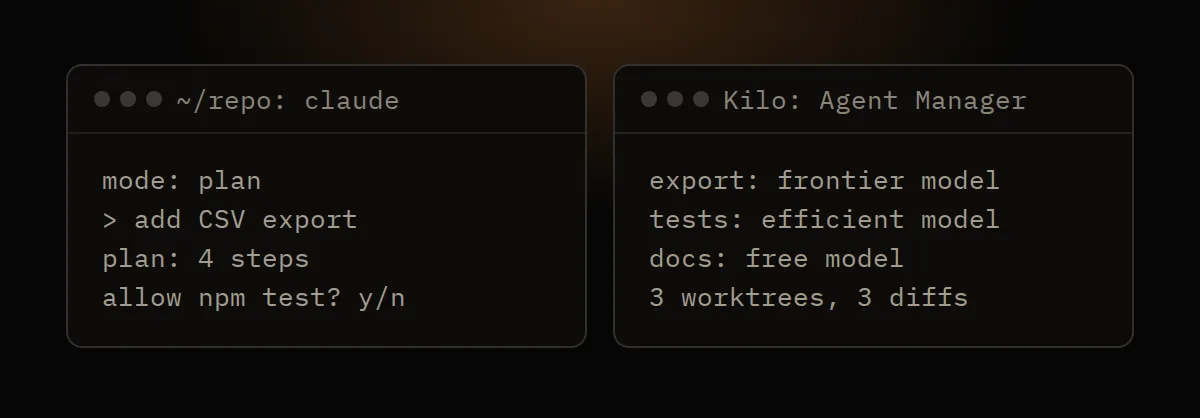
With Claude Code, you start a session, ask for a plan to add CSV export, approve it and review the diff before committing, while a second session in its own worktree writes tests. Your Claude plan covers the day.
With Kilo Code, you open the Agent Manager in VS Code and start three sessions in separate worktrees: one on a frontier model for the export feature, one on an efficient model for tests, one on a free model for docs. You compare their diffs in Kilo's review panel and see what each cost.
Watching every agent at once
When Claude Code, Codex and other agents run across several machines and apps, the hard part is knowing which one is waiting for you. 10u shows every Claude Code and Codex session side by side under the goal it's working toward, marks the ones waiting on you, and lets you answer from one screen on your laptop or phone.

Questions people ask
- What is the difference between Claude Code and Kilo Code?
- Claude Code is Anthropic's coding agent, running Claude models on a Claude plan. Kilo Code is an open-source agent for VS Code, JetBrains, the terminal and desktop that works with hundreds of models from many providers, paid at provider rates.
- Can I use my Claude Pro or Max plan in Kilo Code?
- No. Kilo says Claude Pro and Max subscriptions don't qualify. You can link a Claude API organization so Anthropic bills you per token, or use Claude Code for your plan.
- Can Kilo Code use Claude models?
- Yes, through the Kilo Gateway, your own Anthropic API key, or a linked Claude API organization.
- Is Kilo Code free?
- Kilo Code is free and open source for individuals. You pay for model usage unless you use free or local models.
- Which is better for beginners?
- Claude Code is simpler if you already have a Claude plan: one sign-in and no model choices. Kilo Code suits people happy to pick models and watch costs.
- Can I use Claude Code and Kilo Code together?
- Yes. Keep shared rules in AGENTS.md, give each agent its own git worktree, and review every change the same way.