
Claude vs Claude Code vs Cowork: what is the difference?
Claude is Anthropic's AI assistant: you chat with it on the web, desktop and phone. Claude Cowork is the part of Claude that takes on multi-step tasks with your files and tools and hands back finished work, such as documents, spreadsheets and research. Claude Code is Anthropic's coding agent: it reads your codebase, edits files and runs commands in the terminal, your editor, the desktop app and the browser. All three use Claude models and come with a paid Claude plan. If you are writing software, use Claude Code; for everything else, use Claude and let it bring in Cowork when a task needs it.
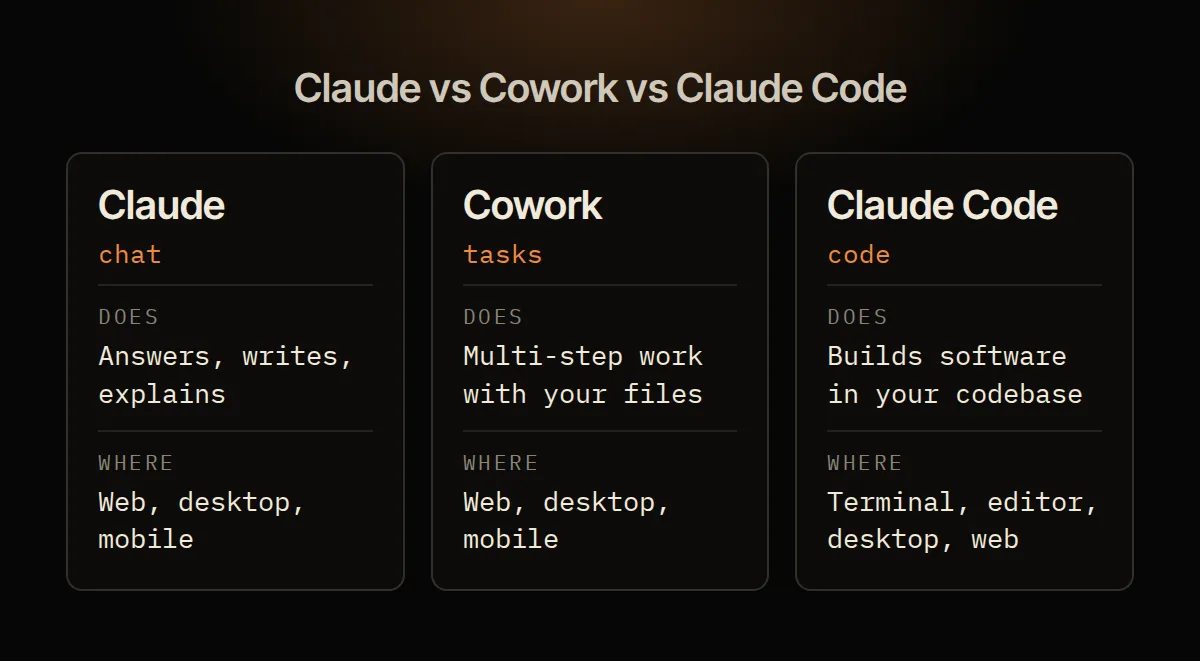
Claude, Cowork and Claude Code at a glance
| Claude (chat) | Claude Cowork | Claude Code | |
|---|---|---|---|
| What it does | Answers, writes and explains in a conversation | Carries out multi-step tasks with your files and tools | Builds and changes software in your codebase |
| Where it works | Web, desktop, mobile | Web, desktop, mobile and the Chrome side panel | Terminal, VS Code, JetBrains, desktop app Code tab, web |
| What it touches | What you paste or upload | Folders, tools and a built-in browser you allow | Your project files, terminal and Git |
| Runs | In your conversation | In the cloud; keeps going when you close your laptop | On your computer or in cloud sessions |
| Best for | Questions, drafts, thinking | Reports, spreadsheets, research, organising files | Features, bug fixes, tests, refactors |
What Claude is
Claude is the assistant most people meet first: a conversation in the browser, the desktop app or the phone app. You ask, it answers, writes, explains or analyses what you give it. Anthropic is rolling out a new experience to Pro, Max and Ultra plans that combines chat and Cowork in one place, so you start both from the same message box. Anthropic's product page puts it simply: Claude Cowork is now just Claude, and when a task calls for working with your files, Claude brings in Cowork's capabilities automatically.
Source: Claude Cowork, Anthropic
What Claude Cowork is
Anthropic's Help Center describes Cowork as bringing Claude Code's agentic capabilities to knowledge work beyond coding. It uses the same agentic architecture that powers Claude Code, with no terminal required. Instead of answering one prompt at a time, it takes on complex, multi-step tasks: you describe an outcome, step away, and come back to formatted documents, organised files or synthesised research.
- Sessions run in the cloud and follow your Claude account across desktop, web and mobile, so you can start a task at your desk and check it from your phone.
- It works in folders and tools you choose, and opens its own browser in a side panel for web tasks, separate from your logins and tabs.
- Scheduled tasks run on a cadence you set, unattended.
- Projects group related tasks into workspaces with their own files, links, instructions and memory.
- Big projects are split into parts that run at the same time.
Cowork is on paid plans: the desktop app for macOS, Windows and Linux (beta) on all paid plans, the web and mobile on Pro, Max, Ultra and Team, and Enterprise when an owner turns it on. Anthropic notes that Cowork carries its own risks because it acts on your behalf with internet access, and has a guide to using it safely.
Source: Get started with Claude Cowork, Claude Help Center
How Cowork runs a task
Cowork's work runs on Anthropic's servers in an isolated environment, and your sessions and files are saved to your Claude account. When you start a task, Claude:
- Analyses your request and makes a plan.
- Breaks complex work into subtasks when needed.
- Runs code and shell commands in its isolated environment.
- Runs several workstreams in parallel when that helps.
- Delivers the finished files to your session, where you can preview and download them.
You can watch what it is planning and doing and step in when it matters, or let it run. When a task needs something on your own computer, such as a local file, your browser or control of the screen, Claude reaches it through the Claude desktop app for macOS or Windows, which has to be open and connected.
What Cowork produces
- Spreadsheets with working formulas, presentations and formatted documents, which you can keep editing with Claude for Excel and PowerPoint.
- Markdown drafts you can edit in place: highlight text, choose Edit with Claude and say what to change.
- Long-running work without conversation timeouts or context limits interrupting it.
- Work that starts from what Claude remembers from your chats, with what it learns carrying back; turn Memory off before the first message for a task that should not use it.
- Browser tasks: opening sites, reading pages, clicking, typing and filling forms, in a browser built into the desktop app or in your own Chrome.
Source: Get started with Claude Cowork, Claude Help Center
What Claude Code is
Claude Code is Anthropic's agentic coding tool. It reads your codebase, edits files, runs commands and works with your development tools. You can use it in the terminal, where it is most complete, in VS Code and JetBrains, in the Code tab of the Claude desktop app, which includes Claude Code so you do not need to install anything else, and in the cloud from your browser or phone. It also connects to Slack, so a bug report in a team channel can become a pull request.
For bigger work it has subagents that take on side jobs, agent teams where a lead session coordinates teammates, parallel sessions in the desktop app each in its own Git worktree, and agent view for many background sessions. Hooks, skills, plugins and MCP servers let you add your own checks, know-how and tools.
Source: Claude Code overview, Anthropic
Source: Get started with the desktop app, Anthropic
Source: Claude Code platforms and integrations, Anthropic
The Code tab in the Claude desktop app
If you already use the Claude desktop app, Claude Code is one tab away. The Code tab includes Claude Code, so there is nothing else to install. You choose a project folder and give Claude a task, then arrange chat, diff, terminal, file and browser panes however you like. Ctrl+` opens a terminal beside the session. When you run your development server, your app opens in the browser pane, where Claude can look at the running app, test endpoints, read logs and keep improving what it sees. From the sidebar you can open parallel sessions, each optionally in its own Git worktree, and watch them in the tasks pane.
This makes the desktop app the easiest way to try Claude Code if the terminal is unfamiliar: the same agent, with a visual diff and a preview of your app.
Source: Get started with the desktop app, Anthropic
Claude Code in the cloud
Claude Code also runs in the cloud, which is the closest it comes to Cowork's way of working. From claude.ai/code in a browser, the Claude mobile app, the desktop app or the terminal, you pick a GitHub repository and describe a task. Claude clones the repository into an isolated virtual machine, makes the changes and pushes a branch for you to review, and the session follows you across devices. Anthropic suggests it for parallel tasks, each in its own session and branch, for repositories you do not have on your computer, for well-defined tasks that need little steering, and for exploring how a codebase works. Cloud sessions are on Pro, Max, Ultra and Team plans, and for Enterprise users with the right seats.
Source: Get started with Claude Code in the cloud, Anthropic
The main differences
Conversation, task or codebase
Chat is a conversation: you stay in the loop for every reply. Cowork is a task: you describe the result and it works through the steps, then hands it back for review. Claude Code is a codebase: it works inside a software project, reading the code, running tests and making changes you can review as a diff or a pull request.
What each can reach
Chat works with what you paste or upload. Cowork works in the folders and tools you allow and its own browser. Claude Code works in your project, with your terminal, Git and development tools, under the permissions you set.
Where the work runs
Cowork sessions run remotely in the cloud, so your laptop can be closed. Claude Code runs on your computer by default, where it can use your real environment, and can also run cloud sessions.
Who it is for
Claude and Cowork are for anyone: writers, analysts, founders, operations teams. Claude Code is for people building software. You do not need to know how to code to try it, but its output is code, and someone needs to review it.
Can Cowork write code?
Cowork runs code and shell commands in its own environment as part of a task, for example to analyse data or build a spreadsheet. But it works on your files and outputs, not inside a software project with your tests, Git history and development tools. When the job is to change an app, Claude Code is the tool built for it: it reads the codebase, runs the project's own tests and leaves a diff or pull request you can review.
Which one should you use?
| You want to... | Use |
|---|---|
| Ask a question or draft an email | Claude chat |
| Turn a folder of notes into a report or a spreadsheet | Cowork |
| Research a topic and get an organised summary | Cowork |
| Run a recurring task on a schedule | Cowork scheduled tasks |
| Fix a bug or add a feature to an app | Claude Code |
| Run tests, refactor or review a pull request | Claude Code |
| Build a small tool or website from scratch | Claude Code |
One goal, three tools
Say you want a new pricing page for your product. Each tool takes a different part of the job:
- Claude chat: talk through how to structure the plans and draft the headline and the questions people will ask.
- Cowork: research how comparable products present their plans, put the findings in a spreadsheet, and write a short brief with the copy, scheduled to refresh the research every month.
- Claude Code: build the page in your website's repository from that brief, run the site locally, check it in the browser pane, and leave a branch for you to review.
The handover between them is plain text and files, so the brief Cowork writes is exactly what you paste into Claude Code. Keeping each tool to the part it is built for also keeps each one's work easy to check: a conversation you can reread, a spreadsheet and brief you can open, and a code change you can review line by line.
Do you pay separately?
No separate product is needed: Cowork and Claude Code come with paid Claude plans, and the desktop app's Code tab asks you to subscribe to a paid plan if you are not on one. Heavier use draws more on your plan's allowance, and Claude Code's /usage command shows where yours went.
Using them together
Many people use all three in a day: chat to think a problem through, Cowork to gather research or produce a document, and Claude Code to build the thing. A common handover is to have Cowork write up requirements from notes and research, then give that write-up to Claude Code as the brief for the build.
When you run more than one coding agent
Once Claude Code is doing real work, many people run several sessions at once, and often OpenAI's Codex beside them. Keeping track of which one has stopped to ask you something becomes the job. 10u is an AI coding agent dashboard that runs every Claude Code and Codex session side by side, each in its real terminal, marked Needs you, Working, Waiting or Parked, with the one waiting on you on top. They do the building. You decide what gets built.

Questions people ask
- Can I use Claude Code from my phone?
- Yes. Start a cloud session from the Claude mobile app or claude.ai/code: Claude clones your GitHub repository into an isolated virtual machine, makes the change and pushes a branch for you to review.
- Which should a non-developer start with?
- Claude, letting it bring in Cowork for tasks with files, research or spreadsheets. Try Claude Code when you want to build or change software, starting in the desktop app's Code tab.
- Does Cowork keep working if I close my laptop?
- Yes. Cowork tasks run on Anthropic's servers, so they continue when you close your laptop, and scheduled tasks run with no device online.
- Do I need the desktop app for Cowork?
- Not to run tasks, which work on the web and mobile too. You need the desktop app for macOS or Windows when a task should reach your local files, your browser or your screen.
- Is Claude Code the same as Claude?
- No. Claude is Anthropic's assistant for chat and tasks. Claude Code is Anthropic's coding agent that works in your codebase from the terminal, editor, desktop app or web.
- What is the difference between Claude Cowork and Claude Code?
- Cowork uses the same agentic architecture as Claude Code for knowledge work such as documents, spreadsheets and research, with no terminal. Claude Code is for building and changing software.
- Is Claude Cowork now part of Claude?
- Yes. Anthropic is rolling out a combined experience to Pro, Max and Ultra plans where chat and Cowork share one message box and Claude brings in Cowork when a task needs your files.
- Do I need a separate subscription for Claude Code?
- No. Claude Code comes with paid Claude plans, and can also be used with an Anthropic Console account.
- Can I use Claude Code without the terminal?
- Yes. Use the Code tab in the Claude desktop app, the VS Code or JetBrains extensions, or Claude Code in the cloud from your browser.