
Claude Code worktrees: run agents in parallel without collisions
A git worktree is a second working folder for the same repo, on its own branch. Give each Claude Code session its own worktree and two agents can work at the same time without editing each other's files. Claude Code has this built in: start it with --worktree and a name.
What a git worktree is
A git worktree is a separate working directory with its own files and its own branch. It shares the same repository history and remote as your main checkout, so commits made in one are visible from the others, but the files on disk are separate. One session can build a feature while a second fixes a bug, and neither can overwrite the other.
Worktrees are one of several ways to run Claude in parallel. They keep file edits apart. Subagents split work up inside one session, and background agents let you run several full sessions and watch them from one screen. Worktrees are the piece that makes running several at once safe.
When to use a worktree
- Two or more agents on one repo at the same time, such as one building a feature while another fixes a bug.
- A risky change you want to try without touching your working copy.
- Reviewing someone else's pull request while your own work stays where it is.
- Background or scheduled work that should not get in the way of what you are doing.
- Subagents that each edit many files in parallel.
If only one agent works on a repo at a time, you do not need one. A worktree costs disk space and a fresh install of your dependencies, so use them where agents would otherwise share files.
Start Claude Code in a worktree
From inside your repo, run:
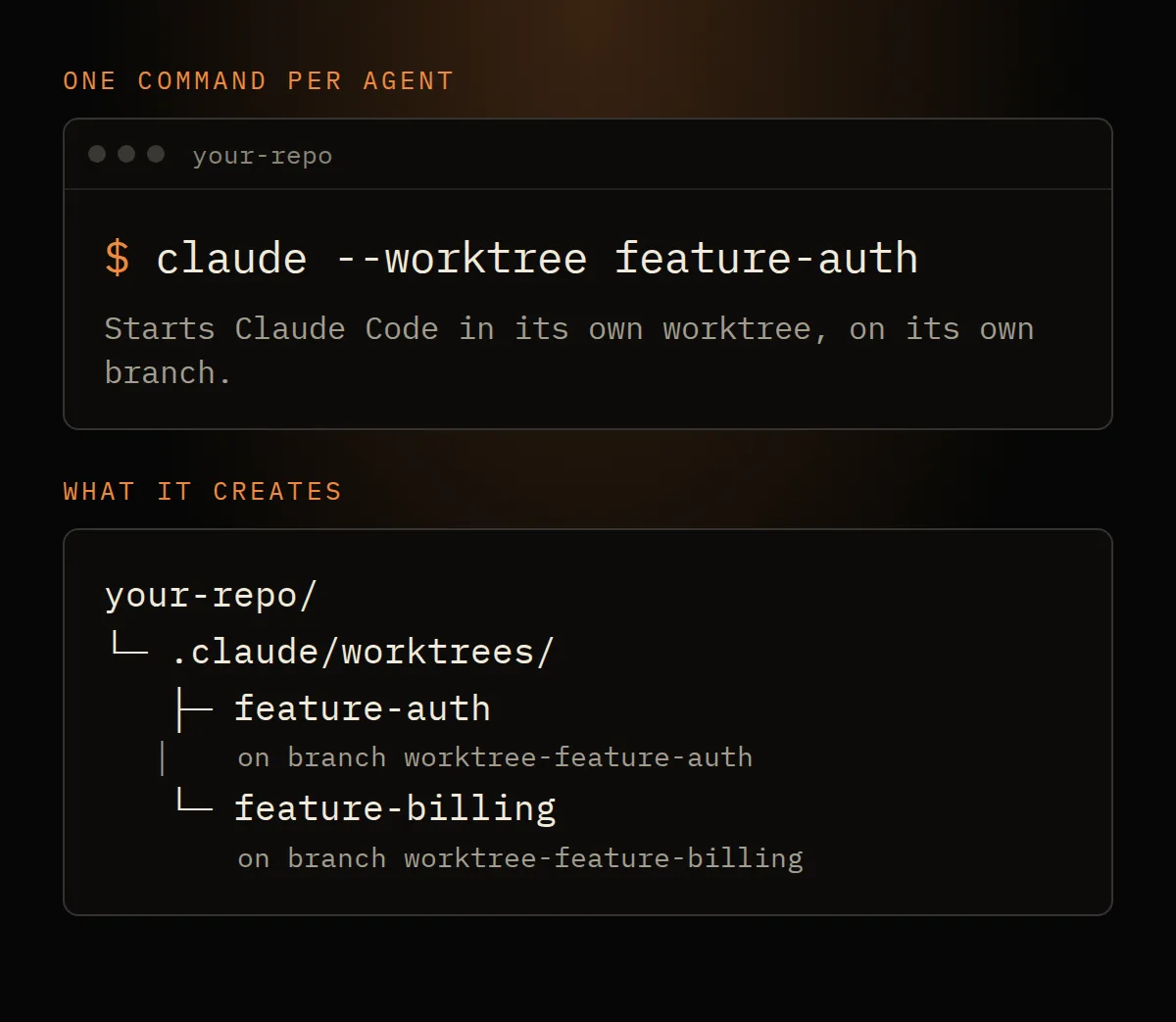
claude --worktree feature-authClaude Code creates the worktree under .claude/worktrees/feature-auth at the root of your repo, on a new branch named worktree-feature-auth, and starts there. The short form is -w. Leave the name out and Claude picks one for you, such as bright-running-fox.
Run a second agent
Open another terminal in the same repo and run the command again with a different name:
claude --worktree fix-login-bugNow two Claude Code sessions are running, each in its own folder on its own branch. Add a third or a fourth the same way.
Before you start
- The repo needs at least one commit, because a worktree starts from an existing commit.
- If you have never run Claude in that folder, run claude once there to accept the trust prompt. Otherwise --worktree stops with an error asking you to. Runs with -p skip the trust check.
- Add .claude/worktrees/ to your .gitignore so the worktrees do not show up as untracked files in your main checkout.
Source: Run parallel sessions with worktrees, Anthropic
Set up the worktree environment
A worktree is a fresh checkout, so it has your tracked files and nothing else. Install your dependencies in each one, or ask Claude to do it. Files git ignores, such as .env or .env.local, are not there either.
Copy .env files with .worktreeinclude
Add a .worktreeinclude file at the root of your project listing the ignored files each worktree needs. It uses the same syntax as .gitignore. This one copies two env files and a secrets config into every new worktree:
.env
.env.local
config/secrets.json
Only files that match a pattern and are also gitignored are copied, so tracked files are never duplicated. The file applies to every worktree Claude Code creates: --worktree sessions, subagent worktrees and parallel sessions in the desktop app.
Ask Claude for a worktree mid-session
You do not have to decide up front. Ask Claude to "work in a worktree" during a session and it makes one for you. Once inside, Claude can switch straight to another worktree under .claude/worktrees, and the one it left stays on disk untouched.
If Claude wants to enter a folder outside the repo's .claude/worktrees directory, Claude Code asks for your approval first, because the move takes the session's working directory, write access and project settings such as CLAUDE.md with it. A permission rule or "don't ask again" does not skip this prompt; only bypassPermissions mode does.
Hook paths stay where they were
After Claude enters a worktree, ${CLAUDE_PROJECT_DIR} in your hooks still points at the project root where the session started, so a hook script there still runs from the main checkout. The cwd field in the hook input follows Claude into the worktree. Read cwd when a hook needs the worktree path.
Choose which branch a worktree starts from
New worktrees branch from your repository's default branch on the remote, usually main, so each one starts from a clean tree. To branch from your current local work instead, set worktree.baseRef in your settings:
{
  "worktree": {
    "baseRef": "head"
  }
}- "fresh", the default, branches from the default branch on the remote.
- "head" branches from your current local HEAD, so the worktree carries your unpushed commits. Use it when subagents need your in-progress work.
- You cannot set baseRef to a branch name. To start from a particular branch, create the worktree with git yourself.
With the fresh base, Claude Code fetches the default branch if the repo has not been fetched in the last 24 hours, waiting at most five seconds and never stopping to ask for a password. If the fetch fails it uses the copy it already has.
Start a worktree from a pull request
To review or continue someone else's change, pass --worktree the pull request number with a # in front, or a GitHub pull request or GitLab merge request link. Quote it so your shell does not treat # as a comment:
claude --worktree "#1234"Claude Code fetches that change from origin and creates the worktree at .claude/worktrees/pr-1234. If the fetch would need a password or a new SSH host confirmation, it fails instead of waiting. A key loaded in ssh-agent still works.
Reuse a worktree name
If a worktree with that name already exists, Claude Code opens it instead of making a new one. A reopened worktree with no changes and no commits of its own, or whose pull request was merged and its remote branch deleted, resets to the default branch so you start fresh. In every other case it reopens where you left off.
Source: Run parallel sessions with worktrees, Anthropic
Clean up when you are done
When you exit an interactive worktree session, Claude Code checks the worktree for anything removal would delete: changed or untracked files, new commits and uncommitted work in submodules.
- Nothing changed: in an unnamed session Claude removes the worktree and its branch automatically. A named session asks first.
- Work in it: Claude asks whether to keep or remove it. Keeping saves the folder and branch, and Claude prints the claude --worktree <name> --resume command to return later. Removing deletes the folder, the branch and all the work in them.
- Another branch checked out: Claude asks, and either answer keeps that other branch and its commits.
- State cannot be checked: Claude asks rather than removing anything, and says what it could not check.
Runs with -p have no exit prompt, so their worktrees stay. Remove one with git worktree remove, and if git says it is locked, run git worktree unlock on it first.
git worktree remove .claude/worktrees/feature-authMerge or open a pull request from each worktree branch as you would any other branch.
Review and merge a worktree branch
Each worktree's work sits on its own branch, so you review it the way you would review any branch. From your main checkout:
git log main..worktree-feature-authgit diff main...worktree-feature-authgit merge worktree-feature-auth
The first command lists the commits the agent made, the second shows every change against main, and the third merges it. On a team, push the branch and open a pull request instead, so the change gets the same review and CI as everything else. Run the tests inside the worktree before you merge, since its dependencies are installed there.
Pick up a worktree session later
Resume a session that ended inside a worktree and Claude Code puts it back in that worktree, for interactive resumes and for --continue and --resume with -p. Before going back in, it checks the worktree is still a separate checkout. If the folder has been deleted, the session resumes where you launched Claude and tells you the worktree is gone. A forked session with --fork-session starts where you launched it and leaves the original worktree alone.
A worked example: two agents, one repo
- Push anything the agents need first. By default a new worktree starts from the default branch on the remote, not from your uncommitted files.
- In terminal one, run claude --worktree feature-auth and ask it to build the sign-in page.
- In terminal two, run claude --worktree fix-login-bug and ask it to fix the bug.
- Let both work. Each edits only its own folder under .claude/worktrees, on its own branch.
- When one finishes, review its branch, run the tests in that worktree and open a pull request.
- Exit the session. If the work is pushed and merged, remove the worktree when Claude asks.
- Repeat for the second branch. If both touched the same file, git shows the conflict at merge time, the same as with any two branches.
Worktrees for background sessions
Background sessions run without a terminal open. Start one in its own worktree with claude --bg --worktree. If permissions.blockWritesOutsideWorkingDirectories is on, Claude Code refuses a background session's edits in your main checkout until it is in a worktree, so starting it with --worktree, setting worktree.bgIsolation to "none", or having it edit in a worktree you made with git worktree add all let it work.
Worktrees take disk space
Each worktree has its own copy of every file in the repo, plus its own dependencies and build caches, so a large project with five worktrees can use five times the space. Remove worktrees you have merged, and let the cleanup sweep clear old subagent ones. Codex limits this for you by keeping only its 15 most recent managed worktrees.
Not using git?
Worktrees need a git repository. If you use another version control system, configure a WorktreeCreate hook to replace the git logic entirely, including placing worktrees somewhere other than .claude/worktrees. A matching WorktreeRemove hook handles cleanup for worktrees your hook created.
How Claude Code keeps a worktree session isolated
While a session is in a worktree, Claude Code blocks four kinds of action, for the session and every subagent it starts:
- File edits that target a path in the main checkout.
- Commands whose working directory is the main checkout.
- Git commands pointed back at the main checkout, through git -C, --git-dir, GIT_DIR, GIT_WORK_TREE or a cd.
- Commands where Claude Code cannot tell from the text that git stays inside the worktree. Claude is told how to rewrite them.
These checks read paths and command text. They do not track every file a shell command writes, so a cp or a shell redirect into the main checkout is not blocked by them. Your normal permissions and sandbox settings still apply.
Give subagents their own worktrees
Subagents can each run in their own worktree so their edits never clash. Ask Claude to "use worktrees for your agents", or make it permanent for a custom subagent by adding isolation: worktree to its frontmatter in .claude/agents/:
---
name: refactorer
description: Applies mechanical refactors across many files
isolation: worktree
---
Apply the requested refactor across every affected file, then run the tests
and report the results.
Each subagent gets a temporary worktree that is removed when it finishes without changes. One with changes stays until it can be removed without losing work. Subagent worktrees branch from the same base as --worktree. A subagent in its own worktree takes its instructions from your main conversation, so a different CLAUDE.md on the worktree's branch is not loaded.
The cleanup sweep
Claude Code regularly removes worktrees it made for subagents and background sessions once they are older than your cleanupPeriodDays setting. It leaves a worktree alone if it still holds changed or untracked files or unpushed commits, if it belongs to a --worktree session you have not backgrounded, or if you made it yourself with git worktree add. While an agent runs, Claude Code holds a git worktree lock on its folder so nothing cleans it up mid-task.
What worktrees share with your main checkout
- The repository's .git directory. Git commands in a worktree write to the shared history.
- Plugins installed at project scope from the main checkout, so you do not reinstall them per worktree.
- Permission approvals. "Yes, and don't ask again" in a worktree saves the rule to the main checkout's .claude/settings.local.json, so it applies in every worktree and survives removal.
- Project skills, agents and commands that are not tracked in git, which load from the main checkout when the worktree has none.
Source: Run parallel sessions with worktrees, Anthropic
Worktrees with plain git
Claude Code uses ordinary git worktrees, so you can make and manage them yourself too:
git worktree add ../feature-auth -b feature-authgit worktree listgit worktree remove ../feature-auth
Then start claude inside the new folder. Git allows each branch to be checked out in only one worktree at a time, so give every worktree its own branch.
Worktrees in Codex
Codex does the same in the ChatGPT desktop app, where worktrees let it run several chats in one project without them getting in each other's way.
- In a new chat, choose Worktree under the message box. You can also pick a local environment to run setup scripts.
- Below the message box, pick the branch to start from: main, a feature branch, or your current branch with unstaged changes.
- Send your prompt. Codex creates the worktree and works there.
- When you are ready, keep working on the worktree, or use Hand off to move the chat and its code to your local checkout.
Codex keeps its worktrees in $CODEX_HOME/worktrees, in a detached HEAD state so it can make several without filling your branch list. Use Create branch here in the chat header to turn one into a branch you can push. By default Codex keeps your 15 most recent Codex-managed worktrees, skips any tied to a pinned chat or a chat still running, and saves a snapshot before deleting one so you can restore it.
Codex reads the same .worktreeinclude file to copy ignored files such as .env, and copies an ignored AGENTS.override.md automatically. You can also start, guide and approve worktree chats from the ChatGPT mobile app; the worktree stays on your connected computer.
Source: Worktrees in Codex, OpenAI
Claude Code worktrees vs Codex worktrees
| Claude Code | Codex | |
|---|---|---|
| How you start one | claude --worktree <name>, or ask mid-session | Choose Worktree under the message box in the desktop app |
| Where it lives | .claude/worktrees/<name> in your repo | $CODEX_HOME/worktrees |
| Branch | A new branch, worktree-<name> | Detached HEAD until you choose Create branch here |
| Copying .env files | .worktreeinclude | .worktreeinclude |
| Moving work back | Merge or open a pull request from the branch | Hand off moves the chat and code to Local |
| Cleanup | Asks on exit; a sweep clears old subagent worktrees | Keeps the 15 most recent, with a snapshot before deleting |
Common worktree problems
fatal: 'feature/a' is already used by worktree
Git lets a branch be checked out in only one place. Check out a different branch in the other worktree, or in Codex use Hand off instead of checking the branch out twice.
Claude has no worktree tools
If Claude cannot enter a worktree when you ask, check whether permissions.blockWritesOutsideWorkingDirectories is on, because it removes those tools. Start the session with claude --worktree instead, or remove the setting and restart.
git commit fails with an index.lock error
With the sandbox on, git commands work from the root of the worktree, which is where --worktree starts a session. Running claude from a subfolder of the worktree can make them fail.
git worktree remove refuses
The worktree is locked, usually because an agent is still running in it. Wait for it to finish, or run git worktree unlock, then remove it. Add --force if it has changes you are happy to lose.
Seeing every worktree agent at once
Worktrees stop agents colliding, but with five of them in five terminals it is hard to see which one stopped to ask you something. 10u is an AI coding agent dashboard that shows every Claude Code and Codex agent side by side under the goal it serves, with the one waiting on you on top. They do the building. You decide what gets built.

Questions people ask
- What does claude --worktree do?
- It creates a git worktree under .claude/worktrees at your repo root, on a new branch, and starts Claude Code inside it, so its edits stay separate from your main checkout.
- How do I run two Claude Code sessions at once?
- Run claude --worktree with a different name in each terminal. Each session gets its own folder and branch.
- Do worktrees copy my .env file?
- Not by default. List the files in a .worktreeinclude file at your project root and Claude Code copies them into each new worktree.
- Does Claude Code delete my worktree when I exit?
- Only if nothing changed in an unnamed session. If there is work in it, Claude asks whether to keep or remove it.
- Can subagents use worktrees?
- Yes. Ask Claude to use worktrees for its agents, or add isolation: worktree to a custom subagent.
- Can Codex use worktrees too?
- Yes. In the ChatGPT desktop app, choose Worktree under the message box when you start a Codex chat.