
Codex CLI GitHub guide: the openai/codex repo, the Action and PR reviews
The Codex CLI lives on GitHub at github.com/openai/codex, OpenAI's open-source repository for its terminal coding agent. It is written in Rust, licensed Apache-2.0, and had about 136,000 stars when we checked in November 2026. Codex also works with GitHub in two other ways: the Codex GitHub Action, openai/codex-action@v1, runs Codex in your CI workflows, and Codex code review posts reviews on pull requests when you comment @codex review.
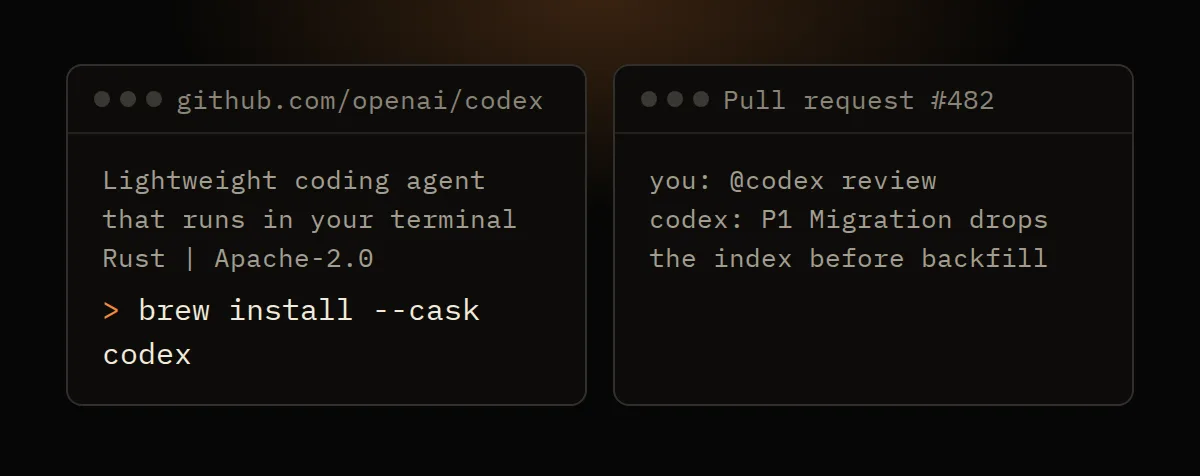
Source: openai/codex on GitHub
Codex and GitHub at a glance
| What | Where | Use it to |
|---|---|---|
| openai/codex repository | github.com/openai/codex | Read the source, download releases, file issues, contribute |
| Codex GitHub Action | openai/codex-action@v1 in a workflow file | Run Codex in CI: reviews, release prep, migrations |
| Codex code review | @codex review in a pull request comment | Get a review focused on serious issues |
| Security Review | @codex security review | A deeper pass on security risks, in research preview |
Source: Review GitHub pull requests with Codex, OpenAI
The openai/codex GitHub repository
OpenAI describes the repository as a lightweight coding agent that runs in your terminal. Its README covers installing the CLI, signing in with your ChatGPT plan, contributing, building from source, and OpenAI's open source fund.
Install the Codex CLI
| System | Command |
|---|---|
| macOS or Linux | curl -fsSL https://chatgpt.com/codex/install.sh | sh |
| Windows | powershell -ExecutionPolicy ByPass -c "irm https://chatgpt.com/codex/install.ps1 | iex" |
| npm | npm install -g @openai/codex |
| Homebrew | brew install --cask codex |
Then run codex and choose Sign in with ChatGPT to use it with a Plus, Pro, Business, Edu or Enterprise plan, or set up an API key.
Download Codex from GitHub Releases
The standalone installers download from releases.openai.com by default and fall back to GitHub Releases if a download is unavailable. To force GitHub Releases, set CODEX_INSTALLER_USE_RELEASES_OPENAI_COM to false:
curl -fsSL https://chatgpt.com/codex/install.sh | CODEX_INSTALLER_USE_RELEASES_OPENAI_COM=false shYou can also download a build by hand. Each release has many files, but most people want one of these, then rename the extracted file to codex:
| Platform | File |
|---|---|
| Mac, Apple Silicon | codex-aarch64-apple-darwin.tar.gz |
| Mac, Intel | codex-x86_64-apple-darwin.tar.gz |
| Linux x86_64 | codex-x86_64-unknown-linux-musl.tar.gz |
| Linux arm64 | codex-aarch64-unknown-linux-musl.tar.gz |
Source: openai/codex on GitHub
Run Codex in GitHub Actions
The Codex GitHub Action installs the Codex CLI, starts a proxy for your OpenAI API key, and runs codex exec with the permissions you set. Use it to post Codex feedback on pull requests, gate changes on Codex checks in CI, or run repeatable tasks such as code review, release prep or migrations from a workflow file.
- Store your OpenAI key as a GitHub secret, such as OPENAI_API_KEY.
- Run on a Linux or macOS runner; Windows needs safety-strategy: unsafe.
- Check out your code before the action runs so Codex can read it.
- Give it a prompt inline with prompt, or a file in the repo with prompt-file, such as .github/codex/prompts/review.md.
name: Codex pull request review
on:
  pull_request:
    types: [opened, synchronize, reopened]
jobs:
  codex:
    runs-on: ubuntu-latest
    permissions:
      contents: read
    outputs:
      final_message: ${{ steps.run_codex.outputs.final-message }}
    steps:
      - uses: actions/checkout@v5
        with:
          ref: refs/pull/${{ github.event.pull_request.number }}/merge
          fetch-depth: 0
          persist-credentials: false
      - name: Run Codex
        id: run_codex
        uses: openai/codex-action@v1
        with:
          openai-api-key: ${{ secrets.OPENAI_API_KEY }}
          prompt-file: .github/codex/prompts/review.md
          output-file: codex-output.md
OpenAI's full example adds a second job that posts the final-message output back to the pull request as a comment with actions/github-script.
Codex Action settings
| Input | What it does |
|---|---|
| prompt or prompt-file | The task, inline or from a file; use one, not both |
| model and effort | Which model and effort level to use |
| sandbox | workspace-write, read-only or danger-full-access |
| codex-args | Extra CLI flags, such as --profile ci |
| output-file | Save the final message for later steps |
| codex-version | Pin a CLI release; blank means latest |
| safety-strategy | Default drop-sudo removes sudo before Codex runs, protecting secrets |
| allow-users, allow-bots | Who can trigger it; by default only people with write access |
OpenAI's security checklist: limit who can start the workflow, clean up prompt text that comes from pull requests, commits or issues to avoid prompt injection, keep safety-strategy on drop-sudo or use an unprivileged user, never use unsafe mode on shared runners, and run Codex as the last step in a job.
Source: Codex GitHub Action, OpenAI
Review pull requests with @codex review
Codex code review reads a pull request's diff, follows your repository guidance and posts a normal GitHub review, flagging only P0 and P1 issues so comments stay on high-priority risks. To set it up, connect your GitHub repository to Codex, open Codex settings, choose the repository and turn on Automatic review under Review code. You need push or admin permission on the repository.
- In a pull request comment, write @codex review.
- Codex reacts with an eyes emoji while it works, then posts its review.
Add a focus for one review, such as @codex review for issues in the database migration. For reviews on every pull request without a comment, turn on Automatic review under Personal preferences and choose a Review trigger.
Set review rules in AGENTS.md
Codex reads AGENTS.md files and follows any ## Code Review Rules section. Put repository-wide rules in the root file and service-specific rules in a nested one; Codex applies the rules that cover each changed file. OpenAI suggests starting with two or three rules that describe a consequential, repository-specific risk and its safe path, and leaving formatting and lint to CI.
## Code Review Rules
### Experiment cohorts
- Do not filter treatment comparisons on post-exposure behavior, including conversion or retention.
  Safe path: build cohorts from assignment or exposure; report conversion as an outcome.
Security Review
Security Review goes deeper on security risks, analysing the diff, repository context and any threat models you configure. Turn on Auto security review under Review security vulnerabilities, or comment @codex security review; the full report is on the Security Report tab of the Codex task.
Source: Review GitHub pull requests with Codex, OpenAI
How GitHub reviews count toward Codex usage
Code Review usage only applies when Codex runs reviews through GitHub, for example when you tag @codex for a review or turn on automatic reviews. Reviews you run locally or outside GitHub count toward your general Codex usage limits. The GitHub Action uses an OpenAI API key, so it is billed at API rates.
Source: Codex pricing, OpenAI
Codex GitHub problems and fixes
| Problem | Fix |
|---|---|
| Codex does not react to @codex review | Check code review is on for the repository, the repository is connected to Codex, and the comment says exactly @codex review |
| Action fails with both prompt and prompt-file | Remove one |
| responses-api-proxy did not write server info | Check the API key secret is present and valid |
| Permission errors after drop-sudo | Grant write access to the checkout before the action, or use the unprivileged-user pattern |
| A bot cannot trigger the workflow | Add it to allow-bots |
Source: Codex GitHub Action, OpenAI
Codex in GitHub, sessions on your machine
Reviews and Actions run in GitHub; the Codex sessions doing your day-to-day building run on your machine. 10u is an AI coding agent dashboard that shows every Codex and Claude Code session side by side, each in its real terminal, marked Needs you, Working, Waiting or Parked. They do the building. You decide what gets built.

Questions people ask
- Is the Codex CLI open source?
- Yes. The Codex CLI is open source on GitHub at github.com/openai/codex under the Apache-2.0 licence, written mostly in Rust.
- How do I get Codex to review a GitHub pull request?
- Connect the repository to Codex, turn on code review in Codex settings, then comment @codex review on the pull request.
- Is there a Codex GitHub Action?
- Yes, openai/codex-action@v1. It installs the Codex CLI and runs codex exec in your workflow using an OpenAI API key stored as a secret.
- Where do I download Codex CLI releases?
- From the Releases page of github.com/openai/codex, or with the install script, which falls back to GitHub Releases.