
How to update Claude Code, choose a release channel and read the changelog
To update Claude Code now, run claude update in your terminal. If you installed it with the native installer, you rarely need to: it checks for updates when it starts and while it runs, downloads them in the background, and switches to the new version the next time you start Claude Code. Homebrew, WinGet and Linux package manager installs do not update themselves unless you turn that on, so you run their upgrade command instead.
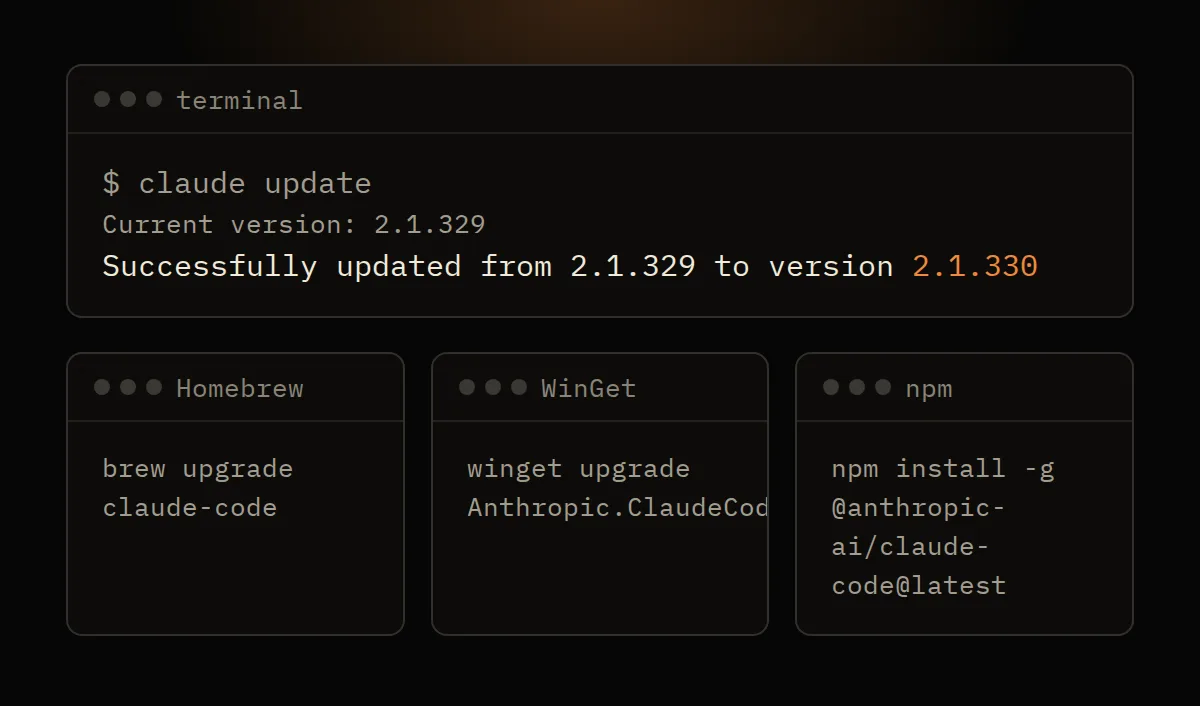
How to update Claude Code, by install method
| How you installed it | Updates itself? | Update command |
|---|---|---|
| Native installer (curl, PowerShell or CMD) | Yes, in the background | claude update |
| Homebrew, stable cask | No, unless you opt in | brew upgrade claude-code |
| Homebrew, latest cask | No, unless you opt in | brew upgrade claude-code@latest |
| WinGet | No, unless you opt in | winget upgrade Anthropic.ClaudeCode |
| npm | Yes, when npm's global folder is writable | npm install -g @anthropic-ai/claude-code@latest |
| apt, dnf or apk | No | Your package manager's upgrade command, with sudo |
Not sure which you have? Run claude doctor in your shell. It prints read-only installation and settings checks without starting a session, including install health, whether auto-updates are on and the result of the last update attempt.
Source: Advanced setup, Claude Code docs
Update Claude Code with claude update
claude updateWhen an update installs, the command prints a line ending in "to version" and the new version number. If you already have the newest version, it says Claude Code is up to date and shows your version. Installs managed by Homebrew, WinGet or apk print "Claude is up to date!" instead. The new version takes effect when you next start Claude Code, so close and reopen any running sessions to use it.
To check what you are running, use claude --version in your shell, which prints something like 2.1.330 (Claude Code), or /status inside a session, which shows your version along with your model, account and connection.
Source: Advanced setup, Claude Code docs
Update Claude Code installed with Homebrew
Homebrew offers two casks. claude-code follows the stable channel, which is usually about a week behind and skips releases with major regressions. claude-code@latest gets every version as soon as it ships. Upgrade the one you installed:
brew upgrade claude-codebrew upgrade claude-code@latest
Homebrew keeps old versions on disk after upgrades, so run brew cleanup now and then to free the space. If brew reports that the cask claude-code@latest is not installed, you have the stable cask; upgrade that one instead, or install the latest cask if you want new versions sooner.
Update Claude Code installed with WinGet
winget upgrade Anthropic.ClaudeCodeWindows locks the program while Claude Code is running, so a WinGet upgrade can fail with Claude Code open. Close your sessions and run it again.
Update Claude Code installed with npm
npm install -g @anthropic-ai/claude-code@latestUse install with @latest, not npm update -g. Anthropic notes that npm update -g respects the version range from your original install and may not move you to the newest release. Never use sudo with npm for Claude Code; it can cause permission problems and security risks. The npm package needs Node.js 22 or later, and installs the same native program as the standalone installer.
Source: Advanced setup, Claude Code docs
Let Homebrew and WinGet update automatically
If you like Homebrew or WinGet but want automatic updates, set the environment variable CLAUDE_CODE_PACKAGE_MANAGER_AUTO_UPDATE to 1. Claude Code then runs the upgrade command in the background when a new version is out and asks you to restart. apt, dnf and apk stay manual, because their upgrade commands need administrator rights. One known issue: Claude Code can tell you about an update before it reaches the package manager; if the upgrade fails, wait and try again later.
Choose a release channel: latest or stable
Claude Code has two release channels, set with the autoUpdatesChannel setting:
| Channel | What you get | Good for |
|---|---|---|
| latest (default) | New features as soon as they are released | Trying new features and new models first |
| stable | A version usually about a week old, skipping releases with major regressions | Teams and anyone who wants fewer surprises |
Change it in /config under Auto-update channel, or in your settings.json file:
{
  "autoUpdatesChannel": "stable"
}
Two things to know. On a native install, switching to stable can move you to an older version than the one you have; to avoid that, pin a minimum version, below. And a newly launched model can need a newer Claude Code than the stable channel serves, so move to latest if you want to use a new model straight away. Homebrew picks the channel by cask name, and the apt, dnf and apk repositories pick it by repository.
Pin a minimum version
To move to stable without going backwards, set minimumVersion to the version you are running now. Updates then never install anything older. The easy way is in /config: switch Auto-update channel to stable and choose the option to stay on your current version. Or set both in ~/.claude/settings.json:
{
  "autoUpdatesChannel": "stable",
  "minimumVersion": "2.1.323"
}
That installation stays on 2.1.323 until the stable channel serves something newer. In company managed settings, minimumVersion is a floor users cannot override, and requiredMinimumVersion and requiredMaximumVersion make Claude Code refuse to start outside a version range.
Source: Advanced setup, Claude Code docs
Install a specific Claude Code version
The native installer accepts a version number or a channel name. The channel you choose at install time becomes your default for auto-updates.
curl -fsSL https://claude.ai/install.sh | bash -s stablecurl -fsSL https://claude.ai/install.sh | bash -s 2.1.89
On Windows PowerShell, the stable install is & ([scriptblock]::Create((irm https://claude.ai/install.ps1))) stable.
Turn off Claude Code auto-updates
Set DISABLE_AUTOUPDATER to "1" in the env section of settings.json. Run claude doctor afterwards and check the Auto-updates line reads disabled (set by env: DISABLE_AUTOUPDATER). This only stops the background check; claude update still works. To block every update path, including manual ones, set DISABLE_UPDATES instead, which suits companies that roll out Claude Code through their own tools.
{
  "env": {
    "DISABLE_AUTOUPDATER": "1"
  }
}
Source: Advanced setup, Claude Code docs
The Claude Code changelog
Anthropic publishes every release in the Claude Code changelog, generated from the CHANGELOG.md file in the anthropics/claude-code repository on GitHub. Releases are frequent: version 2.1.330 shipped on 20 November 2026, and there were ten releases between 6 and 20 November, each listing what was added, improved and fixed, with editor-specific changes marked [VSCode].
- Read it on the web at code.claude.com/docs/en/changelog.
- Inside Claude Code, run /release-notes to pick a version and read its notes in your session, or show all versions.
- Compare against your own version with claude --version.
If you are on the stable channel, read the notes for versions about a week back; newer entries may not have reached you yet.
What recent Claude Code updates added
| Version | Released | One addition from the notes |
|---|---|---|
| 2.1.330 | 20 Nov 2026 | Sign-in to organisations managed in Anthropic's Enterprise Admin Console, and /fork in the VS Code extension |
| 2.1.329 | 19 Nov 2026 | Scheduled tasks, /loop wakeups and the goal listed in /tasks, where x stops one |
| 2.1.328 | 19 Nov 2026 | Auto mode for Opus 4.6 and Sonnet 4.6 on Amazon Bedrock, Google Cloud and Microsoft Foundry |
| 2.1.327 | 17 Nov 2026 | claude mcp add-json reading a server's settings from stdin, so tokens stay off the command line |
| 2.1.326 | 16 Nov 2026 | A /status row saying when your provider or a setting turns features off |
Small releases like these add up, which is the main reason to stay on auto-updates: fixes and new commands land within days.
Source: Claude Code changelog, Anthropic
Updating the VS Code extension and the desktop app
The Claude Code extension for VS Code updates through your editor's Extensions view, separately from the command-line tool. Anthropic's troubleshooting for the extension often starts with updating it: for example, if the Claude Code panel opens but shows nothing, update the extension to v2.1.309 or later and run Developer: Reload Window. If the sign-in screen says login is managed by your organisation and must be completed in the terminal, update the extension, or install the command-line tool and sign in there.
Source: Use Claude Code in VS Code, Claude Code docs
Claude Code update problems and fixes
"Auto-update failed · Run claude doctor" in the footer
Claude Code tried to update in the background and it did not install. You can keep working. claude doctor shows the date of the failed attempt but not the cause, so run claude update in your shell to finish the update and see the actual error.
"The connection dropped while downloading the update"
The download server connection closed and the retries did not recover. Run claude update again; on a healthy network it usually works the next time. If you are behind a proxy, set HTTPS_PROXY first, and if a company proxy keeps cutting the download, ask for downloads.claude.ai to be allowed. A download still running after 10 minutes stops with "Download timed out", which needs a faster network.
"Release verification failed"
Claude Code could not confirm the release was genuine, so it installed nothing and your current version keeps working. If the reason starts with sidecar_fetch_, run the command again; otherwise try later, and report it if it repeats.
claude update hangs
Older versions could hang while checking your shell configuration files if one of them was actually a folder. Update to 2.1.214 or later by re-running the install script, since claude update itself is what hangs.
npm ENOTEMPTY error
npm could not move the old package folder aside. Delete the folder named in the npm error path line, plus any leftover .claude-code- folders next to it, then install again.
Two copies of Claude Code
Anthropic warns that several Claude Code installations, for example one from npm and one from the native installer, can cause version mismatches, so an update seems not to stick. Check which copies you have, keep one and remove the rest.
Source: Troubleshoot installation and login, Claude Code docs
Keeping several Claude Code sessions current
Updates take effect when Claude Code restarts, so a session left open for days keeps running the old version. If you run many sessions at once, a quick way to see which ones are idle and safe to restart helps. 10u is an AI coding agent dashboard that shows every Claude Code and Codex session side by side, each in its real terminal, marked Needs you, Working, Waiting or Parked. It runs on the subscriptions you already have. They do the building. You decide what gets built.

Questions people ask
- How do I update Claude Code?
- Run claude update. Native installs also update automatically in the background. For Homebrew run brew upgrade claude-code, for WinGet run winget upgrade Anthropic.ClaudeCode, and for npm run npm install -g @anthropic-ai/claude-code@latest.
- Does Claude Code update automatically?
- Native installations do: they check at startup and while running, and the new version takes effect the next time you start Claude Code. Homebrew, WinGet and Linux package manager installs do not, unless you set CLAUDE_CODE_PACKAGE_MANAGER_AUTO_UPDATE to 1 for Homebrew or WinGet.
- How do I check my Claude Code version?
- Run claude --version in your shell, or /status inside Claude Code.
- Where is the Claude Code changelog?
- At code.claude.com/docs/en/changelog, generated from CHANGELOG.md in the anthropics/claude-code GitHub repository. Inside Claude Code, run /release-notes.
- What is the Claude Code stable channel?
- A release channel that serves a version usually about a week old and skips releases with major regressions. Set autoUpdatesChannel to stable in /config or settings.json.