
Claude Code best practices: what actually helps in 2026
The best Claude Code practices come down to four things, according to Anthropic's own guide. Tell Claude what it cannot see in the code. Give it a check that comes back pass or fail. Turn rules that can never be broken into hooks and deny rules instead of CLAUDE.md lines. And only change a default when a task costs more time, tokens or interruptions than it should. Much older advice, such as typing think hard or writing IMPORTANT in capitals, no longer helps with current models.
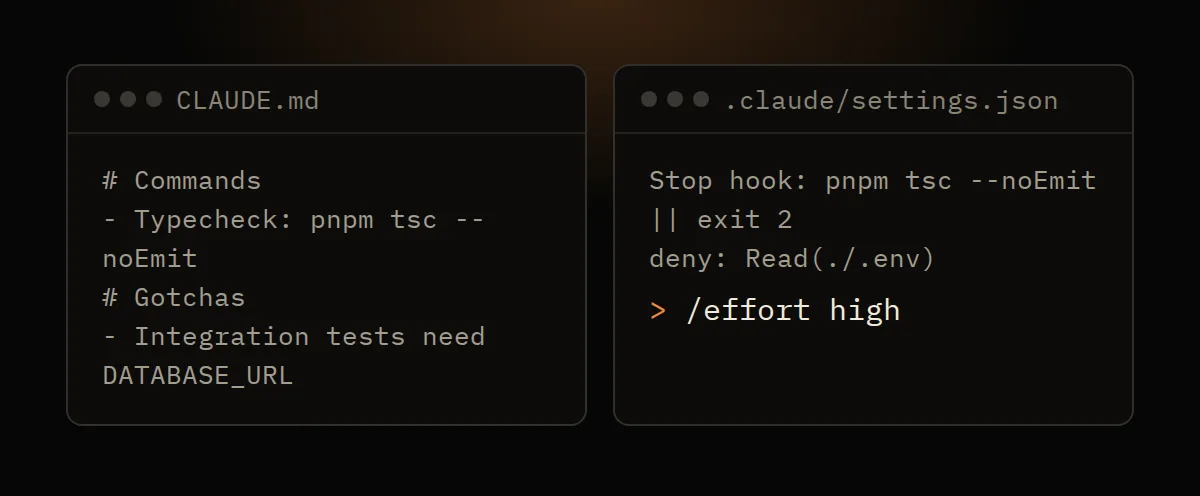
Source: Best practices for Claude Code, Anthropic
Start from the defaults
Anthropic says a plain first prompt in a fresh session usually does the right thing with no setup. New terminal and VS Code sessions start in auto mode, so routine commands run without you approving each one. Claude hands independent work to subagents. The conversation is compacted automatically before the context window fills. The default model is Claude Opus 5.5 at medium effort on most plans.
Setup pays off when your project holds knowledge Claude cannot read from the code: a deploy process that lives in someone's head, a file that must never be read, a check that must pass before anything counts as done, or a budget you need to stay under.
| What went wrong | Usual cause | Fix |
|---|---|---|
| Claude built the wrong thing, or rediscovers the same fact every session | Missing information that is not in the repo | Tell Claude what it cannot see |
| Claude said it was done and it was not | No way to check its own work | Give Claude a check to run |
| Claude did something that must never happen, or skipped a required step | A prompt cannot guarantee either | Enforce it with a hook or deny rule |
| Right answer, but too slow, costly or full of prompts | A default that does not suit the task | Change the permission mode, model, effort or context habits |
Source: Best practices for Claude Code, Anthropic
Claude decides, or Claude Code enforces
Every instruction is one of two kinds. Non-deterministic instructions are read by the model, which decides what to do: your prompt, CLAUDE.md and skills. Claude usually follows them, but there is no guarantee. Deterministic instructions are configured in Claude Code, the harness, which applies them every time: hooks, deny rules and managed settings.
| Claude decides | Claude Code enforces | |
|---|---|---|
| What to do | Your prompt, CLAUDE.md, skills | Hooks, and skills only you can start |
| What it can touch | Auto mode's classifier | Deny rules, strict sandbox, managed settings |
| When it is done | Asking for evidence, /goal, /code-review | Tests, typecheck, a Stop hook, CI |
| How much it spends | Effort level | --max-turns or --max-budget-usd with -p, a spend limit |
| Who has the last word | Claude's summary | Branch protection, a person approving the merge |
Most of the time you want Claude to decide, because it can see the code in front of it. Use the enforced kind only for things that must always or never happen. Anthropic's rule of thumb: if you keep adding emphasis to a CLAUDE.md line and Claude still misses it, the line belongs in a hook. And if you have hooks for mere preferences, delete them.
Source: Best practices for Claude Code, Anthropic
Best practice 1: tell Claude what it cannot see
Claude reads your code very well and quickly finds your file layout, conventions and test framework. What it cannot find is information that was never in the repo, such as a team decision from a meeting or the environment variable your integration tests need. Before you write anything down, ask two questions: could Claude find this by reading the code, and would it actually go and look? If both answers are yes, leave it out.
Write a specific prompt
Name the file, describe the symptom and say what fixed looks like. If you prefer one of two reasonable approaches, say so, because Claude cannot read your preference from the code.
| Instead of | Try |
|---|---|
| fix the login bug | users report login fails after the session times out. look at token refresh in src/auth/, write a failing test that reproduces it, then fix it |
| add a calendar widget | follow the pattern in HotDogWidget.php and build a calendar widget that lets you pick a month and page between years. no new libraries |
- Hand over what you have: type @ and a path to include a file, paste a screenshot, or pipe output in with cat error.log | claude -p "what's going on here".
- Say be ambitious when you want the full version with edge cases and follow-on work, because Claude tends to build the smallest thing that satisfies the request.
- Phrases like think step by step are ordinary text, not switches. Effort is the real control.
- A vague prompt is fine when you are exploring; you will just correct a bit more as you go.
Brainstorm first with an interview
When you do not know exactly what you want, ask Claude to interview you. It asks multiple-choice questions about the parts you have not pinned down until the answers add up to a spec. Then start a fresh session to build from that spec, so the build begins with clean context and a written definition of done.
I want to add rate limiting to the public API but haven't thought it through yet. Interview me until you could write the spec, then write it to SPEC.md.Keep CLAUDE.md short
CLAUDE.md loads into every session, so every line takes a little attention on every task. Keep only what Claude could not work out itself: the exact test, typecheck and lint commands; places where the code misleads, such as an old pattern new code must not copy; decisions not in the repo; and anything you have had to correct twice.
# Commands
- Install: pnpm install
- Run one test file: pnpm vitest run path/to/file.test.ts
- Typecheck: pnpm tsc --noEmit

# Conventions
- Use the error helpers in src/lib/errors.ts, never throw raw strings
- src/legacy/ is still live but don't copy its patterns into new code

# Gotchas
- Integration tests need DATABASE_URL set, see .env.example- /init writes a starting version from your codebase; the work after that is mostly removing lines. Anthropic's memory guide recommends staying under 200.
- /doctor suggests cuts, and /doctor prompt-audit flags lines written for older models, pointing at missing files, or contradicting each other.
- Run /context all to confirm Claude loaded the file.
- Personal preferences go in CLAUDE.local.md, added to .gitignore.
Scope rules, skills and tools
A rule that only matters in one area goes in .claude/rules/ with a paths: filter, so it loads only when Claude works there. Team procedures, such as how you cut a release, go in a skill at .claude/skills/<name>/SKILL.md; Claude sees only its name and description until a task needs it, which is lighter than CLAUDE.md. Add disable-model-invocation: true to a skill with side effects so it runs only when you type its command. For other systems, a CLI such as gh is usually the easiest route; otherwise add an MCP server, and turn off the ones you are not using, because connected servers add to the context.
claude mcp add --transport http notion https://mcp.notion.com/mcpSource: Best practices for Claude Code, Anthropic
Best practice 2: give Claude a check to run
Claude stops when the work looks done. Without something to run, looks done is all it has, which makes you the test suite. Give it a test file, a build exit code, a linter, a script that compares output with a fixture, or a screenshot next to the mockup, and it can make the change, run the check and fix what broke. If your repo has one, the most useful CLAUDE.md line is the command that runs it.
| How strict | How | Who decides |
|---|---|---|
| In the prompt | run the auth tests after, and keep going until they pass | Claude |
| As a goal | /goal all tests in tests/auth pass and lint is clean | A separate model checks after every turn |
| As a Stop hook | A script runs whenever Claude tries to finish; exit code 2 sends it back | Claude Code |
| By a fresh reviewer | /code-review checks the diff in a subagent that never saw your conversation | An independent reviewer |
Whichever you use, ask for evidence: the command Claude ran and its output, or the screenshot. All tests pass on its own tells you little. After Claude says it is done, /verify has it build and run the app and look at the result, which catches problems tests miss. To review against your plan, ask a subagent to compare the diff with SPEC.md and skip style; a reviewer asked to find problems will always find something, and fixing every finding adds needless layers.
A Stop hook that enforces the typecheck
{
  "hooks": {
    "Stop": [
      {
        "hooks": [
          { "type": "command", "command": "pnpm tsc --noEmit 1>&2 || exit 2" }
        ]
      }
    ]
  }
}
Saved in .claude/settings.json, this sends the compiler errors back to Claude until tsc passes. If the hook blocks eight stops in a row with no tool call between them, Claude Code lets the next stop through; set CLAUDE_CODE_STOP_HOOK_BLOCK_CAP to raise that.
Source: Best practices for Claude Code, Anthropic
Best practice 3: enforce rules that cannot have exceptions
Rules like never read .env, always run the formatter after editing, or do not touch the migrations folder are followed almost every time from CLAUDE.md. Where almost is not good enough, move them into configuration Claude Code applies itself.
Hooks for steps that must always happen
Hooks run something of yours at fixed points: before or after a tool call, when Claude tries to stop, when a session starts. Use a command, http or mcp_tool hook for real enforcement, because prompt and agent hooks ask another model to decide. Add onFailure: "block" if the action should also stop when the hook itself crashes. This PostToolUse hook runs Prettier after every edit:
{
  "hooks": {
    "PostToolUse": [
      {
        "matcher": "Edit|Write",
        "hooks": [
          { "type": "command", "command": "f=$(jq -r '.tool_input.file_path') && npx prettier --write --ignore-unknown \"$f\"" }
        ]
      }
    ]
  }
}
You can also just ask Claude to write a hook that blocks edits to the migrations folder, then check it with /hooks. Keep hooks for rules with zero exceptions; prefer named exports has plenty, so it stays in CLAUDE.md.
Deny rules and the sandbox
Deny rules hold in every permission mode, including auto and bypassPermissions:
{
  "permissions": {
    "allow": ["Bash(pnpm tsc --noEmit)"],
    "ask": ["Bash(git push *)"],
    "deny": ["Read(./.env)", "Read(./.env.local)", "Read(./secrets/**)"]
  }
}
A Read rule catches cat .env, but not a script that opens the file, and a WebFetch deny does nothing about curl unless the sandbox is on. For an operating-system limit, turn on the sandbox with /sandbox; it confines shell commands on macOS, Linux and WSL2 and picks up your deny rules. Strict mode stops Claude asking to retry outside it. Auto mode is a classifier judging each action, so your never rules belong in deny rules or hooks.
| File | Applies to |
|---|---|
| ~/.claude/settings.json, .claude/settings.local.json | You alone |
| .claude/settings.json (committed) | Everyone in the repo |
| Managed settings | The whole organisation; nothing personal can override them |
Keep the enforced set small. If you reach forty hooks and deny rules, Anthropic says most are probably preferences Claude could have weighed itself.
Source: Best practices for Claude Code, Anthropic
Best practice 4: change a default only when it costs you
When a task costs more than it should, run /usage to see where it went. One of four defaults is usually why: permission mode, model and effort, subagents, or context.
Permission mode
Manual mode is safe but slow, and after the tenth prompt you start approving without reading. bypassPermissions only makes sense in a disposable container. Auto mode sits between: a separate classifier model stops things like curl | bash, production deploys, force pushes and sensitive data sent outside. After three blocks in a row, or twenty in total, it goes back to asking you. If it keeps stopping something routine, add it to autoMode.allow in ~/.claude/settings.json, keeping "$defaults" in every list so you do not wipe the built-in rules. /auto-mode-setup drafts the environment part for you, and /fewer-permission-prompts builds an allowlist from your recent sessions if you use Manual.
Model and effort
| Effort | Use it for |
|---|---|
| /effort low | Quick back-and-forth you review anyway: brainstorming, a first sketch, a small rename |
| medium (default) | Everyday feature work with a clear scope |
| /effort high or xhigh | Easy-to-miss cases: a bug in code you did not write, a flaky test, a schema change |
| max | A hard problem left to run alone, such as hunting a security hole; it overthinks ordinary tasks |
| ultrathink in one prompt | One tricky question without changing the setting |
Opus 5.5 handles most coding, Sonnet costs less on routine work, /model fable switches to Claude Fable 5.2, and Haiku suits subagents doing simple jobs.
Subagents
Subagents help with parallel work, keeping long output out of your conversation, an independent reviewer, or a task that should have fewer tools. They cost tokens against the same usage, can be slower because they gather context again, and do not give a smarter answer. Set model: haiku for simple ones, ask for short summaries, and give a reviewer only tools: Read, Grep, Glob so it cannot edit anything.
Cost and context
- /clear between unrelated tasks costs nothing and stops the next task paying for the last one's history; /clear oauth-migration names the session you leave.
- /compact with a focus, such as /compact keep the API changes and the test commands; on a long session it is itself a big request.
- Watch background work: a /loop, a goal's check after each turn, and subagents keep sending requests while you are not typing.
- The prompt cache lasts about an hour on a subscription and five minutes on an API key, cloud provider or usage credits.
Source: Best practices for Claude Code, Anthropic
Steer the session
Watch the first minute and press Esc the moment Claude drifts; Esc stops it and keeps the work so far. /rewind, or Esc twice on an empty prompt, rolls code, conversation or both back to an earlier prompt, which makes it low-risk to try the bolder approach first. Checkpoints only cover files Claude edited with its own file tools, not files a Bash command changed, so keep using git. After two failed corrections, run /clear and write one better prompt instead of a third. /btw asks a side question without adding to the history, and /rename oauth-migration lets claude --resume oauth-migration pick the work up days later.
Source: Best practices for Claude Code, Anthropic
Best practices for unattended Claude Code runs
Before a run goes unattended, Anthropic suggests five questions for that specific task:
- Does it know what done looks like? A goal, a spec file, or a failing test to turn green.
- Can it check its own work? Tests, a Stop hook, a review step.
- What is it allowed to touch? Permission rules, dontAsk, the sandbox, a worktree, one branch it may push to.
- What stops it? --max-turns, --max-budget-usd, a spend limit.
- Where does the result go, and who signs off? A pull request or summary, then a person approving the merge or deploy.
From a script, claude -p runs once and exits. Add --bare to skip your hooks, skills, plugins, MCP servers and CLAUDE.md for a faster, predictable run (it uses ANTHROPIC_API_KEY, not your claude.ai login), --allowedTools to pre-approve tools, --permission-mode dontAsk to refuse everything else, and --output-format json to parse the result.
for file in $(cat files.txt); do
  claude --bare -p "Migrate $file to the new logger API and commit. Reply OK or FAIL." \
    --allowedTools "Read,Edit,Bash(git add *),Bash(git commit *)" \
    --permission-mode dontAsk \
    --max-turns 20
done
Try it on three files first, fix the prompt, then run the rest. Inside a session, /loop 15m check CI on this branch, and if it's red pull the failing job's log, fix it and push repeats a prompt on a timer; /schedule sets up a cloud task that runs while your laptop is closed. Protect main with a branch rule the task cannot bypass, and watch the first few runs.
Parallel sessions
Give each piece of work its own checkout: claude -w feature-auth starts a session in a new git worktree. A worktree has no gitignored files, so list small ones like .env in a .worktreeinclude file and Claude Code copies them in. /batch splits one big mechanical change into 5 to 30 units, each in its own worktree. A second session is also the easiest independent reviewer: one writes the code, another reviews it without having watched.
Source: Best practices for Claude Code, Anthropic
Claude Code habits you can drop
| Old advice | Why Anthropic says it is gone |
|---|---|
| Manage the context window aggressively | Most current models have a 1M-token window and compact on their own; /clear between tasks is still worth it |
| Write IMPORTANT or ALL CAPS | Current models follow plain lines, and emphasis makes Claude over-apply the rule |
| Use subagents to protect context | Running out is rare; use them for parallel work, noisy output or review |
| Delegate to a subagent for a better answer | The same task in a subagent is not better; a fresh reviewer is a different thing |
| think hard, be thorough | Effort is the control; ultrathink still works for one turn |
| Tell Claude to keep going and not be lazy | Current models carry on; such lines cause over-work. Give it a check, or use /goal or a Stop hook |
| Describe your architecture in CLAUDE.md | Claude reads the repo itself |
Source: Best practices for Claude Code, Anthropic
When you run several Claude Code sessions
Following these practices, many developers end up with several sessions going at once, in worktrees, in the background and in the cloud. 10u is an AI coding agent dashboard that shows every Claude Code and Codex session side by side, each in its real terminal, marked Needs you, Working, Waiting or Parked. They do the building. You decide what gets built.

Questions people ask
- What should go in CLAUDE.md?
- Only what Claude cannot work out from the code: test, typecheck and lint commands, misleading parts of the code, decisions not in the repo, and anything you have corrected twice. Anthropic recommends staying under 200 lines.
- How do I make Claude Code always follow a rule?
- Use a hook or a deny rule. CLAUDE.md lines are guidelines Claude can decide do not apply; hooks and deny rules are applied by Claude Code every time.
- Does writing think hard still help in Claude Code?
- No. It is ordinary prompt text. Use /effort to change how hard Claude thinks, or put ultrathink in a single prompt.
- How do I stop Claude Code saying it is done when it is not?
- Give it a check that returns pass or fail, such as a test command, and ask for the command output as evidence. A Stop hook or /goal can enforce it.
- How do I cut Claude Code token use?
- Run /usage to see where usage went, /clear between unrelated tasks, /compact with a focus, and give simple subagents the Haiku model.