
Claude Code skills: how to create, install and use them
A Claude Code skill is a folder with a SKILL.md file of instructions that Claude adds to its toolkit. Claude uses a skill on its own when your request matches its description, or you run it directly by typing / and the skill name. Put skills in ~/.claude/skills for every project, or in .claude/skills inside a repository to share them with your team. Unlike CLAUDE.md, a skill's body only loads when it is used, so a long procedure costs almost nothing until you need it.
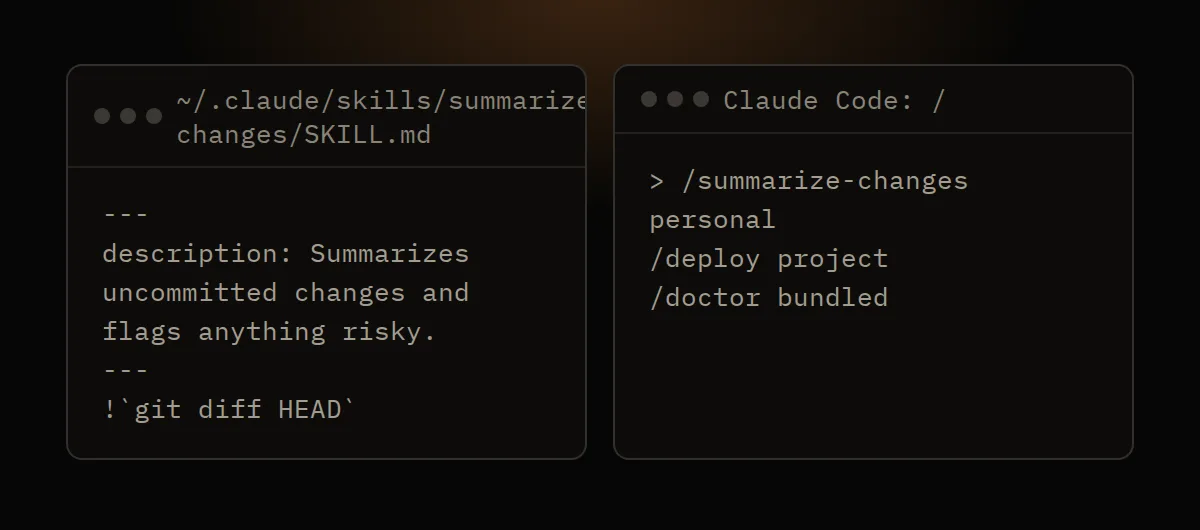
What a Claude Code skill is
Anthropic's rule of thumb is simple: create a skill when you keep pasting the same instructions, checklist or multi-step procedure into chat, or when a section of CLAUDE.md has grown into a procedure rather than a fact. A skill turns that into something you can run in one word, and something Claude can reach for by itself when the job comes up.
Claude Code skills follow the open Agent Skills standard, which several AI coding tools read, so a well-written skill is portable. Claude Code adds its own extras on top: control over who can run a skill, running a skill in a subagent, and live context injected from shell commands.
Skills have also absorbed custom slash commands. A file at .claude/commands/deploy.md and a skill at .claude/skills/deploy/SKILL.md both create /deploy, and old command files keep working, but skills can also hold scripts and other supporting files, so Anthropic recommends skills for anything new.
Source: Extend Claude with skills, Anthropic
Source: Agent Skills open standard
Bundled skills that come with Claude Code
Claude Code ships with skills of its own, such as /doctor, /code-review, /batch, /debug, /loop and /claude-api. They are prompt-based: they give Claude detailed instructions and let it do the work with its tools, rather than running fixed logic like built-in commands. A few worth knowing:
| Skill | What it does |
|---|---|
| /doctor | A setup checkup: install health, unused skills and MCP servers, CLAUDE.md files, permissions and plan usage. It reports first and asks before changing anything |
| /run | Launches and drives your app to see a change working |
| /verify | Builds and runs your app to confirm a change does what it should, without falling back to tests or type checks |
| /run-skill-generator | Records how to build and launch your project as a project skill, so /run and /verify get it right every time |
| /claude-api | Loads Claude API reference material for your language, with workflows such as /claude-api migrate |
When a session starts with a skill named verify or simplify in place, Claude Code tells Claude to run it right before each commit, except for changes to docs or tests. That makes a project verify skill an easy way to get a check before every commit. To turn the bundled skills off, use the disableBundledSkills setting.
Source: Extend Claude with skills, Anthropic
Create your first Claude Code skill
This example from Anthropic's docs summarises your uncommitted changes and flags anything risky. First make the folder in your personal skills directory, so it works in every project:
mkdir -p ~/.claude/skills/summarize-changesThen save this as ~/.claude/skills/summarize-changes/SKILL.md:
---
description: Summarizes uncommitted changes and flags anything risky. Use when the user asks what changed, wants a commit message, or asks to review their diff.
---

## Current changes

!`git diff HEAD`

## Instructions

Summarize the changes above in two or three bullet points, then list any risks you notice such as missing error handling, hardcoded values, or tests that need updating. If the diff is empty, say there are no uncommitted changes.
Every SKILL.md has two parts: YAML frontmatter between --- markers that tells Claude when to use the skill, and markdown instructions Claude follows when it runs. The folder name becomes the command, so this one is /summarize-changes. The !`git diff HEAD` line is dynamic context: Claude Code runs the command and puts its output in place of the line before Claude reads the skill, so the instructions arrive with your real diff already inside.
To test it, make a change in a repository and either ask "what did I change?", which matches the description, or type /summarize-changes. Claude Code notices new and edited skills during a session, so you do not need to restart.
Source: Extend Claude with skills, Anthropic
Where Claude Code skills live
| Location | Path | Loads in |
|---|---|---|
| Enterprise | .claude/skills/<name>/SKILL.md in the managed settings directory | Every user on machines where your organisation deploys it |
| Personal | ~/.claude/skills/<name>/SKILL.md | All your projects on this machine |
| Project | .claude/skills/<name>/SKILL.md | Sessions in this repository; commit it to share it |
| Nested | <subdir>/.claude/skills/<name>/SKILL.md | Sessions started in or below that folder, or once Claude works on files there |
| Additional directory | .claude/skills/ in a folder passed with --add-dir | That session |
| Plugin | <plugin>/skills/<name>/SKILL.md | Wherever the plugin is enabled, as /plugin-name:skill-name |
| claude.ai account | Skills enabled for your claude.ai account | Cowork, cloud sessions and terminal sessions signed in with that account |
A skill folder can be a symbolic link to a folder elsewhere on disk, which lets you keep one copy and link it into several places; Claude Code loads it once even if several locations point at the same target. Avoid the folder names synced and anthropic-skills, which are reserved. Note that personal skills in ~/.claude/skills do not reach Cowork or cloud sessions; use your claude.ai account or a plugin for those.
Source: Extend Claude with skills, Anthropic
Skills in monorepos
Claude Code loads project skills from .claude/skills in the folder where you start it and in every parent folder up to the repository root, so starting in packages/frontend still picks up the root skills. Skills in a .claude/skills folder below where you started load the first time Claude reads or edits a file in that folder, and then stay available for the session; until then they are not in the / menu.
When a nested skill shares a name with another, both stay available. With a deploy skill at the root and another in apps/web/.claude/skills, /deploy runs the root one, /apps/web:deploy runs the nested one, and Claude is told to use whichever matches the files it is working on.
When two skills have the same name
| Same name in | Which one runs |
|---|---|
| Enterprise, personal and project | Enterprise beats personal, and personal beats project |
| Your skill and a bundled skill | Yours replaces the bundled command, but not its aliases |
| Your skill and a built-in command | In a local terminal, yours replaces the command, but not its aliases |
| A skill and a .claude/commands file | The skill |
So a personal deploy skill in ~/.claude/skills quietly wins over the project's own deploy skill. If a team skill is not behaving as written, check you do not have a personal one of the same name.
Edit and remove skills
Claude Code watches the skill folders, so adding, editing or deleting a skill under ~/.claude/skills or the project's .claude/skills takes effect in the running session. If a new skill does not appear, run /reload-skills. To remove a personal or project skill, delete its folder. A plugin skill goes when you disable or uninstall the plugin with /plugin, and an enterprise skill is removed by an administrator from the managed settings directory.
Skills synced from claude.ai
If you sign in to Claude Code with a claude.ai account, or use Cowork or cloud sessions, Claude Code also loads the skills enabled for that account. In the terminal it downloads them into ~/.claude/skills/synced in the background and checks claude.ai for changes while the session runs, about every 10 minutes while you are working. That is why the folder name synced is reserved.
Source: Extend Claude with skills, Anthropic
Two kinds of skill: reference and task
Thinking about how a skill will be used helps decide what goes in it. Reference content adds knowledge Claude applies to whatever you are doing, such as conventions, patterns, style guides or domain knowledge:
---
name: api-conventions
description: API design patterns for this codebase
---

When writing API endpoints:
- Use RESTful naming conventions
- Return consistent error formats
- Include request validation
Task content gives step-by-step instructions for one action, such as a deployment, a commit or code generation. These are usually jobs you want to start yourself, so they often turn off automatic use:
---
name: deploy
description: Deploy the application to production
context: fork
disable-model-invocation: true
---

Deploy the application:
1. Run the test suite
2. Build the application
3. Push to the deployment target
Keep the body short either way. Once a skill loads, its content stays in the conversation for later turns, so every line is a recurring cost. State what to do rather than narrating how or why.
Source: Extend Claude with skills, Anthropic
SKILL.md frontmatter reference
All fields are optional, but description is the one that matters most, because Claude uses it to decide when to apply the skill. Field names must match exactly, hyphens included: Claude Code silently ignores a field it does not recognise. The frontmatter is only read when the opening --- is the very first line of the file.
| Field | What it does |
|---|---|
| name | The command name in the / menu. Defaults to the folder name |
| description | What the skill does and when to use it. Put the key use case first |
| when_to_use | Extra trigger phrases or example requests, appended to the description |
| argument-hint | A hint shown during autocomplete, such as [issue-number] |
| arguments | Named positional arguments, used as $name in the content |
| disable-model-invocation | true stops Claude running the skill by itself; you run it with /name |
| user-invocable | false hides it from the / menu so only Claude can use it |
| allowed-tools | Tools Claude may use without asking during the turn that runs the skill |
| disallowed-tools | Tools removed while the skill is active |
| model | A model for the rest of the turn, such as haiku |
| effort | An effort level for the rest of the turn |
| context | fork runs the skill in a separate subagent |
| agent | Which subagent type to use with context: fork |
| hooks | Hooks registered when the skill runs |
| paths | Glob patterns for the files that activate the skill |
| shell | bash (default) or powershell for inline commands |
The combined description and when_to_use text is capped at 1,536 characters in the skill listing, so the first sentence carries the weight. If the YAML does not parse, the skill still loads, but with no fields set, which means /name works but Claude cannot match it from the description.
Source: Extend Claude with skills, Anthropic
Control who runs a skill
By default both you and Claude can run any skill. Two fields change that:
- disable-model-invocation: true means Claude cannot start the skill on its own. Use it for anything with side effects or where timing matters, such as /commit, /deploy or /send-slack-message. You do not want Claude deciding to deploy because your code looks ready.
- user-invocable: false means only Claude can use it. Use it for background knowledge that is not a command, such as a skill explaining how a legacy system works: Claude should know it when relevant, but /legacy-system-context is not something you would type.
You can also govern skills with permission rules. Deny the Skill tool to turn all skills off, or allow and deny individual ones:
# Deny rules: turn off all skills
Skill

# Allow rules: skip the prompt
Skill(commit)
Source: Extend Claude with skills, Anthropic
Pre-approve tools for a skill
allowed-tools grants permission for the listed tools during the turn that runs the skill, so Claude can use them without asking. The grant clears when you send your next message, even though the skill's instructions stay in context; running the skill again re-applies it. This commit skill lets Claude run the git commands it needs without a prompt for each one:
---
name: commit
description: Stage and commit the current changes
disable-model-invocation: true
allowed-tools: Bash(git add *) Bash(git commit *) Bash(git status *)
---

Stage the relevant files, write a commit message in our format, and commit.
Make the patterns as narrow as the job. Bash(git commit *) is fine for a commit skill; Bash(*) gives a skill your whole shell. The opposite field, disallowed-tools, removes tools while a skill is active, which suits background skills that should never stop to ask you a question.
Activate a skill only for some files
The paths field limits automatic use to matching files, using the same glob format as path-scoped rules. Patterns are relative to Claude's working directory, and only match files inside it:
---
name: api-conventions
description: API design patterns for this codebase
paths:
  - "src/api/**/*.ts"
---

When writing API endpoints, validate every input and use the standard error format.
This keeps a skill out of the way until Claude is actually working in the part of the codebase it covers.
Source: Extend Claude with skills, Anthropic
Pass arguments to a skill
Anything you type after the skill name is available as $ARGUMENTS. This skill fixes a GitHub issue by number, so /fix-issue 123 fills in the number:
---
name: fix-issue
description: Fix a GitHub issue
disable-model-invocation: true
---

Fix GitHub issue $ARGUMENTS following our coding standards.

1. Read the issue description
2. Understand the requirements
3. Implement the fix
4. Write tests
5. Create a commit
For several arguments, use $0, $1 and so on, or name them with the arguments field and use $issue and $branch. Arguments use shell-style quoting, so /my-skill "hello world" second makes $0 "hello world". Other substitutions include ${CLAUDE_SKILL_DIR}, the skill's own folder, ${CLAUDE_PROJECT_DIR}, the project root, ${CLAUDE_SESSION_ID} and ${CLAUDE_EFFORT}, the current effort level.
Source: Extend Claude with skills, Anthropic
Run several skills in one message
At the terminal prompt you can stack skills at the start of one message. Typing /write-tests /fix-issue 123 loads both skills, so Claude works through them together. Claude Code expands the first skill plus up to five more after it, and stops at the first word that is not a skill. Through the Agent SDK or claude -p, only the first skill loads and the rest of the line becomes its arguments.
Source: Extend Claude with skills, Anthropic
Supporting files and scripts
A skill folder can hold more than SKILL.md. That keeps the main file focused while letting Claude open detailed material only when it needs it:
my-skill/
  SKILL.md        required: overview and navigation
  reference.md    detailed docs, loaded when needed
  examples.md     usage examples, loaded when needed
  scripts/
    helper.py     utility script, run rather than loaded
Mention each supporting file from SKILL.md, saying what it contains and when to read it, so Claude knows it exists. Scripts are run, not loaded into context. To let a skill run its own script without a permission prompt, point allowed-tools at the script through ${CLAUDE_SKILL_DIR}:
---
name: render-chart
description: Render a chart from a CSV file
allowed-tools: Bash(${CLAUDE_SKILL_DIR}/scripts/render.sh *)
---

Run `${CLAUDE_SKILL_DIR}/scripts/render.sh <csv-file>` to render the chart.
Both uses of ${CLAUDE_SKILL_DIR} expand to the skill's folder, so the allow rule matches exactly the command the skill tells Claude to run, and nothing broader.
Source: Extend Claude with skills, Anthropic
Inject live context with shell commands
The !`command` syntax runs a shell command before the skill is sent to Claude, and replaces the line with the command's output. Claude receives real data, not an instruction to go and fetch it. This skill summarises a pull request using the GitHub CLI:
---
name: pr-summary
description: Summarize changes in a pull request
context: fork
agent: Explore
allowed-tools: Bash(gh *)
---

## Pull request context
- PR diff: !`gh pr diff`
- PR comments: !`gh pr view --comments`
- Changed files: !`gh pr diff --name-only`

## Your task
Summarize this pull request and flag anything a reviewer should check.
Injected commands still go through permission checks, and the allowed-tools line here pre-approves gh for the turn. A failed command aborts the whole skill run, not just its own line: Claude never sees the skill, and you get a Shell command failed message with the command's output. Any non-zero exit code counts as a failure, except exit code 1 from search and comparison commands, which is treated as a normal result. For several commands at once, use a fenced block opened with ```! instead of the inline form.
Source: Extend Claude with skills, Anthropic
Run a skill in a subagent
Add context: fork to run a skill in isolation. Claude Code starts a new subagent of the type named in agent, such as Explore, and gives it the skill as its prompt. The subagent does not see your conversation, so the skill must say everything the job needs. It runs in the background by default, so you keep working and its result arrives when it is done; set background: false to wait for it instead.
Forking suits research, reviews and summaries that would otherwise fill your main conversation with file contents. Be aware that a forked skill running in the background makes its edits outside your session's checkpoints, so /rewind will not undo them.
Source: Extend Claude with skills, Anthropic
A complete example from Anthropic is a research skill that runs in the read-only Explore agent:
---
name: deep-research
description: Research a topic thoroughly
context: fork
agent: Explore
---

Research $ARGUMENTS thoroughly:
1. Find relevant files using Glob and Grep
2. Read and analyze the code
3. Summarize findings with specific file references
When it runs, Claude Code creates a new isolated context, hands the skill content to the subagent as its prompt, uses the agent field to set the model, tools and permissions, and returns a summary to your main conversation when the subagent finishes. Your conversation gets the findings, not every file the agent read.
Source: Extend Claude with skills, Anthropic
Hide or switch off skills without editing them
The skillOverrides setting controls how a skill appears from your settings rather than from its own frontmatter. It suits skills you do not want to edit, such as ones checked into a shared repository. The /skills menu writes it for you, or you can set it by hand:
{
  "skillOverrides": {
    "legacy-deploy": "off",
    "api-conventions": "name-only"
  }
}| Value | Listed to Claude | In the / menu |
|---|---|---|
| on | Name and description | Yes |
| name-only | Name only | Yes |
| user-invocable-only | Hidden | Yes |
| off | Hidden | Hidden |
name-only is a good middle ground for skills you rarely need: Claude still knows the skill exists, but its description stops taking up room in every session's listing. user-invocable-only hides a skill from Claude entirely while keeping it one / away for you.
Source: Extend Claude with skills, Anthropic
How skills load and stay in context
At the start of a session, Claude Code puts a listing of every skill's name and description into context, so Claude knows what is available. The full SKILL.md only loads when the skill runs. When it does, the content enters the conversation as one message and stays there across later turns. Running the same skill again with identical content adds a short note rather than a second copy.
The listing has a budget of about 1% of the model's context window. With many skills installed, Claude Code drops descriptions to fit, starting with the skills you use least, which removes the keywords Claude needs to match a request. Run /doctor for an estimate of the listing's cost and /skill-doctor to see what each skill costs and how often it is used, then turn off the ones you never touch.
When a long conversation is compacted, Claude Code carries recently used skills forward within a token budget, but may keep only the start of each. Put the most important instructions near the top.
Source: Extend Claude with skills, Anthropic
Skills, CLAUDE.md, subagents or hooks?
| Use | When |
|---|---|
| CLAUDE.md | A fact or rule every session needs: build commands, conventions, project layout |
| A skill | A procedure or reference you need some of the time: releases, migrations, API conventions |
| A subagent | A specialist with its own context and tools that Claude hands work to |
| A hook | Something that must happen every time, whatever Claude decides: formatting, blocking a command |
Anthropic's guidance is that if an entry in CLAUDE.md is a multi-step procedure, or only matters for one part of the codebase, it belongs in a skill or a path-scoped rule instead. And if Claude skips a rule in a skill that must hold every time, move that rule into a hook.
Source: How Claude remembers your project, Anthropic
Source: Extend Claude with skills, Anthropic
The best Claude Code skills to install
Before writing everything yourself, look at what already exists. Three sources are worth knowing:
- Anthropic's own skills repository, anthropics/skills on GitHub, with nearly 200,000 stars. It includes skill-creator for building and testing skills, document skills for docx, pdf, pptx and xlsx files, frontend-design, mcp-builder, webapp-testing, doc-coauthoring and brand-guidelines. Anthropic also publishes it as a plugin marketplace.
- The official plugin marketplace, claude-plugins-official, with plugins Anthropic maintains plus partner plugins, many of which bundle skills.
- Community catalogs such as Claude Code Templates at aitmpl.com, which lists hundreds of skills you can install with npx claude-code-templates@latest --skill and a name.
Read any skill before you install it. Its instructions steer what Claude does, its scripts run on your machine, and its allowed-tools can grant itself broad access. Anthropic notes that Claude Code applies a project skill's allowed-tools even in a -p run in a folder you have never trusted, so review the skills checked into a repository before running Claude Code there.
Source: anthropics/skills on GitHub
Source: Anthropic plugin marketplaces, Anthropic
Source: davila7/claude-code-templates on GitHub
Skills in Cowork, cloud sessions and scheduled tasks
Cowork sessions and cloud sessions, including cloud scheduled tasks, do not read ~/.claude/skills on your machine. A scheduled cloud task that calls a skill you only keep locally reports that the skill was not found, because each run starts as a fresh cloud session. To make a personal skill available there, enable it for your claude.ai account, or commit it to the repository's .claude/skills so cloud sessions on that repository load it. Desktop scheduled tasks run on your own machine, so they do load your personal skills.
Source: Extend Claude with skills, Anthropic
Share skills with your team
- Commit project skills to .claude/skills so everyone who clones the repository gets them.
- In a monorepo, put skills for one package in that package's own .claude/skills; they load when someone works there.
- Package skills you want to share across repositories as a plugin, where they appear as /plugin-name:skill-name and update for everyone at once.
- For a whole organisation, deploy them as enterprise skills through managed settings.
Source: Extend Claude with skills, Anthropic
Test a skill properly
Seeing a skill trigger only tells you Claude found it, not that it did what you meant. Anthropic recommends a baseline comparison: collect a few realistic prompts, run each in a fresh session with the skill available and again with it turned off, and compare the results. Use a fresh session because leftover context from writing the skill skews the result. Turn a personal or project skill off for the second run by setting it to "off" in skillOverrides. For skills that ship in a plugin, claude plugin eval runs each prompt with and without the plugin for you, and the bundled skill-creator can run evals on a skill you are building.
Source: Extend Claude with skills, Anthropic
Run evals with skill-creator
The skill-creator plugin automates that comparison inside Claude Code. Install it from the official marketplace:
/plugin install skill-creator@claude-plugins-officialThen ask Claude to evaluate your skill. It stores test prompts and expected behaviour in evals/evals.json inside the skill folder, runs each case in its own subagent so every run starts clean, grades each assertion with evidence, and writes a benchmark of pass rate, time and tokens with and without the skill. It can also run a blind comparison between two versions of a skill, and tune the description by generating prompts that should and should not trigger it and measuring the hit rate. A review page lets you record feedback that the next round reads.
That last feature is the most useful for most people, because the description is where skills usually fail: too vague and Claude never uses the skill, too broad and it fires on the wrong requests.
Source: Extend Claude with skills, Anthropic
How to write Claude Code skills that work
- Write the description first, with the main use case and the words people actually say near the start.
- Keep each skill to one job. Two jobs means two skills.
- Keep SKILL.md short and move detail into supporting files it points to.
- Put the most important instructions near the top, because after compaction only the start may survive.
- Word guidance to cover the whole task, such as "after every edit", because Claude does not re-read the file.
- Turn off automatic use for anything with side effects, and pre-approve only the exact commands a skill needs.
- Test against a baseline before trusting a skill, and prune the ones /skill-doctor says you never use.
Source: Extend Claude with skills, Anthropic
When a Claude Code skill does not work
The skill does not trigger
- Check the description uses the words people would naturally say.
- Ask Claude "What skills are available?" to confirm it is listed.
- Rephrase the request to match the description more closely.
- Run it directly with /skill-name.
- If it sets paths, check the files Claude is working on are inside the folder the patterns are relative to.
To find SKILL.md files whose frontmatter does not parse, validate the folder:
claude plugin validate .claude/skillsThe skill triggers too often
Make the description more specific, and say what the skill is not for. If you only ever want to start it yourself, add disable-model-invocation: true.
Claude stops following the skill
Claude Code does not re-read a skill file on later turns, so word guidance to cover the whole task, such as "run the tests after every edit" rather than "run the tests". After compaction, run the skill again to restore its full content. And move any rule that must hold every time into a hook.
Source: Extend Claude with skills, Anthropic
Claude Code skills and Codex skills
OpenAI's Codex reads the same Agent Skills format, so the core of a skill, a folder with a SKILL.md holding a name, a description and instructions, works in both. The differences are in the wiring. Codex looks in .agents/skills in a repository and ~/.agents/skills for your own, where Claude Code uses .claude/skills and ~/.claude/skills. In Codex you mention a skill with $ and its name; in Claude Code you type /. To stop automatic use, Codex sets allow_implicit_invocation: false in an agents/openai.yaml file beside the skill, while Claude Code uses disable-model-invocation: true in the frontmatter. Claude Code-only fields such as context: fork, allowed-tools and the !`command` syntax are ignored elsewhere, so keep a shared skill to plain instructions and link one folder into both locations if you use both agents.
Source: Extend Claude with skills, Anthropic
Source: Build skills for ChatGPT and Codex, OpenAI
Skills across many sessions
Good skills make every session do a job the same way, which pays off most when several Claude Code agents run at once. 10u is an AI coding agent dashboard that shows every Claude Code and Codex session side by side, each in its real terminal, marked Needs you, Working, Waiting or Parked. They do the building. You decide what gets built.

Questions people ask
- What are Claude Code skills?
- Folders with a SKILL.md file of instructions that Claude uses when a request matches the description, or that you run with /skill-name.
- Where do Claude Code skills go?
- In ~/.claude/skills/<name>/SKILL.md for your own skills in every project, or .claude/skills/<name>/SKILL.md inside a repository to share them with your team.
- How do I create a skill in Claude Code?
- Make a folder under ~/.claude/skills, add a SKILL.md with a description in its frontmatter and instructions below, then run it with / and the folder name.
- What is the difference between skills and slash commands?
- Custom commands have been merged into skills. Both create a /name command, but skills can also hold scripts and supporting files and can be used by Claude automatically.
- How do I stop Claude running a skill on its own?
- Add disable-model-invocation: true to the skill frontmatter. You can still run it yourself with /skill-name.