
How to run multiple Codex agents at once
There are five ways to run multiple Codex agents at once: ask one chat to spawn subagents, open several Codex CLI sessions in separate Git worktrees, run parallel chats in the ChatGPT desktop app, send tasks to Codex Cloud, or script runs with codex exec. Which one fits depends on whether the agents work on one task or several, and whether you want them on your own computer or in the cloud.
| Way | How many tasks | Where it runs | Best for |
|---|---|---|---|
| Subagents in one chat | One task, split up | Wherever the chat runs | Reviews, research, tests and triage done in parallel |
| Several CLI sessions in worktrees | Several tasks | Your computer | Separate features or fixes at the same time |
| Parallel chats in the desktop app | Several tasks | Your computer | The same, with a window instead of terminals |
| Codex Cloud tasks | Several tasks | OpenAI's cloud | Work that should keep going while your computer sleeps |
| codex exec scripts | Many small tasks | Your computer or CI | Repeatable jobs and pipelines |
Way 1: subagents inside one Codex chat
Codex can split one job across several agents and collect their results in a single answer. OpenAI calls this a subagent workflow. Each subagent works in its own thread, so its notes and tool output do not bury the main chat. OpenAI gives two reasons this helps: context pollution, where useful information gets buried under noisy output, and context rot, where a chat gets worse as it fills with less relevant detail.
How to start subagents
In current local Codex releases, ask for them directly with words such as "spawn two agents", "delegate this work in parallel" or "use one agent per" part of the job. OpenAI's own example:
Review this branch with parallel subagents. Spawn one subagent for security risks,
one for test gaps, and one for maintainability. Wait for all three, then summarize
the findings by category with file references.
OpenAI suggests starting with read-heavy work such as exploring a codebase, running tests, triage and summaries, and being more careful with parallel agents that write code, where changes can clash.
Watching and steering subagents
- In the Codex CLI, type /subagents to switch between active agent threads and look at the one running.
- In the desktop app and IDE extension, open a subagent's thread from the activity in the main chat, or use the background-agent panel where it is available to see status and stop one.
- On the web, the Subagents list shows Active and Done agents. It reports activity but does not let you stop or steer one.
- Anywhere, you can ask Codex in plain words to steer a running subagent, stop it, or close finished threads.
Approvals and permissions for subagents
Subagents inherit the sandbox and approval settings of the turn that spawned them, including changes made with /permissions or --yolo, so set permissions on the main chat before you ask Codex to delegate. A custom agent file cannot replace those settings, and instructions that tell an agent not to edit files do not create a separate read-only sandbox.
- In the interactive CLI, approval requests can come from agent threads you are not looking at. The approval overlay names the thread it came from, and pressing o opens that thread before you approve, reject or answer.
- In non-interactive runs, or whenever a fresh approval cannot be shown, an action that needs one fails and Codex reports the error back to the main workflow.
OpenAI's documentation also has a larger review prompt to try on a branch: ask Codex to spawn one agent per point, covering security issues, code quality, bugs, race conditions, test flakiness and maintainability, wait for all of them, and summarise the result for each point. When many agents run, Codex waits until every requested result is in, then gives one combined answer.
Built-in and custom Codex agents
Codex ships with three built-in agents: default, a general-purpose fallback; worker, for implementation and fixes; and explorer, for reading through a codebase. To define your own, add a TOML file per agent in ~/.codex/agents/ for personal agents or .codex/agents/ in a project. Each file needs a name, a description and developer_instructions, and can set its own model and reasoning effort:
name = "security-reviewer"
description = "Reviews changes for security risks. Use after any change to auth or payments."
developer_instructions = "Review the diff for injection, auth and secret-handling problems. Report findings with file references. Do not edit files."
model_reasoning_effort = "high"
Custom agents inherit the parent's permissions, provider and MCP servers, and a custom agent with the same name as a built-in one, such as explorer, replaces it.
Two custom agent teams from OpenAI's docs
OpenAI's advice is that the best custom agents are narrow and opinionated: one clear job, tools that match it, and instructions that stop it drifting into neighbouring work. Its documentation gives two worked setups.
- Pull request review: pr_explorer maps the codebase and gathers evidence without editing, reviewer looks for correctness, security and test risks, and docs_researcher checks framework or API documentation through a dedicated MCP server. The project config allows up to 8 agent threads at once.
- Frontend debugging: code_mapper finds the frontend and backend code behind a failing screen without editing, browser_debugger reproduces the problem in a browser through a browser tools MCP server and records exactly what happens, and a worker makes the fix once the evidence is in.
name = "pr_explorer"
description = "Read-only codebase explorer for gathering evidence before changes are proposed."
model_reasoning_effort = "high"
developer_instructions = """
Stay in exploration mode.
Do not edit files.
Trace the real execution path, cite files and symbols.
"""
The pattern in both is the same: cheap, read-only explorers gather facts first, and only one agent writes code, which avoids the clashes OpenAI warns about with several agents editing at once.
Choosing models and reasoning effort for each agent
If you set nothing, a subagent uses the same model and reasoning effort as the chat that spawned it. You can override that in three places: ask for a specific model or effort in your prompt, set [agents] defaults in config.toml, or put model and model_reasoning_effort in the custom agent file. OpenAI's guidance on effort levels:
| Effort | Use it for |
|---|---|
| low | Straightforward tasks where speed matters most |
| medium | A balance of speed and depth |
| high | Agents that trace complex logic, check assumptions or work through edge cases, such as reviewers and security checks |
| xhigh, max | Especially demanding reasoning, where the model supports it |
| ultra | The deepest reasoning, where the model supports it |
Higher effort takes longer and uses more tokens, which matters more when several agents run at once.
Subagent settings in config.toml
Global settings live under [agents] in your Codex config:
| Setting | What it does |
|---|---|
| agents.enabled | Turns multi-agent tools on or off. On by default |
| agents.max_concurrent_threads_per_session | Caps how many spawned agents can be open at once, not counting the main one |
| agents.default_subagent_model | The model spawned agents use unless you say otherwise |
| agents.default_subagent_reasoning_effort | The reasoning effort spawned agents use unless you say otherwise |
OpenAI suggests its everyday model for agents that plan, use tools and check their work, and its lighter model for fast, narrow, repeatable jobs. Higher reasoning effort costs more time and tokens but helps reviewers and security checks that need to trace complex logic.
Source: Subagents in ChatGPT and Codex, OpenAI
Way 2: several Codex CLI sessions in Git worktrees
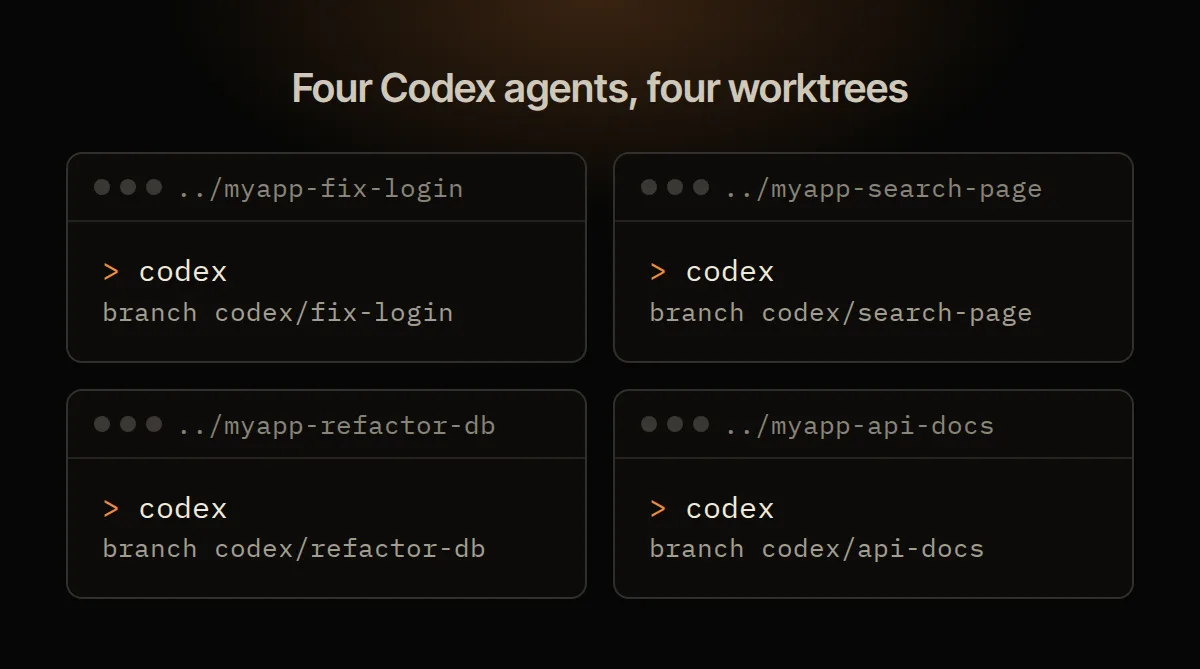
Subagents split one task. For several separate tasks, such as a bug fix, a new page and a refactor, run several Codex sessions. The rule that matters: never point two agents at the same checkout, or they will overwrite each other's edits. A Git worktree gives each agent its own copy of the files on its own branch, while sharing one repository.
Set it up
From your project, create one worktree per task:
git worktree add ../myapp-fix-login -b codex/fix-logingit worktree add ../myapp-search-page -b codex/search-pagegit worktree add ../myapp-refactor -b codex/refactor-db
Then open a terminal for each and start Codex inside it:
cd ../myapp-fix-login && codexGive each session its task. Each one works on its own branch, so you can review and merge them one at a time, the way you would merge a teammate's work. When a branch is merged, remove its worktree:
git worktree remove ../myapp-fix-loginThings to know about worktrees
- Each worktree is a full set of files, so a large project with big dependencies takes disk space per worktree.
- Untracked files such as .env are not copied into a new worktree. Copy what each one needs, or set it up with a script.
- Installed packages are per worktree too, so run your install step in each one.
- A branch can only be checked out in one worktree at a time.
To come back to a session later, codex resume reopens a recent chat from the current repository.
Source: Codex CLI, OpenAI
Way 3: parallel chats in the ChatGPT desktop app
If you prefer a window to a stack of terminals, Codex in the ChatGPT desktop app runs several chats in the same project. In a Git repository, a chat can run in a worktree instead of your local checkout. OpenAI lists three reasons to do it: work in parallel without disturbing your local setup, queue up background work while you stay focused on something else, and move a chat back to your local checkout when you are ready to inspect, test or collaborate.
The app handles the Git steps for you. Moving a chat between your local checkout and a worktree is called a handoff, and Codex makes the Git moves needed to carry your work safely between them. The repository and worktrees stay on your computer. The ChatGPT phone app can control Codex on that computer, but worktrees never run on the phone.
Scheduled tasks in a Git project can also run in their own background worktrees, so a recurring job does not clash with what you are doing.
Start a chat in a worktree
- In a new chat, select Worktree under the composer. Optionally pick a local environment to run setup scripts for it.
- Below the composer, choose the branch to start from: main, a feature branch, or your current branch with its uncommitted changes, which Codex copies across.
- Send your prompt. Codex creates the worktree from that branch and works in a detached HEAD state by default.
- When you are ready, keep working in the worktree or use Hand off in the chat header to move the chat and its code to your local checkout.
How the app manages worktrees
- Codex-managed worktrees live in $CODEX_HOME/worktrees by default; change the location in Settings, Worktrees, Worktree root.
- Ignored files a new worktree needs, such as .env, .env.local or config/secrets.json, can be listed in a .worktreeinclude file at the repository root and Codex copies them in. It never copies other untracked files.
- The app keeps your 15 most recent Codex-managed worktrees by default, never deletes one tied to a pinned chat or a chat still running, and saves a snapshot before deleting one so you can restore it later.
- Git allows a branch to be checked out in only one worktree at a time. If Codex made a branch in a worktree and you want it in your local checkout, use Hand off instead of checking it out in both places.
Source: Worktrees in Codex, OpenAI
Way 4: Codex Cloud tasks
Codex Cloud runs tasks on OpenAI's machines instead of yours. Each task gets its own workspace and keeps working while your computer is asleep, so you can start several, close the lid and come back to results. Start one from the web or the desktop app by choosing Work in, then Cloud; on mobile, open Codex.
- Choose an environment: the default one to start without a repository, or a published environment with your repositories and tools already set up.
- Codex can check out any repository it can reach through your connected GitHub or GitLab account.
- When a task finishes, look at the changed files and results, ask for follow-up changes, and commit or open a pull request.
Cloud environments are where Codex Cloud earns its keep for parallel work. You let Codex inspect your repositories and prepare their dependencies and tools, review the checks, and publish the environment. Every task then starts from that saved setup while keeping its own working state, so several tasks can share one setup without stepping on each other. Network secrets give tasks access to the HTTPS services and private registries they need, with the environment's network destinations limited. You can also start a cloud task from the CLI and list recent cloud chats and their status there.
OpenAI's pricing page notes that cloud tasks may use more of your allowance than local messages, so keep them for work that needs them.
Source: Codex Cloud, OpenAI
Way 5: codex exec in scripts and CI
For repeatable jobs, the CLI can run without the interactive screen. codex exec takes a prompt, does the work and exits, so you can call it from scripts and pipelines. A shell loop or a CI job can start several runs side by side, for example one per package in a monorepo, each in its own worktree or container. OpenAI suggests an API key rather than a personal ChatGPT sign-in for automation in shared places such as CI.
Source: Codex CLI, OpenAI
Running codex exec jobs side by side
While codex exec runs, it streams progress to stderr and prints only the final message to stdout, so each run's result can be redirected to its own file. A simple batch looks like this:
codex exec "generate release notes for the last 10 commits" | tee release-notes.md- Permissions: codex exec runs in a read-only sandbox by default. Add --sandbox workspace-write to let it edit files, and keep danger-full-access for isolated CI runners or containers.
- Machine-readable output: --json prints JSON Lines events a script can read with a tool such as jq.
- Two-stage jobs: codex exec resume --last "fix the race conditions you found" continues the previous run, or codex exec resume with a session ID continues a specific one.
- Clean runs: --ephemeral skips saving session files to disk, which suits many short parallel jobs.
- Safety check: Codex requires a Git repository by default to prevent destructive changes; --skip-git-repo-check overrides it only where you are sure it is safe.
- Project settings and project MCP servers only load for trusted projects, even with a writable sandbox; --trust saves trust for the project.
Piped input becomes extra context when you also give a prompt, so a job can feed command output straight in, such as a test log for Codex to summarise. OpenAI's own examples include autofixing CI failures in GitHub Actions and drafting a pull request comment from CI logs.
Source: Non-interactive mode, OpenAI
Codex agents in GitHub Actions
For agents that run on every pull request, OpenAI publishes the Codex GitHub Action, openai/codex-action@v1. It installs the Codex CLI and runs codex exec under the permissions you set, so you can automate Codex feedback on pull requests or releases, gate changes on Codex quality checks, or run repeatable tasks such as code review, release prep and migrations from a workflow file. You store an OpenAI API key as a GitHub secret, run the job on a Linux or macOS runner, check out the code first, and give the prompt inline or as a file in the repository. Separate jobs in one workflow give you several Codex agents running side by side on GitHub's runners instead of your computer.
Source: Codex GitHub Action, OpenAI
How many Codex agents should you run?
There is no fixed number, but three things set the practical limit:
Your usage allowance
Every agent draws on the same plan. On Plus and Business plans, Codex usage is counted per five-hour period, and weekly limits may also apply; Pro plans currently have no five-hour limit. Four agents running at once use your allowance about four times as fast as one. Subagent workflows also use more tokens than a comparable single-agent run, because each subagent does its own model and tool work. Check what you have left with /status in the CLI or the usage dashboard.
How far one plan goes
OpenAI publishes estimates of local messages per five-hour period on Plus and Standard Business. They are ranges, not fixed limits, but they show why model choice matters when several agents share one plan:
| Model | Local messages per 5 hours (Plus and Standard Business) |
|---|---|
| GPT-6.2 Astra | 6 to 50 |
| GPT-6.2 Sol | 17 to 180 |
| GPT-6.1 Sol | 15 to 160 |
| GPT-6.1 Terra | 35 to 285 |
| GPT-6 Sol | 15 to 150 |
| GPT-6 Luna | 350 to 3,000 |
Split across four agents, the low end of a range runs out quickly. Putting routine agents on GPT-6 Luna and keeping a larger model for the one hard task stretches the same allowance much further.
Source: Codex pricing and usage limits, OpenAI
How the work splits
Parallel agents pay off when the pieces really are separate: different features, different folders, or read-only jobs such as reviews. If two tasks touch the same files, run them one after the other instead; the merge conflicts will cost more time than the parallel run saved.
Your attention
Agents stop to ask for approval or a decision. With one agent you notice. With five, an agent can sit waiting for twenty minutes in a terminal you are not looking at. In practice the limit is often how many agents you can keep an eye on, not how many your computer can run.
Get told when a Codex agent needs you
Codex can alert you when it finishes or needs approval. In ~/.codex/config.toml, tui.notifications turns on the built-in terminal notifications and can be limited to events such as agent-turn-complete and approval-requested. tui.notification_condition chooses whether they fire only when the terminal is unfocused or always. For anything more, notify runs a program of your own when a turn completes, and it receives the thread ID and working folder so it can say which session finished:
notify = ["python3", "/path/to/notify.py"]Source: Codex advanced configuration, OpenAI
A worked example: three agents on one app
Say your web app needs a login bug fixed, a new pricing page and a slow report sped up, and you want all three done this afternoon. One way to run it:
- Check AGENTS.md at the repository root says how to run the tests and which folders are off limits, so all three agents follow the same rules.
- Create three worktrees: codex/fix-login, codex/pricing-page and codex/fast-report.
- Start Codex in each. Give the login agent the error and the steps to reproduce it. Give the page agent the brief and an existing page to copy the layout from. Ask the report agent to measure first and explain the slow part before changing anything.
- Put the page agent on a lighter model, since it is following a pattern, and keep the stronger model for the report, where the reasoning is harder.
- Work on something else. When an agent stops for approval or a decision, answer it and let it carry on.
- As each finishes, ask a fresh Codex chat with parallel subagents to review that branch for bugs, test gaps and security problems.
- Merge the branches one at a time, run the tests after each, then remove the three worktrees.
The same pattern scales up or down: one task per worktree, the right model for each task, a review before every merge, and one merge at a time.
Codex and Claude Code side by side
Everything above works the same if some of the agents are Claude Code instead of Codex. Worktrees keep their files apart, a shared AGENTS.md gives them the same rules, and each one counts only against its own plan. Many people run both so a second plan carries on when the first one's limit is reached, and so each agent can review the other's work.
Give every agent the same rules with AGENTS.md
Several agents only stay consistent if they read the same instructions. Codex builds its instruction chain once per run: first a global AGENTS.md, or AGENTS.override.md if present, from your Codex home folder, then every AGENTS.md from the project root down to the folder the agent works in. Files nearer the agent's folder come later, so their guidance wins. Codex stops adding files once the combined size reaches 32 KiB by default, so keep the root file short and put folder-specific rules in nested files.
Each worktree is a full checkout, so a committed AGENTS.md is present in all of them automatically. An ignored AGENTS.override.md is copied into the desktop app's managed worktrees too.
Source: Custom instructions with AGENTS.md, OpenAI
Tips for running several Codex agents
- Give each agent one clear task with a definition of done, such as "the login test passes and nothing else changes".
- Put shared rules in AGENTS.md at the repository root so every agent follows the same conventions.
- Name branches by task, such as codex/fix-login, so you can tell the work apart when you merge.
- Use a lighter model for routine agents and save the strongest for the hard task.
- Review each branch before merging. A second agent is a good reviewer for work it did not write.
- Merge one branch at a time and run your tests after each merge.
- Stop agents you are not using. Several agents running at once spend your allowance several times faster.
Common problems
Two agents edited the same file
They were sharing a checkout, or their tasks overlapped. Give each agent its own worktree, and split tasks by folder or feature so they do not meet.
A worktree is missing settings or packages
New worktrees only get files Git tracks. Copy untracked files such as .env, and run your install step in each worktree before starting Codex.
The limit ran out mid-afternoon
Parallel agents multiply usage. Use lighter models for simple agents, keep cloud tasks for work that needs them, and check /status before starting a big batch.
Codex says the branch is already used by another worktree
Git lets a branch be checked out in only one worktree at a time, so checking out a branch that a worktree holds fails with a message that it is already used by worktree at that path. Switch the worktree to another branch first, or in the desktop app use Hand off to move the chat and its code into your local checkout.
The disk is filling up with worktrees
Each worktree has its own files, dependencies and build caches. The desktop app keeps your 15 most recent managed worktrees by default and you can lower that in settings; for worktrees you made yourself, remove merged ones with git worktree remove.
An agent sat waiting for an answer
Turn on Codex notifications, or use a dashboard that shows which session is waiting.
See every Codex agent on one screen
Running several Codex agents is easy to start and hard to keep moving. 10u is an AI coding agent dashboard that shows every Codex and Claude Code session side by side, each in its real terminal, marked Needs you, Working, Waiting or Parked. When one stops to ask you something, it moves to the top, you answer it, and it carries on. It runs the Codex you already have, on your own account. They do the building. You decide what gets built.

Questions people ask
- Can Codex review every pull request automatically?
- Yes. The Codex GitHub Action runs codex exec in a GitHub Actions workflow, for example to review each new pull request and post the result as a comment.
- Can I run several codex exec jobs at once?
- Yes. Each codex exec run prints only its final message to stdout, so a script can start several in parallel, each in its own worktree or container, and write each result to its own file.
- Do Codex subagents ask me for approval?
- They inherit the main chat's sandbox and approval settings. In the CLI, a request from another agent thread shows which thread it came from, and pressing o opens that thread first.
- Can Codex run multiple agents at once?
- Yes. One chat can spawn subagents in parallel, and you can run several Codex sessions at once in separate Git worktrees, in the desktop app, or as Codex Cloud tasks.
- How do I make Codex use subagents?
- Ask directly, for example "spawn one subagent for security risks, one for test gaps, and one for maintainability", then ask it to summarise their findings.
- How do I run two Codex sessions on the same repository?
- Create a Git worktree for each with git worktree add, open a terminal in each, and start codex. Each session gets its own files and branch.
- Do multiple Codex agents use more of my limit?
- Yes. Every agent draws on the same allowance, and subagent workflows use more tokens than a single-agent run.
- How many Codex subagents can run at once?
- Codex picks the default. You can cap it with agents.max_concurrent_threads_per_session in config.toml.
- Can Codex agents keep working when my computer is off?
- Codex Cloud tasks can. Each task has its own workspace in the cloud and keeps going while your computer sleeps.